pengenalan
This manual provides detailed instructions for the installation, operation, and maintenance of the ASD NLS Microwave Motion Sensor with Q-Base. This sensor utilizes advanced microwave technology for precise motion detection, offering an efficient and adaptable lighting control solution designed to enhance energy savings and convenience in various environments.

Image: The ASD NLS Microwave Motion Sensor, its packaging, remote control, and a smartphone displaying the control app.
Ciri-ciri Produk
- Intelligent Lighting Control: Offers versatile control via a dedicated app, including On/Off switching, 0-10V dimming (1-100%), and adjustable time delays (30 seconds to 30 minutes), with an optional cut-off delay for energy efficiency.
- Advanced Microwave Detection: Employs high-frequency electromagnetic waves for accurate motion detection, even through certain obstacles like doors and walls.
- Penjimatan Tenaga: Activates lights only when movement is detected, contributing to reduced electricity consumption and operational costs.
- Wide Coverage Range: Designed for extensive detection coverage, suitable for various commercial and residential applications.
- Penyepaduan Mudah: Q-base design facilitates seamless integration with existing lighting systems without requiring extensive modifications.
- Sensitiviti boleh disesuaikan: Adjustable sensitivity settings allow for tailored detection to specific environments, minimizing false triggers.
- Aplikasi Serbaguna: Ideal for hallways, parking lots, warehouses, and other areas requiring efficient, motion-activated lighting.
- Lokasi Basah Dinilai: Suitable for use in wet and damp persekitaran.
- Emergency Back-up Compatibility: Designed to integrate with emergency lighting systems.

Image: Key features of the ASD NLS sensor, including smart control, high installation height, wet location rating, and emergency compatibility.
Spesifikasi

Image: Detailed product specifications including physical dimensions and adjustable parameters like detection area, hold time, daylight threshold, and standby period.
| Spesifikasi | Perincian |
|---|---|
| Jenama | ASD |
| Nombor Model | A-09MW-NLS-WH |
| warna | putih |
| Sumber Kuasa | Q-Base |
| Berat Barang | 1.6 auns |
| Jenis Pemasangan | Lekap di dinding |
| Dimensi Produk | 2.13 x 2.13 x 1.31 inci |
| bahan | plastik |
| Persekitaran Penggunaan | Basah dan Damp Lokasi |
| Komponen yang Disertakan | Penderia Pergerakan |
| Peranti Serasi | LSB5A, LSB5B, LSB5R, CAN07A, CAN09S, UHB2A, UHB3, UHB5, WHB5A |
Persediaan dan Pemasangan
The ASD NLS Microwave Motion Sensor is designed for straightforward installation with its Q-Base system. Ensure power is disconnected before beginning installation.
Melekap
- The sensor is designed for wall mount applications.
- It features a 3-pin base for secure and easy connection to compatible lighting fixtures.
- The sensor is rated for wet locations, allowing for versatile indoor and outdoor placement.
- Optimal installation height can be up to 49 feet for effective detection.
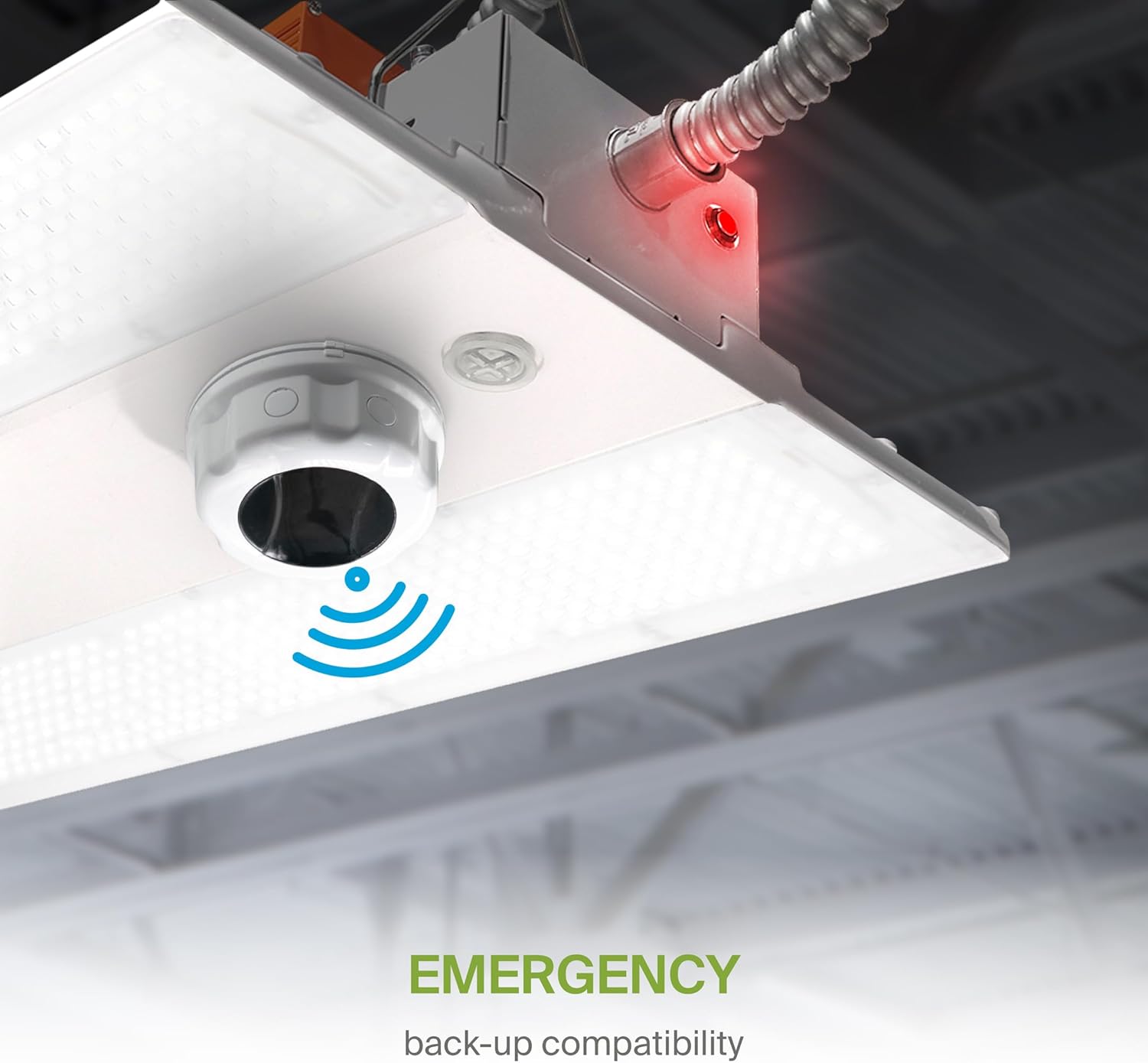
Image: The sensor's 3-pin base and Q-Base connection method, highlighting its wet location rating.

Imej: Bekasample of a high-ceiling installation, demonstrating the sensor's suitability for heights up to 49 feet.
Pendawaian
Connect the 3-pin base of the sensor to the corresponding Q-Base receptacle on your compatible LED light fixture. Ensure a secure connection to prevent power interruptions.
Arahan Operasi
The ASD NLS Microwave Motion Sensor can be controlled via a dedicated smartphone application or a remote control unit.
Smart Control (ASD NLS App)
For advanced control and customization, download the ASD NLS app on your smartphone. The app allows for precise adjustments of detection range, hold time, daylight sensitivity, and dimming levels.

Image: QR codes for downloading the ASD NLS app for Android and iOS, enabling fixture control, advanced area management, scheduling, and energy consumption monitoring.
- Muat turun Apl: Scan the QR code or visit the respective app store:
Gedung Google Play
Apple App Store - Berpasangan: Follow the in-app instructions to pair your sensor with the application.
- tetapan: Adjust parameters such as:
- Detection Area (25-100%)
- Hold Time (5 seconds - 30 minutes)
- Daylight Threshold (2-400 Lux)
- Standby Period (0 seconds - infinite)
- Dimming Levels (0-10V, 1-100%)
Operasi Kawalan Jauh
The included remote control provides quick access to essential functions and settings. Refer to the table below for button descriptions.

Image: The remote control unit with a comprehensive guide to each button's function for controlling the motion sensor.
| Butang | Teguran |
|---|---|
| HIDUP/MATI | Turns the sensor ON/OFF. |
| Auto | Enters 'sensor mode' and performs previous settings. |
| Tetapkan semula | Enters 'sensor mode' and performs the default settings. |
| Adegan | Menunjukkan tetapan semasa yang disimpan dalam jauh. |
| Mulakan | Tekan ini untuk memulakan persediaan pemandangan. |
| Ingatan | Menyimpan tetapan pemandangan. |
| Mohon | Menggunakan tetapan pemandangan semasa pada lekapan. |
| M H (Mounting Height) | Adjusts detection area/sensitivity levels according to real installation situations, higher or lower. |
| Hantar | Memorizes and sends out the previous setting of individual parameters. |
| Julat Pengesanan | Also known as 'sensitivity', 100% means the highest sensitivity and longest distance. Use this button and the +/- buttons to adjust. |
| Penderia Cahaya Siang | The preset lux level at which motion will be detected. Use this button and the +/- buttons to adjust. |
| Peredupan Bersedia | After hold time, the light will dim from 100% to optional standby dimming levels. Use this button and the +/- buttons to adjust. |
| Tahan Masa | The period that light will stay illuminated 100% after no motion is detected. Use this button and the +/- buttons to adjust. |
| Tempoh Tunggu Sedia | The period after hold time, during which the light keeps standby dimming level. Use this button and the +/- buttons to adjust. |
| Up | Butang berfungsi utama untuk melaraskan faktor ke tahap yang dikehendaki. |
| Bawah | Press +/- button to dim light directly in non-detection mode. |
| CCT | Tidak berkenaan dengan produk ini. |
| KUASA | Adjust brightness in both ON/OFF mode & sensor mode, minimum 10%, max 100%, each time this button is pressed it changes by 5%. |
| Butang Terpelihara | Tidak berkenaan dengan produk ini. |
| Penuaian Siang | Fungsi penuaian siang hari didayakan atau dilumpuhkan. |
| Butang ujian | Press this button to test the sensor; it will temporarily change the hold time to 2s. The setting cannot be saved. |
Penyelenggaraan
The ASD NLS Microwave Motion Sensor requires minimal maintenance. To ensure optimal performance:
- Pembersihan: Periodically wipe the sensor's exterior with a soft, dry cloth to remove dust or debris. Avoid using abrasive cleaners or solvents.
- Pemeriksaan: Periksa secara kerap untuk sebarang kerosakan fizikal atau sambungan yang longgar.
- Persekitaran: Ensure the sensor is not obstructed by new installations or objects that could interfere with its detection capabilities.
Menyelesaikan masalah
If you encounter issues with your ASD NLS Microwave Motion Sensor, consider the following common solutions:
- Sensor Not Detecting Motion:
- Check the detection range setting on the remote or app; increase if necessary.
- Ensure there are no physical obstructions blocking the sensor's field of view.
- Verify the power supply to the sensor and connected fixture.
- Lampu Tidak Dimatikan:
- Review the hold time and standby period settings; adjust to shorter durations if needed.
- Check for continuous motion within the detection area.
- Lights Not Dimming Correctly:
- Verify the dimming level settings in the app or via remote.
- Ensure the connected fixture is compatible with 0-10V dimming.
- False Triggers:
- Decrease the detection range or sensitivity setting.
- Ensure the sensor is not exposed to vibrations or rapid temperature changes that could cause false readings.
- Isu Ketersambungan Apl:
- Ensure your smartphone's Bluetooth or Wi-Fi is enabled and working correctly.
- Restart the app and attempt to re-pair the device.
Jika masalah berterusan selepas mencuba langkah ini, sila hubungi sokongan pelanggan.
Keserasian
The ASD NLS Microwave Motion Sensor is compatible with the following ASD LED light fixtures:
- LSB5A
- LSB5B
- LSB5R
- BOLEH07A
- CAN09S
- UHB2A
- UHB3
- UHB5
- WHB5A
Maklumat Keselamatan
- Always disconnect power before installing or servicing the sensor.
- Pemasangan hendaklah dilakukan oleh juruelektrik bertauliah mengikut kod elektrik tempatan.
- Do not attempt to disassemble or modify the sensor. There are no user-serviceable parts inside.
- Keep the sensor away from strong electromagnetic fields, which may interfere with its operation.
Waranti dan Sokongan
For warranty information and technical support, please refer to the official ASD Lighting Corporation webtapak atau hubungi bahagian perkhidmatan pelanggan mereka. Simpan resit pembelian anda untuk tuntutan waranti.


