1. Pengenalan
This manual provides essential instructions for the safe and effective use of your HITBOX HT-111 Auto Darkening Welding Helmet. This helmet is designed to offer superior eye and face protection during various welding and grinding operations. It features an auto-darkening lens, true color technology, and a comfortable, lightweight design.

Rajah 1: Depan view of the HITBOX HT-111 Auto Darkening Welding Helmet.
2. Maklumat Keselamatan
Always prioritize safety when performing welding or grinding tasks. This helmet provides protection against harmful ultraviolet (UV) and infrared (IR) radiation, sparks, and spatter. However, it is crucial to follow all general welding safety guidelines and wear appropriate personal protective equipment (PPE).
- Pastikan topi keledar dipasang dan dilaraskan dengan betul sebelum setiap penggunaan.
- Inspect the helmet and lens for any damage before use. Replace damaged parts immediately.
- Do not use the helmet if the auto-darkening function is not working correctly.
- Avoid direct exposure to welding arc without proper eye protection.
- The helmet is not suitable for laser welding or overhead applications where falling objects may be a hazard.
3. Produk Lebihview dan Komponen
Familiarize yourself with the various parts of your welding helmet for optimal performance and safety.
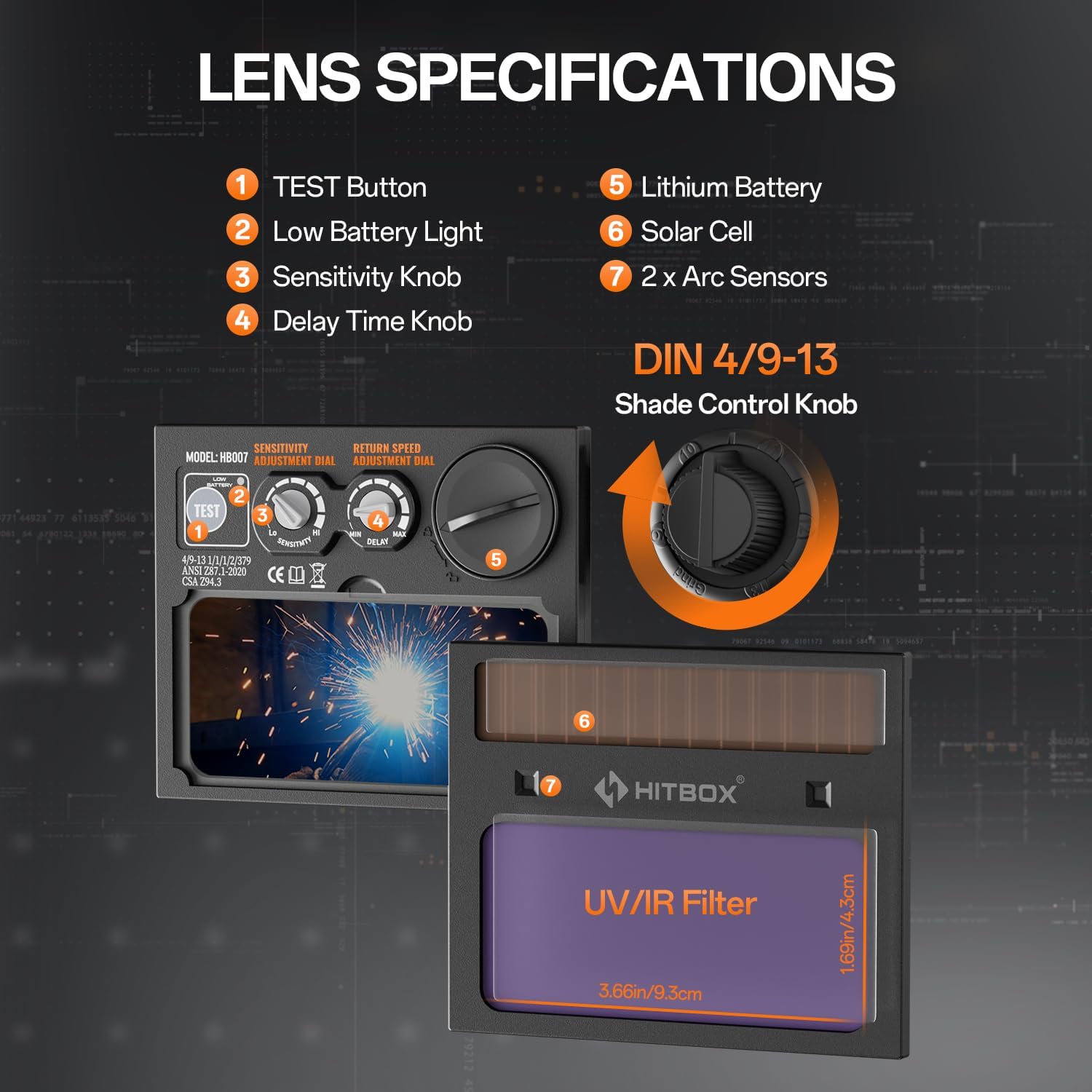
Figure 2: Lens specifications and controls.
- Butang UJIAN: Used to check the auto-darkening function.
- Lampu Bateri Rendah: Menunjukkan bila bateri memerlukan penggantian.
- Tombol Sensitiviti: Adjusts the sensitivity of the arc sensors.
- Delay Time Knob: Controls the time the lens stays dark after the arc stops.
- Bateri Litium: Provides power to the auto-darkening filter.
- Sel Suria: Extends battery life by charging from welding light.
- Penderia Arka: Detect the welding arc to trigger darkening.
- Shade Control Knob: Adjusts the dark shade level (DIN 4/9-13).
Aksesori yang disertakan:

Rajah 3: Aksesori yang disertakan.
- Welding Helmet x 1
- Outer Protection Board x 1
- CR2450 Battery x 3 (Note: Product specifications state 3 batteries, image shows 2 replaceable batteries plus one pre-installed)
- Manual Pengguna x 1
4. Persediaan
4.1 Pelarasan Ikat Kepala
Proper adjustment of the headband is crucial for comfort and stability during use.

Figure 4: Headband adjustment points.
- Laraskan Tali Atas: Loosen or tighten the top strap to adjust the helmet's height on your head.
- Width Knob: Rotate the knob at the back of the headband to adjust the circumference for a snug fit.
- Angle Knob: Laraskan sudut topi keledar berbanding muka anda untuk optimum viewing dan keselesaan.
- Comfort Cushion: Ensure the comfort cushion rests properly against your forehead to reduce pressure points.
4.2 Pemasangan/Pemeriksaan Bateri
The helmet is powered by a CR2450 lithium battery, supplemented by solar cells. Ensure the battery is correctly installed and functional.
- Locate the battery compartment, typically on the auto-darkening filter cartridge.
- Masukkan bateri CR2450 dengan polariti yang betul.
- Tekan ke UJIAN button (1 in Figure 2) to verify the auto-darkening function. The lens should momentarily darken.
- If the low battery light (2 in Figure 2) illuminates, replace the battery.
5. Arahan Operasi
The HT-111 helmet offers various adjustments to suit different welding and grinding tasks.

Rajah 5: Jelas view before welding and auto-darkening during welding.
5.1 Hidupkan/Mati Kuasa
The auto-darkening filter is solar-powered and automatically activates when exposed to light. There is no manual on/off switch for the auto-darkening function itself.
5.2 Shade Control
The external shade control knob (8 in Figure 2) allows adjustment from DIN 4 (light state) to DIN 9-13 (dark state). Rotate the knob to select the appropriate shade level for your welding process.
5.3 Pelarasan Sensitiviti
The sensitivity knob (3 in Figure 2) controls how easily the arc sensors detect the welding arc. Adjust it to prevent false darkening from ambient light or to ensure darkening in low-amp Kimpalan TIG.
5.4 Delay Time Adjustment
The delay time knob (4 in Figure 2) sets how long the lens remains dark after the welding arc ceases. A shorter delay is suitable for tack welding, while a longer delay is recommended for high-amperage welding to protect eyes from afterglow.
5.5 Welding and Grind Modes
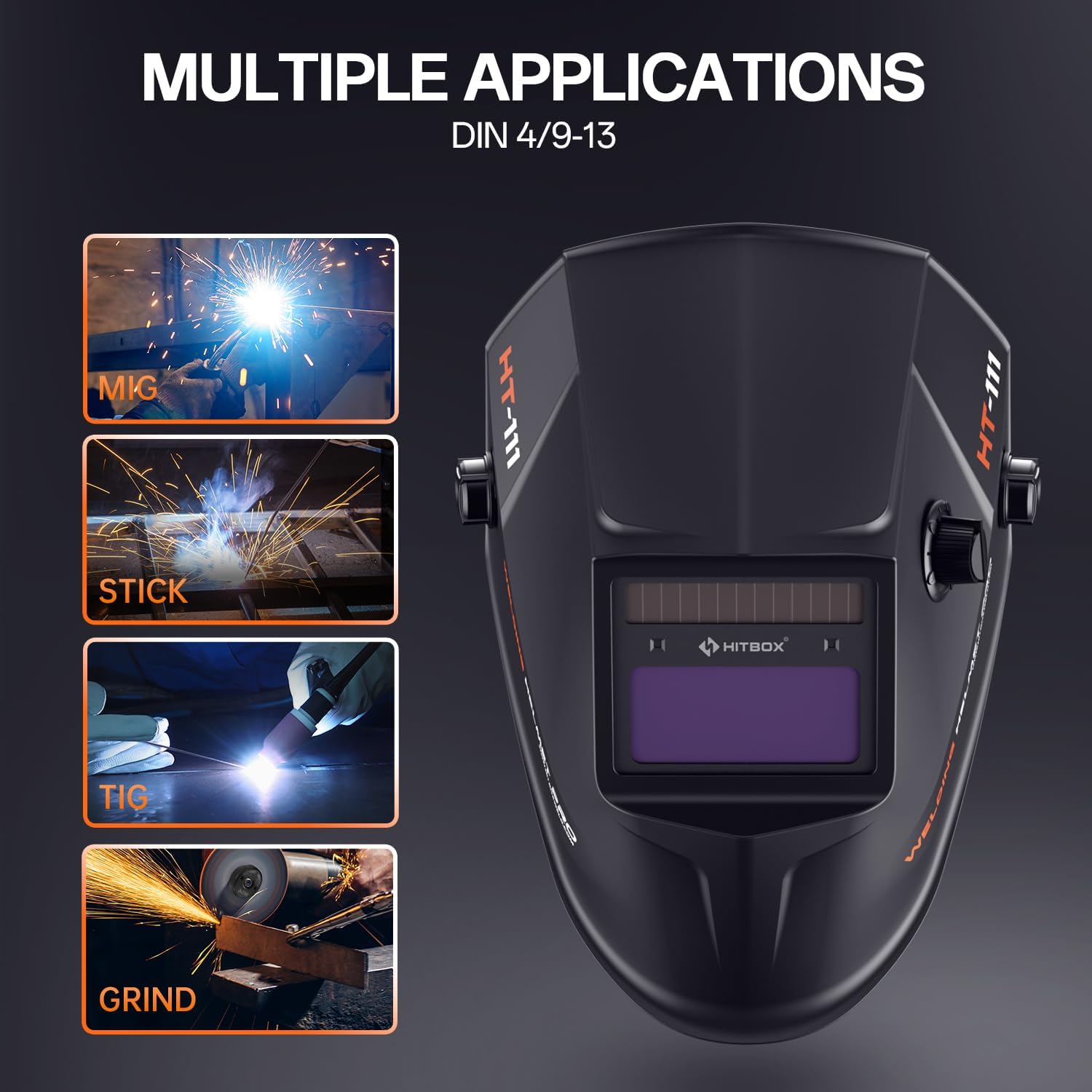
Figure 6: Multiple applications supported by the helmet.
The HT-111 helmet supports various applications:
- Mod Kimpalan: For MIG, TIG, ARC (Stick), and other welding processes. The lens automatically darkens to the selected shade (DIN 9-13) upon arc ignition.
- Mod Kisar: For grinding operations. The lens remains in its light state (DIN 4) to provide clear vision while protecting against sparks and debris. Ensure the helmet is set to Grind Mode before starting grinding to prevent accidental darkening.
5.6 Shade Number Selection Guide
Refer to the table below for recommended shade numbers based on welding process and current (Amperes).
Figure 7: Shade number selection table.
| Proses | Semasa (A) | |||||||||||||||||
|---|---|---|---|---|---|---|---|---|---|---|---|---|---|---|---|---|---|---|
| 5 | 10 | 15 | 30 | 40 | 70 | 100 | 125 | 150 | 175 | 200 | 225 | 250 | 300 | 350 | 400 | 500 | 600 | |
| MMA | 9 | 10 | 11 | 12 | 13 | 14 | ||||||||||||
| MAG | 10 | 11 | 12 | 13 | 14 | |||||||||||||
| TIG | 9 | 10 | 11 | 12 | 13 | 14 | ||||||||||||
| MIG | 10 | 11 | 12 | 13 | 14 | |||||||||||||
| PAC | 11 | 12 | 13 | 14 | ||||||||||||||
| cakar | 9 | 10 | 11 | 12 | 13 | 14 | ||||||||||||
6. Penyelenggaraan
Regular maintenance ensures the longevity and proper functioning of your welding helmet.
6.1 Pembersihan
- Clean the helmet shell with a mild soap and water solution. Avoid harsh solvents.
- Wipe the auto-darkening filter and protection lenses with a soft, clean cloth. Do not use abrasive materials or cleaners that could scratch the lens.
- Keep the arc sensors clean and free from obstructions.
6.2 Replacing Outer Protection Board
The outer protection board protects the auto-darkening filter from spatter and scratches. Replace it when it becomes scratched or damaged to maintain clear vision.
- Carefully remove the old protection board from its frame.
- Insert a new outer protection board (one is included as an accessory) into the frame, ensuring it sits securely.
6.3 Replacing CR2450 Battery
When the low battery indicator illuminates, replace the CR2450 battery.
- Cari petak bateri pada penapis penggelapan automatik.
- Buka petak dan keluarkan bateri lama.
- Masukkan bateri CR2450 baharu, pastikan kekutuban yang betul (+ sisi ke atas).
- Close the compartment and press the TEST button to confirm functionality.
7. Penyelesaian masalah
If you encounter issues with your welding helmet, refer to the following common problems and solutions.
| Masalah | Kemungkinan Punca | Penyelesaian |
|---|---|---|
| Kanta tidak menjadi gelap apabila arka dipukul. |
|
|
| Lens darkens intermittently or flashes. |
|
|
| Keterlihatan yang lemah melalui kanta. |
|
|
| Topi keledar berasa tidak selesa atau tidak stabil. | Ikat kepala tidak dilaraskan dengan betul. | Adjust the top strap, width knob, and angle knob for a secure and comfortable fit. |
8. Spesifikasi
Detailed technical specifications for the HITBOX HT-111 Auto Darkening Welding Helmet.
| Ciri | Spesifikasi |
|---|---|
| Model | HT111 |
| ViewKawasan Kawasan | 3.66" x 1.69" |
| Penderia Arka | 2 pcs |
| Perlindungan UV/IR | DIN 16 |
| Negeri Cahaya | DIN 4 |
| Negeri Gelap | DIN 9-13 |
| Tukar Masa | 1/30000s (0.04ms) |
| Kawalan Kelewatan | 0.1-1.0s |
| Bekalan Kuasa | Li-battery & Solar |
| Jenis Bateri | CR2450 (boleh diganti) |
| Kapasiti Bateri | 600mAh |
| Way to Shift Dark State | Outer Stepless Shift |
| Suhu Operasi | -5°C hingga +55°C |
| Low Battery Tip | Petunjuk LED |
| Grind Function | ya |
| Keserasian Proses Kimpalan | MMA, MIG/MAG, TIG |
| Berat Barang | 13.8 auns |
| Dimensi Produk | 11.02 x 9.84 x 11.02 inci |
9. Waranti dan Sokongan
HITBOX is committed to providing reliable welding products and customer satisfaction. If you encounter any quality problems with your HT-111 welding helmet, please contact our customer service team. We are dedicated to arranging an immediate replacement or a full refund as per our after-sale service policy.
For support, please refer to the contact information provided with your product packaging or visit the official HITBOX webtapak.


