pengenalan
This manual provides comprehensive instructions for the setup, operation, and maintenance of your ZEBRONICS NS4000 Rotatable Laptop Metal Stand. Designed for ergonomic comfort and optimal cooling, this stand is suitable for laptops up to 17 inches. Please read this manual carefully before use to ensure proper functionality and longevity of your product.
Ciri-ciri Produk
- Reka bentuk ergonomik: Foldable and durable metal body for comfortable use.
- Optimum Cooling: Features a Type-C powered detachable magnetic fan with 66 CFM airflow.
- Putaran 360°: Allows for easy adjustment and viewsudut-sudut.
- Pelarasan Berbilang Sudut: Customize height and angle to minimize eye strain.
- Anti-Slip Silicone Pads: Ensures laptop stability and prevents sliding.
- Pembinaan Teguh: Carbon steel body with anti-rust properties, supporting up to 5 kg.
- mudah alih: Compact and foldable for easy transport.
Kandungan Pakej
Sila sahkan bahawa semua item yang disenaraikan di bawah disertakan dalam pakej anda:
- ZEBRONICS NS4000 Laptop Stand - 1 unit
- Detachable Magnetic Fan - 1 unit
- USB Type-C Cable - 1 unit
- Allen Key - 1 unit
- Socket Spanner - 1 unit
Arahan Persediaan
- Buka Penyangga: Carefully unfold the ZEBRONICS NS4000 stand from its compact, folded position. Ensure all joints are securely extended.

Figure 1: Folded and Expanded dimensions of the stand. The stand expands from 26 x 22.5 x 5 cm (folded) to 26 x 19 x 26 cm (expanded).
- Attach the Magnetic Fan: Locate the detachable magnetic fan. Align the fan with the designated area on the stand's surface and allow the magnets to secure it in place.

Figure 2: Illustration of the detachable magnetic fan, highlighting its 66 CFM airflow capability.
- Connect Power to Fan: Use the provided USB Type-C cable to connect the fan to a power source (e.g., laptop USB port, USB wall adapter).

Figure 3: The stand features a metal body, anti-rust properties, anti-slip silicone rubber pads, and is powered via a Type-C connection.
- Place Laptop: Carefully place your laptop onto the anti-slip silicone pads of the stand. Ensure the laptop is centered and stable. The stand supports laptops up to 17 inches and a maximum weight of 5 kg.

Figure 4: The stand is designed to support laptops weighing up to 5 kg and with screen sizes up to 17 inches (43.18 cm).
Arahan Operasi
- Adjusting Height and Angle: The stand features multiple pivot points for angle adjustment. Gently lift or lower the support arms to achieve your desired ergonomic height and viewing angle. Use the provided Allen key and socket spanner if any joints require tightening for stability.
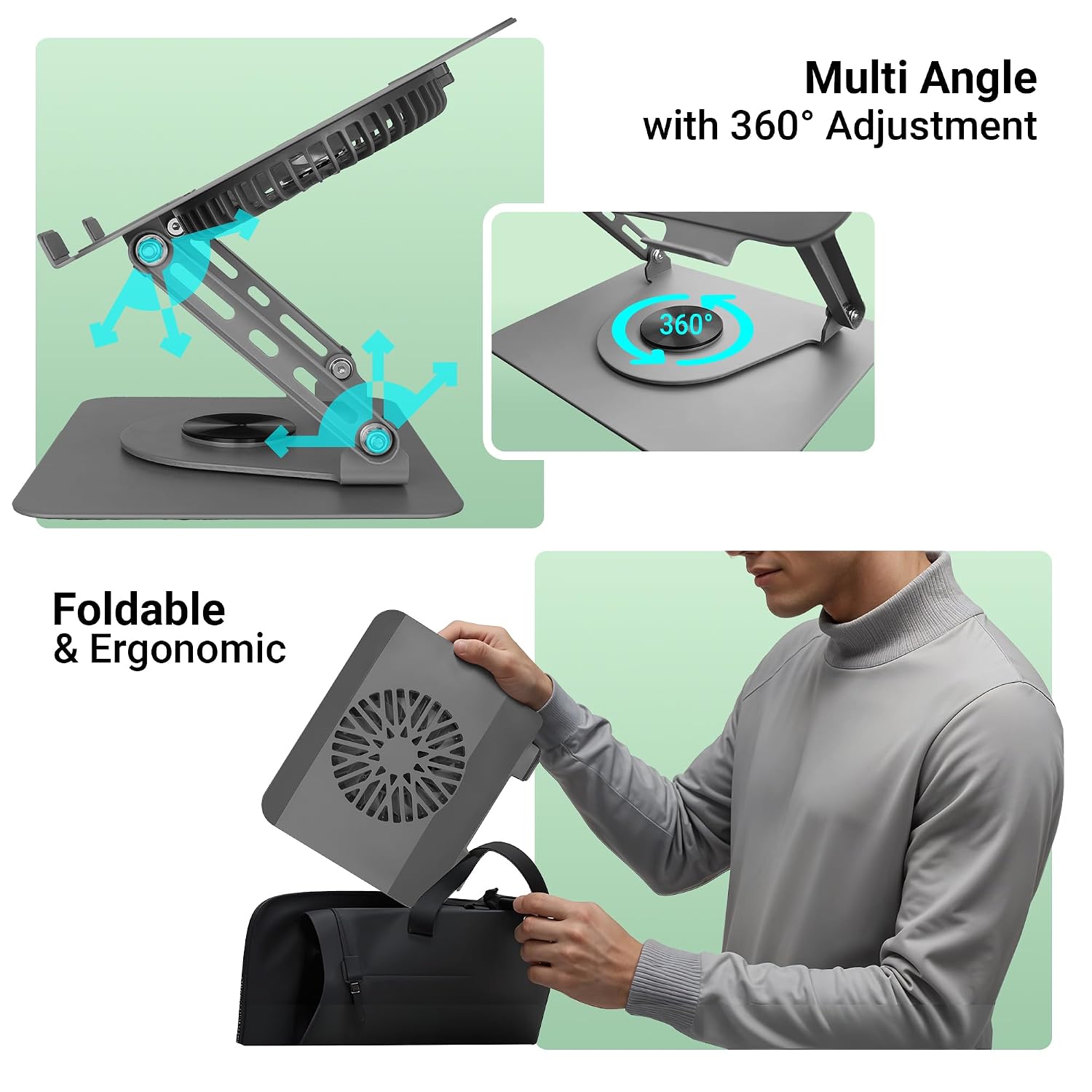
Figure 5: The stand offers multi-angle adjustment and a 360° rotatable base for flexible positioning.
- Utilizing 360° Rotation: The base of the stand allows for 360° rotation. Simply rotate the top platform to share your screen or adjust your viewing direction without moving the entire stand.

Figure 6: The ZEBRONICS NS4000 stand features a 360° rotatable base for easy screen sharing and viewpelarasan sudut.
- Operasi Kipas: Once connected via the Type-C cable, the magnetic fan will begin operating, providing cooling airflow to your laptop. There are no external controls for fan speed; it operates at a fixed optimal speed.
Penyelenggaraan
- Pembersihan: Lap penyangga dengan kain lembut dan kering. Untuk kotoran degil, lap sedikitamp kain boleh digunakan, diikuti dengan pengeringan segera. Jangan gunakan pembersih atau pelarut yang melelas.
- Pembersihan Kipas: Periodically detach the magnetic fan and gently clean any dust accumulation from the fan blades and grille using a soft brush or compressed air. Ensure the fan is disconnected from power before cleaning.
- Mengetatkan sendi: If the stand's joints become loose over time, use the provided Allen key and socket spanner to gently tighten the screws until the desired stability is achieved. Do not overtighten.
- Storan: When not in use, fold the stand into its compact form for easy storage and to protect it from damage.
Menyelesaikan masalah
| Masalah | Kemungkinan Punca | Penyelesaian |
|---|---|---|
| Pendirian terasa tidak stabil atau goyah. | Joints may be loose. | Use the provided Allen key and socket spanner to tighten the screws at the pivot points. Ensure the stand is fully unfolded. |
| Kipas tidak berputar. | Fan not properly connected or power source issue. | Ensure the Type-C cable is securely connected to both the fan and a working USB power source. Check if the power source is active. |
| Laptop slides on the stand. | Anti-slip pads are dirty or worn. Laptop weight exceeds limit. | Clean the anti-slip silicone pads. Ensure your laptop's weight does not exceed 5 kg. |
| Difficulty rotating the base. | Habuk atau serpihan dalam mekanisme putaran. | Gently clean around the rotating base. Avoid forcing the rotation. |
Spesifikasi
| Nama Model | ZEB-NS4000 |
| Jenama | ZEBRONIK |
| bahan | Carbon Steel, Silicone, Metal |
| Dimensi Produk (Dikembangkan) | 19 x 26 x 26 cm (L x W x T) |
| Dimensi Produk (Dilipat) | 26 x 22.5 x 5 cm (L x W x T) |
| Berat Barang | 2.07 kg (2070 gram) |
| Kapasiti Beban Maksimum | 5 kg |
| Supported Laptop Size | Sehingga 17 inci (43.18 cm) |
| Aliran Udara Kipas | 66 CFM |
| Fan Power Connection | USB Jenis-C |
Waranti dan Sokongan
ZEBRONICS products come with a manufacturer's warranty. For detailed warranty terms and conditions, please refer to the warranty card included with your product or visit the official ZEBRONICS website. For technical support, product inquiries, or service requests, please contact ZEBRONICS customer support through their official channels.
You can find more information and support on the official ZEBRONICS webtapak: www.zebronics.com


