1. Pengenalan
This manual provides detailed instructions for the assembly, operation, and maintenance of the Geekworm X1100 series accessories for Raspberry Pi 5. This kit includes the X1100 2.5" SATA HDD/SSD Shield, X1100-C1 Metal Case, Active Cooler H505, and a PD27W Power Supply, designed to enhance the functionality and cooling of your Raspberry Pi 5.

Gambar 1.1: Lebihview of the Geekworm X1100 kit components.
2. Panduan Persediaan
2.1 Kandungan Pakej
Sebelum memulakan pemasangan, sila sahkan bahawa semua komponen yang disenaraikan di bawah terdapat dalam pakej anda:
- 1 x X1100 2.5" SATA HDD/SSD Shield with accessories
- 1 x X1100-C1 Metal Case with Screws
- 1 x Active Cooler H505
- 1 x PD27W Power Supply (US Plug)
- Note: Raspberry Pi 5 board and SSD/HDD are NOT included.
2.2 Arahan Perhimpunan
Follow these steps to assemble your Geekworm X1100 kit with Raspberry Pi 5:
- Prepare the Raspberry Pi 5: Ensure your Raspberry Pi 5 is powered off and disconnected from any peripherals.
- Install the X1100 SATA Shield: Carefully align the X1100 2.5" SATA HDD/SSD Shield with the GPIO pins and mounting holes on your Raspberry Pi 5. Gently press down to secure the shield. Use the provided standoffs and screws to fasten the shield to the Raspberry Pi 5 board.
- Connect the 2.5" SATA HDD/SSD: Insert your 2.5-inch SATA hard disk drive (HDD) or solid-state drive (SSD) into the SATA connector on the X1100 shield. Ensure it is firmly seated. The X1100 supports up to 5TB 2.5-inch SATA drives.
- Install the Active Cooler H505: Attach the Active Cooler H505 to the Raspberry Pi 5's CPU. Connect the cooler's fan cable to the appropriate fan header on the Raspberry Pi 5 board.
- Enclose in the X1100-C1 Metal Case: Carefully place the assembled Raspberry Pi 5 with the X1100 shield and active cooler into the X1100-C1 Metal Case. Secure the case using the provided screws.
- Sambungkan Bekalan Kuasa: Connect the PD27W Power Supply to the USB-C power input of the Raspberry Pi 5. The system requires 5Vdc +/-5% 1.3A via the USB3 port for operation. No additional power adapter is needed for the X1100 shield itself.

Figure 2.1: Connecting a 2.5" SATA HDD/SSD to the X1100 Shield.

Figure 2.2: Installation guide for the Active Cooler H505 on Raspberry Pi 5.

Figure 2.3: Assembly of the X1100-C1 Metal Case with Raspberry Pi 5 and X1100 board.
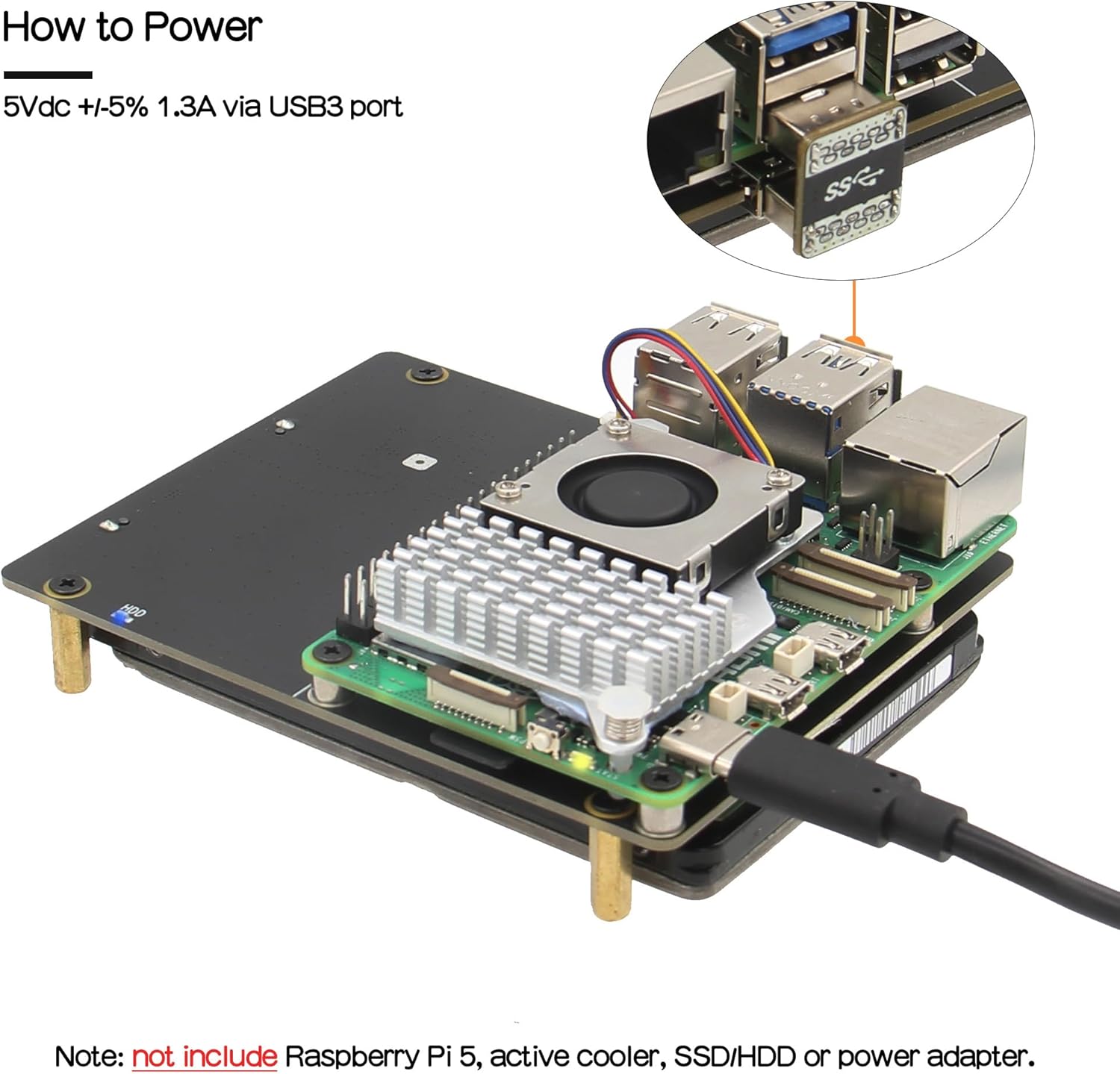
Figure 2.4: Powering the Raspberry Pi 5 via the USB3 port.
3. Arahan Operasi
3.1 Menghidupkan
Once all components are assembled and the PD27W Power Supply is connected, the Raspberry Pi 5 will power on. Ensure your operating system (typically Linux-based) is properly configured to recognize and mount the connected 2.5" SATA HDD/SSD.
3.2 Storage Access
The X1100 shield provides a USB 3.0 interface for the connected SATA drive. After booting your Raspberry Pi 5, the attached HDD/SSD should be accessible as a standard storage device. You may need to format and partition the drive if it is new or contains incompatible data.
4. Penyelenggaraan
4.1 Sistem Penyejukan
The Active Cooler H505 is designed to dissipate heat from the Raspberry Pi 5, ensuring stable performance. Regularly check that the fan is free from dust and debris to maintain optimal airflow. If necessary, gently clean the fan blades and heatsink fins with compressed air or a soft brush.

Figure 4.1: Active cooling mechanism with the H505 cooler.
4.2 Penjagaan Am
To ensure the longevity of your X1100 kit and Raspberry Pi 5, keep the device in a clean, dry environment. Avoid exposing it to extreme temperatures, humidity, or direct sunlight. Do not obstruct the ventilation holes on the X1100-C1 metal case.
5. Penyelesaian masalah
If you encounter issues during setup or operation, please refer to the official Geekworm Wiki for detailed troubleshooting guides and frequently asked questions. Cari untuk "X1100" on the Geekworm Wiki to find relevant installation and support information.
Common issues may include:
- Pemanduan Tidak Dikesan: Ensure the SATA drive is properly seated and the Raspberry Pi 5's operating system is configured to recognize USB storage devices. Check power supply.
- Isu Kuasa: Verify the PD27W power supply is correctly connected and providing sufficient power (5Vdc +/-5% 1.3A).
- Terlalu panas: Ensure the active cooler fan is spinning and not obstructed.
6. Spesifikasi
| Ciri | Spesifikasi |
|---|---|
| Nombor Model | X1100 |
| Keserasian | Raspberry Pi 5 (8GB/4GB/2GB/1GB) |
| Storan yang Disokong | 2.5-inch SATA HDD/SSD (up to 5TB) |
| Antara Muka Perkakasan | USB 3.0 |
| Bekalan Kuasa | 5Vdc +/-5% 1.3A via USB3 port (PD27W Power Supply included) |
| Sistem Operasi | Linux (compatible with Raspberry Pi OS) |
| Dimensi Sarung (L x W x H) | 91.8 mm x 114 mm x 41.8 mm |

Figure 6.1: Physical dimensions of the X1100-C1 Metal Case.
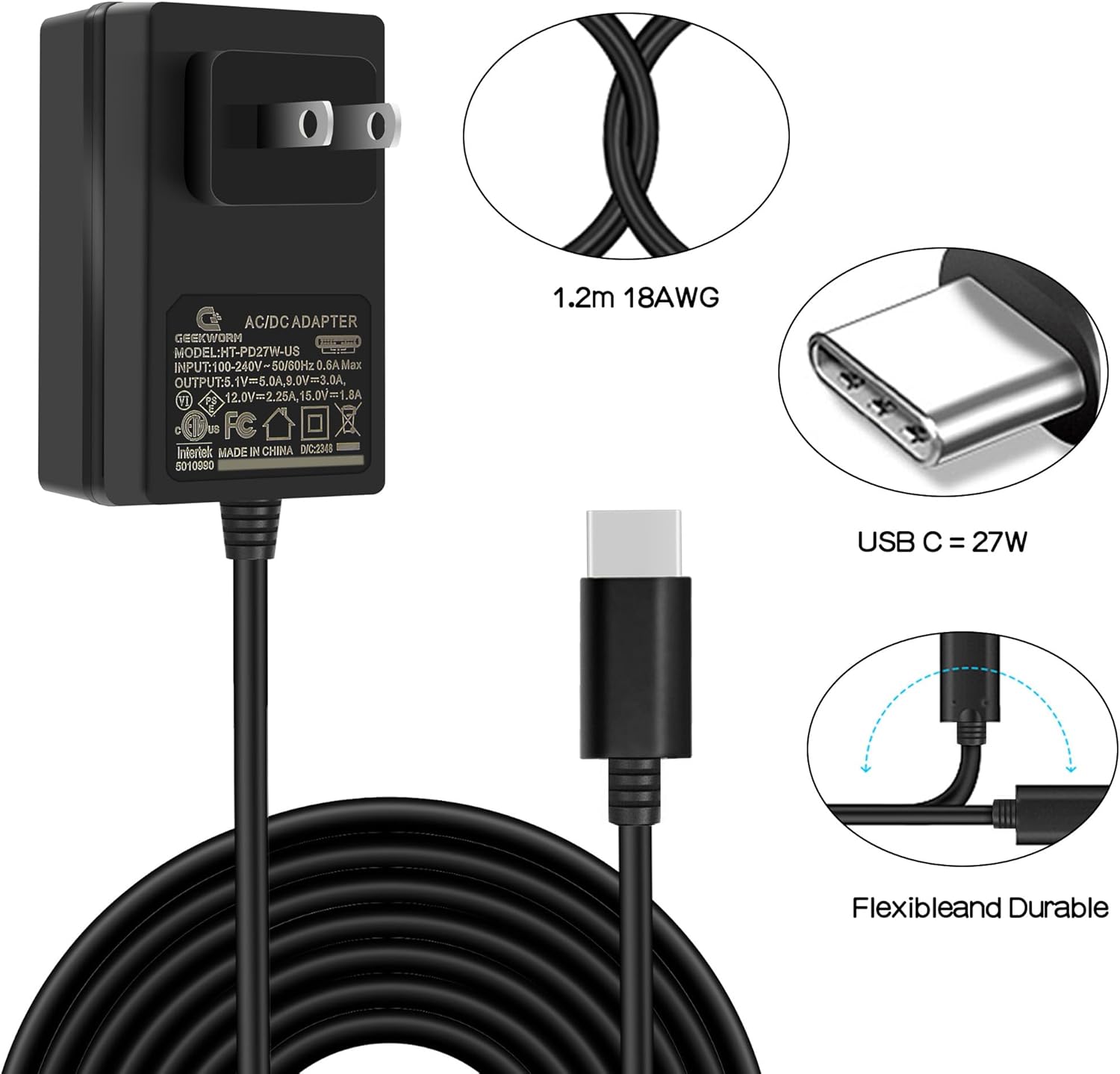
Figure 6.2: Specifications of the included PD27W Power Supply.
7. Sokongan dan Sumber
For further assistance, detailed guides, and community support, please visit the official Geekworm Wiki:
Cari untuk "X1100" on the Wiki for product-specific documentation and troubleshooting tips.


