1. Pengenalan
Thank you for choosing the Techno Line WD2200 Weather Station. This device provides comprehensive weather data, including indoor and outdoor temperature and humidity, barometric pressure, and a 3-day weather forecast. It also features connectivity with the 'Direct Weather' application for smartphones (iOS and Android), allowing you to view data on your mobile device. This manual will guide you through the setup, operation, and maintenance of your weather station to ensure optimal performance.
2. Maklumat Keselamatan
- Baca semua arahan dengan teliti sebelum menggunakan peranti.
- Jauhkan peranti ini daripada suhu ekstrem, cahaya matahari langsung, getaran kuat dan hentaman.
- Jangan rendam peranti di dalam air atau cecair lain.
- Jangan cuba membuka atau membaiki peranti ini sendiri. Rujuk semua servis kepada kakitangan yang berkelayakan.
- Buang bateri terpakai secara bertanggungjawab mengikut peraturan tempatan.
- Pastikan bateri dimasukkan dengan polariti yang betul.
3. Kandungan Pakej
Please check that all components are present in your package:
- WD2200 Weather Station (Main Unit)
- TX205DTH Outdoor Transmitter (Sensor)
- Manual Pengguna
Nota: Bateri tidak disertakan dan mesti dibeli secara berasingan.
4. Produk Lebihview
The Techno Line WD2200 Weather Station consists of a main display unit and an external wireless sensor. The main unit displays all collected data and forecasts, while the external sensor measures outdoor temperature and humidity.
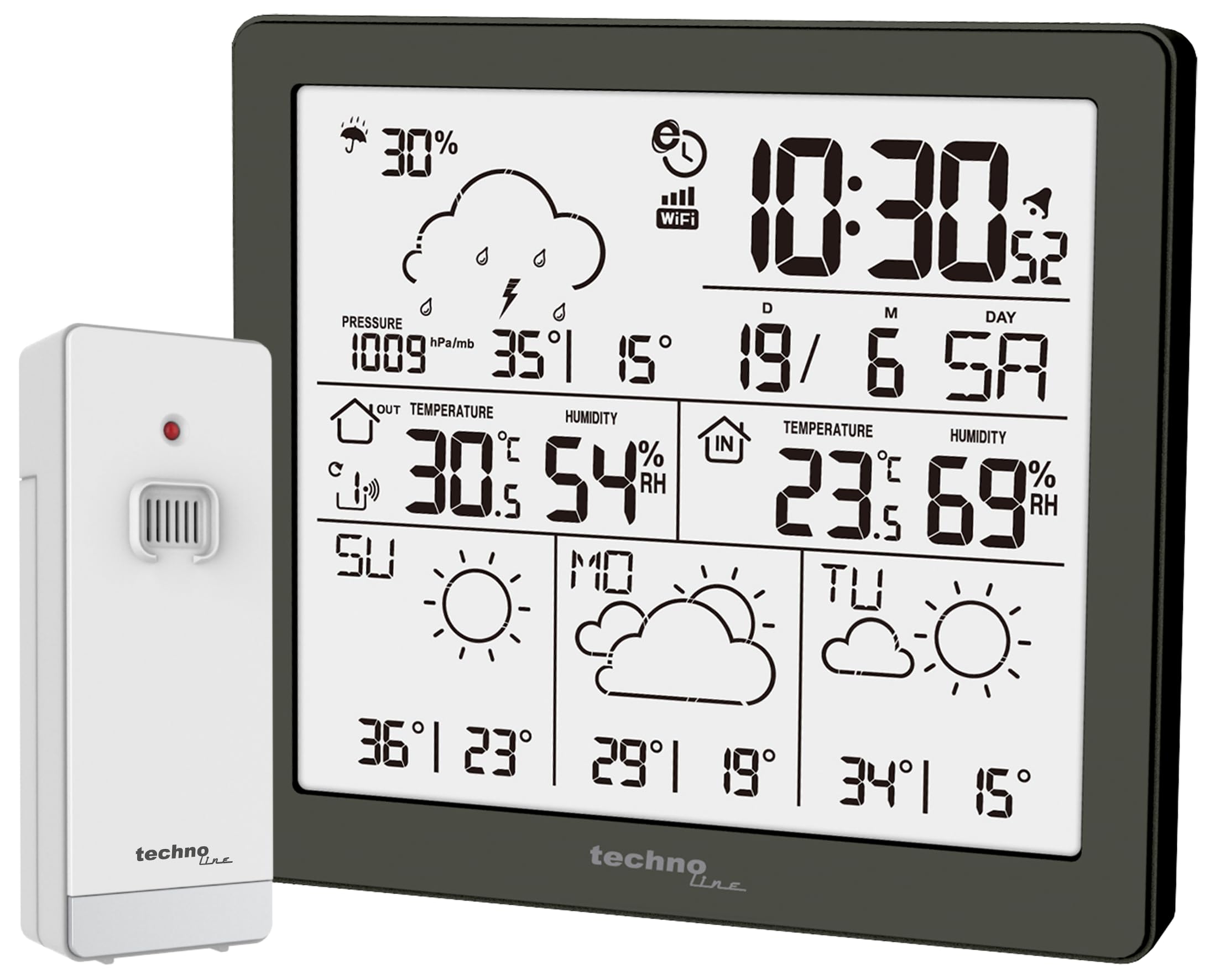
Rajah 1: Depan view of the Techno Line WD2200 Weather Station display. The display shows time, date, indoor and outdoor temperature and humidity, barometric pressure, precipitation probability, and a 3-day forecast with corresponding weather icons and min/max temperatures.
Elemen Paparan:
- Atas Kiri: Precipitation probability (e.g., 30%).
- Atas Kanan: Current time (e.g., 10:30) and date (e.g., 19/6 SA for June 19th, Saturday).
- Middle Left (Outdoor Data): Barometric pressure (e.g., 1009 hPa/mb), outdoor temperature (e.g., 30.5°C), and outdoor humidity (e.g., 54% RH).
- Middle Right (Indoor Data): Indoor temperature (e.g., 23.6°C) and indoor humidity (e.g., 69% RH).
- Bahagian Bawah: 3-day forecast (e.g., Sunday, Monday, Tuesday) with weather icons (sunny, cloudy) and corresponding minimum and maximum temperatures (e.g., SU: 36°/23°, MO: 29°/19°, TU: 34°/15°).
5. Persediaan
5.1 Pemasangan Bateri
- Outdoor Transmitter (TX205DTH): Open the battery compartment on the back of the sensor. Insert 2 x AA Mignon LR06 batteries, observing the correct polarity (+/-). Close the compartment securely.
- Main Unit (WD2200): Open the battery compartment on the back of the main unit. Insert 4 x AA Mignon LR06 batteries, observing the correct polarity (+/-). Close the compartment securely.
Note: It is recommended to insert batteries into the outdoor sensor first, then into the main unit, to ensure proper pairing.
5.2 Initial Power-On and Sensor Pairing
Upon inserting batteries into the main unit, the display will light up, and the unit will begin searching for the outdoor sensor. The outdoor temperature and humidity readings should appear on the main unit within a few minutes. If the outdoor data does not appear, refer to the Troubleshooting section.
5.3 App Connection (Direct Weather)
The WD2200 Weather Station connects to your smartphone via Bluetooth for enhanced data viewing and settings management through the 'Direct Weather' app.
- Download the 'Direct Weather' app from the App Store (iOS) or Google Play Store (Android).
- Pastikan Bluetooth didayakan pada telefon pintar anda.
- Open the 'Direct Weather' app and follow the on-screen instructions to pair with your WD2200 Weather Station. The app will guide you through the connection process.
6. Mengendalikan Stesen Cuaca
6.1 Membaca Paparan
The main unit's display provides a comprehensive overview keadaan cuaca semasa dan ramalan:
- Masa dan Tarikh: Automatically synchronized via the app or manually set.
- Suhu dan Kelembapan Dalaman: Diukur oleh unit utama.
- Suhu dan Kelembapan Luar: Received from the TX205DTH outdoor sensor.
- Tekanan Barometrik: Displays current atmospheric pressure.
- Precipitation Probability: Indicates the likelihood of rain or snow.
- 3-Day Forecast: Provides weather icons and expected high/low temperatures for today and the next three days.
6.2 Using the Direct Weather App
The 'Direct Weather' app offers additional functionalities:
- Data Terperinci View: Access historical data and more detailed graphs of temperature, humidity, and pressure.
- Konfigurasi Tetapan: Adjust time, date, measurement units (°C/°F, hPa/inHg), and other preferences directly from your phone.
- Makluman: Set up custom alerts for specific temperature or humidity thresholds.
7. Penyelenggaraan
7.1 Pembersihan
Lap unit utama dan sensor luar dengan kain lembut,amp cloth. Do not use abrasive cleaners or solvents, as these may damage the surfaces or electronic components.
7.2 Penggantian Bateri
When the battery indicator appears on the display, replace the batteries in the respective unit (main station or outdoor sensor). Always replace all batteries in a unit at the same time with new ones of the same type.
7.3 Penempatan Sensor Luar
For accurate outdoor readings, place the TX205DTH sensor in a shaded area, protected from direct sunlight and precipitation. Ensure it is within the effective transmission range of the main unit (typically up to 30 meters, depending on obstacles).
8. Penyelesaian masalah
- Tiada Paparan: Periksa kekutuban bateri dan pastikan bateri segar.
- Outdoor Data Not Appearing:
- Ensure batteries in the outdoor sensor are correctly installed and fresh.
- Relocate the outdoor sensor closer to the main unit.
- Press the reset button on both the main unit and the outdoor sensor (if available) and allow them to re-pair.
- Bacaan yang salah: Ensure both units are placed in appropriate locations (main unit indoors, sensor outdoors in a shaded, protected area). Allow some time for readings to stabilize after setup or relocation.
- Isu Ketersambungan Apl:
- Pastikan Bluetooth didayakan pada telefon pintar anda.
- Restart the 'Direct Weather' app.
- Try unpairing and re-pairing the device within the app's settings.
9. Spesifikasi
| Nombor Model | WD2200 |
| Main Unit Dimensions (L x H x P) | 129 x 118 x 29 mm |
| Outdoor Sensor Dimensions (L x H x P) | 40 x 102 x 26 mm |
| Main Unit Power Supply | 4 x AA Mignon LR06 batteries (not included) |
| Outdoor Sensor Power Supply | 2 x AA Mignon LR06 batteries (not included) |
| Teknologi Ketersambungan | Bluetooth |
| Penggunaan yang Disyorkan | Home weather monitoring |
| Ciri Khas | Lightweight, App integration |
10. Waranti dan Sokongan
Techno Line products are designed for reliability and performance. For information regarding warranty terms and conditions, please refer to the documentation provided at the time of purchase or visit the official Techno Line webtapak. Untuk sokongan teknikal atau bantuan lanjut, sila hubungi peruncit anda atau jabatan khidmat pelanggan pengilang.


