1. Lebihview
This manual provides detailed instructions for the Jazmm CD Cassette Player Combo with Bluetooth, Model CD-W16. This versatile audio system offers multiple playback options including CD, cassette tape, FM radio, Bluetooth, USB, TF card, and AUX-IN. It features 10W HiFi speakers, a built-in rechargeable battery, and remote control for convenient use in various settings.

Image 1.1: The Jazmm CD Cassette Player Combo (Model CD-W16) highlighting its seven playback modes: CD Player, FM Radio, TF Card Playback, USB Playback, Tape Player, AUX-IN Playback, and Bluetooth 5.1.
2. Maklumat Keselamatan Penting
- Baca semua arahan sebelum mengendalikan peranti.
- Simpan manual ini untuk rujukan masa hadapan.
- Jangan dedahkan peranti kepada hujan atau lembapan untuk mengelakkan kebakaran atau kejutan elektrik.
- Jangan sekat sebarang bukaan pengudaraan. Pasang mengikut arahan pengilang.
- Jangan pasang berhampiran mana-mana sumber haba seperti radiator, daftar haba, dapur, atau radas lain (termasuk amppenghidup) yang menghasilkan haba.
- Lindungi kord kuasa daripada berjalan atau tersepit, terutamanya pada palam, bekas kemudahan dan tempat keluar dari radas.
- Hanya gunakan lampiran/aksesori yang ditentukan oleh pengilang.
- Cabut plag radas ini semasa ribut petir atau apabila tidak digunakan untuk jangka masa yang lama.
- Rujuk semua perkhidmatan kepada pegawai perkhidmatan yang berkelayakan. Servis diperlukan apabila alat telah rosak dengan cara apa pun.
3. Ciri-ciri Produk
The Jazmm CD Cassette Player Combo (Model CD-W16) is designed for versatile audio playback and recording. Key features include:
- 7-in-1 Playback Modes: Supports CD, Cassette Tape, FM Radio, Bluetooth 5.1, USB, TF Card, and AUX-IN.
- Pemain CD: Compatible with CD, CD-R, CD-RW, MP3, and WMA formats. Features song programming.
- Cassette Player & Recorder: Play existing tapes or record audio onto blank tapes using the built-in microphone.
- Radio FM: Extended antenna for improved reception, automatic scanning, and storage for up to 30 preset stations (FM 87.5-108MHz).
- Bluetooth 5.1: Supports both Bluetooth transmission (to external Bluetooth speakers/headphones) and reception (from mobile devices).
- High-Fidelity Speakers: Dual 10W HiFi speakers deliver clear sound with strong bass and pure treble.
- 5 Mod Bunyi EQ: Customize your audio experience with NORMAL, ROCK, POP, JAZZ, and CLASS settings.
- Berbilang Input: USB port, TF (Micro SD) card slot, and 3.5mm AUX-IN jack for various media sources.
- Bateri boleh dicas semula: Built-in 5000mAh rechargeable battery for portable use.
- Kawalan Jauh: Conveniently operate the device from a distance of up to 7 meters.
- Jack fon kepala: 3.5mm headphone output for private listening.
4. Kandungan Pakej
Sila semak pakej untuk item berikut:
- Jazmm CD Cassette Player Combo (Model CD-W16)
- Alat Kawalan Jauh
- Penyesuai/Kabel Kuasa
- Manual Pengguna
5. Kawalan dan Pelabuhan
Familiarize yourself with the controls and connection ports on your device.
Kawalan Panel Depan:
- FUNC/REP/PROG: Function/Repeat/Program button.
- JILID- / JILID+: Volume down / Volume up.
- IMBAS: Scan for radio stations.
- EQ: Tetapan penyama.
- SEBELUM / SETERUSNYA: Trek sebelumnya / Trek seterusnya.
- MAIN/JEDA: Butang Main/Jeda.
- BERHENTI/EJECT: Stop playback / Eject CD or cassette.
- FFWD / REW: Fast forward / Rewind (for cassette).
- REKAM: Record button (for cassette).
- Butang Kuasa: Menghidupkan/mematikan peranti.
- Paparan LCD: Shows current mode, track number, time, etc.
Side/Rear Panel Ports:
- Bicu Fon Kepala (3.5mm): Untuk menyambungkan fon kepala.
- AUX-IN (3.5mm): Untuk menyambungkan peranti audio luaran.
- Port USB: Untuk pemacu kilat USB.
- Slot Kad TF: Untuk kad Mikro SD.
- Pelabuhan DC IN: Untuk sambungan penyesuai kuasa.
- Antena FM: Antena boleh dipanjangkan untuk penerimaan radio.
6. Persediaan
- Sambungan Kuasa:
Connect the provided power adapter to the DC IN port on the device and plug it into a standard wall outlet. The internal battery will begin charging automatically.
- Caj Permulaan:
For optimal battery life, fully charge the device before first use. The charging indicator light will show charging status.
- Antenna (for FM Radio):
Extend the telescopic FM antenna for better radio reception.
- Hidupkan kuasa:
Tekan ke kuasa button to turn on the device. The LCD display will illuminate.
7. Arahan Operasi
7.1 Main Semula CD
- Buka penutup petak CD.
- Place a CD (label side up) onto the spindle.
- Tutup penutup petak CD dengan kemas.
- Tekan ke FUNGSI button repeatedly until "CD" mode is selected.
- Tekan ke MAIN/JEDA butang untuk memulakan main balik.
- guna SEBELUM dan SETERUSNYA butang untuk melangkau trek.
- Tekan BERHENTI/EJECT untuk menghentikan main balik.
7.2 Cassette Tape Playback & Recording

Image 7.1: The Jazmm CD Cassette Player Combo with a cassette tape inserted into the front loading slot.
- Buka pintu petak kaset.
- Insert a cassette tape with the open edge facing the player.
- Tutup pintu petak kaset.
- Tekan ke FUNGSI button repeatedly until "TAPE" mode is selected.
- Tekan ke MAIN/JEDA butang untuk memulakan main balik.
- guna FFWD or REW for fast winding.
- To record: Insert a blank tape. Press the REC button. The device will record audio from the built-in microphone. Press BERHENTI/EJECT untuk menamatkan rakaman.
7.3 Operasi Radio FM

Image 7.2: The Jazmm CD Cassette Player Combo with its telescopic FM antenna fully extended for optimal radio reception.
- Panjangkan antena FM sepenuhnya.
- Tekan ke FUNGSI button repeatedly until "FM" mode is selected.
- Tekan ke IMBAS butang untuk mengimbas dan menyimpan stesen FM yang tersedia secara automatik.
- guna SEBELUM dan SETERUSNYA buttons to navigate through saved preset stations.
7.4 Sambungan Bluetooth
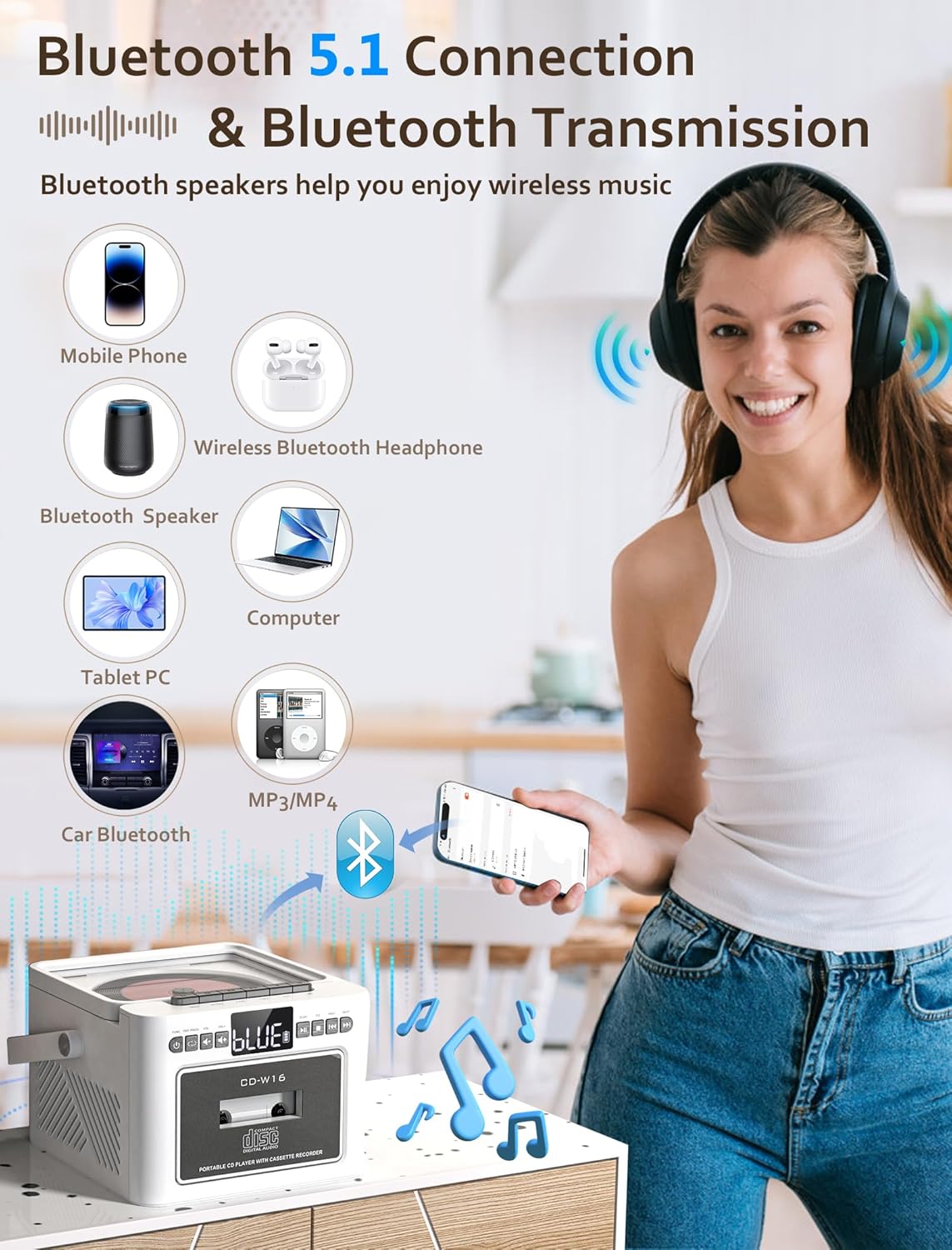
Image 7.3: The Jazmm CD Cassette Player Combo illustrating its Bluetooth 5.1 capabilities for both connecting to mobile devices and transmitting to Bluetooth speakers or headphones.
- Tekan ke FUNGSI button repeatedly until "BT" (Bluetooth) mode is selected. The display will show "BLUE" and flash, indicating it's in pairing mode.
- On your external device (smartphone, tablet, etc.), enable Bluetooth and search for "CD-W16" (or similar).
- Select "CD-W16" to pair. Once connected, the "BLUE" indicator will stop flashing.
- You can now play audio from your device through the boombox speakers.
- Penghantaran Bluetooth: To transmit audio from the boombox (e.g., CD playback) to external Bluetooth headphones or speakers, ensure the external device is in pairing mode. The boombox will automatically search and connect.
7.5 USB / TF Card / AUX-IN Playback
- Kad USB/TF: Insert a USB flash drive into the USB port or a TF (Micro SD) card into the TF card slot. Press the FUNGSI button to select "USB" or "TF" mode. Playback will begin automatically.
- AUX-IN: Connect an external audio device (e.g., MP3 player) to the AUX-IN port using a 3.5mm audio cable (not included). Press the FUNGSI button to select "AUX" mode. Control playback from your external device.
7.6 Menggunakan Alat Kawalan Jauh

Image 7.4: The Jazmm CD Cassette Player Combo shown with its included remote control, allowing for convenient operation from a distance.
The remote control allows you to operate most functions from a distance. Ensure there are no obstructions between the remote and the boombox. Insert batteries (not included) into the remote control before use.
8. Penyelenggaraan
- Pembersihan: Gunakan kain lembut dan kering untuk membersihkan bahagian luar unit. Jangan gunakan pembersih atau pelarut yang melelas.
- Penjagaan Kanta CD: Jika masalah main balik CD berlaku, gunakan cakera pembersih kanta CD yang tersedia secara komersial.
- Pembersihan Kepala Kaset: Periodically clean the cassette player's heads with a cotton swab lightly dampened with isopropyl alcohol to ensure optimal sound quality.
- Storan: Apabila tidak digunakan untuk tempoh yang lama, simpan peranti di tempat yang sejuk dan kering.
- Penjagaan Bateri: To prolong battery life, avoid fully discharging the battery frequently. Recharge the battery regularly, even if the device is not in active use.
9. Penyelesaian masalah
| Masalah | Kemungkinan Punca | Penyelesaian |
|---|---|---|
| Tiada kuasa | Penyesuai kuasa tidak disambungkan; Bateri kehabisan kuasa. | Pastikan penyesuai kuasa disambungkan dengan selamat dan dipasang pada soket yang berfungsi. Cas bateri. |
| Tiada bunyi | Kelantangan terlalu rendah; Mod salah dipilih; Fon kepala disambungkan. | Increase volume. Select the correct playback mode (CD, BT, FM, etc.). Disconnect headphones if sound is desired from speakers. |
| CD tidak dimainkan / dilangkau | CD dirty or scratched; CD inserted incorrectly; CD format not supported. | Clean the CD with a soft cloth. Reinsert the CD label side up. Ensure the CD is a supported format (CD, CD-R, CD-RW, MP3, WMA). |
| Pita kaset tidak dimainkan | Tape inserted incorrectly; Tape tangled or damaged. | Reinsert the tape correctly. Check the tape for damage. |
| Penerimaan radio FM yang lemah | Antena tidak dilanjutkan; Isyarat lemah. | Fully extend the FM antenna. Reposition the unit for better reception. |
| Penggandingan Bluetooth gagal | Device not in pairing mode; Boombox too far from device. | Ensure both devices are in pairing mode. Move devices closer. Restart Bluetooth on both devices. |
10. Spesifikasi
| Ciri | Perincian |
|---|---|
| Model | CD-W16 |
| Jenama | Jazmm |
| Dimensi Produk (L x W x H) | 7.5 x 6.2 x 4.3 inci |
| Teknologi Ketersambungan | Tambahan, Bluetooth, USB |
| Jenis Pembesar Suara | Stereo (Dual 10W HiFi Speakers) |
| Sumber Kuasa | Dikuasakan Bateri (Bateri Boleh Dicas Semula 5000mAh Terbina dalam) |
| Kekerapan Radio FM | 87.5-108 MHz |
| Versi Bluetooth | 5.1 |
| Media yang Disokong | CD, CD-R, CD-RW, MP3, WMA, Cassette Tape, USB, TF Card |
11. Waranti dan Sokongan
Jazmm offers a lifetime warranty on this portable CD player boombox. For any inquiries, technical assistance, or warranty claims, please contact our customer service team. We provide 24/7 world-class customer service to ensure your satisfaction.
Please refer to your purchase documentation or the Jazmm official webtapak untuk butiran hubungan khusus.


