pengenalan
This manual provides comprehensive instructions for the assembly, operation, maintenance, and troubleshooting of your FLEXISPOT 79 x 32 Inch Large Standing Desk. Please read this manual thoroughly before use to ensure proper function and safety. Keep this manual for future reference.

Image: The FLEXISPOT standing desk in an office setting, showcasing its large surface area with multiple monitors and accessories.
Maklumat Keselamatan
Always follow assembly instructions carefully. Do not exceed the maximum weight recommendation of 132 pounds to ensure stability and safety. Ensure all connections are secure before operating the desk. Keep children and pets away from the desk during operation.
Kandungan Pakej
Verify that all components are present before beginning assembly. Your FLEXISPOT standing desk package typically includes:
- Desktop (79 x 32 inches, may be a splice board design)
- Desk Frame (legs, crossbar, motor)
- Panel Kawalan
- Penyesuai Kuasa dan Kabel
- Pemegang Cawan
- Cangkuk Fon Kepala
- Perkakasan Pemasangan (skru, alatan)
- Manual Arahan
Note: Due to the size and weight, your desk may arrive in multiple packages that could ship and arrive separately.

Image: Illustration showing two separate boxes for the desktop and desk frame, indicating that components may arrive in multiple shipments.
Persediaan dan Perhimpunan
Assembly of the FLEXISPOT standing desk is designed to be straightforward. A power drill may be needed for some steps (not included). Follow the detailed instructions provided in the included assembly guide. Ensure all screws are tightened securely, but do not overtighten.
Petua Perhimpunan:
- Susun atur semua bahagian dan perkakasan sebelum memulakan.
- Ensure the desktop halves (if applicable) are correctly aligned before securing.
- When installing the transmission rod, ensure it slides smoothly into the motor. Tolerances can be tight.
- It is recommended to have a second person assist when flipping the desk over after assembly.
Arahan Operasi
Your FLEXISPOT standing desk features an electric height adjustment system with a multifunctional controller.
Pelarasan Ketinggian:
- The desk height can be adjusted smoothly and quietly from 28.9 inches to 46.5 inches.
- Gunakan UP dan TURUN buttons on the control panel to manually adjust the desk to your desired height.
Pratetap Memori:
The control panel includes 4 programmable memory presets, allowing you to save and recall your preferred sitting and standing heights with a single touch.
- Laraskan meja ke ketinggian yang anda inginkan menggunakan butang ATAS/BAWAH.
- Tekan ke M button (or similar memory set button) followed by one of the numbered preset buttons (1, 2, 3, or 4) to save the current height.
- Untuk mengingat semula ketinggian yang disimpan, hanya tekan butang pratetap bernombor yang sepadan.
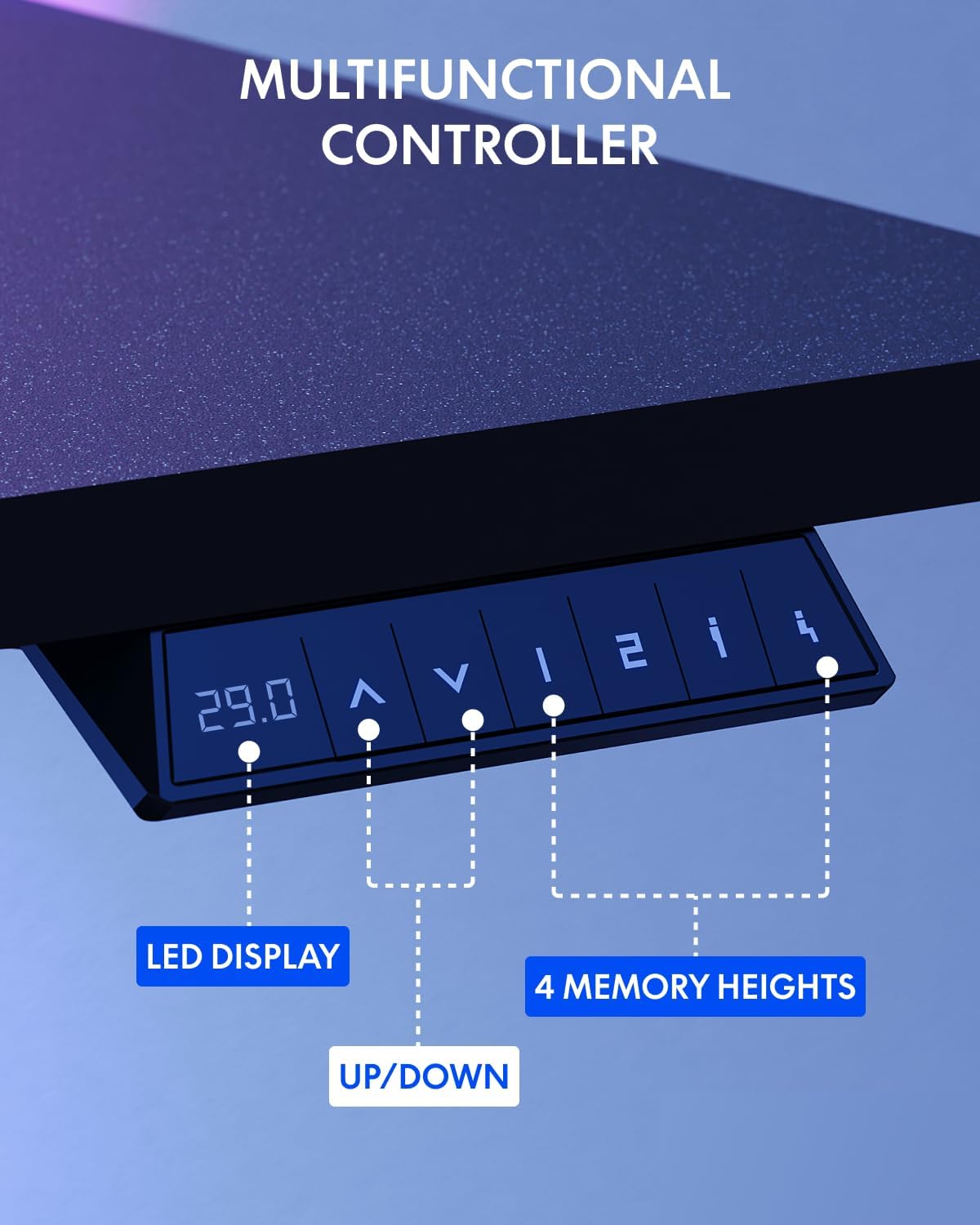
Image: The multifunctional control panel with an LED display and buttons for height adjustment and four memory presets.
Penggunaan Aksesori:
- The included cup holder can be attached to the side of the desk for convenient beverage access.
- The headphone hook provides a dedicated storage spot for your headphones, keeping your workspace tidy.

Image: Details of the integrated cup holder and headphone hook accessories.
Penyelenggaraan
Penyelenggaraan yang kerap memastikan jangka hayat dan prestasi optimum meja berdiri anda.
- Pembersihan: Lap desktop dan bingkai dengan lembut, damp kain. Elakkan pembersih yang melelas atau bahan kimia yang keras.
- Semak Sambungan: Periksa semua skru dan bolt secara berkala untuk memastikan ia kekal ketat. Ketatkan semula jika perlu.
- Pengurusan Kabel: Organize cables to prevent snagging during height adjustments.
Menyelesaikan masalah
If you encounter issues with your FLEXISPOT standing desk, refer to the following common solutions:
| Masalah | Kemungkinan Punca | Penyelesaian |
|---|---|---|
| Meja tidak bergerak | Power cable disconnected, motor error | Check power connections. Unplug and replug the desk. If an error code is displayed, consult customer support. |
| Pelarasan ketinggian tidak sekata | Obstruction, uneven load | Ensure no obstructions are present. Distribute weight evenly on the desktop. Perform a reset if available (refer to specific controller instructions). |
| Meja bergoyang | Loose connections, uneven floor | Tighten all assembly screws. Ensure the desk is on a level surface. Adjust foot pads if necessary. |
For persistent issues or error codes not listed, please contact FLEXISPOT customer support.
Spesifikasi
Key specifications for the FLEXISPOT 79 x 32 Inch Large Standing Desk:
- Jenama: FLEXISPOT
- model: 79 x 32 Inch Large Standing Desk
- Dimensi Produk: 32"P x 79"L x 29"T (pada ketinggian minimum)
- warna: Bingkai Hitam + Atasan Hitam
- gaya: moden
- Bahan asas: Keluli Aloi
- Jenis Bahan Atas: Kayu Kejuruteraan
- Jenis Selesai: Bersalut Serbuk
- Julat Ketinggian: 28.9" hingga 46.5"
- Saran Maksimum Berat: 132 paun
- Ciri Khas: 79" x 32" Large Tabletop, Splice Board, Cup Holder, Headphone Hook, Electric Height Adjustment, 4 Memory Presets
- Perhimpunan: Diperlukan
- UPC: 810072869357

Image: Visual representation of the desk's dimensions and adjustable height range.
Waranti dan Sokongan
FLEXISPOT provides the following warranty for your standing desk:
- Frame and Mechanical Parts: Waranti terhad 5 tahun
- Elektronik: Waranti terhad 2 tahun
For warranty claims, technical assistance, or any questions regarding your product, please contact FLEXISPOT customer support. You can find contact information on the official FLEXISPOT webtapak atau melalui platform pembelian anda.
Visit the official FLEXISPOT Store for more information and products: Kedai FLEXISPOT


