1. Pengenalan
The Tera P162GC is an advanced Android 11-based barcode scanner PDA designed for high-performance data collection in various demanding environments. Featuring a robust Qualcomm Octa-Core CPU and a powerful Zebra SE4750MR 2D scanning engine, this device offers exceptional speed, accuracy, and an extended scanning range. Its durable IP65-rated design and hot-swappable battery ensure reliable operation and continuous productivity.

The Tera P162GC Android Barcode Scanner PDA, shown with its included pistol grip and charging cradle, designed for efficient data collection.
2. Kandungan Pakej
Sila sahkan bahawa semua item yang disenaraikan di bawah disertakan dalam pakej anda:
- 1x Tera P162GC Android 11 Barcode Scanner
- 1x Pegangan Pistol
- Buaian Pengecasan 1x
- 1x Tali Tangan
- 1x Charge Adapter
- 1x QC-Adapter-US
- 1x Pelindung Skrin
- 1x Kabel USB
- 1x Manual Pengguna
- 1x SDK

This image displays the complete package contents for the Tera P162GC, ensuring users have all necessary items for immediate operation and development.
3. Ciri-ciri Utama
- Zebra SE4750MR 2D Scanner Engine: Offers an impressive scanning range of up to 13 feet, which is 10 times that of conventional scanners. It reads barcodes with exceptional speed and accuracy, even in challenging conditions like low light, direct sunlight, or with damaged labels.
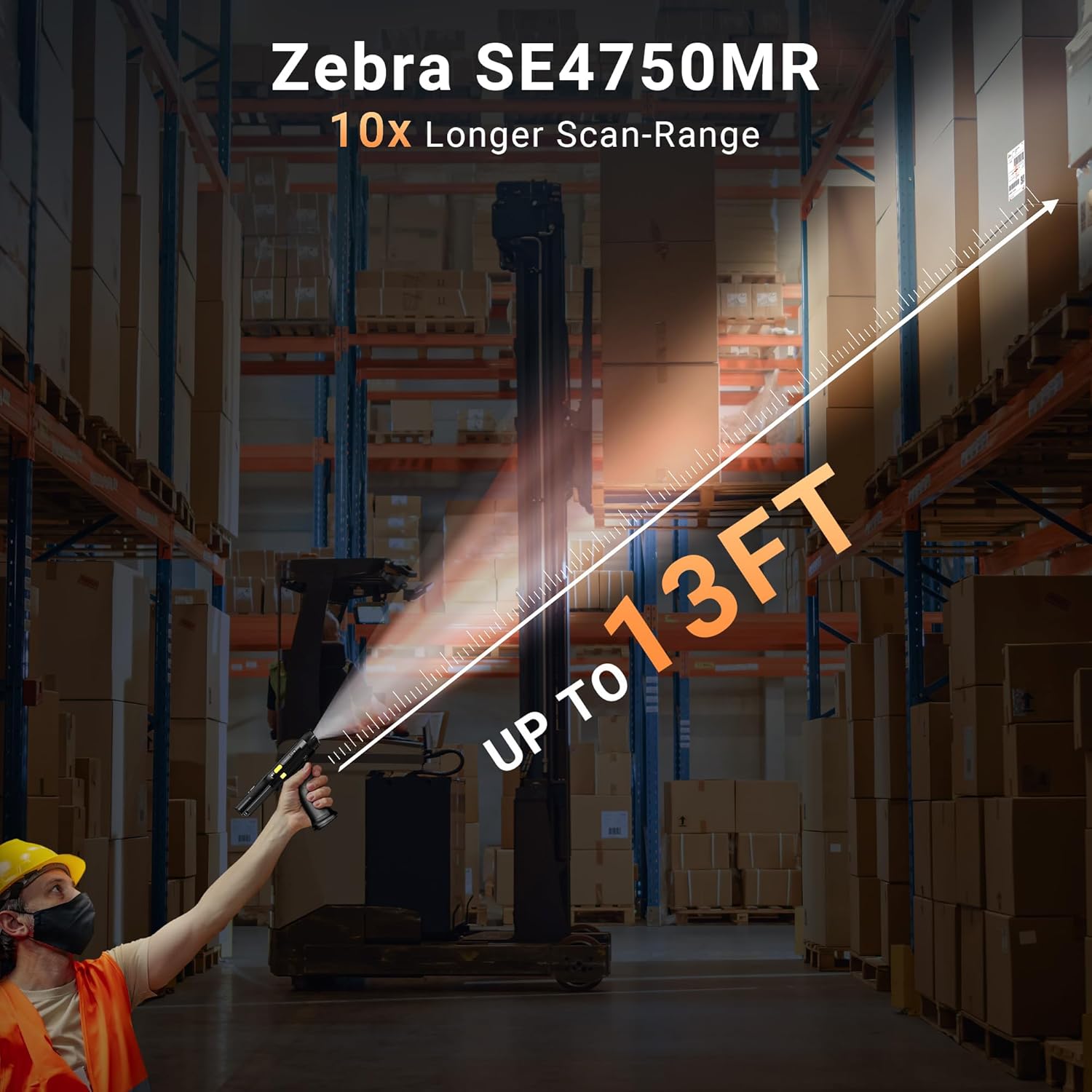
This image demonstrates the extended 13-foot scanning range of the Tera P162GC, powered by the Zebra SE4750MR engine, allowing for efficient scanning of items on high shelves.
- Qualcomm 662 Octa-Core CPU: The Qualcomm Snapdragon 662 Octa-Core Processor, clocked at 2.0GHz, provides robust performance and efficiency for a wide range of applications. Its eight cores enable smooth multitasking and handle demanding tasks seamlessly.

Powered by a Qualcomm 2.0GHz Octa-Core CPU, the Tera P162GC ensures fast and accurate decoding with lower power consumption, featuring 3GB RAM, 32GB ROM, and Android 11.
- 47 Keys Design: Unlike full touchscreen PDAs, the physical keypad offers accurate response, well-spaced keys for easy pressing, and dedicated function keys for quick access to frequently used commands, streamlining data entry and improving efficiency.
- 6700 mAh Large Battery with Hot-Swap: The P162GC PDA features a substantial 6700 mAh battery, offering up to 680 hours of standby time and over 12 hours of continuous use. A built-in 100mAh backup battery supports hot-swap functionality, preventing data loss during battery replacement.

The P162GC is equipped with a substantial 6700mAh removable battery, offering up to 680 hours standby time, 12 hours continuous use, and a 3.5-hour charging time. A 100mAh backup battery supports hot-swap functionality.
- IP65 Grade Protection: Built to withstand harsh working environments, the device boasts an IP65 rating, making it resistant to dust and water splashes, and durable against accidental drops.

The Tera P162GC is built with an IP65 grade, ensuring durability against drops, water splashes, and dust, making it suitable for harsh working environments.
4. Persediaan
- Pemasangan Bateri:
Locate the battery compartment on the back of the device. Insert the 6700mAh battery, ensuring it clicks into place. The device also has a 100mAh backup battery for hot-swapping.
- Pengecasan Awal:
Connect the provided USB cable to the device and the charge adapter. Plug the adapter into a power outlet. For convenient charging, place the device in the charging cradle. A full charge takes approximately 3.5 hours.
- Hidupkan/Mati Kuasa:
To power on, press and hold the power button until the screen illuminates. To power off, press and hold the power button, then select 'Power off' from the options.
- Konfigurasi Awal:
Upon first boot, follow the on-screen prompts to set up your Android 11 operating system, including Wi-Fi connection, language, and time zone settings.
This video demonstrates the key features and operation of the Tera P162GC Android PDA, including its Zebra SE4750MR scanner, IP65 protection, battery hot-swap, and barcode scanning capabilities.
5. Arahan Operasi
- Pengimbasan Kod Bar:
Point the scanner's window at the barcode you wish to scan. Press the dedicated scan button (typically on the side or pistol grip) to activate the laser. Ensure the barcode is within the optimal scanning range (up to 13 feet for 2D barcodes). The device supports scanning of all common barcode types.
- Penggunaan papan kekunci:
Utilize the 47-key physical keypad for accurate data entry. The keys are designed for tactile feedback and ease of use, even with gloves. Dedicated function keys provide quick access to specific operations within applications.
- Android 11 Interface:
Navigate the Android 11 operating system using the touchscreen. Access applications, settings, and system functions as you would on any Android device. The device is optimized for enterprise applications.
- Pistol Grip Attachment:
Attach the pistol grip to the bottom of the device for comfortable, extended use, especially during high-volume scanning tasks. The grip provides an ergonomic hold and often integrates an additional scan trigger.
6. Penyelenggaraan
- Pembersihan:
Lap peranti dengan kerap menggunakan kain lembutamp cloth. For the screen, use a microfiber cloth. Avoid abrasive cleaners or solvents. Ensure the scanning window is clean and free of smudges for optimal performance.
- Penjagaan Bateri:
To prolong battery life, avoid extreme temperatures. Store the device with a partial charge if not in use for extended periods. Utilize the hot-swap feature to replace batteries without powering down the device, ensuring continuous operation.
- Kemas Kini Perisian:
Periodically check for and install software updates to ensure optimal performance, security, and access to new features. Refer to the device's settings for update options.
7. Penyelesaian masalah
| Masalah | Kemungkinan Punca | Penyelesaian |
|---|---|---|
| Peranti tidak dihidupkan | Low or depleted battery; Power button not pressed correctly | Cas peranti selama sekurang-kurangnya 30 minit. Tekan dan tahan butang kuasa dengan kuat selama 3-5 saat. |
| Kod bar tidak diimbas | Barcode damaged or dirty; Incorrect scanning distance; Scanner window obstructed; Application issue | Clean the barcode and scanner window. Adjust scanning distance. Ensure no obstructions. Restart the scanning application or device. |
| Prestasi perlahan | Terlalu banyak aplikasi berjalan; Ruang storan rendah | Close unnecessary applications. Clear cache or uninstall unused apps to free up storage. Restart the device. |
| Bateri cepat habis | Screen brightness too high; Wi-Fi/Bluetooth always on; Background apps | Reduce screen brightness. Turn off Wi-Fi/Bluetooth when not in use. Close background applications. |
8. Spesifikasi
| Ciri | Perincian |
|---|---|
| Nombor Model | P162GC_US |
| Sistem Operasi | Android 11 |
| CPU | Qualcomm Snapdragon 662 Octa-Core 2.0GHz |
| Scanner Engine | Zebra SE4750MR 2D Imager |
| Julat Pengimbasan | Sehingga 13 kaki (4 meter) |
| Papan kekunci | 47 Kekunci Fizikal |
| Kapasiti Bateri | 6700 mAh (Removable) + 100 mAh (Backup) |
| Masa Mengecas | lebih kurang 3.5 jam |
| Masa Penggunaan Berterusan | Lebih daripada 12 jam |
| Masa Tunggu Sedia | Sehingga 680 jam |
| Penilaian Perlindungan | IP65 (Drop-proof, Water-proof, Dust-proof) |
| Dimensi Produk | 1.18 x 3.1 x 7.8 inci (1.18"D x 3.1"W x 7.8"H) |
| Berat Barang | 2 paun |
| Peranti Serasi | Desktop, Laptop, POS, Smartphone, Tablet |
| Sumber Kuasa | Dikuasakan Bateri |
9. Waranti dan Sokongan
Tera is committed to providing high-quality products and excellent customer service. Your Tera P162GC barcode scanner PDA comes with comprehensive support.
- Bantuan Teknikal Sepanjang Hayat: As a US-based brand, Tera offers lifetime technical assistance to ensure your satisfaction and peace of mind.
- Sokongan Pelanggan 24/7: Dedicated customer support is available 24/7 to assist with any inquiries or issues you may encounter.
- SDK Kits: SDK (Software Development Kit) kits are provided to facilitate customization and integration with your existing systems.

Tera provides comprehensive support including SDK development kits, 24/7 customer support, and technical assistance, highlighting their US-based brand and factory source.
For further assistance, please refer to the contact information provided in your package or visit the official Tera webtapak.


