1. Pengenalan
This manual provides detailed instructions for the operation and maintenance of your new Fanvace M31 MP3 Player. Please read this manual thoroughly before using the device to ensure proper functionality and to maximize your user experience. Keep this manual for future reference.
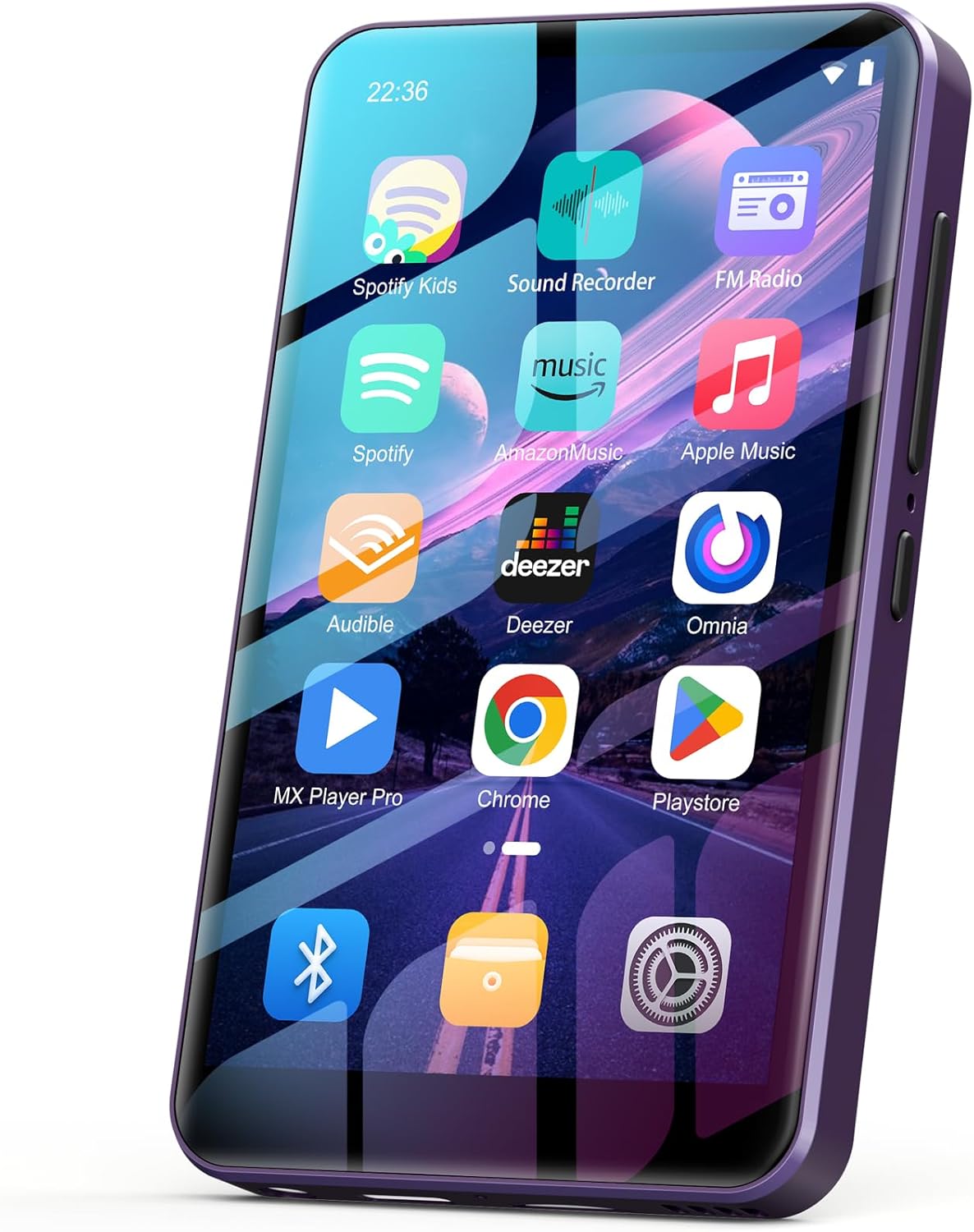
Imej 1.1: Depan view of the Fanvace M31 MP3 Player, showcasing its 4-inch touchscreen with pre-installed applications like Spotify, Amazon Music, and Play Store.
2. Apa yang ada di dalam Kotak
Selepas membongkar, sila sahkan bahawa semua item yang disenaraikan di bawah ada dan dalam keadaan baik:
- 1 x Fanvace M31 MP3 Player
- 1 x 64GB SD Card (pre-installed or separate)
- 1 x Kabel USB C
- 1 x Fon Telinga Berwayar
- 1 x Pelindung Skrin
- 1 x Sarung Pelindung
- 1 x Manual Pengguna (dokumen ini)

Image 2.1: The complete packing list for the Fanvace M31 MP3 Player, showing all included accessories.
3. Produk Lebihview
3.1 Physical Components and Controls
The Fanvace M31 MP3 Player features a compact design with essential controls and ports for ease of use.

Image 3.1: Detailed diagram of the Fanvace M31 MP3 Player, highlighting its physical dimensions and the location of its various ports and buttons.
- Jilid + / Jilid -: Laraskan tahap output audio.
- On/Off / Reset: Power the device on or off, or perform a reset.
- Keluaran 3.5mm: Connect wired headphones or external audio devices.
- Port USB-C: Untuk pengecasan dan pemindahan data.
- Slot Kad TF: Insert a microSD card for expanded storage.
- Penceramah: Integrated speaker for audio playback without headphones.
- Recording Hole: Mikrofon terbina dalam untuk rakaman suara.
4. Persediaan
4.1 Penghidupan dan Pengecasan Awal
- Cas Peranti: Before first use, fully charge the MP3 player using the provided USB-C cable and a compatible power adapter (not included). The battery indicator on the screen will show charging status.
- Hidupkan kuasa: Press and hold the On/Off button until the screen illuminates.
4.2 Sambungan Wi-Fi
- Dari skrin utama, ketik ikon 'Tetapan'.
- Pilih 'Rangkaian & Internet' kemudian 'Wi-Fi'.
- Togol Wi-Fi kepada 'Hidup'.
- Pilih rangkaian Wi-Fi yang anda inginkan daripada senarai dan masukkan kata laluan jika digesa.
- Sebaik sahaja disambungkan, ikon Wi-Fi akan muncul di bar status.
4.3 Berpasangan Bluetooth
- Dari skrin utama, ketik ikon 'Tetapan'.
- Select 'Connected devices' then 'Bluetooth'.
- Toggle Bluetooth to 'On'.
- Pastikan fon kepala atau pembesar suara Bluetooth anda berada dalam mod berpasangan.
- The MP3 player will scan for available devices. Select your device from the list to pair.
- Sahkan pemasangan pada kedua-dua peranti jika digesa.

Image 4.1: The Fanvace M31 MP3 Player demonstrating its Bluetooth 4.1 connectivity with headphones.
5. Arahan Operasi
5.1 Main balik Muzik
The device supports various music formats including MP3, WAV, FLAC, APE, OGG, M4A, AAC, WMA. You can play local files or stream from pre-installed apps.
- Muzik Tempatan: Pindahkan muzik files to the device's internal storage or microSD card. Use the 'Music' app or a file manager to browse and play your tracks.
- Apl Penstriman: Open pre-installed apps like Spotify, Pandora, Deezer, or Amazon Music. Log in to your accounts to access streaming content.

Image 5.1: User enjoying HiFi music playback on the Fanvace M31 MP3 Player.
5.2 Main balik Video
The MP3 player supports 720p and 1080p HD video playback for formats such as RM, RMVB, FLV, MP4, DAT, MKV, MPG, MOV, TS without conversion.
- Pindahkan video files ke peranti.
- Open a video player app (e.g., MX Player Pro) to browse and play your videos.

Image 5.2: The Fanvace M31 MP3 Player showcasing its visual impact with HD video playback.
5.3 App Usage and Google Play Store
The device runs on Android and comes with the Google Play Store pre-installed, allowing you to download and install additional applications.
- Pastikan anda disambungkan ke Wi-Fi.
- Open the 'Play Store' app.
- Log masuk dengan akaun Google anda.
- Browse or search for apps and install them as needed.

Image 5.3: The Google Play Store interface on the Fanvace M31, demonstrating app download capabilities.
5.4 File Pemindahan
Connect the MP3 player to your computer using the USB-C cable. The device will appear as a removable storage device, allowing you to drag and drop files (music, videos, documents) to and from its internal storage or the inserted microSD card.
6. Ciri-ciri
- Smart MP3 Music Player: Equipped with an 8-core MTK chip for faster response and smoother operation. Runs on Android and comes pre-installed with popular online music apps like Spotify, Pandora, Deezer, and Amazon Music.
- Kualiti Bunyi HiFi Lossless: Features a powerful audio decoding chip and optimized circuit technology for HIFI-level sound. Compatible with MP3, WAV, FLAC, APE, OGG, M4A, AAC, WMA, and other formats.
- High-performance MP4 Player: Boasts a 4-inch full-touch IPS screen and HiFi sound module. Supports 720p and 1080p HD video playback for formats including RM, RMVB, FLV, MP4, DAT, MKV, MPG, MOV, TS without prior conversion.
- Bluetooth & Wi-Fi Connectivity: Supports wireless network connection for app downloads, online music/video playback, and web browsing. Features stable and fast two-way Bluetooth for latency-free connection to headphones, speakers, or other playback devices.
- 80GB Large Capacity: Built-in 2GB RAM and 80GB storage (16GB ROM + 64GB TF card). Supports external storage expansion up to 1TB via microSD card (FAT32 format only).
- 2000mAh High Capacity Battery: Integrated 2000mAh lithium battery with a low-power solution, providing up to 50 hours of continuous music playback or 8 hours of video playback.
- Peranti Pelbagai fungsi: Beyond music and video playback, it includes FM radio, voice recorder, e-book reader, calculators, and web browsers. Allows for desktop customization by installing or removing apps.
Video 6.1: A demonstration of the Fanvace M31 MP3 Player's user interface, showcasing navigation through apps, settings, and media playback options.
7. Penyelenggaraan
- Pembersihan: Gunakan kain lembut dan kering untuk membersihkan skrin dan badan peranti. Elakkan menggunakan bahan kimia yang keras atau bahan yang melelas.
- Storan: Simpan peranti di tempat yang sejuk dan kering jauh dari cahaya matahari langsung dan suhu yang melampau.
- Penjagaan Bateri: Untuk memanjangkan hayat bateri, elakkan daripada menyahcas sepenuhnya bateri dengan kerap. Cas peranti dengan kerap, walaupun tidak digunakan untuk tempoh yang lama.
- Kemas Kini Perisian: Periodically check for system updates in the device settings to ensure optimal performance and security.
8. Penyelesaian masalah
| Masalah | Kemungkinan Punca | Penyelesaian |
|---|---|---|
| Peranti tidak dihidupkan | Bateri lemah; Ranap sistem | Charge the device for at least 30 minutes. If unresponsive, press and hold the power/reset button for 10-15 seconds to force a restart. |
| Tidak dapat menyambung ke Wi-Fi | Incorrect password; Out of range; Router issue | Verify Wi-Fi password. Move closer to the router. Restart your Wi-Fi router. |
| Peranti Bluetooth tidak berpasangan | Device not in pairing mode; Out of range | Ensure Bluetooth accessory is in pairing mode. Move devices closer. Restart Bluetooth on both devices. |
| Peranti perlahan atau tidak responsif | Terlalu banyak aplikasi yang berjalan; Storan rendah | Close unnecessary background apps. Clear cache. Uninstall less frequently used apps. Check available storage. |
| Charging issues (slow or not charging) | Faulty cable/adapter; Dirty USB-C port; Software glitch | Try a different USB-C cable and power adapter. Clean the USB-C port gently. Restart the device. If issues persist, contact customer service. |
9. Spesifikasi
| Ciri | Perincian |
|---|---|
| Nombor Model | M31 |
| Jenama | Fanvace |
| Saiz Skrin | Skrin Sentuh IPS 4 Inci |
| Pemproses | Cip MTK 8-teras |
| Sistem Operasi | Android |
| Storan Dalaman | 16GB ROM (80GB total with included 64GB TF card) |
| RAM | 2GB |
| Storan Boleh Dikembangkan | Up to 1TB via microSD card (FAT32 format only) |
| Ketersambungan | Bluetooth, USB-C, Wi-Fi |
| Bateri | 2000mAh Litium Ion |
| Format Audio | MP3, WAV, FLAC, APE, OGG, M4A, AAC, WMA |
| Format Video | RM, RMVB, FLV, MP4, DAT, MKV, MPG, MOV, TS (720p, 1080p HD) |
| Dimensi | 5.83 x 5.79 x 0.75 inci |
| Berat Barang | 7.8 auns |
10. Waranti dan Sokongan
Fanvace provides customer service for its products. If you encounter any problems during use, please contact customer service for assistance. They aim to resolve issues within 12 hours.
For more detailed user guides or specific inquiries, please refer to the online customer service resources.


