1. Pengenalan
Thank you for choosing the Bobtot B38 5.1 Channel Home Theater System. This system is designed to provide an immersive audio experience for your entertainment needs. Featuring a 4-inch subwoofer with a built-in receiver and five wired satellite speakers, it delivers clear highs, rich mid-range, and deep bass. Its compact design makes it suitable for small to medium-sized rooms, allowing for flexible placement to optimize sound quality.
This manual provides detailed instructions for setting up, operating, and maintaining your home theater system. Please read it thoroughly before use to ensure proper functionality and to maximize your audio experience.

Image: The Bobtot B38 5.1 Channel Home Theater System, showcasing the central subwoofer unit and five wired satellite speakers.
2. Apa yang ada di dalam Kotak
Upon unpacking your Bobtot B38 Home Theater System, please ensure all the following items are present:
- 1 x Subwoofer with Built-in Receiver
- 1 x Center Speaker
- 2 x Front Speakers
- 2 x Rear Speakers
- 1 x Alat Kawalan Jauh Fungsi Penuh
- 1 x Quick Start Guide (User Manual)
- 3 x Kabel Audio Video RCA
- 1 x Kabel Stereo Audio RCA 3.5mm ke 2-Jantan
- 1 x Kabel Sepaksi
- 1 x Kabel Antena FM
- 1 x Kabel Stereo Optik
- 1 x Kabel ARC TV (HDMI)

Image: All components included in the Bobtot B38 package, laid out on a table.
3. Produk Lebihview
The Bobtot B38 system comprises a central subwoofer unit and five satellite speakers, designed for a 5.1 channel surround sound experience. The subwoofer houses the main amplifier and various input/output ports.
3.1 Subwoofer and Satellite Speakers
The main unit features a 4-inch subwoofer for powerful bass and a built-in receiver. The five wired satellite speakers (center, two front, two rear) work in conjunction to create an immersive soundstage.

Imej: Terperinci view of the 4-inch subwoofer, illustrating its internal structure.
The compact size of the satellite speakers allows for versatile placement in your room.

Image: A satellite speaker and the subwoofer, with their dimensions indicated.
3.2 Sambungan Panel Belakang
The rear panel of the subwoofer features various input and output ports for connecting to your audio sources and the satellite speakers.

Image: The rear panel of the subwoofer, detailing the ARC Input, Optical Input, Coaxial Input, AUX Audio Input (RCA), FM Antenna, DVD Audio Input, and speaker Audio Output ports.
- Input ARC: For connecting to TVs with HDMI ARC support.
- Input Optik: For digital audio connection from compatible devices.
- Input sepaksi: For digital audio connection from compatible devices.
- AUX Audio Input (RCA): Untuk sambungan audio analog daripada pelbagai peranti.
- Antena FM: Untuk penerimaan radio FM.
- DVD Audio Input: Specific RCA inputs for DVD players.
- Output Audio: RCA jacks for connecting the five wired satellite speakers.
- Sumber Kuasa: AC 120V 60Hz 0.5A.
- Suis kuasa: Untuk menghidupkan/mematikan unit.
3.3 Kawalan Panel Hadapan
The front panel of the subwoofer includes essential controls and indicators.

Image: The front panel of the subwoofer with buttons for ST.BY, INPUT, 5.1/2.1, AUTO/M, and ON/OFF Timer.
- ST.BY: Standby button. Press this before selecting the mode every time you turn on the unit.
- MASUKKAN: Cycles through available input sources (BT/ARC/OPT/COA/DV/AUX/FM/USB).
- 5.1/2.1: Toggles between 5.1 channel surround sound and 2.1 channel stereo mode (only front speakers play).
- AUTO/M: Auto/Manual tuning for FM radio.
- ON/OFF Timer: For setting sleep timer.
- Tombol Kelantangan: Melaraskan kelantangan induk.
- Slot Kad USB/SD: For direct media playback.
3.4 Alat Kawalan Jauh
The included full-function remote control allows for convenient operation of your home theater system from a distance.

Image: The remote control for the Bobtot B38 system, showing buttons for power, input selection, 5.1/2.1 channel mode, individual speaker volume control, and other settings.
- Hidupkan/Mati Kuasa: Menghidupkan atau mematikan sistem.
- Input Mode Select: Buttons for BT, ARC, OPT, COA, AUX, USB, FM, DVD.
- 5.1/2.1 Channel Select: Toggles between surround sound and stereo.
- Kawalan Kelantangan: Melaraskan volum sistem keseluruhan.
- Individual Speaker Volume: The remote control allows independent volume adjustment for each speaker and the subwoofer. Refer to the remote control diagram in Section 3.4 for specific buttons.
- Redam: Membisukan output audio.
- EQ: Tetapan penyama.
- TUNE+/-: For FM radio tuning.
- CH +/-: For changing FM radio channels.
- Papan kekunci angka: For direct input or channel selection.
4. Persediaan
Follow these steps to set up your Bobtot B38 Home Theater System.
4.1 Sambungan Pembesar suara
- penempatan: Position your subwoofer and satellite speakers for optimal performance. Ensure the center speaker is placed centrally, front speakers to the left and right of your viewing area, and rear speakers behind you.
- Sambungkan Pembesar Suara Satelit: Connect the five small wired speakers to the "AUDIO OUTPUT" slots on the rear of the subwoofer. Ensure each speaker is connected to its corresponding output (FL, FR, CEN, SL, SR).
- Hidupkan kuasa: Turn on the subwoofer using the power switch on the rear panel.
- Select 5.1 Mode: Tekan ke ST.BY button on the front panel or remote. Then, press the 5.1/2.1 button to switch to 5.1 channel mode.

Image: A visual guide demonstrating the four steps of setting up the 5.1 surround sound system, including speaker placement, wired connections, device connections, and sound testing.
Video: A detailed guide on setting up the Bobtot B38 5.1 Home Theater System, covering speaker connections and initial power-on.
4.2 Connecting to External Devices
The Bobtot B38 system supports various connection methods for different audio sources. Ensure your external device has the appropriate output port to match the subwoofer's input.
4.2.1 HDMI ARC Connection (for TVs)
- Verify TV ARC Output: Check if your TV has an HDMI port labeled "ARC" or "HDMI ARC".
- Sambungkan Kabel: Use the provided HDMI ARC cable to connect the TV's ARC port to the "ARC INPUT" port on the subwoofer.
- Pilih Input: Tekan ke INPUT button on the subwoofer or remote until "ARC" is displayed on the LED screen.
- Tetapan Audio TV: On your TV, navigate to the audio settings and select "HDMI ARC" or "Receiver (HDMI)" as the sound output. Some TVs may automatically detect this. If not, manually select it.
- Nota Penting: The B38 ARC output only supports LPCM 2.0 audio format. Ensure your TV's digital audio output format is set to LPCM 2.0 if you encounter issues.
Video: Demonstrates how to connect the Bobtot B38 to a TV using an HDMI ARC cable and adjust TV audio settings.
4.2.2 Optical Connection (for TVs/Devices)
- Verify Optical Output: Check if your TV or audio device has an optical audio output port.
- Sambungkan Kabel: Remove the transparent cap from the optical cable. Connect one end to your device's optical output and the other end to the "OPTICAL INPUT" port on the subwoofer.
- Pilih Input: Tekan ke INPUT button on the subwoofer or remote until "OPT" is displayed on the LED screen.
- Device Audio Settings: On your TV or audio device, navigate to the audio settings and select "PCM" (Pulse-code modulation) as the digital audio output format. Do not select "Automatic" or "Bitstream".
4.2.3 Coaxial Connection (for TVs/Devices)
- Verify Coaxial Output: Check if your TV or audio device has a coaxial audio output port.
- Sambungkan Kabel: Use the provided coaxial cable to connect your device's coaxial output to the "COAXIAL INPUT" port on the subwoofer.
- Pilih Input: Tekan ke INPUT button on the subwoofer or remote until "COA" is displayed on the LED screen.
- Device Audio Settings: On your TV or audio device, navigate to the audio settings and select "PCM" as the digital audio output format. Do not select "Automatic" or "Bitstream".
4.2.4 AUX Input (RCA to RCA Connection)
For devices with RCA stereo audio outputs (e.g., older DVD players, some TVs).
- Sambungkan Kabel: Use the provided RCA audio cables (red and white) to connect your device's audio output to the "AUX AUDIO INPUT" (L/R) ports on the subwoofer. Match colors (red to red, white to white).
- Pilih Input: Tekan ke INPUT button on the subwoofer or remote until "AUX" is displayed on the LED screen.
4.2.5 AUX Input (RCA to 3.5mm Aux Connection)
For devices with a 3.5mm auxiliary output (e.g., smartphones, laptops, some projectors).
- Sambungkan Kabel: Use the provided 3.5mm to 2-Male RCA audio stereo cable. Connect the RCA ends to the "AUX AUDIO INPUT" (L/R) ports on the subwoofer and the 3.5mm end to your device's auxiliary output.
- Pilih Input: Tekan ke INPUT button on the subwoofer or remote until "AUX" is displayed on the LED screen.
4.2.6 DVD Input (3-piece RCA to RCA Connection)
For some older DVD players with multi-channel RCA outputs.
- Sambungkan Kabel: Use three RCA to RCA cables. Connect the corresponding outputs from your DVD player (Front L/R, Center/Subwoofer, Rear L/R) to the "DVD AUDIO INPUT" ports on the subwoofer. Match colors.
- Pilih Input: Tekan ke INPUT button on the subwoofer or remote until "DVD" is displayed on the LED screen.
4.3 Sambungan Bluetooth
Connect your smartphone, tablet, or other Bluetooth-enabled devices wirelessly.
- Pilih Mod Bluetooth: Tekan ke INPUT button on the subwoofer or remote until "BT" is displayed on the LED screen. The system will enter pairing mode.
- Dayakan Bluetooth pada Peranti: On your smartphone or tablet, go to Bluetooth settings and enable Bluetooth.
- Pasangkan Peranti: Cari untuk "Bobtot B38" in the list of available devices and tap to connect.
- Password (if required): Jika diminta kata laluan, masukkan "0000" (empat sifar).
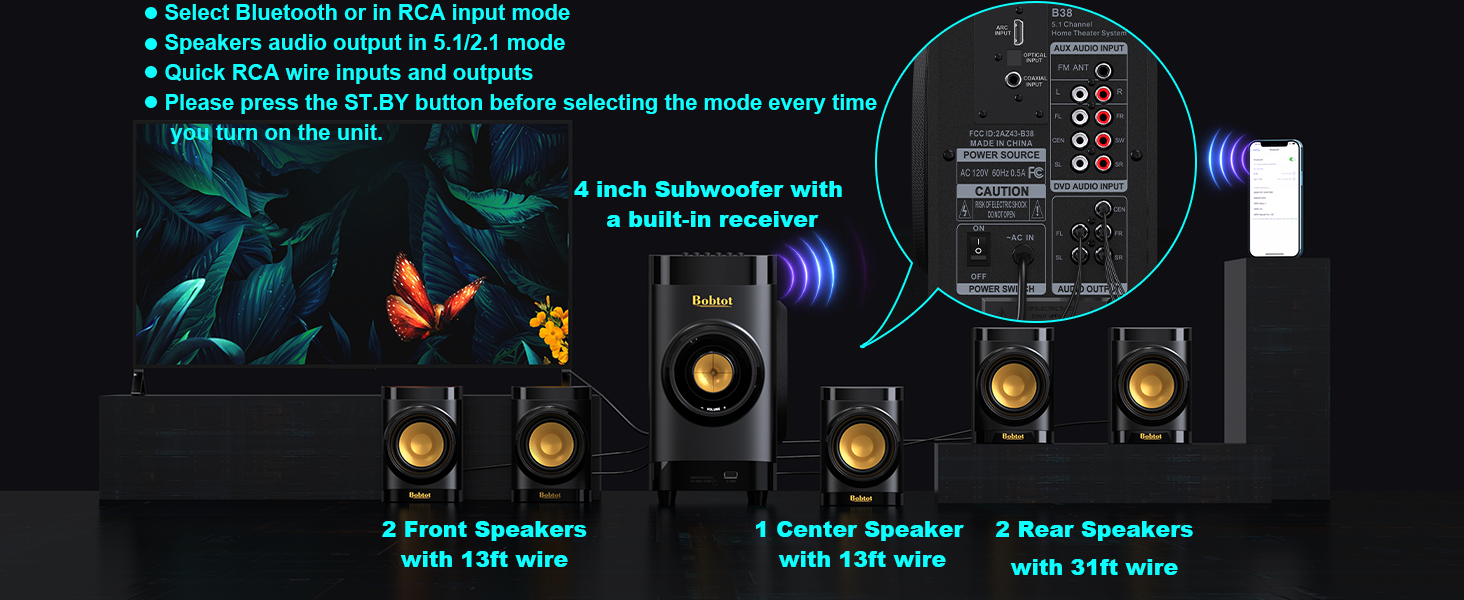
Image: A smartphone displaying Bluetooth settings, showing "Bobtot B38" as an available device for connection.
4.4 Main Semula USB/Kad SD
For direct music playback without an external device.
- Sisipkan Media: Insert a USB disk or SD card (with music files) into the corresponding slot on the front panel of the subwoofer.
- Pilih Input: Tekan ke INPUT button on the subwoofer or remote until "USB" or "SD" is displayed on the LED screen.
- Main balik: The system will automatically begin playing music from the inserted media.
5. Arahan Operasi
Once your system is set up, use the remote control or front panel buttons to manage playback and settings.
- Pelarasan Kelantangan: Gunakan VOL +/- buttons on the remote or the volume knob on the subwoofer to adjust the master volume.
- Individual Speaker Volume: The remote control allows independent volume adjustment for each of the five satellite speakers and the subwoofer. Refer to the remote control diagram in Section 3.4 for specific buttons.
- Redam: Tekan ke HILANGKAN button on the remote to temporarily silence the audio. Press again to unmute.
- Tetapan EQ: Gunakan EQ button on the remote to cycle through different equalizer presets.
- Radio FM: In FM mode, use TALA+/- for manual tuning or AUTO/M for automatic station search. Use CH +/- to navigate saved channels.
- Pemasa Tidur: Gunakan TIDUR+/- buttons on the remote to set a sleep timer.
6. Penempatan Speaker
Proper speaker placement is crucial for achieving the best surround sound experience. Consider the following guidelines:
- subwufer: Place the subwoofer on the floor, ideally in a corner or near a wall, to enhance bass response. Experiment with placement to find the best sound for your room.
- Penceramah Pusat: Position the center speaker directly above or below your TV/projector screen, facing the listening area. This speaker handles dialogue.
- Pembesar Suara Kiri & Kanan Depan: Place these speakers to the left and right of your TV, at roughly ear level when seated. They should be equidistant from your main listening position.
- Rear Left & Right Speakers: Place these speakers behind your main listening position, slightly to the sides or directly behind, also at ear level. These provide the surround effects.

Image: An illustration of a living room with the Bobtot B38 5.1 system correctly positioned for optimal surround sound.
The satellite speakers are mountable, allowing for wall installation to save space and optimize sound dispersion.
Video: Shows a person installing a satellite speaker on a wall using a screwdriver, demonstrating the mountable feature.
7. Spesifikasi
| Jenama | Bobtot |
| Nama Model | B38 |
| Jenis Pembesar Suara | Bunyi Sekeliling |
| Konfigurasi Saluran Bunyi Sekeliling | 5.1 |
| Kuasa Output Maksimum Pembesar Suara | 200 Watt |
| Diameter Subwoofer | 4 Inci |
| Speaker Size (Satellite) | 2.75 Inci |
| Teknologi Ketersambungan | Auxiliary, Bluetooth, Coaxial, Optical, ARC |
| Versi Bluetooth | 5.0 |
| Julat Bluetooth | 33 Kaki |
| Peranti Serasi | Desktop, Gaming Console, Projector, Smartphone, Television |
| Dimensi Produk | 17"D x 13"W x 14"H |
| Berat Barang | 14.34 paun (6.52 Kilogram) |
| bahan | Akrilonitril Butadiena Stirena (ABS), Kayu |
| Input Voltage | 120 Volt |
| Nisbah Isyarat-ke-Bunyi | 70 dB |
| Respons Kekerapan | 20 KHz |
| Penggunaan Dalaman/Luar | Dalaman |
8. Penyelesaian masalah
If you encounter any issues with your Bobtot B38 Home Theater System, please refer to the following common troubleshooting steps:
- Tiada Bunyi:
- Ensure all speakers are correctly connected to the subwoofer's audio output ports.
- Verify the power is ON for both the subwoofer and your audio source (TV, DVD player, etc.).
- Check that the correct input mode is selected on the subwoofer (e.g., ARC, OPT, COA, AUX, BT, USB/SD).
- Adjust the master volume and individual speaker volumes.
- For digital inputs (ARC, Optical, Coaxial), ensure your TV/device audio output is set to "PCM" and not "Automatic" or "Bitstream".
- If using ARC, ensure your TV's HDMI ARC output is selected and the B38 supports LPCM 2.0.
- Isu Berpasangan Bluetooth:
- Ensure the subwoofer is in "BT" input mode.
- Make sure Bluetooth is enabled on your device and it's within range (33 feet).
- Lupakan "Bobtot B38" daripada senarai Bluetooth peranti anda dan cuba pasangkan semula.
- Jika kata laluan diperlukan, masukkan "0000".
- Bunyi Herot:
- Reduce the volume on both the system and your audio source.
- Periksa semua sambungan kabel untuk kelonggaran atau kerosakan.
- Ensure the audio source is not sending an over-ampisyarat dikuatkan.
- Alat Kawalan Jauh Tidak Berfungsi:
- Periksa dan gantikan bateri pada alat kawalan jauh.
- Ensure there are no obstructions between the remote and the subwoofer's sensor.
- Point the remote directly at the subwoofer.
Jika langkah ini tidak menyelesaikan isu, sila hubungi sokongan pelanggan.
9. Penyelenggaraan
Untuk memastikan ketahanan dan prestasi optimum Sistem Pawagam Rumah Bobtot B38 anda, ikuti garis panduan penyelenggaraan ini:
- Pembersihan: Use a soft, dry cloth to clean the surfaces of the subwoofer and speakers. Do not use liquid cleaners or abrasive materials, as they may damage the finish.
- Pengudaraan: Ensure adequate ventilation around the subwoofer to prevent overheating. Do not block any ventilation openings.
- penempatan: Elakkan meletakkan sistem di bawah cahaya matahari langsung, berhampiran sumber haba atau di kawasan yang mempunyai kelembapan atau habuk yang tinggi.
- Kabel: Periodically check all cables for any signs of wear or damage. Replace damaged cables immediately to prevent performance issues or safety hazards.
- Matikan: When not in use for extended periods, it is recommended to turn off the system and unplug it from the power outlet.
10. Waranti dan Sokongan
The Bobtot B38 Home Theater System comes with a Waranti Terhad. Sila rujuk kad jaminan yang disertakan dalam pakej anda untuk terma dan syarat tertentu.
For technical support, troubleshooting assistance, or warranty claims, please contact Bobtot customer service through the following channels:
- Sokongan Amazon: Lawati halaman produk di Amazon.com and look for customer support options.
- Pengeluar Webtapak: Refer to the official Bobtot webtapak untuk maklumat hubungan dan sumber sokongan.
- Sokongan Telefon: Check your Quick Start Guide for any provided phone numbers for direct support.
Please have your product model number (B38) and purchase details ready when contacting support.


