pengenalan
This instruction manual provides comprehensive guidance for the setup, operation, maintenance, and troubleshooting of your HiBy R4 Digital Audio Player. Please read this manual thoroughly to ensure proper use and to maximize your audio experience.

Image: The HiBy R4 Digital Audio Player, showcasing reka bentuknya yang anggun.
Produk Selesaiview
The HiBy R4 is a high-fidelity digital audio player designed for superior sound quality and versatile media playback. It features an Android 12 operating system, advanced audio components, and extensive connectivity options.
Ciri-ciri Utama:
- OS Android 12: Provides a familiar and customizable user interface, supporting various third-party applications.
- Audio yang berkualiti tinggi: Equipped with 4 DAC chips, 2 low-phase noise crystals, 28 Tantalum capacitors, and a Class A headphone amplifier for enhanced audio resolution and dynamic range.
- Dual Circuitry: Pioneers PCM/DSD dual circuitry for independent operation of DAC, low-pass filters, and power supplies, optimizing audio output for different music files.
- Sokongan Resolusi Tinggi: Supports DSD 256 native, PCM768kHz/32bit audio, and MQA 16X unfolding.
- Kesambungan Tanpa Wayar: Features Bluetooth 5.0 (two-way, UAT, LDAC, aptX, aptX HD, AAC, SBC codecs) and dual-band Wi-Fi (2.4GHz/5GHz) for streaming and file pemindahan.
- Storan Boleh Dikembangkan: 32GB internal ROM, expandable up to 2TB via Micro SD card.
- Output Serbaguna: Includes both 3.5mm single-ended and 4.4mm balanced dual interfaces.
- Kawalan Fizikal: Dedicated FN keys for quick access to functions like key lock and screen rotation.
- paparan: 4.7-inch high-definition LCD screen.
- Bateri: Large 4500mAh battery for extended usage.
Komponen:
- HiBy R4 unit
- Type C to Type C charging cable (2.0)
- Manual pengguna
- Front screen protector (2, 1 pre-applied)
- kes TPU
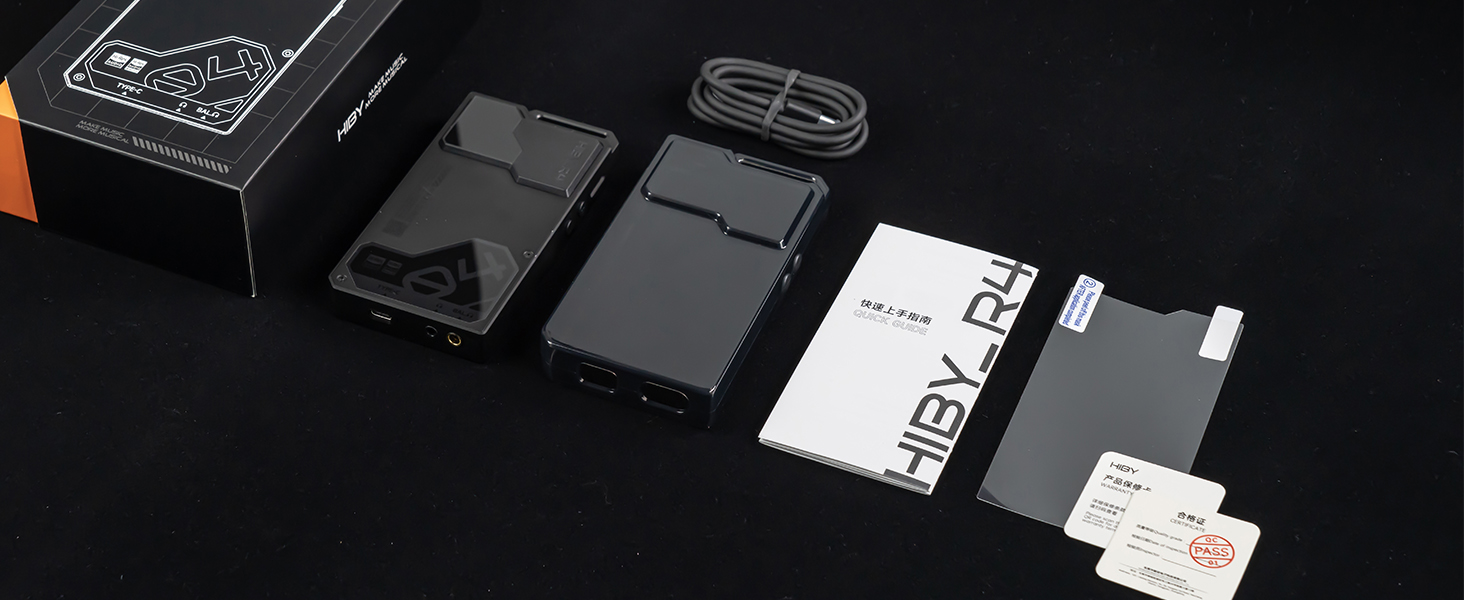
Image: Contents of the HiBy R4 retail box, including the player, cables, and accessories.
Persediaan
1. Pengecasan Awal
Before first use, fully charge the HiBy R4. Connect the provided Type-C to Type-C charging cable to the device and a compatible 20W PD charger. A full charge typically takes approximately 2 hours.
2. Memasukkan Kad SD Mikro
The HiBy R4 has 32GB of internal storage. For additional storage, insert a Micro SD card (up to 2TB supported) into the designated slot. Ensure the card is inserted correctly until it clicks into place.
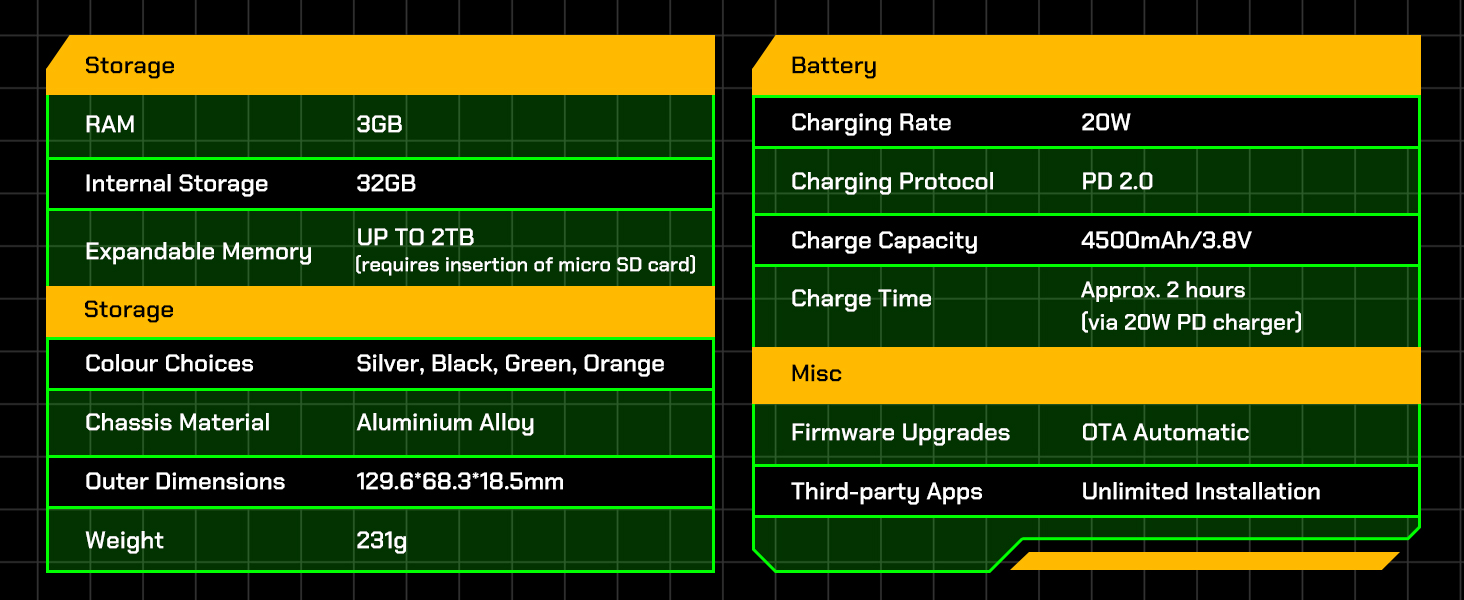
Image: Diagram illustrating the storage capabilities of the HiBy R4, including internal and expandable memory.
3. Menghidupkan/Mematikan
Press and hold the power button (usually located on the side) until the screen illuminates to power on the device. To power off, press and hold the power button, then select "Power off" from the on-screen options.
4. Initial Android 12 Setup
Upon first startup, follow the on-screen prompts to configure basic settings such as language, Wi-Fi connection, and Google account (optional). This process is similar to setting up an Android smartphone.

Image: Screenshot of the HiBy R4 running the Android 12 operating system.
5. Applying Screen Protector
One screen protector is pre-applied at the factory. An additional screen protector is included in the box. If needed, carefully apply the spare screen protector following the instructions provided with the accessory.
Arahan Operasi
1. Navigasi Asas
Navigate the HiBy R4 using its 4.7-inch touchscreen, similar to an Android smartphone. Swipe, tap, and pinch to interact with applications and settings. Physical buttons on the side control power, volume, and playback.
2. Menyambung Fon Kepala
The device supports both 3.5mm single-ended and 4.4mm balanced headphone outputs. Connect your headphones to the appropriate port for optimal audio quality.

Image: Close-up of the HiBy R4's bottom, showing the 3.5mm single-ended and 4.4mm balanced headphone jacks, and the USB-C port.
3. Kesambungan Bluetooth
The HiBy R4 features Bluetooth 5.0 with two-way communication. To pair with a Bluetooth device:
- Go to Settings > Connected devices > Bluetooth.
- Hidupkan Bluetooth.
- Select "Pair new device" and choose your desired device from the list.
It supports high-definition Bluetooth codecs including UAT, LDAC, aptX, aptX HD, AAC, and SBC.

Image: Visual representation of the HiBy R4's bidirectional Bluetooth audio capabilities and supported codecs.
4. Kesambungan Wi-Fi
Connect to dual-band Wi-Fi (2.4GHz and 5GHz) via Settings > Network & internet > Wi-Fi. This enables downloading and installing third-party apps, DLNA, AirPlay, and Wi-Fi song transfer.
5. Memainkan Muzik
The HiBy R4 can play local high-resolution audio files or stream from installed applications like Spotify, Pandora, Amazon Music, and Tidal. It supports DSD 256 native, PCM768kHz/32bit audio, and MQA 16X unfolding. The system-wide SRC bypass technology ensures original audio quality.

Image: Illustration of the HiBy R4's True Systemwide Bitperfect Audio feature, ensuring high-fidelity sound.
6. Kawalan Fizikal
Utilize the physical FN keys for quick access to functions such as key lock and screen rotation. Volume controls are also available via dedicated buttons.
Penyelenggaraan
1. Pembersihan
Lap peranti dengan kain lembut dan kering. Elakkan menggunakan bahan kimia yang keras atau bahan kasar yang boleh merosakkan skrin atauasing.
2. Penjagaan Bateri
The HiBy R4 is equipped with a 4500mAh battery. To prolong battery life, avoid exposing the device to extreme temperatures. While charging, you can set a battery charge limit in the settings to prevent overcharging if connected for extended periods, such as during file pemindahan.
3. Kemas Kini Perisian
The device supports OTA (Over-The-Air) automatic firmware upgrades. Ensure your device is connected to Wi-Fi to receive and install the latest updates, which can improve performance and add new features.
4. Pengurusan Storan
Regularly manage your 32GB internal storage and up to 2TB expandable Micro SD card. Delete unnecessary files or transfer them to a computer to maintain optimal performance.
Menyelesaikan masalah
1. Peranti Tidak Dihidupkan
- Pastikan bateri dicas secukupnya. Sambungkan peranti kepada sumber kuasa dan biarkan ia dicas selama sekurang-kurangnya 15 minit sebelum cuba menghidupkannya semula.
- Perform a hard reset by holding the power button for an extended period (e.g., 10-15 seconds).
2. Poor Audio Quality / No Sound
- Check headphone connections for both 3.5mm and 4.4mm ports. Ensure they are fully inserted.
- Verify volume levels on the device and any connected headphones/speakers.
- If using Bluetooth, ensure the device is properly paired and within range. Try re-pairing the Bluetooth device.
- Test with different headphones or audio files untuk mengasingkan isu.
3. Isu Kesambungan Wi-Fi / Bluetooth
- Toggle Wi-Fi or Bluetooth off and on in the settings.
- Restart the HiBy R4.
- Ensure the device is within range of the Wi-Fi router or Bluetooth accessory.
- For Wi-Fi, try connecting to a different network if available.
4. Touchscreen Unresponsive / Laggy
- Mulakan semula peranti.
- Pastikan skrin bersih dan bebas daripada serpihan atau kelembapan.
- If the issue persists after a restart, consider checking for available firmware updates.
5. Album Art Not Displaying Correctly
- Ensure the device is connected to Wi-Fi, as some album art may be downloaded.
- Verify that album art is embedded correctly within your audio files.
- Consider using the HiBy Music app's features for managing and downloading album art.
6. File Transfer Issues with Micro SD Card
- Ensure the Micro SD card is properly formatted (exFAT is recommended).
- Try connecting the HiBy R4 to a different USB port or computer.
- Jika berpindah files directly to the SD card via a card reader, ensure the card reader is functioning correctly.
Spesifikasi
Umum
- model: HiBy R4
- Sistem pengendalian: Android 12
- SoC: Snapdragon 665
- DAC: ES9018C2M * 4
- Amplifier Components: OPA1652*4 & OPA1612*2
- Format Audio yang Disokong: DSD 256, PCM768kHz/32bit, MQA 16x Unfolding
Ketersambungan
- Wi-Fi: Supports 2.4GHz / 5GHz
- Bluetooth: Bluetooth 5.0
- USB: USB2.0 & USB3.2 Gen1, Maximum Transfer Rate 5Gbps
Paparan
- Saiz: 4.7"
- Jenis: IPS
- Resolusi: 720*1280
Penyimpanan
- RAM: 3GB
- Storan Dalaman: 32GB
- Memori Boleh Dikembangkan: Up to 2TB (requires insertion of micro SD card)
Bateri
- Kadar Pengecasan: 20W
- Protokol Pengecasan: PD 2.0
- Kapasiti Caj: 4500mAh/3.8V
- Masa Pengecasan: Approx. 2 hours (via 20W PD charger)
- Masa Larian: 11 jam
Ciri-ciri Fizikal
- Bahan Casis: Aloi Aluminium
- Dimensi Luar: 129.6*68.3*18.5mm
- Berat: 231g
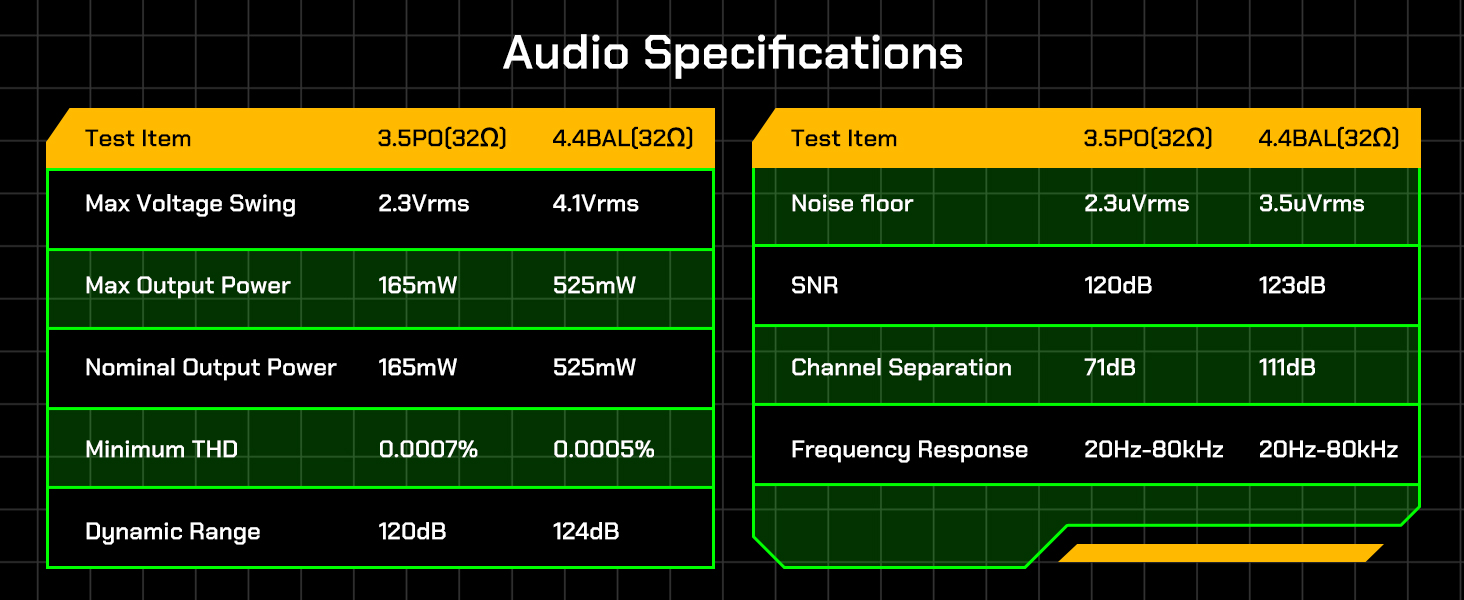
Image: Detailed table of HiBy R4 audio specifications for 3.5mm PO and 4.4mm BAL outputs.

Image: Table outlining the hardware specifications of the HiBy R4, including processor, DAC, and display details.
Waranti dan Sokongan
For detailed warranty information, please refer to the separate warranty card included with your HiBy R4 unit. If you encounter any issues or have questions regarding your HiBy R4 Digital Audio Player, please contact HiBy customer support. Contact information can typically be found on the official HiBy website or within the included user manual.
Video Produk Rasmi
Video: An official product video from HiBy showcasing the features and design of the R4 Digital Audio Player.


