Produk Selesaiview
The Honeywell Home DT4 spatial thermostats combine a sleek, modern design with simple features for ease of use. DT4 spatial thermostats are suitable for almost any home and application, from on/off and OpenTherm boilers to district heating and heat pumps. They are designed for various residential applications and systems and are available as wired or wireless solutions. DT4 spatial thermostats can be installed as a standalone thermostat or as part of a broader comfort solution, such as the HCC100 multi-zone floor comfort controller or as part of Honeywell Evohome. DT4 spatial thermostats are compatible with hybrid and greener energy systems, including heat pumps, zoning, and underfloor heating and cooling.
Ciri-ciri Utama
- On/Off 24V and 230V: vol. serba bolehtage compatibility for various heating systems.
- Sambungan 2-Kawat: Simple and straightforward wiring for easy installation.
- Suitable for Heating and Cooling: Provides year-round climate control for optimal comfort.
- Bateri Termasuk: Ready for immediate use upon installation.
- Battery Life: 3.5 Years: Long-lasting battery ensures reliable operation.
- Backlit Touch Buttons: Easy-to-use interface with clear visibility in any lighting condition.
Pemasangan dan Persediaan
Before proceeding with installation, ensure the power supply to your heating/cooling system is turned off at the main circuit breaker to prevent electrical shock.
Membongkar
Carefully remove all components from the packaging. Verify that all parts listed in the product contents are present and undamaged.
Melekap
The DT4 thermostat can be wall-mounted. Choose a location on an interior wall, away from direct sunlight, drafts, or heat sources, which could affect temperature readings. Ensure the mounting height is approximately 1.5 meters (5 feet) from the floor for accurate room temperature sensing.
Pendawaian
The DT4 thermostat supports both 24V and 230V on/off systems. Connect the two wires from your heating/cooling system to the appropriate terminals on the thermostat's backplate. Refer to the detailed wiring diagram provided in the separate installation guide for specific terminal connections. Ensure all connections are secure.
Kuasa Permulaan
Once wiring is complete and the thermostat is securely mounted, restore power to your heating/cooling system. The thermostat display should illuminate, indicating it is powered on. Follow any on-screen prompts for initial setup, such as language selection or time setting.
Arahan Operasi
The Honeywell Home DT4 thermostat features intuitive backlit touch buttons for easy operation.
Menetapkan Suhu
Use the 'Up' and 'Down' arrow buttons on the thermostat to adjust the desired room temperature. The new setpoint will be displayed prominently on the screen.
Mode Selection (Heating/Cooling)
The thermostat can be switched between heating and cooling modes, depending on your system's capabilities. Consult the full user manual for specific instructions on how to change the operating mode, typically accessed through a dedicated mode button or menu option.
Backlit Touch Buttons
The touch buttons illuminate when pressed, providing clear feedback and ease of use, especially in low-light conditions. The display also features a temperature indicator for quick reference.
Penyelenggaraan
Penggantian Bateri
The DT4 thermostat is powered by batteries with an expected life of 3.5 years. When the battery indicator appears on the display, replace the batteries promptly to ensure continuous operation. Refer to the full user manual for instructions on how to access the battery compartment and replace the batteries.
Pembersihan
To clean the thermostat, gently wipe the display and casing dengan lembut, damp cloth. Do not use abrasive cleaners, solvents, or chemical sprays, as these can damage the device.
Menyelesaikan masalah
| Isu | Kemungkinan Punca | Penyelesaian |
|---|---|---|
| Paparan kosong | Tiada kuasa atau bateri mati. | Check power supply to the heating system. Replace batteries if applicable. |
| Heating/Cooling not turning on | Incorrect mode selected, setpoint not reached, or wiring issue. | Verify the thermostat is in the correct mode (heating/cooling). Adjust the setpoint to be above/below the current room temperature. Check wiring connections. |
| Bacaan suhu tidak tepat | Thermostat location affected by external factors. | Ensure the thermostat is not in direct sunlight, near drafts, or close to heat-emitting appliances. |
Spesifikasi Teknikal
| Spesifikasi | Perincian |
|---|---|
| Jenama | Rumah Honeywell |
| Nama Model | DT4 |
| warna | Hitam |
| Voltage | 230 Volt, 24 Volt |
| Ciri Khas | Penunjuk suhu |
| Jenis Pengawal | Kawalan Manual |
| Kegunaan Khusus Produk | CV boiler |
| Jenis Kawalan Suhu | Manual Arahan |
| Teknologi Ketersambungan | berwayar |
| Komponen yang Disertakan | Connection cables (2) |
| Sumber Kuasa | Dikuasakan Bateri |
Visual dan Demonstrasi Produk
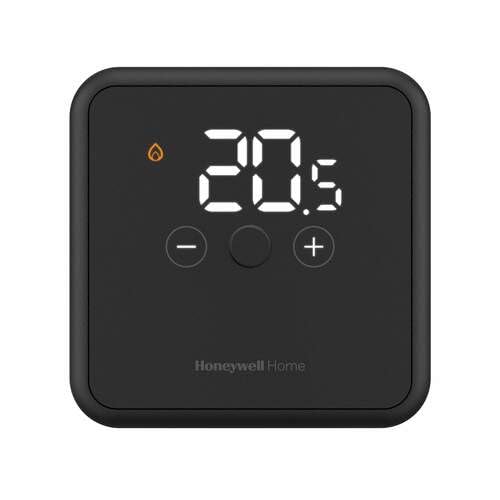
Penerangan Imej: A depan view of the Honeywell Home DT4 Wired Thermostat in black, showcasing its sleek design and digital display. The thermostat is placed on a stand with its power adapter visible.
Penerangan Imej: Sebuah belakang view of the Honeywell Home DT4 Wired Thermostat, highlighting the backplate with wiring terminals for connection to the heating/cooling system. This view demonstrates the ease of installation.
Penerangan Imej: The Honeywell Home DT4 Wired Thermostat mounted on a wall, illustrating its discreet and modern appearance in a typical home environment. The digital display shows temperature information.
Video Produk Rasmi
No official product videos specifically for the Honeywell Home DT4 model from a 'Seller' creator type were found in the provided data. Please refer to the written instructions for detailed guidance.
Waranti dan Sokongan
Untuk maklumat jaminan, sila rujuk dokumentasi yang disertakan dengan produk anda atau lawati laman web rasmi Honeywell Home. website. Technical support and customer service contact details can also be found on the official website or by contacting your retailer.


