pengenalan
Terima kasih kerana memilih Blackview AirBuds 4 Wireless Earbuds. This manual provides essential information for setting up, operating, and maintaining your earbuds. Please read it carefully to ensure optimal performance and longevity of your device.
Kandungan Pakej
Sahkan bahawa semua item terdapat dalam pakej anda:
- Hitamview AirBuds 4 Earbuds (Left and Right)
- Kes Pengecasan
- Panduan Pengguna
- Kabel Pengecasan Jenis-C
- Two additional pairs of silicone ear tips (total of 3 sizes: S, M, L)

Produk Selesaiview
Si Hitamview AirBuds 4 feature an ergonomic in-ear design for comfortable wear and stable fit. The charging case provides convenient storage and extends battery life.

Persediaan
1. Mengecas Fon Telinga dan Sarung
Before first use, fully charge the earbuds and charging case. Connect the provided Type-C charging cable to the charging port on the case and a USB power source.
- The charging case can provide up to 5 full charges for the earbuds.
- Caj penuh untuk kes mengambil masa kira-kira 1.5 jam.

2. Berpasangan Bluetooth
- Buka bekas pengecas. Fon telinga akan memasuki mod berpasangan secara automatik.
- Pada peranti anda (telefon pintar, tablet, PC), dayakan Bluetooth.
- Cari untuk available Bluetooth devices and select "AirBuds 4" from the list.
- Sebaik sahaja disambungkan, anda akan mendengar nada pengesahan dan fon telinga sedia untuk digunakan.
The earbuds feature automatic re-connection to the last paired device when removed from the case.

Arahan Operasi
Memakai Earbud
Choose the silicone ear tips that provide the most comfortable and secure fit for your ears. Insert the earbuds gently into your ear canal and rotate slightly to ensure a snug seal for optimal sound quality and stability.

Kawalan Sentuh
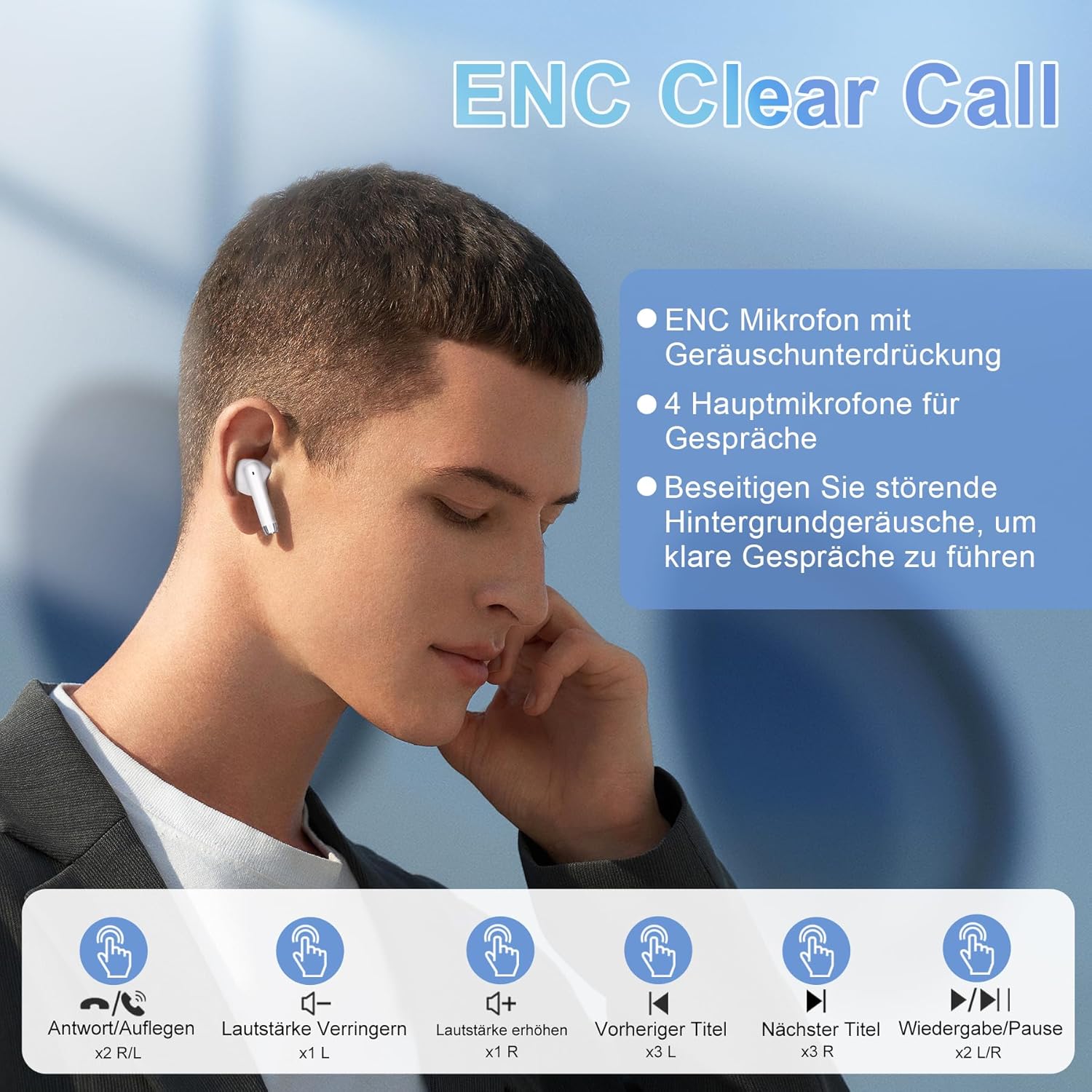
Si Hitamview AirBuds 4 feature intuitive touch controls on each earbud. The functions are as follows:
| Tindakan | Kawalan | Fungsi |
|---|---|---|
| Ketik Dua Kali (L/R) | Earbud Touch Sensor | Main/Jeda Muzik, Jawab/Tamatkan Panggilan |
| Ketik Tiga Kali (L) | Left Earbud Touch Sensor | Trek Sebelumnya |
| Ketik Tiga Kali (R) | Right Earbud Touch Sensor | Trek Seterusnya |
| Single Tap (L) | Left Earbud Touch Sensor | Kelantangan Kurang |
| Single Tap (R) | Right Earbud Touch Sensor | Kelantangan Naik |
| Tekan Lama (L/R) | Earbud Touch Sensor | Aktifkan Pembantu Suara |
Ciri-ciri
Teknologi Bluetooth 5.3 Termaju
The AirBuds 4 utilize Bluetooth 5.3, offering a faster and more stable wireless connection. This technology ensures lower power consumption and reduced latency for a seamless audio experience.

Hi-Fi Stereo Sound & ENC Noise Reduction
Equipped with 13mm dynamic drivers and a three-layer composite diaphragm, the AirBuds 4 deliver high-resolution audio with strong bass and clear highs. Each earbud includes an Environmental Noise Cancellation (ENC) microphone to enhance voice clarity and reduce background noise during calls.

Penilaian Kalis Air IPX7
The earbuds are IPX7 waterproof, making them resistant to sweat, rain, and splashes. This protection allows for use during workouts or in light rain conditions.
Jangka Hayat Bateri
Enjoy up to 8 hours of music playback on a single charge. With the included charging case, the total listening time extends to approximately 36 hours.
Menyelesaikan masalah
Tiada Bunyi daripada Earbuds
- Pastikan fon telinga dicas.
- Check Bluetooth connection on your device. Re-pair if necessary.
- Laraskan kelantangan pada kedua-dua peranti anda dan melalui kawalan sentuh fon telinga.
Fon telinga Tidak Berpasangan
- Make sure both earbuds are in the charging case and have sufficient charge.
- Remove "AirBuds 4" from your device's Bluetooth list and attempt to pair again.
- Pastikan tiada peranti Bluetooth lain yang mengganggu sambungan.
Isu Pengecasan
- Verify the Type-C cable is securely connected to both the case and the power source.
- Cuba kabel pengecasan atau penyesuai kuasa yang berbeza.
- Bersihkan sesentuh pengecasan pada fon telinga dan dalam sarung.
Spesifikasi
| Ciri | Perincian |
|---|---|
| Nama Model | AirBuds 4 |
| Teknologi Ketersambungan | Wayarles (Bluetooth 5.3) |
| Penempatan Telinga | Dalam Telinga |
| Faktor Bentuk | Dalam Telinga |
| Kawalan Bunyi | Pembatalan Kebisingan Alam Sekitar (ENC) |
| Tahan Air | IPX7 |
| Hayat Bateri (Earbud) | Sehingga 8 jam |
| Jumlah Masa Main (dengan Kes) | Sehingga 36 jam |
| Port Pengecasan | Jenis-C |
| Berat badan | 100 grams (packaging dimensions) |
Penyelenggaraan
- Pembersihan: Bersihkan fon telinga dan bekas pengecas secara berkala dengan kain lembut dan kering. Elakkan menggunakan bahan kimia yang keras atau bahan yang melelas.
- Storan: Apabila tidak digunakan, simpan fon telinga dalam bekas pengecasnya untuk melindunginya daripada habuk dan kerosakan.
- Penjagaan Bateri: To prolong battery life, avoid fully discharging the earbuds or case frequently. Charge them regularly, even if not in constant use.
Waranti dan Sokongan
Hitam Andaview AirBuds 4 are covered by a manufacturer's warranty. For detailed warranty information, please refer to the warranty card included in your package or visit the official Blackview website. For technical support or service inquiries, please contact Blackview khidmat pelanggan melalui saluran rasmi mereka.
Sila simpan bukti pembelian anda untuk tuntutan waranti.


