1. Pengenalan
Thank you for choosing the BOTSLAB G980H 4K Dash Cam with Hardwire Kit. This manual provides detailed instructions for the installation, operation, and maintenance of your new dash camera system. Please read this manual thoroughly before using the product to ensure proper functionality and safety.
2. Produk Lebihview
The BOTSLAB G980H is a high-performance dash camera system designed to capture clear video footage of your journeys. The front camera records in true 4K resolution, while the rear camera records in 1080P (optimized to approximately 2K via BOTSLAB algorithm). Both cameras utilize the Sony IMX 415 sensor, providing clear video capture, including in low-light conditions. The system includes advanced features such as 24/7 parking mode, ADAS (Advanced Driver-Assistance Systems), and built-in GPS for reliable recording and enhanced driving safety.
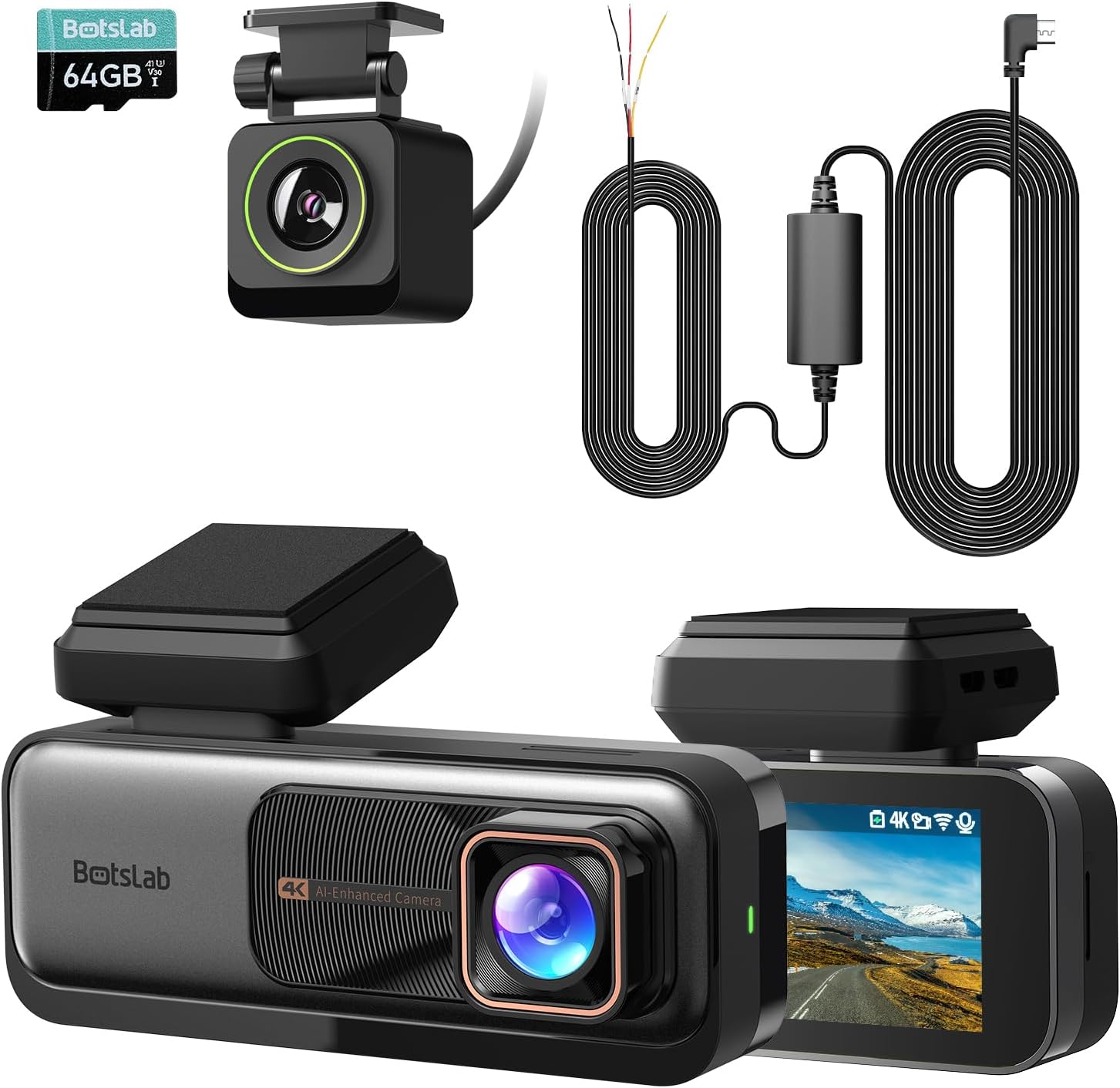
Image: The main components of the BOTSLAB G980H Dash Cam system, including the front camera, rear camera, and hardwire kit.
3. Apa yang ada di dalam Kotak
Setelah membuka kotak, sila sahkan bahawa semua item berikut disertakan:
- BOTSLAB G980H Dash Cam (Front Unit)
- Kamera Belakang
- Kit Hardwire
- ADAS (Advanced Driver-Assistance Systems) functionality
- Micro USB cable (integrated with hardwire kit)
- Manual Pengguna
Imej: Gambaran visual barang-barang yang disertakan dalam pembungkusan produk.
4. Persediaan dan Pemasangan
Proper installation is crucial for optimal performance. The G980H dash cam is designed for windshield mounting.
4.1 Pemasangan Kit Wayar Keras
The included hardwire kit enables 24/7 parking mode functionality. It requires connection to your vehicle's fuse box.
- Langkah 1: Uji Sumber Kuasa
Use a multimeter to check for a 12V constant power source and an ACC (Accessory) power source in your car's fuse box. - Langkah 2: Sediakan Wayar
Connect the Yellow Wire (ACC) to the accessory power, the Red Wire (VCC+) to the constant power, and the Black Wire (GND-) to a grounding point on the vehicle chassis. - Langkah 3: Sambungkan Kamera Dash
Attach the micro USB port of the hardwire kit to your BOTSLAB G980H dash cam. Ensure the cable is routed neatly and securely.

Image: A multimeter being used to test fuse box connections for constant and ACC power.

Imej: Jarak dekat view of the hardwire kit's yellow, red, and black wires connected to the car's fuse box and ground.
Image: The micro USB connector of the hardwire kit ready to be plugged into the dash cam.

Image: A diagram showing the micro USB port, power conversion box, and the three wires (ACC, VCC+, GND-) of the hardwire kit.

Image: The 9ft long hardwire cable, designed for compatibility with various car models.
4.2 Dash Cam Mounting
Pasang kamera papan pemuka hadapan pada cermin depan anda, sebaik-baiknya di belakang bahagian belakangview mirror, to ensure it does not obstruct your view. Position the rear camera on the rear window for optimal coverage.
4.3 Memasukkan Kad Memori
Insert a high-quality U3 or V30 rated microSD card (not included) into the designated slot on the dash cam. Ensure it is inserted correctly until it clicks into place. The dash cam requires a memory card for recording footage.
5. Arahan Operasi
5.1 Operasi Asas
- Hidupkan/Mati Kuasa: The dash cam will automatically power on and begin recording when your vehicle starts, and power off when the engine is turned off (if connected via ACC power).
- Rakaman Gelung: The G980H features seamless loop recording, continuously overwriting the oldest footage apabila kad memori penuh.
- G-Sensor: In the event of a sudden impact or collision, the built-in G-Sensor will automatically lock the current video segment to prevent it from being overwritten.
- Kualiti Video: The front camera records in 4K resolution, providing a wide 170-degree view jalan di hadapan.

Image: Illustration of the dash cam's 4K resolution and 170-degree wide-angle recording capability.
5.2 ADAS Features (Advanced Driver-Assistance Systems)
The G980H is equipped with a 1.5TOPS AI NPU chip and BOTSLAB's AI algorithm to provide real-time driving alerts:
- Amaran Perlanggaran Pejalan Kaki: Alerts you to potential collisions with pedestrians.
- Front Vehicle Starts Moving: Notifies you when the vehicle ahead begins to move, useful in traffic.
- Amaran Berlepas Lorong: Alerts if you unintentionally drift out of your lane.
- Headway Monitoring Warning: Helps maintain a safe distance from the vehicle in front.
- Driver Fatigue Alerts: Provides alerts every 2 hours to encourage breaks and prevent fatigue.

Image: Visual representation of the various ADAS warnings provided by the dash cam, along with illustrations of the AI NPU chip and built-in GPS.
5.3 24/7 Parking Mode
With the hardwire kit installed, the G980H can monitor your vehicle even when it's turned off, providing protection against theft and vandalism.
- The dash cam will automatically switch to parking mode when the vehicle is parked.
- It will record emergencies and suspicious activities around your car.

Image: The dash cam display showing options for Time-Lapse Recording (Parking Mode) and Normal Recording (Driving Mode), illustrating its 24-hour monitoring capability.
5.4 GPS Integration
The built-in GPS module integrates with Google Maps, allowing you to track your driving path. The dash cam's display will show your real-time speed, and recorded videos will include speed records.

Image: The dash cam screen showing real-time speed and GPS data, with a map overlay indicating the driving path.
6. Penyelenggaraan
- Pembersihan: Gunakan kain lembut dan kering untuk membersihkan kanta kamera dan skrin. Elakkan menggunakan pembersih atau pelarut yang kasar.
- Kad Memori: Regularly format the memory card (at least once a month) to ensure optimal performance and prevent data corruption. Use a high-quality U3 or V30 rated microSD card.
- Kemas kini Firmware: Semak pegawai BOTSLAB weblaman web ini secara berkala untuk kemas kini perisian tegar bagi memastikan kamera papan pemuka anda mempunyai ciri terkini dan pembetulan pepijat.
7. Penyelesaian masalah
| Masalah | Kemungkinan Punca / Penyelesaian |
|---|---|
| Dash cam tidak dihidupkan. |
|
| Kualiti video kurang baik atau kabur. |
|
| Parking mode is not working. |
|
| GPS signal is weak or not found. |
|
8. Spesifikasi
| Ciri | Perincian |
|---|---|
| Nama Model | G980H |
| Jenama | BOTSLAB |
| Resolusi Kamera Depan | True 4K (Sony IMX 415 sensor) |
| Resolusi Kamera Belakang | 1080P (optimized to near 2K) |
| Ciri Khas | Hardwire Kit, ADAS, 24/7 Parking Mode, Built-in GPS, Loop Recording, G-Sensor |
| Teknologi Ketersambungan | USB, Wireless (for display features) |
| Jenis Pemasangan | Gunung Cermin Mata |
| warna | Hitam |
| Cip AI | 1.5TOPS AI NPU chip |
9. Waranti dan Sokongan
Untuk maklumat jaminan dan sokongan teknikal, sila rujuk BOTSLAB rasmi webtapak atau hubungi perkhidmatan pelanggan mereka secara langsung. Simpan resit pembelian anda sebagai bukti pembelian untuk tuntutan waranti.
Pengeluar: BOTSLAB
Tarikh Mula-mula Tersedia: 25 Oktober 2024


