pengenalan
The KIEUIENK Digital Pet Electronic Game Machine is an interactive virtual pet device designed for entertainment and fostering responsibility. It features multiple built-in game modes and a user-friendly interface, making it suitable for various age groups. Its compact design with smooth corners ensures durability and ease of handling.

Imej: Depan view of the KIEUIENK Digital Pet Electronic Game Machine in purple, featuring a screen, three control buttons (RESET, SELECT, DECIDE), and a keychain attachment. The device has a unicorn and cloud design.
Maklumat Keselamatan
This product is designed with child safety in mind, featuring smooth corners and durable PP material. No specific safety warnings beyond general electronic device handling are provided by the manufacturer. Always supervise young children during use. Keep away from water and extreme temperatures.
Apa yang ada dalam Kotak
- 1 x Electronic Pet Game Machine (Purple)
- 1 x Keychain attachment

Image: The Electronic Pet Game Machine shown with its attached keychain, highlighting its portability.
Persediaan
Pemasangan Bateri
The device is powered by batteries. To install or replace batteries:
- Cari petak bateri di bahagian belakang peranti.
- Use a small screwdriver (not included) to open the battery compartment cover.
- Insert the required batteries (type and quantity typically indicated inside the compartment) ensuring correct polarity (+/-).
- Gantikan penutup petak bateri dan kencangkannya dengan skru.
Kuasa Awal Hidup
After battery installation, the device should power on automatically or by pressing the 'RESET' button. Follow on-screen prompts to set up your virtual pet.
Arahan Operasi
Kawalan
The device features three primary control buttons:
- TETAP SEMULA: Used to restart the device or return to the main menu in some contexts.
- PILIH: Navigates through menu options or cycles through choices.
- MEMUTUSKAN: Confirms a selection or performs an action.
- BATAL: Used to exit a menu or cancel an action.

Imej: Dari dekat view of the bottom portion of the digital pet device, clearly showing the 'RESET', 'SELECT', 'DECIDE', and 'CANCEL' buttons.
Caring for Your Virtual Pet
Your virtual pet requires regular attention to thrive. Key activities include:
- Memberi makan: Berikan makanan apabila haiwan peliharaan anda lapar.
- bermain: Libatkan diri dalam permainan mini untuk memastikan haiwan peliharaan anda gembira dan terhibur.
- Pembersihan: Clean up after your pet to maintain its health.
- Disiplin: Address misbehavior to teach your pet good habits.
- Medical Care: Berikan ubat jika haiwan peliharaan anda jatuh sakit.
Mod Permainan
The device includes multiple built-in game modes for extended entertainment. Use the 'SELECT' and 'DECIDE' buttons to navigate through the game menu and choose your preferred activity.

Image: A child holding the purple digital pet game machine, demonstrating its handheld nature and ease of use during play.
Penyelenggaraan
- Pembersihan: Lap peranti dengan kain lembut dan kering. Jangan gunakan pembersih cecair atau bahan yang melelas.
- Storan: Simpan peranti di tempat yang sejuk dan kering jauh dari cahaya matahari langsung dan suhu yang melampau.
- Penjagaan Bateri: Tanggalkan bateri jika peranti tidak akan digunakan untuk tempoh yang lama untuk mengelakkan kebocoran.
Menyelesaikan masalah
| Masalah | Kemungkinan Punca | Penyelesaian |
|---|---|---|
| Peranti tidak dihidupkan. | Bateri rendah atau mati; pemasangan bateri yang salah. | Gantikan bateri; memastikan polariti yang betul. |
| Skrin kosong atau beku. | Gangguan perisian; bateri lemah. | Press the 'RESET' button; replace batteries. |
| Butang tidak bertindak balas. | Software glitch; physical obstruction. | Press the 'RESET' button; ensure buttons are not stuck. |
Spesifikasi
| Ciri | Perincian |
|---|---|
| Nama Produk | Virtual Electronic Digital Pet |
| Nombor Model | B0D7BQ18PR |
| bahan | PP (Polypropylene) |
| Dimensi Produk | Lebih kurang 5.8 x 4.9 x 1.7 cm (2.28 x 1.93 x 0.67 inci) |
| Berat badan | 26g |
| Jenis Paparan | LCD |
| Sumber Kuasa | Dikuasakan Bateri |
| Jenis Pengawal | Kawalan Butang |
| Umur Disyorkan | 10 - 20 years (as per manufacturer) |
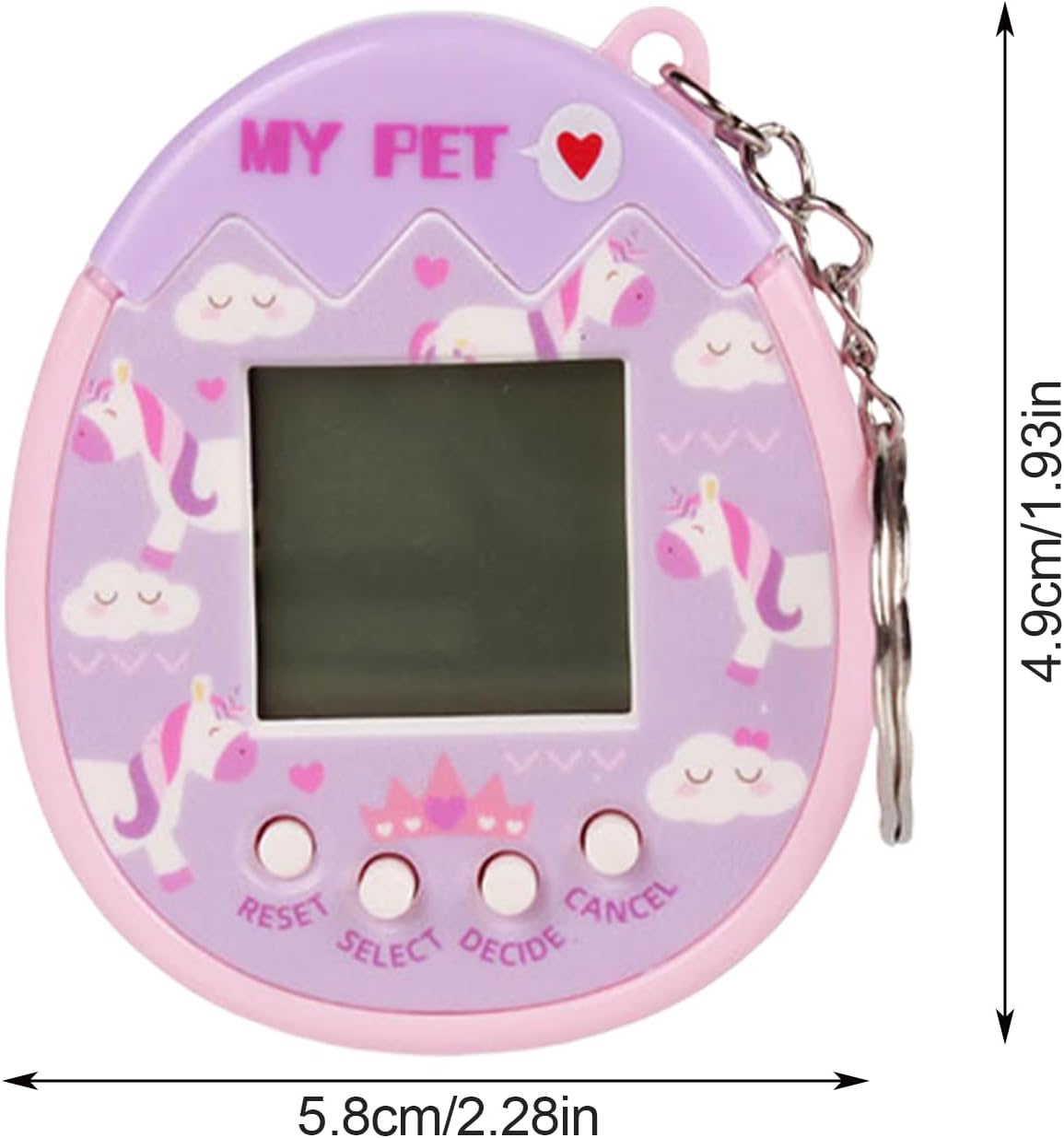
Image: The digital pet game machine with arrows and measurements indicating its dimensions: 5.8cm/2.28in width and 4.9cm/1.93in height.
Waranti dan Sokongan
For product support, inquiries, or warranty information, please contact the manufacturer, KIEUIENK, through their official channels or the retailer from whom the product was purchased. Please retain your proof of purchase for any warranty claims.
