pengenalan
This manual provides detailed instructions for the setup, operation, and maintenance of your Koiiko Mobile Cloud Gaming Controller, Model BSP-D10. Please read this manual thoroughly before use to ensure optimal performance and a complete understanding of the product's features.

The Koiiko Mobile Cloud Gaming Controller, designed for versatile gaming across multiple platforms.
Ciri-ciri Produk
- Keserasian Universal: Supports iOS (iPhone 10-16, iPad Air/Pro/Mini), Android (6.0+ phones/tablets), PC (Windows 10+), Nintendo Switch/Switch OLED, PlayStation 3/4 (streaming only for PS4), and Xbox (streaming only). Compatible with devices from 5 to 11 inches.
- Advanced Cloud Gaming Support: Seamlessly connects with major cloud gaming services including Xbox Game Pass Ultimate, Stadia, Amazon Luna, GeForce NOW, and Steam Link.
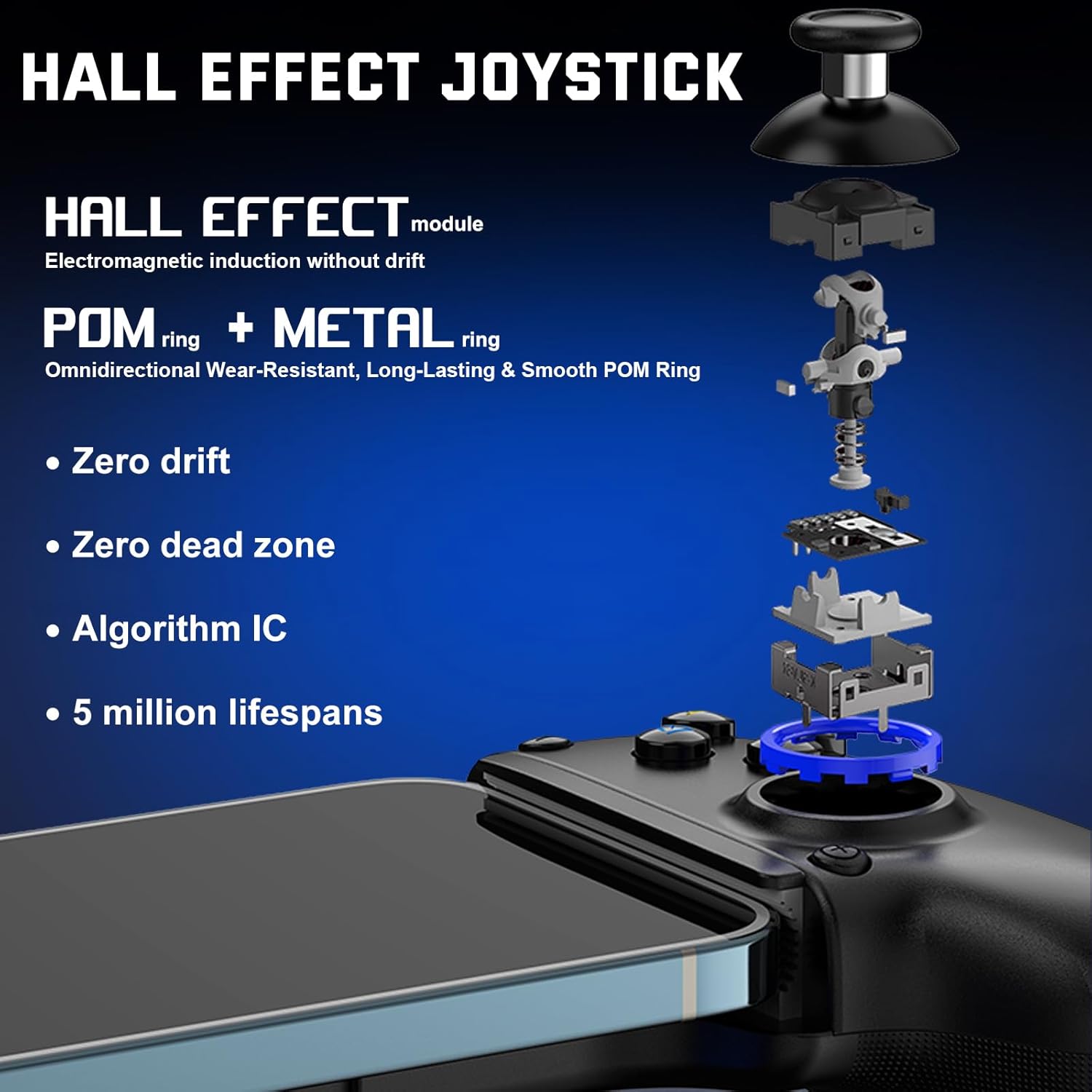
- Kayu Joy Kesan Dewan: Features electromagnetic induction technology for zero drift, zero dead zones, and extended lifespan (5 million operations).
- Pencetus Kesan Hall: Provides precise and efficient data transmission with 256 levels of hierarchy changes and a response interval of less than 0.1mm.
- Butang Kembali Boleh Diprogram: Two customizable M1/M2 buttons allow mapping of up to 16 basic keys for enhanced control.
- Adjustable Turbo Function: Offers auto and manual turbo modes with adjustable speeds (8/15/25 times/sec) for various game types.
- Dual Vibration Feedback: Provides immersive haptic feedback (supported on PC, PS4, PS3, and Nintendo Switch).
- Sensor Giro 6-Paksi: Enables accurate motion control (supported on PC, PS4, PS3, and Nintendo Switch).
- Bateri Tahan Lama: Equipped with a 400mAh battery, providing over 15 hours of continuous gameplay.
- Reka bentuk ergonomik: Designed for a comfortable handheld grip, stretchable to securely fit various device sizes without requiring phone case removal.
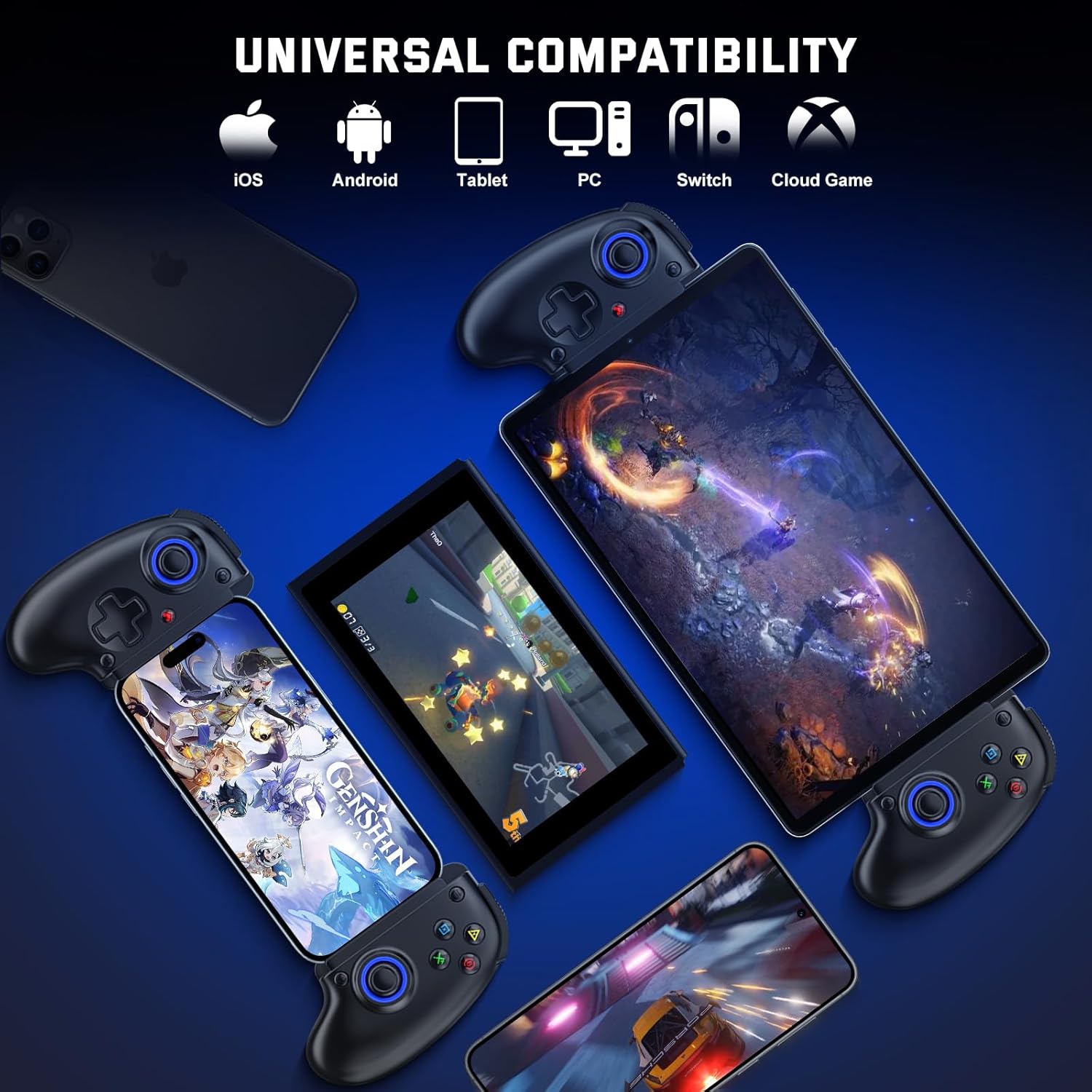
The controller offers universal compatibility across iOS, Android, PC, Switch, and cloud gaming platforms.

A comprehensive list of compatible devices, including specific iPhone, iPad, Android, PlayStation, Switch, and PC models.
Persediaan dan Sambungan
Before connecting, ensure the controller is fully charged and powered off. The controller supports a stretchable range of 143mm to 260mm for device mounting.

Berakhirview of connection modes for various platforms using specific button combinations.
1. iOS Mode Connection
- Pastikan pengawal dimatikan.
- Hold down the 'RB' key, then press the 'HOME' key to boot the controller.
- On your iOS device, go to Bluetooth settings and connect to 'Xbox Wireless Controller'.
- Start playing. Cloud gaming apps like Game Pass are supported.

Visual guide for connecting the controller to iOS and PC devices via Bluetooth.
2. Android Mode Connection
- Pastikan pengawal dimatikan.
- Boot Mode 1 (Xbox Wireless Controller): Hold down the 'RB' key, then press the 'HOME' key to boot the controller. Connect to 'Xbox Wireless Controller' in your Android device's Bluetooth settings.
- Boot Mode 2 (BSP-D10): Hold down the 'X' key, then press the 'HOME' key to boot the controller. Connect to 'BSP-D10' in your Android device's Bluetooth settings.
- Start playing. Cloud gaming apps are supported.

Visual guide for connecting the controller to Android devices, showing two boot modes.
3. Nintendo Switch Mode Connection
- On your Switch console, navigate to 'System Settings' -> 'Controllers and Sensors' -> 'Change Grip/Order'.
- Pastikan pengawal dimatikan.
- Hold down the 'RT' key, then press the 'HOME' key to boot the controller. The controller will automatically connect to the Switch.
- Mula bermain.

Visual guide for connecting the controller to Nintendo Switch consoles.
4. Sambungan Mod PC
- Pastikan pengawal dimatikan.
- Hold down the 'RB' key, then press the 'HOME' key to boot the controller.
- On your PC, go to Bluetooth settings and connect to 'Xbox Wireless Controller'.
- Mula bermain.
5. PlayStation 4/3 Connection (Streaming Only)
- On your PS4 console, go to 'Settings' -> 'Devices' -> 'Controllers' -> 'Communication Method', and select 'Use USB Cable'. Turn off your original controller.
- Ensure the Koiiko controller is off. Connect the Koiiko controller to the PS4 console with a Type-C cable.
- Press the 'HOME' key to boot the controller. It will automatically connect to the console.
- Once connected, you can unplug the Type-C cable to use the controller wirelessly.

Visual guide for connecting the controller to PlayStation 4 and 3 consoles.
6. Xbox One/Series Streaming Connection
- Pastikan pengawal dimatikan.
- Hold down the 'RB' key, then press the 'HOME' key to boot the controller.
- On your iOS/Android mobile device or PC, go to Bluetooth settings and connect to 'Xbox Wireless Controller'.
- Start playing via Xbox streaming apps (e.g., Xbox Game Pass).

Visual guide for connecting the controller for Xbox One/Series streaming.
Arahan Operasi

Detailed layout of the Koiiko BSP-D10 controller with all button labels.
1. Fungsi Turbo
The controller features an adjustable Turbo mode for rapid button presses. You can set it to auto or manual mode and adjust the speed to 8, 15, or 25 times per second. This is particularly useful for shooting games.

Visual representation of the adjustable Turbo function and ABXY layout adaptation.
2. Butang Belakang Boleh Diprogram (M1/M2)
The M1 and M2 buttons on the back of the controller are programmable. You can map up to 16 basic keys (A+B+Y+RB+RT+LB+LT+D-Pad) to these buttons to minimize repetitive actions and enhance gameplay efficiency.

The programmable M1 button, allowing custom key mapping for strategic advantage.
3. ABXY Function Adaptive
The ABXY key-value interchange function allows you to freely switch between Xbox and Nintendo Switch button layouts, adapting to your preferred gaming system.
4. Kayu Ria dan Pencetus Kesan Hall
The Hall Effect technology in both joysticks and triggers ensures high precision, durability, and responsiveness. This electromagnetic induction prevents drift and provides a smooth, accurate gaming experience.

Sebuah meletup view illustrating the internal components and Hall Effect technology of the joystick.
Terperinci view of the Hall-Trigger, emphasizing its precise electromagnetic induction and rapid response.
5. Dual Vibration and 6-Axis Gyro
Experience enhanced realism with dual vibration feedback and precise motion control via the 6-axis gyro sensor. Note that these features are supported only on PC, PS4, PS3, and Nintendo Switch.

Illustration of the turbo function, button configuration, and adjustable dual vibration intensity.
Pengecasan dan Bateri
The controller is equipped with a 400mAh rechargeable battery. To charge, connect the controller to a power source using the provided USB Type-C cable. A full charge provides over 15 hours of gameplay. The charging port is located on the handle.
Penyelenggaraan
- Pastikan pengawal bersih dengan mengelapnya dengan kain lembut dan kering.
- Avoid exposing the controller to extreme temperatures, direct sunlight, or moisture.
- Do not attempt to disassemble or repair the controller yourself, as this may void the warranty and cause damage.
- Simpan alat kawalan jauh di tempat yang selamat apabila tidak digunakan untuk mengelakkan kerosakan yang tidak disengajakan.
Menyelesaikan masalah
- Pengawal tidak bersambung: Ensure the controller is fully charged. Verify you are using the correct boot mode (button combination) for your device. Check your device's Bluetooth settings to ensure the controller is visible and selected. If issues persist, try restarting both the controller and your device.
- Kelewatan input atau ketidakresponsifan: Ensure there are no obstructions between the controller and your device. Move closer to your device to reduce potential interference.
- Hanyut kayu riang: The Hall Effect joysticks are designed to prevent drift. If you experience drift, ensure the controller's firmware is up to date (check the manufacturer's website for updates). If the issue persists, contact customer support.
- Vibration or Gyro not working: Confirm that your connected device (PC, PS4, PS3, or Nintendo Switch) supports these features and that they are enabled in the game or system settings.
- Device not fitting: The controller supports devices between 143mm and 260mm in width. Ensure your device falls within this range.
Spesifikasi
- model: BSP-D10
- Compatible Device Size: 5-11 inches (143mm-260mm width)
- Kapasiti Bateri: 400mAh
- Hayat Bateri: Lebih kurang 15+ jam
- Ketersambungan: Bluetooth
- Kayu bedik: Kesan Dewan
- Pencetus: Kesan Dewan
- Ciri Khas: Programmable Back Buttons (M1/M2), Adjustable Turbo, Dual Vibration (PC/PS4/PS3/Switch), 6-Axis Gyro (PC/PS4/PS3/Switch), ABXY Function Adaptive
- Berat Barang: 8.8 auns
- Dimensi Pakej: 9.7 x 4.1 x 2 inci
- Pengeluar: ShenZhen ShanWan Technology Co., Ltd.
Waranti dan Sokongan
For warranty information and technical support, please refer to the official Koiiko webtapak atau hubungi perkhidmatan pelanggan mereka secara langsung. Simpan resit pembelian anda untuk tuntutan waranti.


