1. Pengenalan
Terima kasih kerana membeliasing the ZEBRONICS VITA BAR 200 Mini Soundbar. This manual provides essential information for the proper setup, operation, and maintenance of your device. Please read this manual carefully before use to ensure optimal performance and to prevent damage.

Image 1.1: The ZEBRONICS VITA BAR 200 Mini Soundbar, showcasing its sleek design and integrated multicolor LED lighting.
2. Apa yang ada di dalam Kotak
Sila semak kandungan pakej untuk memastikan semua item ada:
- Speaker - 1 Unit
- Charging Cable - 1 Unit (Type-C)
- AUX Cable - 1 Unit
- QR code Guide - 1 Unit
3. Ciri-ciri Produk
- Output Kuat: Delivers a robust 24W RMS output for immersive sound.
- Radiator Pasif Berkembar: Enhances bass performance for deeper, richer low-frequency sounds.
- Pelbagai Kesambungan: Supports Bluetooth v5.3, USB, and AUX for versatile audio source connections.
- Pemacu Dwi: Provides clear, dynamic sound across a wide frequency range.
- Penunjuk LED: Built-in LED provides visual cues for power and connectivity status.
- Masa Main yang Lebih Lama: Integrated rechargeable battery offers up to 8 hours of playback (at 50% volume, LED off).
- LED pelbagai warna: Customizable LED modes add vibrant visual effects.
- Kawalan Intuitif: Easy adjustment of audio settings directly on the device.

Image 3.1: Illustration highlighting the 24W (12W + 12W) RMS output, dual passive radiators, and dual powerful drivers of the soundbar.

Image 3.2: The soundbar displaying various multicolor LED modes, enhancing the aesthetic appeal.

Image 3.3: Visual representation of the soundbar's built-in rechargeable battery, providing up to 8 hours of backup at 50% volume with LED off.
4. Persediaan
4.1 Mengecas Bar Bunyi
- Connect the provided Type-C charging cable to the charging port on the soundbar.
- Sambungkan hujung kabel yang satu lagi ke penyesuai kuasa USB (tidak disertakan) atau port USB komputer.
- The LED indicator will illuminate to show charging status. It will change or turn off once fully charged.
4.2 Menghidupkan/Mematikan
- Untuk menghidupkan, luncurkan suis HIDUP/MATI ke kedudukan 'HIDUP'.
- Untuk mematikan kuasa, luncurkan suis ON/OFF ke kedudukan 'OFF'.
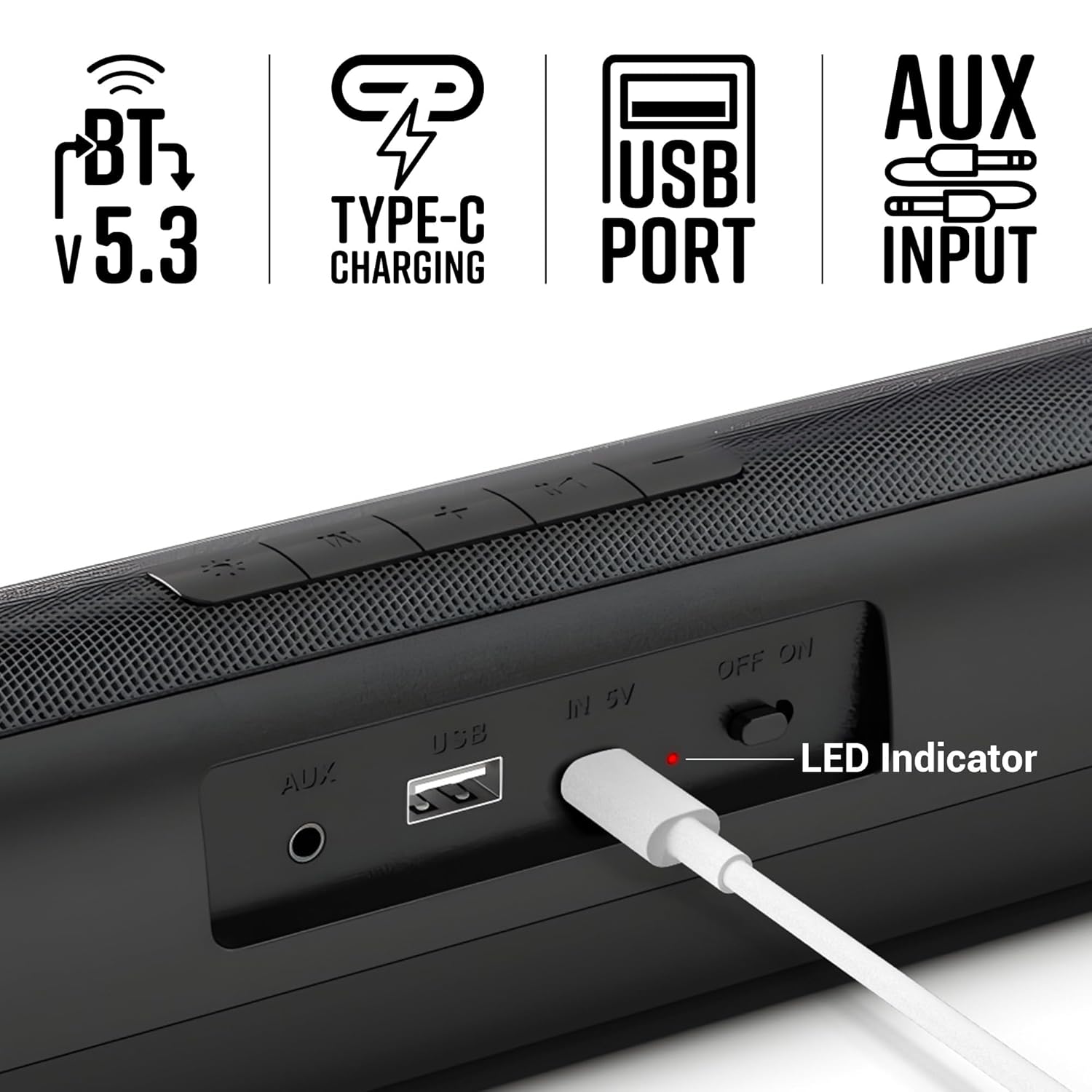
Imej 4.1: Jarak dekat view of the soundbar's rear panel, showing the AUX input, USB port, Type-C charging port, ON/OFF switch, and LED indicator.
5. Arahan Operasi
5.1 Mod Bluetooth
- Turn on the soundbar. It will automatically enter Bluetooth pairing mode.
- Dayakan Bluetooth pada telefon pintar atau peranti anda yang lain.
- Cari untuk "Zeb-VITA BAR 200" in the list of available devices and select it to pair.
- Setelah disambungkan, bar bunyi akan menunjukkan pasangan yang berjaya.
5.2 Mod USB
- Masukkan pemacu USB yang mengandungi audio files ke dalam port USB pada bar bunyi.
- The soundbar will automatically switch to USB mode and begin playing audio.
5.3 Mod AUX
- Connect one end of the provided AUX cable to the AUX input on the soundbar.
- Connect the other end to the audio output of your device (e.g., smartphone, TV, computer).
- The soundbar will automatically switch to AUX mode.
5.4 Kawalan
The soundbar features intuitive control buttons on its top panel:
- Perlahankan suara (-): Mengurangkan kelantangan.
- Previous Track (<<): Melangkau ke trek sebelumnya.
- Main/Jeda (►▮▮): Memainkan atau menjeda audio.
- Next Track (>>): Langkau ke trek seterusnya.
- Kelantangan Naik (+): Meningkatkan kelantangan.
- Mod (M): Switches between Bluetooth, USB, and AUX modes.
- LED Light Control (☀): Toggles or changes multicolor LED modes.
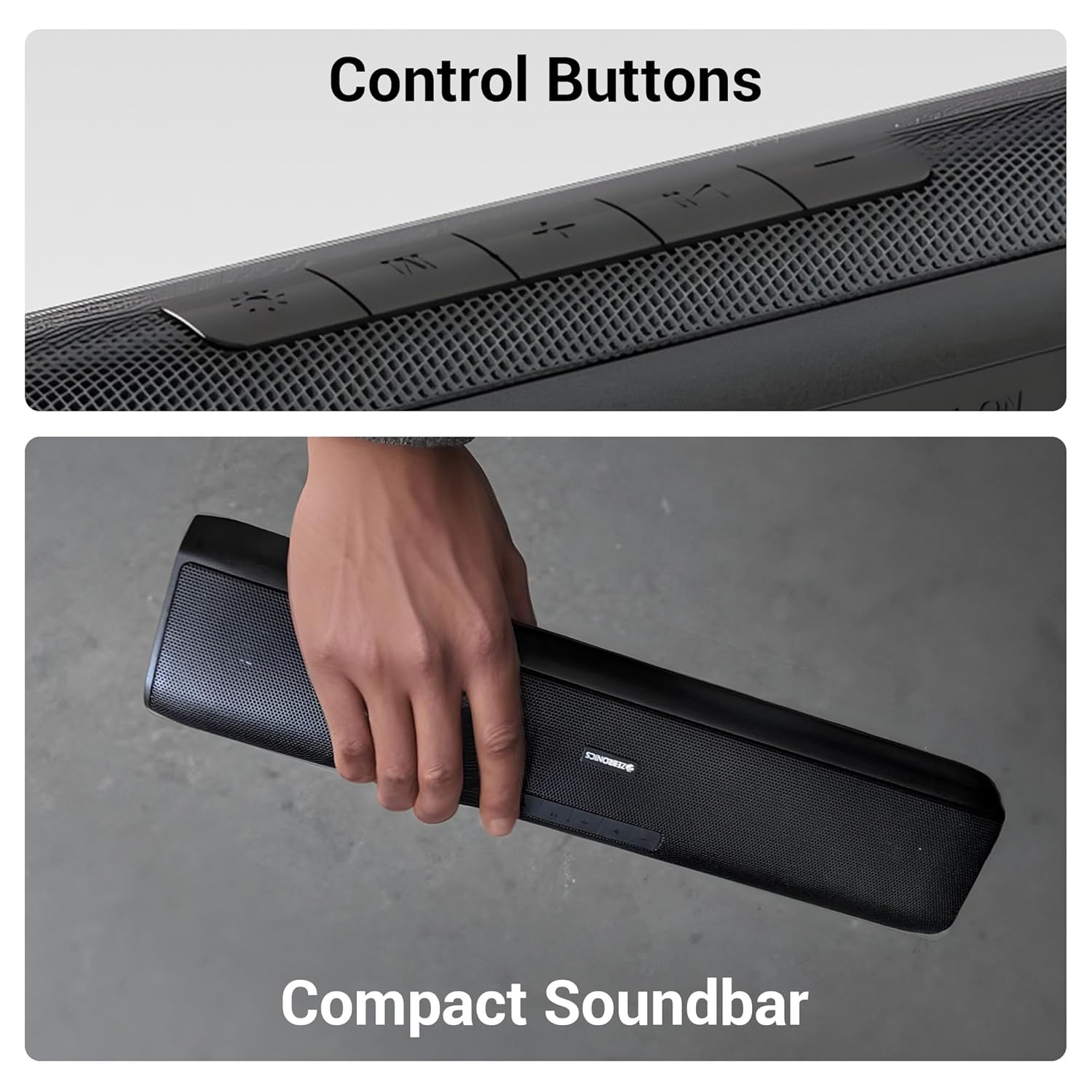
Imej 5.1: Terperinci view of the control buttons located on the top surface of the soundbar.
6. Penyelenggaraan
6.1 Pembersihan
- Use a soft, dry cloth to clean the surface of the soundbar.
- Jangan gunakan pembersih cecair atau semburan aerosol terus pada peranti.
6.2 Penyimpanan
- Simpan bar bunyi di tempat yang sejuk dan kering, jauh daripada cahaya matahari langsung dan suhu yang melampau.
- Jika menyimpan untuk tempoh yang lama, cas bateri secara berkala untuk mengekalkan kesihatannya.
6.3 Penjagaan Bateri
- Elakkan menyahcas sepenuhnya bateri dengan kerap.
- Jangan dedahkan bateri kepada suhu tinggi.
7. Penyelesaian masalah
| Masalah | Kemungkinan Punca | Penyelesaian |
|---|---|---|
| Tiada kuasa | Bateri habis | Charge the soundbar using the provided Type-C cable. |
| Tiada bunyi | Kelantangan terlalu rendah atau diredamkan | Increase the volume on the soundbar and your connected device. |
| Bluetooth tidak bersambung | Soundbar not in pairing mode or too far | Ensure the soundbar is in Bluetooth mode and within range (10 meters). Forget the device on your phone and re-pair. |
| Audio yang diputarbelitkan | Volume too high or poor source quality | Kurangkan kelantangan. Cuba sumber audio lain atau file. Ensure AUX cable is fully inserted. |
8. Spesifikasi
| Ciri | Perincian |
|---|---|
| Nama Model | Zeb-VITA BAR 200 |
| Jenis Pembesar Suara | Bar Bunyi Mini |
| Kuasa Keluaran | 24 Watt RMS |
| Ketersambungan | Bluetooth v5.3, USB, AUX |
| Hayat Bateri | Up to 8 Hours (at 50% volume, LED off) |
| Jenis Pengecasan | Jenis-C |
| Dimensi Produk (D x W x H) | 8.5D x 41W x 6.8H Sentimeter |
| Berat Barang | 857 Gram |
| Impedans | 3 Ohm |
| Kaedah Kawalan | Butang |

Image 8.1: Diagram illustrating the physical dimensions of the ZEBRONICS VITA BAR 200 soundbar.
9. Waranti dan Sokongan
The ZEBRONICS VITA BAR 200 Mini Soundbar comes with a standard manufacturer's warranty. Please refer to the warranty card included in your package for specific terms and conditions, including the warranty period and coverage details.
For technical support, service, or warranty claims, please contact ZEBRONICS customer service through their official webtapak atau maklumat hubungan yang diberikan dalam dokumentasi produk anda.
Pengeluar: Zebronics India Private Limited
Alamat: No.13/7, Jalan Smith, Royapettah, Chennai - 600 002


