pengenalan
Terima kasih kerana membeliasing the S.M.S.L H400 Headphone Amppenguat & Praamppenghidup. Manual ini menyediakan maklumat penting untuk persediaan, pengendalian dan penyelenggaraan peranti anda yang betul. Sila baca dengan teliti sebelum digunakan untuk memastikan prestasi dan jangka hayat yang optimum.
Apa yang ada dalam Kotak
- S.M.S.L H400 Headphone Amppenguat & Praamppenguat x 1
- Alat kawalan jauh x 1
- Kabel Kuasa x 1
- Manual Pengguna x 1
- Brand Card x 1
Produk Selesaiview
Panel Depan
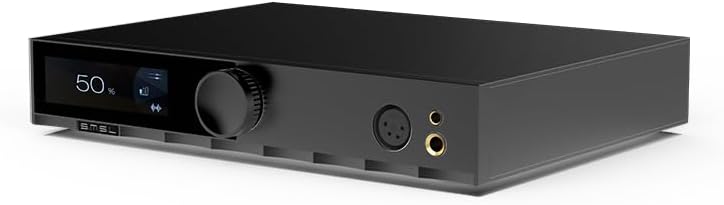
Imej: Depan view of the S.M.S.L H400 Headphone Amplifier. The front panel features a digital display on the left, a large rotary volume knob in the center, and two headphone output jacks (one 4-pin XLR balanced, one 6.35mm unbalanced) on the right.
- Skrin Paparan: Shows current volume level, input source, and other operational information.
- Tombol Kelantangan: Controls the output volume. Can also be pressed to access menu options.
- Output Fon Kepala: Includes a balanced 4-pin XLR output and an unbalanced 6.35mm (1/4 inch) output for connecting headphones.
Panel Belakang

Imej: belakang view of the S.M.S.L H400 Headphone Amplifier. From left to right, it features balanced XLR inputs, unbalanced RCA inputs, balanced XLR pre-outputs, unbalanced RCA pre-outputs, a USB-C update port, a ground switch (Floating/Grounded), and the AC power inlet with an integrated power switch.
- Balanced Inputs (XLR): For connecting balanced audio sources.
- Unbalanced Inputs (RCA): For connecting unbalanced audio sources.
- Balanced Pre-Outputs (XLR): Untuk menyambung kepada kuasa luaran amppenghidup atau pembesar suara aktif.
- Unbalanced Pre-Outputs (RCA): Untuk menyambung kepada kuasa luaran amppenghidup atau pembesar suara aktif.
- UPDATE Port (USB-C): Untuk kemas kini perisian tegar.
- Suis Tanah: Selects between Floating and Grounded modes to manage ground loops.
- Masuk Kuasa AC: Connects the included power cable.
- Suis kuasa: Menghidupkan atau mematikan unit.
Persediaan
- penempatan: Place the H400 on a stable, flat surface, ensuring adequate ventilation around the unit. Avoid placing it near heat sources or in direct sunlight.
- Sambungkan Sumber Audio:
- For balanced sources, connect XLR cables from your source to the H400's Input Seimbang (XLR).
- For unbalanced sources, connect RCA cables from your source to the H400's Unbalanced Inputs (RCA).
- Sambungkan Fon Kepala: Plug your headphones into either the XLR 4-pin seimbang or Unbalanced 6.35mm headphone output on the front panel.
- Sambung ke Kuasa Amppenguat (Pilihan): If using the H400 as a preamppenguat, sambungkan Balanced Pre-Outputs (XLR) or Unbalanced Pre-Outputs (RCA) kepada kuasamu amppembesar atau pembesar suara aktif.
- Sambungan Kuasa: Sambungkan kabel kuasa yang disertakan ke Saluran masuk AC on the rear panel, then plug the other end into a suitable AC power outlet (100-240V).
- Hidupkan kuasa: Balikkan Suis Kuasa on the rear panel to the 'ON' position. The unit will power on, and the display will illuminate.
Arahan Operasi
Operasi Asas
- Hidupkan/Mati Kuasa: Use the rear panel switch for main power. The remote control can put the unit into standby.
- Kawalan Kelantangan: Putar Tombol Kelantangan on the front panel or use the volume buttons on the remote control to adjust the output level.
- Pemilihan Input: Tekan ke Tombol Kelantangan briefly to cycle through available input sources (Balanced, Unbalanced). Alternatively, use the input selection buttons on the remote.
- Tetapan Keuntungan: The H400 offers High, Medium, and Low gain settings. These can be adjusted via the menu system, typically accessed by pressing and holding the volume knob or a dedicated button on the remote.
- Balanced Gain: Low (-5.8dB), Medium (6dB), High (20.4dB)
- Unbalanced Gain: Low (-11.8dB), Medium (0dB), High (14.4dB)
Alat Kawalan Jauh
The included remote control provides convenient access to all functions, including power, volume, input selection, and menu navigation. Ensure the remote has fresh batteries and an unobstructed line of sight to the H400's front panel sensor.
Penyelenggaraan
- Pembersihan: Gunakan kain lembut dan kering untuk membersihkan bahagian luar unit. Jangan gunakan pembersih cecair atau pelarut.
- Pengudaraan: Pastikan bukaan pengudaraan tidak disekat untuk mengelakkan terlalu panas.
- Matikan: Always power off the unit using the rear switch when not in use for extended periods.
Menyelesaikan masalah
| Masalah | Kemungkinan Punca | Penyelesaian |
|---|---|---|
| Tiada kuasa | Power cable not connected; Rear power switch off; Power outlet faulty. | Check power cable connection; Ensure rear power switch is ON; Try a different power outlet. |
| Tiada keluaran bunyi | Incorrect input selected; Volume too low; Headphones not connected properly; Source device not playing. | Select correct input; Increase volume; Reconnect headphones; Verify source device is playing audio. |
| Bunyi herot | Input signal too high; Gain setting too high; Faulty cables. | Reduce source volume; Adjust H400 gain setting; Check and replace cables if necessary. |
| Alat kawalan jauh tidak berfungsi | Bateri berkurangan; Halangan antara alat kawalan jauh dan unit; Sensor alat kawalan jauh tersekat. | Replace batteries; Remove obstructions; Ensure clear line of sight to the unit's front panel. |
Spesifikasi
| Parameter | Nilai |
|---|---|
| Praamp Kaedah Keluaran | Seimbang, Tidak Seimbang |
| Kuasa Output (16Ω) | 15W x 2 |
| Kuasa Output (32Ω) | 7.5W x 2 |
| Kuasa Output (300Ω) | 1000mW x 2 |
| Kuasa Output (600Ω) | 550mW x 2 |
| SNR | 133dB |
| Julat Dinamik | 133dB |
| THD+N | -123dB, 0.00006% (1kHz, 32Ω) |
| Impedans Input | 47kΩ |
| Impedans Keluaran Fon Kepala | Approximately 0Ω |
| Praamp Impedans Keluaran (Seimbang) | 44Ω |
| Praamp Output Impedance (Unbalanced) | 22Ω |
| Respons Kekerapan | 20Hz-100kHz (-0.5dB) |
| Gain (Balanced) | Low (-5.8dB), Medium (6dB), High (20.4dB) |
| Gain (Unbalanced) | Low (-11.8dB), Medium (0dB), High (14.4dB) |
| Consumption (EN60065) | <50W |
| Penggunaan Kuasa Siap Sedia | <0.5W |
| Dimensi (WxHxD) | 254x46x189mm |
| Berat badan | 2.03kg / 4.47 paun |
Waranti dan Sokongan
For warranty information and technical support, please refer to the documentation provided with your purchase or visit the official S.M.S.L webtapak. Simpan bukti pembelian anda untuk tuntutan waranti.


