pengenalan
This manual provides comprehensive instructions for the proper setup, operation, and maintenance of your MIPRO ACT-32H UHF Handheld Transmitter. Please read this manual thoroughly before using the device to ensure optimal performance and longevity.
The MIPRO ACT-32H UHF Handheld Transmitter is designed for professional audio applications, offering reliable wireless performance and high-fidelity sound reproduction. Its robust construction and advanced features make it suitable for singers, presenters, and audio/video professionals.
Produk Selesaiview
The ACT-32H handheld transmitter features a durable housing, an integrated microphone capsule, and controls for power and frequency selection.
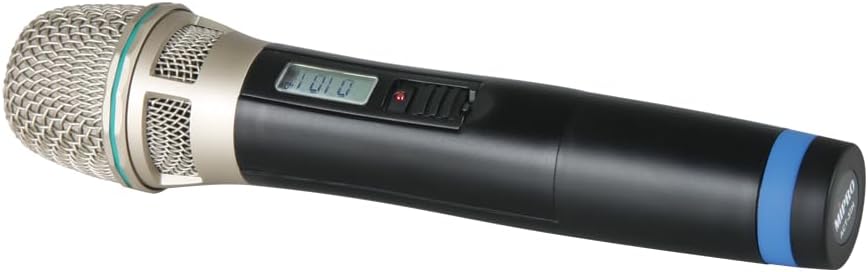
Figure 1: MIPRO ACT-32H UHF Handheld Transmitter. This image shows the black handheld microphone with a silver mesh grille at the top, a small display screen, and a power switch on the body. A blue band is visible near the bottom of the handle.
Komponen Utama:
- Gril Mikrofon: Protects the microphone capsule and helps shape the sound.
- Kapsul: High-quality condenser capsule for clear audio capture.
- Paparan LCD: Shows frequency, battery status, and other operational information.
- Power/Mute Switch: Controls power on/off and mutes the microphone output.
- Petak Bateri: Menempatkan bateri yang diperlukan untuk operasi.
- Antena: Integrated antenna for wireless signal transmission.
Apa yang ada dalam Kotak
Setelah membuka bungkusan, sila sahkan bahawa semua barang yang disenaraikan ada dan dalam keadaan baik:
- MIPRO ACT-32H UHF Handheld Transmitter (Microphone)
- Manual Pengguna (dokumen ini)
- (Note: Batteries may or may not be included depending on the specific package. Please check packaging for details.)
Persediaan
1. Pemasangan Bateri:
- Unscrew the bottom cap of the handheld transmitter to access the battery compartment.
- Insert two fresh AA alkaline batteries, observing the correct polarity (+/-) as indicated inside the compartment.
- Securely screw the bottom cap back onto the transmitter.
2. Berpasangan dengan Penerima:
The ACT-32H transmitter must be paired with a compatible MIPRO wireless receiver (sold separately) to function. Refer to your receiver's user manual for specific pairing instructions. Generally, the process involves:
- Powering on both the transmitter and the receiver.
- Initiating the ACT (Automatic Channel Targeting) sync function on the receiver.
- Aligning the IR (Infrared) ports of the transmitter and receiver for data transfer.
- Confirming successful pairing on both devices' displays.
Penting: Ensure the transmitter and receiver are set to the same frequency band (e.g., 904-925 MHz for this model) to avoid compatibility issues.
Operasi
Menghidupkan/Mematikan:
- To power on, slide the power switch to the "ON" position. The LCD display will illuminate.
- Untuk mematikan kuasa, luncurkan suis kuasa ke kedudukan "MATI".
Fungsi Redam:
- While powered on, briefly slide the power switch to the "MUTE" position and release to mute the microphone. The LCD display may indicate "MUTE".
- Repeat the action to unmute the microphone.
Memantau Status Bateri:
The LCD display on the transmitter will show the current battery level. Replace batteries promptly when the low battery indicator appears to avoid interruption during use.
Penggunaan Optimum:
- Hold the microphone approximately 2-6 inches from your mouth for best vocal pickup.
- Avoid covering the antenna area (typically at the bottom of the microphone) with your hand, as this can reduce wireless range and signal quality.
- Maintain a clear line of sight between the transmitter and the receiver whenever possible.
Penyelenggaraan
- Pembersihan: Use a soft, dry cloth to clean the exterior of the transmitter. Do not use liquid cleaners or solvents.
- Penjagaan Bateri: Remove batteries if the transmitter will not be used for an extended period to prevent leakage and damage.
- Storan: Simpan pemancar di tempat yang sejuk dan kering, jauh daripada cahaya matahari langsung dan suhu yang melampau.
- Pengendalian: While robust, avoid dropping or subjecting the transmitter to severe impacts.
Menyelesaikan masalah
| Masalah | Kemungkinan Punca | Penyelesaian |
|---|---|---|
| Tiada bunyi dari mikrofon |
|
|
| Intermittent signal or static |
|
|
| Kualiti bunyi yang lemah |
|
|
Spesifikasi
| Ciri | Perincian |
|---|---|
| Model | ACT-32H |
| Jenama | Mipro |
| Respons Kekerapan | 904-925 MHz (UHF) |
| Faktor Bentuk Mikrofon | pegang tangan |
| Corak Kutub | Satu arah |
| Sumber Kuasa | Dikuasakan oleh Bateri (AA) |
| Berat Barang | 4 paun |
| Ciri Khas | Wireless, Lightweight |
| Peranti Serasi | PA Sistem |
Waranti dan Sokongan
MIPRO products are designed for durability and performance. For specific warranty information, please refer to the warranty card included with your product or visit the official MIPRO webtapak. Simpan resit pembelian anda sebagai bukti pembelian untuk tuntutan waranti.
For technical support, troubleshooting assistance beyond this manual, or service inquiries, please contact MIPRO customer support or your authorized dealer. Contact information can typically be found on the manufacturer's webtapak.
Note: Protection plans may be available for purchase separately from third-party providers. These plans are distinct from the manufacturer's warranty.


