1. Pengenalan
This manual provides detailed instructions for the installation, operation, and maintenance of your Olafus 3-LBG10N Battery Operated LED Flood Light Outdoor. This product is designed to provide bright, motion-activated illumination for outdoor areas without the need for electrical wiring.

Image 1.1: Olafus 3-LBG10N Battery Operated LED Flood Light Outdoor (2-Pack shown)
2. Garis Panduan Keselamatan
- Baca semua arahan dengan teliti sebelum pemasangan dan penggunaan.
- Jangan campurkan bateri lama dan baru. Jangan campurkan bateri beralkali, standard (karbon-zink), atau boleh dicas semula (nikel-kadmium).
- Pastikan bateri dimasukkan dengan polariti yang betul.
- Jauhkan produk daripada api terbuka atau sumber haba yang melampau.
- Do not stare directly into the LED light when it is illuminated.
- Produk ini direka bentuk untuk kegunaan luar dan kalis air IP65. Walau bagaimanapun, elakkan daripada merendamnya di dalam air.
- Installation should be performed on a stable surface.
3. Kandungan Pakej
Sahkan bahawa semua komponen hadir sebelum memulakan pemasangan:
- Olafus 3-LBG10N LED Flood Light (quantity as purchased, e.g., 1 or 2)
- Perkakasan Pemasangan (skru, sauh dinding)
- Manual Arahan
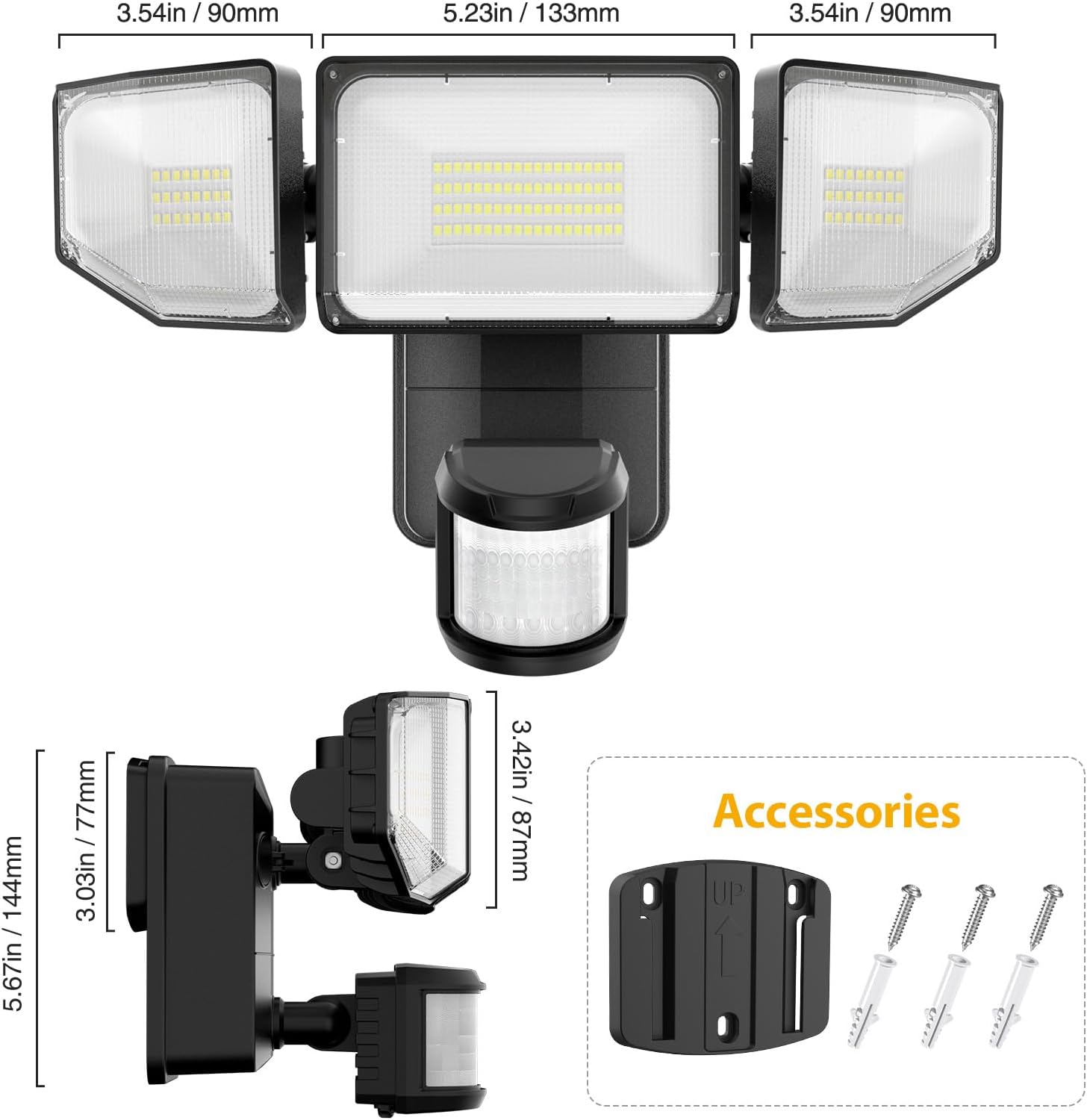
Image 3.1: Product dimensions and included accessories.
4. Produk Lebihview
The Olafus 3-LBG10N features three adjustable light heads and an integrated motion sensor. The main body houses the battery compartment and control knobs for settings.

Image 4.1: Motion sensor and control knobs.
5. Pemasangan
The Olafus 3-LBG10N is battery-operated, allowing for flexible installation without the need for electrical wiring. Recommended installation height is 7.2ft - 10.5ft (2.2m - 3.2m) above the ground.
5.1 Pemasangan Bateri
- Buka penutup petak bateri di bahagian belakang unit.
- Insert 4 new 1.5V D-cell batteries (not included), ensuring correct polarity.
- Tutup penutup petak bateri dengan selamat.
5.2 Memasang Cahaya
- Choose a suitable location for installation, such as a wall, fence, or garage, ensuring the desired coverage area.
- Fasten the mounting bracket onto the wall using the provided screws and wall anchors. Ensure the 'UP' arrow on the bracket points upwards.
- Buckle the light unit into the mounting plate securely.
- Adjust the three light heads and the motion sensor to cover the desired area.
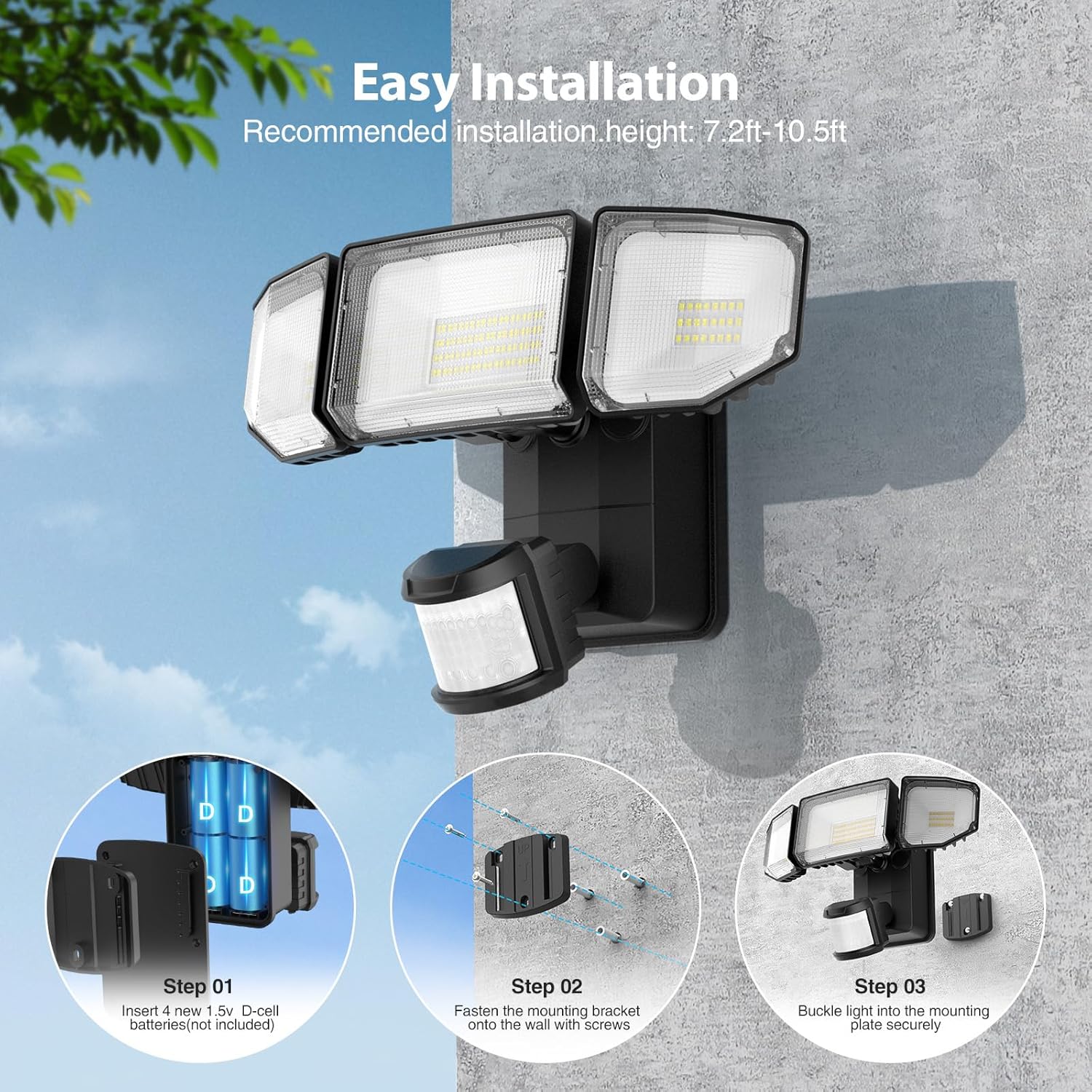
Image 5.1: Easy installation steps.

Image 5.2: Battery-powered installation offers flexibility over wired or solar options.
6. Arahan Operasi
The motion sensor flood light features adjustable settings for optimal performance.
6.1 Tombol Kawalan
Locate the three control knobs on the motion sensor unit:
- MASA: Adjusts the duration the light stays on after motion is detected (5 seconds to 30 seconds).
- LUX: Sets the ambient light level at which the motion sensor will activate the light.
- SENS (Sensitiviti): Adjusts the detection range of the motion sensor (19ft to 72ft).
6.2 Setting the Motion Sensor
- Tetapan MASA: Rotate the 'TIME' knob to select the desired illumination duration. For testing, set it to the minimum (5s).
- Tetapan LUX: Rotate the 'LUX' knob. Set it to the sun icon for daytime testing or to the moon icon for night-only operation. The light will only activate when the ambient light is below the set LUX level.
- SENS Setting: Rotate the 'SENS' knob to adjust the motion detection range. Start with a lower setting and increase as needed to avoid false triggers.
Image 6.1: Motion Sensor Mode controls (TIME, LUX, SENS).
Video 6.1: This video demonstrates the functionality of the battery-powered motion outdoor lights, showcasing their activation and illumination capabilities.
7. Ciri-ciri
- Dikendalikan Bateri & Pemasangan Mudah: Powered by 4 D batteries (not included), this light is ideal for locations without access to electricity or direct sunlight. Installation can be completed in approximately 5 minutes, requiring no main power or complex wiring.
- Penderia Gerakan Dinaik Taraf: The sensor offers a wide 180-degree detection angle and can detect motion up to 72 feet away. The timer is adjustable from 5 to 30 seconds, and the ambient illuminance value (LUX) can be set to trigger the light only when needed, such as at night or dusk.
- Super Bright & Energy Efficient: Equipped with high-efficiency LED beads and professional optical lenses, the light produces 2000 lumens of brightness. This is comparable to a 150W halogen bulb while being significantly more energy-efficient. The innovative 3-folded surface design provides a wide 220° beam angle for extensive coverage.
- Efficient Cooling & Long Lifespan: Featuring a fin-type heat sink design and durable ABS housing material, the flood light ensures safe operation and extended product life. With typical usage (20 triggers per day, 20s per trigger), batteries can last approximately 180 days.
- IP65 Kalis Air: Designed to withstand various weather conditions, including rain and snow, making it suitable for year-round outdoor use in garages, shops, yards, basements, and other areas.

Image 7.1: Wide beam angle and 2000LM brightness.

Image 7.2: Motion sensor detection range.

Image 7.3: IP65 Waterproof rating for all-weather reliability.
8. Spesifikasi Teknikal
| Spesifikasi | Perincian |
|---|---|
| Nama Model | 3-LBG10N |
| Jenama | Olafus |
| Jenis Sumber Cahaya | LED |
| Kecerahan | 2000 Lumen |
| Suhu Warna | 6500 Kelvin (Putih Sejuk) |
| Sumber Kuasa | Battery Powered (4 x D-cell batteries, not included) |
| Wattage | 7 Watt |
| Sudut Pengesanan Penderia Gerakan | 180 darjah |
| Jarak Pengesanan Penderia Gerakan | Sehingga 72 kaki |
| Pelarasan Pemasa | 5s ke 30s |
| Tahap Ketahanan Air | IP65 Kalis Air |
| bahan | Akrilonitril Butadiena Stirena (ABS) |
| Dimensi Produk | 10.7"L x 8.5"W x 5.11"H |
| Berat Barang | 3.23 paun |
| Jenis Pemasangan | Gunung siram |
9. Penyelenggaraan
- Pembersihan: Lap lampu secara berkala dengan kain lembutamp kain untuk menghilangkan habuk dan serpihan. Jangan gunakan pembersih atau pelarut yang melelas.
- Penggantian Bateri: Replace all four D-cell batteries simultaneously when the light output diminishes or the unit stops functioning. Ensure to use new, high-quality alkaline batteries for optimal performance and lifespan.
- Pemeriksaan: Regularly check the mounting and housing for any signs of damage or wear. Ensure the battery compartment seal is intact to maintain IP65 waterproofing.
10. Penyelesaian masalah
- Lampu tidak menyala:
- Periksa sama ada bateri dipasang dengan betul dengan polariti yang betul.
- Gantikan bateri lama atau habis dengan yang baru.
- Ensure the LUX setting is appropriate for the ambient light conditions (e.g., set to 'moon' for night operation).
- Verify that the motion sensor is not obstructed.
- Light stays on constantly:
- Check the TIME setting; it might be set to a longer duration.
- Reduce the SENS (Sensitivity) setting to prevent triggering by distant or minor movements.
- Ensure there are no constant heat sources or moving objects within the detection range.
- Light is too dim:
- Replace batteries with new, high-quality D-cell batteries.
- Clean the LED panels and motion sensor lens.
- Motion sensor not detecting:
- Increase the SENS (Sensitivity) setting.
- Ensure the motion sensor is aimed correctly towards the desired detection area.
- Verify that the LUX setting is not preventing activation in current ambient light conditions.
11. Waranti dan Sokongan
For warranty information or technical support, please refer to the contact details provided on the product packaging or visit the official Olafus webtapak:
- Webtapak: www.olafuslife.com
- e-mel: support@olafuslife.com
Sila simpan resit pembelian anda untuk tuntutan waranti.


