1. Lebihview
The M5Stack AtomS3 Lite is an ultra-compact programmable controller designed for Internet of Things (IoT) development. It integrates the powerful ESP32-S3FN8 as its main control unit, offering Wi-Fi connectivity and a range of built-in features for various embedded smart device applications.
Ciri-ciri Utama:
- Reka Bentuk Ultra-Kompak: Measuring only 24x24x9.5mm (0.97x0.97x0.37 inches), ideal for space-constrained projects.
- ESP32-S3FN8 Main Control: Features 8MB SPI flash memory for robust application development.
- Ketersambungan Bersepadu: Built-in 3D Wi-Fi antenna for reliable wireless communication.
- Pengurusan tenaga: Efficient 5V to 3.3V power circuit.
- User Feedback & Control: Includes an infrared LED, RGB LED status indicators, and an integrated button.
- Antara Muka Boleh Diperkembangkan: GROVE/HY2.0-4P interfaces and 6 GPIO headers for easy expansion with external modules.
- Antara Muka USB-C: On-board Type-C port for convenient reprogramming, downloading, and serial port communication.
- Pemasangan selamat: An M2 screw hole is provided on the back for stable installation.
Apa yang ada di dalam Kotak:
- 1 x M5Stack AtomS3 Lite ESP32 IoT Development Kit

Rajah 1: Atas view of the M5Stack AtomS3 Lite.
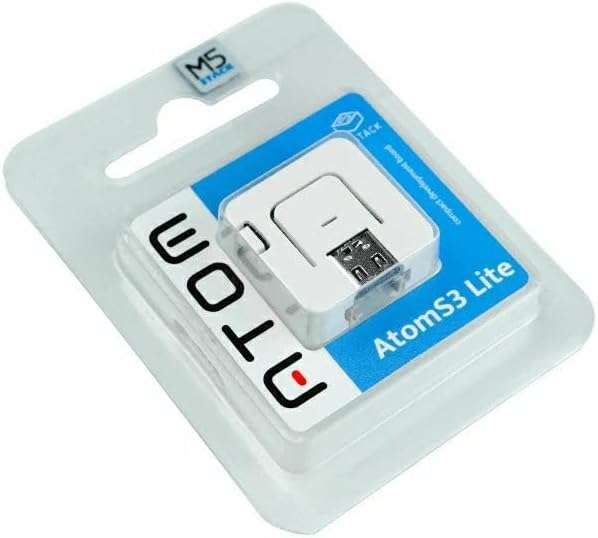
Figure 2: M5Stack AtomS3 Lite in its retail packaging.
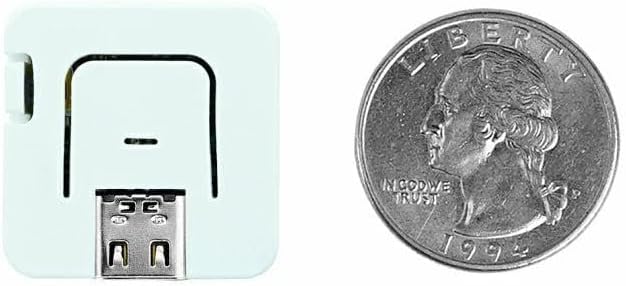
Figure 3: Size comparison of the AtomS3 Lite with a US quarter.
2. Persediaan
2.1 Sambungan Awal
Connect the M5Stack AtomS3 Lite to your computer using a USB Type-C cable. The device will typically power on automatically. The on-board RGB LED may illuminate to indicate power status.
2.2 Pemasangan Pemandu
Depending on your operating system, you may need to install a USB-to-serial driver for the device to be recognized by your computer. Refer to the official M5Stack documentation for specific driver requirements and installation guides for your OS.
2.3 Entering Download Mode
To upload new firmware or programs to the AtomS3 Lite, you may need to place it into download mode. To do this, press and hold the TETAP SEMULA button on the AtomS3 Lite before connecting it to power (or before turning it on if already connected). Release the button after the device powers on. This procedure allows the device to enter the bootloader for programming.

Rajah 4: Sisi view highlighting the reset button.

Rajah 5: Sisi view highlighting the USB-C port.
3. Arahan Operasi
3.1 Menghidupkan/Mematikan
The AtomS3 Lite powers on automatically when connected to a 5V power source via its USB Type-C port. There is no dedicated power switch. To power off, disconnect the power source.
3.2 Pengaturcaraan dan Pembangunan
The AtomS3 Lite is designed for custom programming using various development environments compatible with ESP32-S3, such as Arduino IDE, PlatformIO, or ESP-IDF. The USB Type-C interface facilitates code uploading and serial debugging.
3.3 Using Integrated Peripherals
- LED RGB: The on-board RGB LED can be controlled programmatically to indicate status or provide visual feedback.
- Butang: The integrated button can be used as a user input for various functions within your application.
- LED inframerah: The infrared LED allows for IR transmission, useful for remote control applications.
- GROVE/HY2.0-4P Interfaces: These ports provide convenient connections for M5Stack's extensive range of Grove modules and other compatible sensors/actuators.
- GPIO Headers: The 6 GPIO headers on the bottom of the device offer direct access to additional ESP32-S3 pins for advanced customization and expansion.

Rajah 6: Terperinci view of AtomS3 Lite pinout and interfaces.
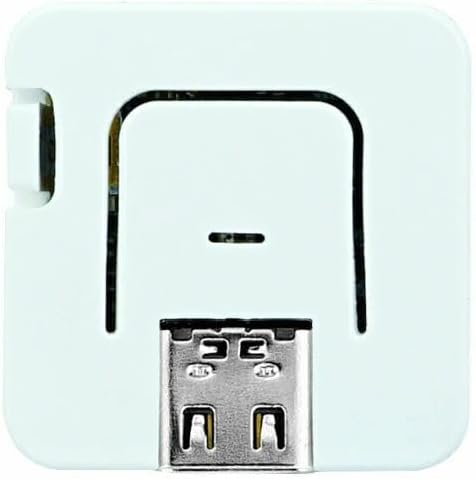
Rajah 7: Bawah view showing GPIO headers.
3.4 Testing RGB LED and Button Functionality
The following video demonstrates how to test the RGB LED and button on an M5Stack device, which is applicable to the AtomS3 Lite's integrated components.
Video 1: Demonstration of RGB LED and button functionality test on an M5Stack device.
4. Penyelenggaraan
To ensure the longevity and proper functioning of your M5Stack AtomS3 Lite, observe the following maintenance guidelines:
- Keadaan Persekitaran: Elakkan daripada mendedahkan peranti kepada suhu yang melampau, kelembapan tinggi atau cahaya matahari langsung.
- Sentuhan Cecair: Keep the device away from water and other liquids to prevent short circuits and damage.
- Perlindungan Fizikal: Handle the device with care to prevent physical impact or dropping.
- Pembersihan: Use a dry, soft cloth to clean the device. Do not use harsh chemicals or abrasive materials.
- Storan: When not in use, store the device in a dry, dust-free environment.
- Pengembangan: When using the M2 screw hole for fixing, ensure screws are not overtightened to prevent damage to the PCB.
5. Penyelesaian masalah
If you encounter issues with your M5Stack AtomS3 Lite, consider the following troubleshooting steps:
- Peranti Tidak Membalas: Ensure the device is properly connected to a stable 5V power source via the USB Type-C cable.
- Isu Pengaturcaraan: If you are unable to upload code, verify that the correct drivers are installed and that the device is in download mode (refer to Section 2.3). Check your development environment settings for the correct board and port selection.
- Masalah Ketersambungan: For Wi-Fi or Bluetooth issues, ensure your code correctly initializes and configures the wireless modules. Check for environmental interference.
- Tingkah laku yang tidak dijangka: Review your code for logical errors. If using external modules, ensure they are correctly wired and powered.
- Kerosakan Fizikal: Inspect the device for any visible signs of damage. If damage is present, discontinue use.
6. Spesifikasi
| Ciri | Perincian |
|---|---|
| Nombor Model | C124 |
| Kawalan Utama | ESP32-S3FN8 |
| Memori Kilat | 8 MB SPI Flash |
| RAM | 512 KB SRAM |
| Kesambungan Wayarles | Wi-Fi (802.11bgn), Bluetooth |
| Keserasian Sistem Pengendalian | FreeRTOS, Ubuntu, Linux |
| Dimensi (LxWxH) | 0.95 x 0.95 x 0.37 inci (24 x 24 x 9.5 mm) |
| Berat badan | 0.423 auns |
| Antara muka | USB Type-C, GROVE/HY2.0-4P, 6x GPIO Headers |
| Periferal Bersepadu | Infrared LED, RGB LED, Button |
7. Waranti dan Sokongan
7.1 Maklumat Waranti
Specific warranty details for the M5Stack AtomS3 Lite are typically provided at the point of purchase or on the official M5Stack webtapak. Sila simpan bukti pembelian anda untuk sebarang tuntutan waranti.
7.2 Sokongan Teknikal
For technical assistance, detailed documentation, and community forums, please visit the official M5Stack website. You can find resources for programming, project examples, and further troubleshooting guides.
Official M5Stack Store: Visit M5Stack Store on Amazon


