pengenalan
This user manual provides detailed instructions for setting up, operating, and maintaining your Ninkear N15 Plus Laptop. Please read this manual thoroughly before using your device to ensure optimal performance and longevity. The Ninkear N15 Plus is a high-performance laptop featuring an Intel N100 processor, a 15.6-inch FHD IPS screen, 16GB DDR4 RAM, and a 1TB SSD, designed for efficient productivity and entertainment.
Apa yang ada dalam Kotak
Selepas membuka pakej, sahkan bahawa semua item berikut disertakan:
- Ninkear N15 PLUS Laptop
- Pengecas
- Manual Arahan (dokumen ini)

Image: The Ninkear N15 Plus Laptop, showcasing its sleek design and the included charger.
Panduan Persediaan
1. Pengecasan Awal dan Hidupkan
- Connect the provided charger to the Type-C charging port on the laptop and plug it into a power outlet. Ensure the charging indicator light illuminates.
- Allow the laptop to charge for at least 30 minutes before initial use, or until the battery is sufficiently charged.
- Press the power button located on the keyboard to turn on the laptop. The Ninkear logo will appear, followed by the Windows 11 setup screen.
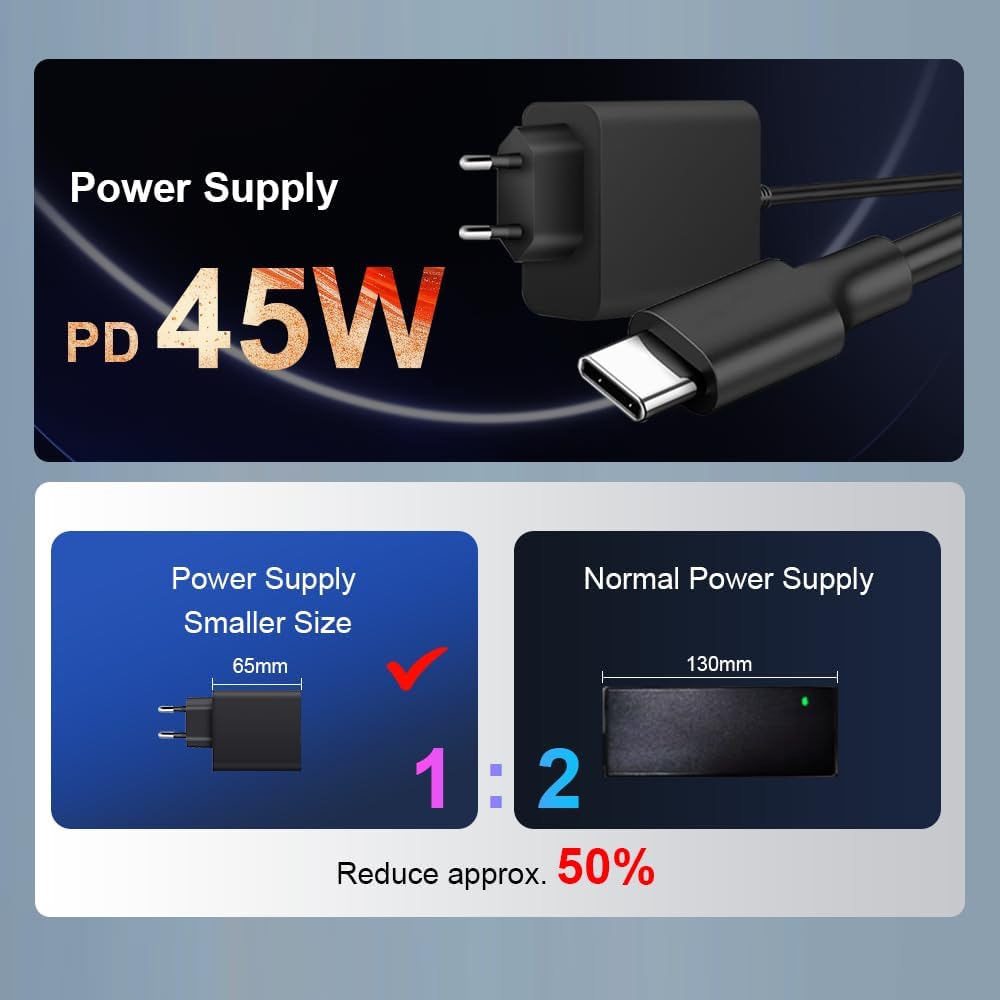
Imej: Dari dekat view of the N15 Plus laptop connected to its Type-C power supply, highlighting the compact charger design.
2. Windows 11 Setup
Follow the on-screen prompts to complete the Windows 11 setup process. This typically includes:
- Memilih kawasan dan reka letak papan kekunci anda.
- Menyambung ke rangkaian Wi-Fi.
- Log masuk dengan atau mencipta akaun Microsoft.
- Menyediakan PIN atau kata laluan.
- Configuring privacy settings.
Once setup is complete, your laptop is ready for use.
Mengendalikan Komputer Riba Anda
Papan Kekunci dan Pad Sentuh
The N15 Plus features an ergonomic full-size keyboard with a numeric keypad for comfortable typing. The integrated touchpad supports multi-touch gestures for intuitive navigation.
- Papan Kekunci Bercahaya Belakang: To turn the keyboard backlight on or off, press the Fn + F5 shortcut key. Three levels of backlight brightness can be adjusted as needed.

Imej: Tamatview of the Ninkear N15 Plus laptop, highlighting its 15.6-inch IPS screen, Intel N100 processor, 16GB DDR4 RAM, 1TB SSD, 89WH battery, Wi-Fi 6, Bluetooth 5.2, Windows 11, and diamond pattern texture.
Buka Kunci Cap Jari
For enhanced security and quick access, the N15 Plus is equipped with a fingerprint sensor. Set up your fingerprint through Windows Hello in the system settings.
- Fingerprint unlocking takes approximately 0.5 seconds.
Paparan
The laptop features a 15.6-inch Full HD (1920x1080) IPS screen, providing wide viewing angles, accurate color reproduction, and consistent image quality. This display is designed to protect eyesight during extended use.
Ketersambungan
The N15 Plus supports modern wireless standards and offers versatile ports:
- Wi-Fi 6: For fast and reliable wireless internet connection.
- Bluetooth 5.2: For connecting wireless peripherals such as headphones, mice, and keyboards.
- Port USB 3.0: Two ports for high-speed data transfer.
- Port HDMI: Untuk menyambung ke paparan luaran atau projektor.
- Port Jenis-C: Two Type-C interfaces. The left Type-C port supports PD charging and data transmission. The right Type-C interface supports reverse power supply, allowing you to charge other electronic devices like mobile phones.
- Jack Audio: Untuk fon kepala atau pembesar suara luaran.
- Slot Kad TF: Untuk mengembangkan storan atau memindahkan data daripada kad memori.

Imej: Terperinci view of the N15 Plus laptop's side ports, including Audio, TF Card slot, USB 3.0, and Type-C ports with their functionalities (PD charging, data transmission, reverse charging).
Prestasi dan Storan
The N15 Plus is powered by an Intel N100 processor with 4 cores and 4 threads, offering a maximum frequency of 3.4 GHz. This configuration ensures smooth operation for productivity software and supports 4K video decoding and multi-display setups.
- RAM: RAM DDR4 16GB untuk multitasking yang cekap.
- Storan: 1TB PCIe SSD provides ample and fast storage for your files, aplikasi dan media.

Image: A graph illustrating the performance of the Intel N100 processor compared to other Intel Jasper Lake series CPUs, showing its multi-core and single-core capabilities.

Image: Visual representation of the laptop's 16GB DDR4 RAM and 1TB M.2 SSD, emphasizing fast reading and writing speeds for smooth operation and amppenyimpanan le.
Hayat Bateri
The N15 Plus is equipped with a built-in 11600mAh (89WH) high-capacity lithium-ion battery, offering extended usage times.
- Up to 13 hours of working use on a full charge.
- Sehingga 72 jam masa siap sedia.

Image: A graphic illustrating the impressive 11600mAh battery life of the N15 Plus, showing approximately 13 hours of working time and 72 hours of standby time.

Image: A visual demonstration of the Type-C reverse charging feature, showing the laptop charging a mobile phone.
Penyelenggaraan
Pembersihan
- Gunakan kain lembut dan tidak berbulu untuk membersihkan skrin dan bahagian luar.
- Untuk calitan degil, sedikit dampbilas kain dengan air atau larutan pembersih skrin. Elakkan bahan kimia yang keras.
- Regularly clean the keyboard and touchpad to prevent dust and debris buildup.
Kemas Kini Perisian
- Keep your Windows 11 operating system updated to ensure optimal performance, security, and compatibility.
- Check for driver updates periodically from the Ninkear support website (if applicable) or through Windows Update.
Pengurusan Storan
- Padam secara kerap yang tidak perlu files and applications to free up storage space on your 1TB SSD.
- Pertimbangkan untuk menggunakan storan awan atau pemacu luaran untuk saiz yang besar files to maintain optimal system speed.
Menyelesaikan masalah
This section addresses common issues you might encounter with your Ninkear N15 Plus Laptop.
Laptop Does Not Power On
- Pastikan pengecas disambungkan dengan selamat pada komputer riba dan soket kuasa yang berfungsi.
- Sahkan alur keluar kuasa berfungsi dengan memasang peranti lain.
- Biarkan komputer riba dicas selama sekurang-kurangnya 30 minit sebelum cuba menghidupkannya semula.
- If the issue persists, try a different compatible Type-C charger if available.
Screen Remains Blank or Flickers
- Mulakan semula komputer riba.
- Ensure the display brightness is not set to minimum. Use the function keys (e.g., Fn + F2/F3 or similar, check keyboard icons) to adjust brightness.
- If connected to an external monitor, try disconnecting it or pressing Fn + F10 (or similar, check keyboard icons) to cycle display modes.
Isu Ketersambungan Wi-Fi
- Pastikan Wi-Fi didayakan dalam tetapan Windows.
- Restart your Wi-Fi router and the laptop.
- Forget the network and reconnect, re-entering the password.
- Update your Wi-Fi drivers through Windows Update or the Ninkear support webtapak.
Prestasi Perlahan
- Tutup aplikasi yang tidak perlu berjalan di latar belakang.
- Semak Pengurus Tugas (Ctrl+Shift+Esc) untuk proses yang menggunakan penggunaan CPU, RAM atau cakera yang tinggi.
- Ensure your Windows 11 is up to date.
- Run a disk cleanup and defragmentation (for HDD, though SSDs don't need defragging, Windows handles TRIM automatically).
- Imbas untuk perisian hasad atau virus.
Spesifikasi
| Ciri | Perincian |
|---|---|
| Jenama | Ninkear |
| Nama Model | N15 PLUS |
| Saiz Skrin | 15.6 Inci |
| Resolusi Skrin | 1920 x 1080 pixels (FHD IPS) |
| Pemproses | Intel Processor N100 (4 Cores, 4 Threads, up to 3.4 GHz) |
| RAM | 16GB DDR4 |
| Pemacu Keras | 1TB SSD (PCIe) |
| Pemproses bersama Grafik | Grafik Intel UHD (Bersepadu) |
| Sistem Operasi | Windows 11 |
| Jenis Wayarles | Wi-Fi 6 (802.11ax), Bluetooth 5.2 |
| Port USB | 2 x USB 3.0, 2 x Type-C (one with PD charging/data, one with reverse power supply) |
| Pelabuhan Lain | HDMI, Audio Jack, TF Card Slot |
| Bateri | 11600mAh (89WH Lithium Ion) |
| Berat Barang | 4.4 paun |
| Dimensi Produk | 14 x 9 x 0.25 inci |
| Ciri Khas | Papan Kekunci Bercahaya Latar, Pembaca Cap Jari, Pad Kekunci Berangka |
Waranti dan Sokongan
Your Ninkear N15 Plus Laptop comes with a manufacturer's warranty. For detailed warranty information, please refer to the warranty card included in your product packaging or visit the official Ninkear webtapak.
For technical support, troubleshooting assistance beyond this manual, or service inquiries, please contact Ninkear customer support through their official channels. Keep your purchase receipt and product serial number handy when contacting support.


