1. Arahan Keselamatan Penting
Sila baca manual ini dengan teliti sebelum mengendalikan perkakas ini dan simpannya untuk rujukan pada masa hadapan. Kegagalan mematuhi arahan ini boleh mengakibatkan renjatan elektrik, kebakaran atau kecederaan serius.
- Sentiasa sambungkan penyahlembap ke soket kuasa yang dibumikan.
- Jangan kendalikan unit dengan kord kuasa atau palam yang rosak.
- Jauhkan perkakas daripada air dan cecair lain. Jangan rendamkannya.
- Pastikan pengudaraan yang betul di sekitar unit. Jangan halang saluran masuk atau keluar udara.
- Cabut plag penyahlembap sebelum membersihkan atau melakukan sebarang penyelenggaraan.
- Perkakas ini tidak dimaksudkan untuk digunakan oleh orang (termasuk kanak-kanak) yang kurang keupayaan fizikal, deria atau mental, atau kurang pengalaman dan pengetahuan, melainkan mereka telah diberi pengawasan atau arahan mengenai penggunaan perkakas oleh orang yang bertanggungjawab untuk keselamatan mereka.
- Do not use the appliance in areas where flammable gases or vapors are present.
- Operate the unit within the specified temperature range of 5-32 °C.
2. Produk Lebihview
The SENCOR SDH 3028WH is a portable smart dehumidifier designed to efficiently remove excess moisture from your indoor environment. It features Wi-Fi connectivity for app control, multiple operating modes, and a large water tank capacity.
Ciri-ciri Utama:
- Dehumidification Capacity: 30 liters per day (at 30 °C, 80% Relative Humidity).
- Water Tank Capacity: 6 liters.
- Control: Wi-Fi enabled with Sencor HOME app (iOS and Android).
- Dehumidification Settings: Adjustable from 35% to 85% Relative Humidity, or Continuous operation.
- Operating Modes: Dehumidification, Fan, Laundry Drying.
- Fan Speeds: High and Low.
- Display: Precise humidity indication.
- Timer: 0-24 hours.
- Safety Features: Full tank indicator, Child safety lock, Automatic defrost function, Automatic restart function.
- Convenience: Removable and washable filter, Integrated handles and wheels for easy portability, 1-meter drain hose for continuous drainage.
- Quiet Operation: Noise level 43/41 dB.
- Suitable Room Size: 30 to 89 m².
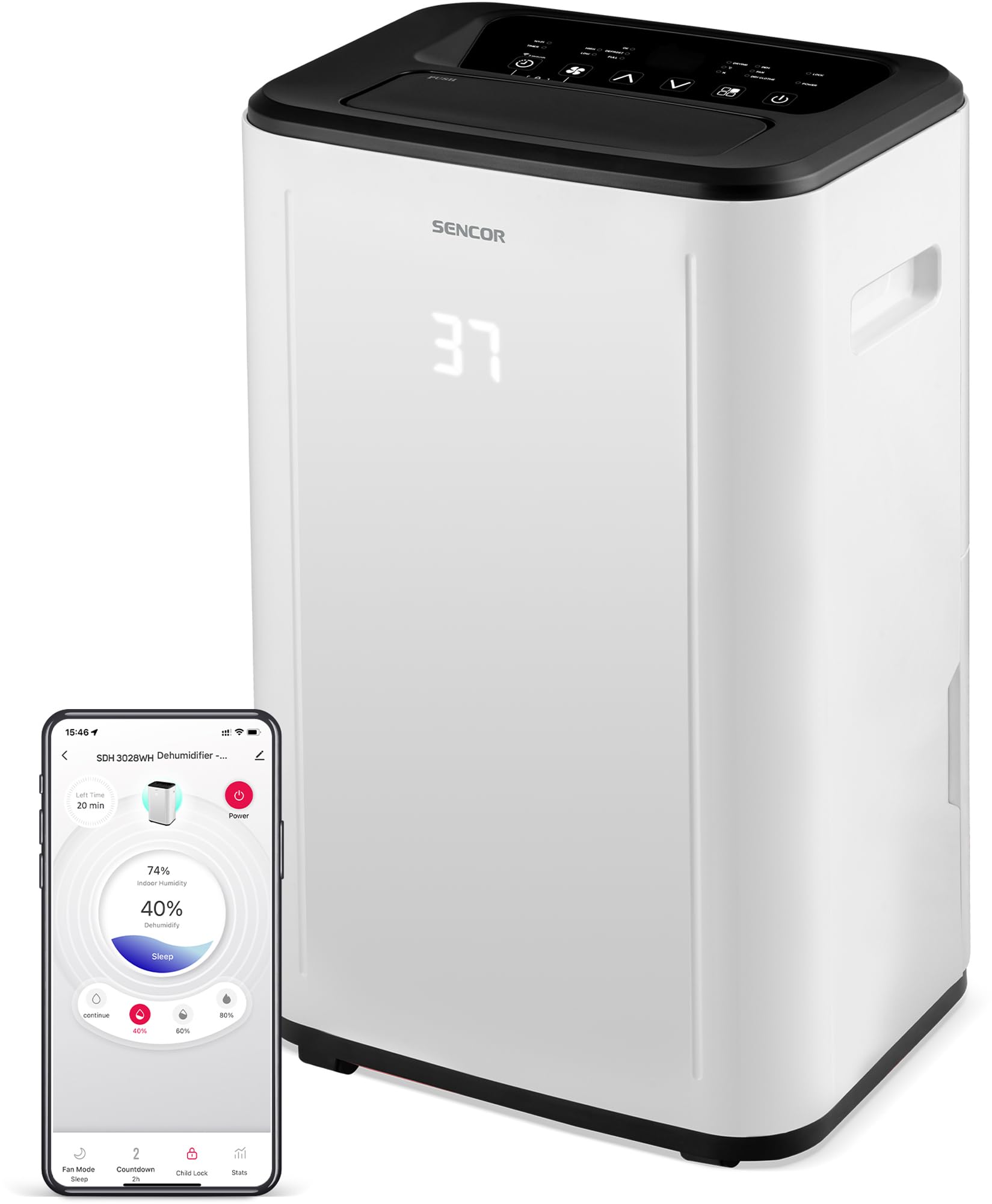
Rajah 1: Depan view of the SENCOR SDH 3028WH Portable Dehumidifier.
3. Kandungan Pakej
Selepas membongkar, sila pastikan semua item ada dan dalam keadaan baik:
- SENCOR SDH 3028WH Portable Dehumidifier
- Manual Arahan
- Drain Hose (1 meter)

Figure 2: Packaging of the SENCOR SDH 3028WH, illustrating key features.
4. Persediaan
4.1 Penempatan
Place the dehumidifier on a firm, level surface in the area where dehumidification is desired. Ensure there is at least 20 cm (8 inches) of clear space around the air inlets and outlets for optimal airflow.
4.2 Sambungan Kuasa
Plug the power cord into a suitable grounded electrical outlet (220-240V, 50Hz). The unit will enter standby mode.
4.3 Wi-Fi Setup (Sencor HOME App)
- Download the Sencor HOME app from the App Store (iOS) or Google Play Store (Android).
- Buat akaun atau log masuk.
- Follow the in-app instructions to add your SDH 3028WH dehumidifier. This typically involves putting the dehumidifier into pairing mode (refer to the app or device display for specific instructions) and connecting it to your home Wi-Fi network.
- Once connected, you can control the dehumidifier remotely and monitor its status via the app.
5. Arahan Operasi
5.1 Panel Kawalan
The control panel on top of the unit allows you to manage all functions. The digital display shows the current humidity level or timer settings.
5.2 Hidupkan/Mati Kuasa
Tekan ke kuasa butang untuk menghidupkan atau mematikan unit.
5.3 Menetapkan Kelembapan yang Diingini
- Tekan ke Kelembapan butang.
- Gunakan Atas/Bawah arrows to adjust the desired humidity level between 35% and 85% RH in 5% increments.
- Unit ini akan beroperasi sehingga tahap kelembapan yang ditetapkan dicapai, kemudian hidupkan dan matikan kitaran untuk mengekalkannya.
- To enable continuous dehumidification, select the 'Continuous' setting (usually indicated by 'CO' or similar on the display).
5.4 Mod Pengendalian
Tekan ke Mod butang untuk melihat mod yang tersedia:
- Mod Penyahlembapan: Standard operation to remove moisture.
- Mod Kipas: Circulates air without dehumidifying.
- Mod Pengeringan Dobi: Optimized for drying clothes faster by continuously running the fan and dehumidifier.
5.5 Kelajuan Kipas
Tekan ke Kelajuan Kipas butang untuk bertukar antara kelajuan kipas Tinggi dan Rendah.
5.6 Fungsi Pemasa
- Tekan ke Pemasa butang.
- Gunakan Atas/Bawah arrows to set the desired operating duration from 0 to 24 hours.
- The unit will automatically turn off or on after the set time.
5.7 Kunci Kanak-kanak
Untuk mengaktifkan kunci kanak-kanak, tekan dan tahan butang Kunci Kanak-kanak button (or a combination of buttons as indicated on the control panel) for a few seconds. This prevents accidental changes to settings. Repeat the action to deactivate.
6. Penyelenggaraan
Penyelenggaraan tetap memastikan prestasi optimum dan memanjangkan jangka hayat penyahlembap anda.
6.1 Mengosongkan Tangki Air
- When the water tank is full, the unit will stop operating, and the 'Full Tank' indicator will illuminate.
- Carefully pull out the water tank from the back or side of the unit.
- Kosongkan air yang terkumpul.
- Reinsert the empty tank firmly into its position. The unit will resume operation.
6.2 Saliran Berterusan
For continuous operation without needing to empty the tank, you can use the included drain hose.
- Locate the continuous drain outlet on the back of the dehumidifier.
- Tanggalkan penyumbat getah (jika ada).
- Connect one end of the 1-meter drain hose to the outlet.
- Direct the other end of the hose to a suitable drain or larger container, ensuring it is lower than the dehumidifier's drain outlet for gravity flow.
6.3 Membersihkan Penapis Udara
- Adalah disyorkan untuk membersihkan penapis udara setiap dua minggu atau lebih kerap bergantung pada penggunaan.
- Matikan dan cabut plag penyahlembap.
- Locate and remove the air filter (usually at the back or side).
- Basuh penapis dengan air suam dan detergen lembut. Bilas sebersih-bersihnya.
- Biarkan penapis kering sepenuhnya sebelum memasukkannya semula ke dalam unit. Jangan gunakan pengering atau haba langsung.
6.4 Membersihkan Bahagian Luar
Lap bahagian luar unit dengan lembut, damp cloth. Do not use harsh chemicals, abrasive cleaners, or solvents.
7. Penyelesaian masalah
Sebelum menghubungi sokongan pelanggan, sila rujuk isu dan penyelesaian biasa berikut:
| Masalah | Kemungkinan Punca | Penyelesaian |
|---|---|---|
| Unit tidak dihidupkan. | Tiada bekalan kuasa. Kord kuasa tidak disambungkan dengan betul. | Periksa sama ada unit dipasang pada soket yang berfungsi. Pastikan kabel kuasa disambungkan dengan selamat. |
| Dehumidifier tidak mengumpul air. | Penapis udara tersumbat. Suhu bilik terlalu rendah (di bawah 5°C). Tetapan kelembapan terlalu tinggi. Water tank is not properly inserted. | Bersihkan penapis udara. Ensure room temperature is within 5-32°C. Turunkan tetapan kelembapan yang dikehendaki. Masukkan semula tangki air dengan betul. |
| Unit is noisy or vibrating excessively. | Unit is on an uneven surface. Penapis udara tersumbat. | Letakkan unit di permukaan yang rata dan stabil. Bersihkan penapis udara. |
| "Full Tank" indicator is on, but tank is not full. | Water tank is not properly seated. Float switch is stuck. | Remove and reinsert the water tank firmly. Check the float switch inside the tank for obstructions. |
| Isu sambungan Wi-Fi. | Kata laluan Wi-Fi salah. Dehumidifier too far from router. Isu penghala. | Sahkan kata laluan Wi-Fi. Move dehumidifier closer to the router. Restart your Wi-Fi router. Re-attempt pairing process. |
8. Spesifikasi
| Ciri | Perincian |
|---|---|
| Jenama | SENCOR |
| Nombor Model | SDH 3028WH |
| Kapasiti Dehumidifikasi | 30 Liters/day (at 30 °C, 80% RH) |
| Kapasiti Tangki Air | 6 Liter |
| Penggunaan Kuasa | 420 Watt |
| Julat Suhu Operasi | 5-32 °C |
| Saiz Bilik yang Disyorkan | 30-89 m² |
| Tahap Kebisingan | 43/41 dB |
| Dimensi (L x W x H) | 26 x 33.5 x 53 cm |
| Berat badan | 15.3 kg |
| bahan | plastik |
| Ciri Khas | Digital display, Automatic defrost, Timer, Portable, Wi-Fi control, Child lock, Auto restart |
| Panjang Hos Saliran | 1 meter |
9. Waranti dan Sokongan
SENCOR products are manufactured to the highest quality standards. For warranty information, please refer to the warranty card included with your product or visit the official SENCOR weblaman web. Untuk sokongan teknikal atau pertanyaan perkhidmatan, sila hubungi khidmat pelanggan SENCOR melalui saluran rasmi mereka.
Ketersediaan alat ganti: 5 Tahun.


