1. Pengenalan
This manual provides detailed instructions for the Tinwoo Smart Watch T17. Please read this manual thoroughly before using the device to ensure proper operation and to maximize its features. This smartwatch is designed for daily use, fitness tracking, and communication, offering a rugged design and various health monitoring functions.

Imej 1.1: Selesaiview of Tinwoo Smart Watch T17 features.
2. Kandungan Pakej
Sila semak pakej untuk item berikut:
- Tinwoo Smart Watch T17
- Kabel Pengecas (Magnetik)
- Manual Pengguna
Jika ada item yang hilang atau rosak, sila hubungi sokongan pelanggan.
3. Produk Lebihview
The Tinwoo Smart Watch T17 features a 2.01-inch HD display, a durable casing, and multiple sensors for health and fitness tracking.

Imej 3.1: Depan view of the Tinwoo Smart Watch T17.
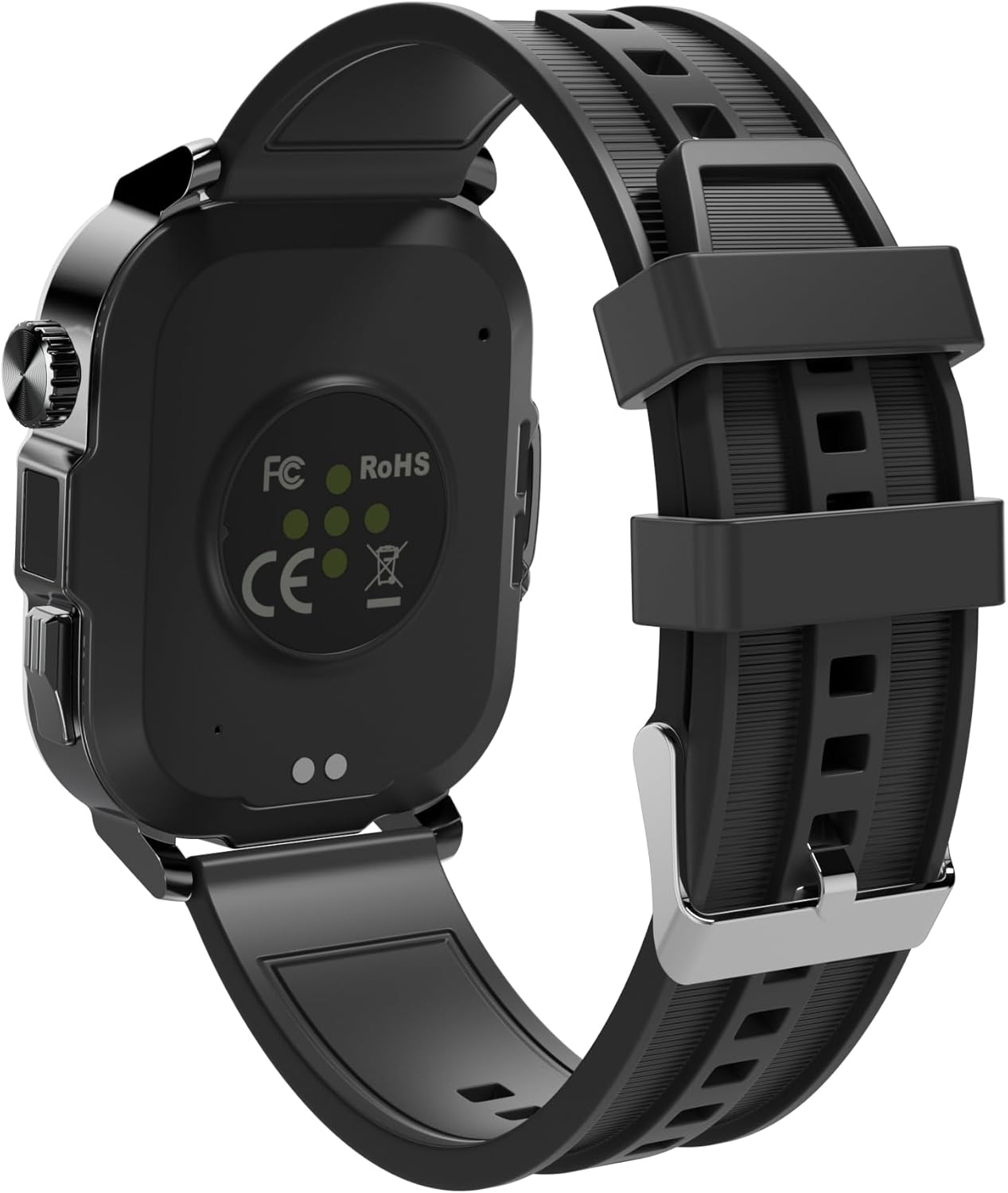
Imej 3.2: Belakang view of the Tinwoo Smart Watch T17, highlighting sensors and charging points.
4. Panduan Persediaan
4.1 Mengecas Peranti
Before first use, fully charge your smartwatch. Connect the magnetic charging cable to the charging points on the back of the watch and plug the USB-A end into a compatible power source. A full charge takes approximately 2 hours.

Image 4.1: Smartwatch battery charging indicator.
4.2 Pemasangan Apl dan Berpasangan
- Download the companion app from your smartphone's app store. The app is compatible with Android 6.0+ and iOS 9.0+ devices.
- Pastikan Bluetooth didayakan pada telefon pintar anda.
- Open the app and follow the on-screen instructions to search for and pair with your Tinwoo Smart Watch T17.
- Setelah digandingkan, jam tangan akan menyegerakkan masa dan tarikh secara automatik dengan telefon anda.
5. Arahan Operasi
5.1 Navigasi Asas
- Skrin Sentuh: Leret ke kiri, kanan, atas atau bawah untuk menavigasi menu dan ciri. Ketik untuk memilih.
- Butang Sisi: The watch features two physical controls on the right side: a button and a rotatable crown. These can be used for navigation, returning to the home screen, or accessing specific functions.
5.2 Display and Watch Faces
The 2.01-inch HD display offers clear visuals. You can adjust brightness and screen-on time (5, 10, or 15 seconds) through the watch settings. The watch supports over 200 customizable watch faces, accessible via the companion app.

Image 5.1: Selection of available watch faces.
5.3 Panggilan dan Pemberitahuan Bluetooth
Once connected to your phone via Bluetooth, the smartwatch allows you to make and receive calls directly from your wrist. You can also view call history and access frequently contacted contacts. The watch vibrates to alert you of incoming messages and app notifications (e.g., Facebook, WhatsApp, Instagram, X, Telegram, TikTok, Skype). Note that direct replies are not supported through the watch.

Image 5.2: Bluetooth calling feature in action.
5.4 Ciri Pelbagai Fungsi
The Tinwoo Smart Watch T17 includes various utility features:
- Kawalan Muzik: Play music through the smartwatch's built-in speaker or control music playback on your phone.
- Kawalan Kamera: Kawal kamera telefon anda dari jauh.
- Peringatan Sedentari: Alerts to encourage movement after periods of inactivity.
- Latihan Pernafasan: Latihan pernafasan berpandu.
- Kemas Kini Cuaca: Real-time weather information.
- Jam Penggera, Jam randik, Pemasa: Standard timekeeping functions.
- Female Period Tracking: Monitor menstrual cycles.
- Cari Telefon Anda: Cari telefon pintar berpasangan anda.
- Kalkulator: Fungsi asas aritmetik.
- Pembantu Suara: Akses pembantu suara telefon anda.
- Lampu suluh LED: A super bright LED flashlight is integrated into the watch. Access it through the watch's menu.

Image 5.3: AI Voice Assistant function.

Image 5.4: Integrated LED flashlight.
6. Pemantauan Kesihatan
The smartwatch provides comprehensive health tracking features:
- Pemantauan Denyut Jantung: 24-hour continuous heart rate tracking.
- Pemantauan SpO2: Real-time blood oxygen saturation (SpO2) monitoring.
- BP Monitoring: Blood pressure monitoring.
- Penjejakan Tidur: Analyzes sleep quality, including deep sleep, light sleep, and wake-up times.

Image 6.1: Multifaceted health monitoring features.
7. Mod Sukan
The Tinwoo Smart Watch T17 supports over 100 different sports modes, accurately tracking steps, distance, and calories burned. Examples termasuk:
- berjalan
- Berlari
- Berbasikal
- Gym Workouts
- Berenang
- Yoga
- Mendaki
- bola sepak
- besbol
- Dan banyak lagi.

Imej 7.1: Cthamples of supported sports modes.
8. Penyelenggaraan
8.1 Tahan Air
The Tinwoo Smart Watch T17 has an IP68 waterproof rating, making it suitable for use in rainy conditions and during swimming. Avoid prolonged submersion in hot water or exposure to high-pressure water jets.

Image 8.1: IP68 waterproof capability.
8.2 Pembersihan dan Penjagaan
Lap jam tangan dengan kerap menggunakan kain lembut dan kering. Untuk kotoran degil, gunakan sedikit pembersihamp kain dan kemudian keringkan dengan teliti. Elakkan menggunakan bahan kimia yang keras atau bahan yang melelas.
8.3 Penjagaan Bateri
To prolong battery life, avoid extreme temperatures and fully discharge and recharge the battery periodically. If the watch will not be used for an extended period, charge it to about 50% before storing.
9. Penyelesaian masalah
- Tonton tidak dihidupkan: Pastikan jam tangan dicas sepenuhnya.
- Isu sambungan: Check if Bluetooth is enabled on your phone and the watch. Restart both devices and try pairing again. Ensure the companion app is running in the background.
- Inaccurate time/date: Ensure the watch is properly paired with the app, as time and date sync automatically.
- Masalah pengecasan: Verify the charging cable is correctly aligned with the magnetic contacts on the watch. Use the original charging cable provided.
- App frequently disconnects: Check your phone's power saving settings, which might be closing the app in the background. Ensure the app has necessary permissions.
For further assistance, refer to the warranty and support section.
10. Spesifikasi

Image 10.1: Product dimensions and parameters.
| Ciri | Spesifikasi |
|---|---|
| Nombor Model | T17 |
| Paparan | 2.01-inch HD, 240x296 resolution, Full screen touch |
| Kapasiti Bateri | 410 mAh |
| Hayat Bateri | Up to 50 days standby, 15 days regular use, 7 days heavy use |
| Gred Kalis Air | IP68 |
| Keserasian | Android 6.0 dan ke atas, iOS 9.0 dan ke atas |
| Ketersambungan | Bluetooth |
| Dimensi | 2.09 x 1.61 x 0.45 inci (53 x 41 x 11.5 mm) |
| Berat Barang | 1.62 auns (46 Gram) |
| Kapasiti Penyimpanan Memori | 128 MB |
| Saiz Terpasang Memori RAM | 2048 KB |
| Bahan Tali | Silikon/Logam |
11. Waranti dan Sokongan
The Tinwoo Smart Watch T17 comes with a 12-month warranty from the date of purchase. This warranty covers manufacturing defects and issues arising from normal use.
If you encounter any issues with your device, such as accessory problems, quality concerns, or charging difficulties, please contact our customer support team. We are committed to providing a solution within 24 hours.
Sokongan Pelanggan: Refer to the contact information provided on the product packaging or the official Tinwoo webtapak.


