1. Pengenalan
This manual provides detailed instructions for the installation, operation, and maintenance of your ZUMIMALL ZS-GX2S 3MP Wireless Outdoor Security Camera. Please read this manual thoroughly before using the product to ensure proper functionality and safety.
The ZUMIMALL ZS-GX2S is a solar-powered, wireless outdoor security camera designed for comprehensive surveillance. It features 3MP resolution, 360° pan and tilt capabilities, AI detection, two-way audio, and IP66 weatherproofing, making it suitable for various outdoor environments.
2. Produk Lebihview
2.1 Kandungan Pakej
Pakej termasuk item berikut:
- ZUMIMALL ZS-GX2S 3MP Wireless Outdoor Security Camera (2 units)
- Panel Suria (2 unit)
- Mounting Bracket for Camera
- Pendakap Pemasangan untuk Panel Suria
- Kabel Pengecas USB
- Screw Package (screws and wall anchors)
- Manual Arahan
- Tip Sticker ('Hey! YOU ARE ON CAMERA')
2.2 Komponen Kamera
Familiarize yourself with the main parts of the camera:
- Kanta Kamera: Tangkap video footage.
- Cahaya Putih: Menyediakan pencahayaan untuk penglihatan malam warna.
- Sensor PIR: Mengesan gerakan.
- mikrofon: Merakam audio untuk komunikasi dua hala.
- Penceramah: Outputs audio for two-way communication and siren.
- Antena Wi-Fi: Enhances wireless connectivity.
- Penunjuk Mod: Menunjukkan status kamera.
- Tetapkan Semula Kunci: Used to reset the camera.
- Kekunci Kuasa: Menghidupkan/mematikan kamera.
- Slot Kad SD: Untuk storan video tempatan (menyokong sehingga 128GB).
- Port Caj Jenis-C: For connecting the solar panel or charging.

2.3 Ciri-ciri Utama
- 3MP Full Color Image: Delivers 2K resolution, 1.5 times sharper than standard 1080p, with 4X digital zoom.
- 360° View: Menawarkan putaran mendatar 355° dan menegak 120° untuk liputan menyeluruh.
- Solar Powered & 100% Wireless: Equipped with a high-efficiency solar panel and large-capacity rechargeable battery for continuous operation.
- Kesambungan WiFi 2.4G: Features 4dBi dual antennas for stable wireless connection.
- Intelligent AI Detection: Advanced PIR sensor and AI algorithms identify persons, pets, vehicles, and parcels, reducing false alarms.
- Makluman masa nyata: Sends instant notifications to your mobile app upon motion detection.
- Audio Dua hala: Membolehkan komunikasi masa nyata melalui kamera.
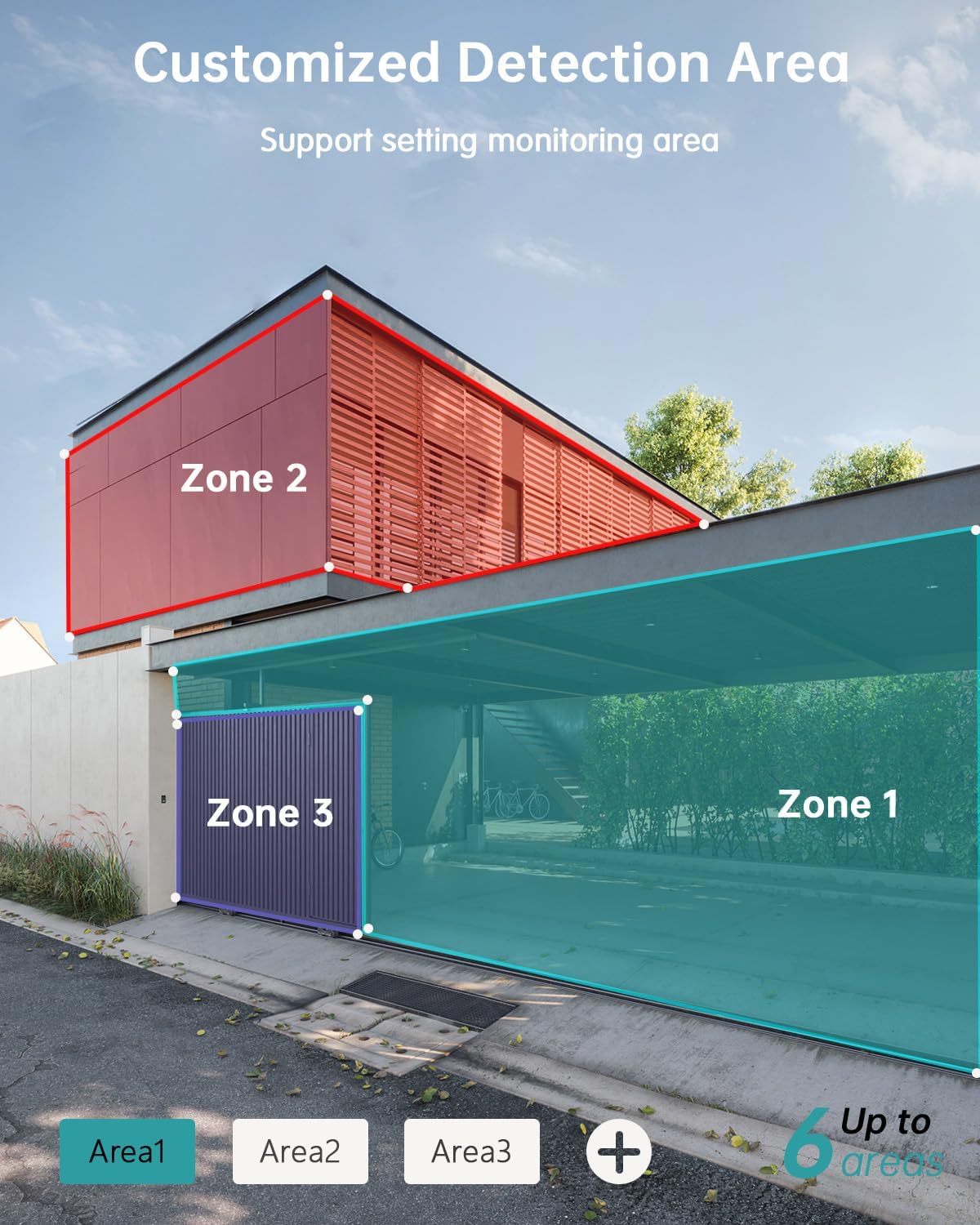
- Kawasan Pengesanan Boleh Disesuaikan: Set specific monitoring zones to focus on critical areas.
- IP66 Kalis Cuaca: Designed to withstand various weather conditions, including rain, wind, and snow.
- Pelbagai Pilihan Storan: Supports local storage via Micro SD card (up to 128GB) and cloud storage.
- Bekerja dengan Alexa: Integrasikan dengan Amazon Alexa untuk kawalan suara dan siaran langsung view pada peranti yang serasi.
3. Persediaan
3.1 Pemasangan Fizikal
Before permanent installation, ensure the camera has a strong 2.4G Wi-Fi signal in the desired location. The camera can be mounted on various surfaces including wood, drywall, stucco, or even gutters using appropriate fasteners.
- Pasang Tapak Pemasangan: Secure the camera's mounting base to your chosen surface using the provided screws and wall anchors.
- Sambungkan Panel Suria: Attach the solar panel to its bracket and position it to receive maximum sunlight. Connect the solar panel's Type-C cable to the camera's charging port. Ensure the cable is neatly managed to prevent damage.
- Lekapkan Kamera: Align the camera with the mounting base and slide it down until it locks securely.

3.2 Pemasangan Apl dan Berpasangan
The ZUMIMALL app is required to operate your camera. Follow these steps to set up the app and pair your camera:
- Muat turun Apl: Scan the QR code provided in the manual or on the product packaging, or search for 'ZUMIMALL' in your device's app store.
- Daftar Akaun: Open the ZUMIMALL app and follow the on-screen instructions to register a new account or log in if you already have one.
- Tambah Peranti: In the app, select 'Add Device' or the '+' icon. Follow the prompts to select your camera model.
- Hidupkan Kamera: Ensure your camera is powered on.
- Imbas Kod QR: The app will display a QR code. Hold your camera's lens towards your phone screen to scan the QR code. You will hear a confirmation sound when successful.
- Sambung ke Wi-Fi: Follow the app's instructions to connect the camera to your 2.4G Wi-Fi network.
- Persediaan Selesai: Setelah disambungkan, anda boleh menamakan kamera anda dan mula menggunakannya.

4. Operasi
4.1 Langsung View dan Main semula
Access the live feed and review dirakam footage directly from the ZUMIMALL app.
- Langsung View: Buka aplikasi dan pilih kamera anda untuk view the real-time feed.
- Main balik: Navigate to the 'History' or 'Cloud' section in the app to review peristiwa yang dirakam.

4.2 Pengesanan Gerakan dan Makluman
The camera's AI detection system identifies specific objects and sends alerts.
- Pengesanan AI: The camera can distinguish between persons, pets, vehicles, and parcels.
- Custom Areas: Set specific detection zones within the app to monitor areas of interest and reduce unnecessary alerts.
- Pemberitahuan masa nyata: Terima makluman segera pada telefon anda apabila gerakan dikesan.

4.3 Audio Dua Hala
Engage in real-time conversations through the camera using the app's two-way audio feature.
4.4 Kawalan PTZ
Control the camera's pan (horizontal) and tilt (vertical) movements directly from the app to adjust your viewsudut ing.
- Roti: Putaran mendatar 355°.
- Condong: Putaran menegak 120°.

4.5 Pilihan Storan
Your camera offers flexible storage solutions for recorded footage.
- Kad SD mikro: Insert a Micro SD card (up to 128GB) into the designated slot for local storage.
- Storan Awan: ZUMIMALL offers cloud storage services for convenient access and backup of your recordings.
4.6 Integrasi Alexa
The ZUMIMALL ZS-GX2S camera is compatible with Amazon Alexa. You can use voice commands to view the live feed on compatible Alexa-enabled devices.
5. Penyelenggaraan
5.1 Bateri dan Pengecasan Solar
The integrated solar panel is designed to keep your camera's battery charged, providing continuous operation.
- Ensure the solar panel is positioned in an area that receives direct sunlight for several hours daily.
- In periods of low sunlight or high usage, the camera's battery may require manual charging via the USB port.
5.2 Pembersihan
Pembersihan tetap membantu mengekalkan prestasi optimum.
- Lap kanta kamera dan panel solar dengan lembutamp kain untuk menghilangkan habuk dan serpihan.
- Elakkan menggunakan bahan kimia yang keras atau bahan kasar yang boleh merosakkan permukaan atau kanta kamera.
6. Penyelesaian masalah
If you encounter issues with your ZUMIMALL ZS-GX2S camera, consider the following common solutions:
- Tiada Kuasa: Ensure the solar panel is receiving adequate sunlight or manually charge the camera using the USB cable.
- Isu Sambungan Wi-Fi: Verify your Wi-Fi network is 2.4Ghz. Check the camera's proximity to the router and ensure a strong signal. Restart your router and camera if necessary.
- Penggera Palsu: Adjust the motion detection sensitivity settings in the app. Utilize the custom detection area feature to exclude irrelevant zones.
- No Recordings: Check if the Micro SD card is properly inserted and formatted. Ensure cloud storage is active if you are using that service.
- Kualiti Imej Lemah: Bersihkan lensa kamera. Pastikan tiada halangan dalam bidang kamera view.
- Masalah Audio Dua Hala: Check the volume settings on your phone and in the app. Ensure there are no obstructions blocking the camera's microphone or speaker.
For further assistance, please refer to the ZUMIMALL app's help section or contact customer support.
7. Spesifikasi
| Ciri | Perincian |
|---|---|
| Nombor Model | ZS-GX2S |
| Resolusi | 3MP (2K) |
| Sumber Kuasa | Solar Powered (with rechargeable Lithium Ion battery) |
| Ketersambungan | Wi-Fi 2.4G |
| Julat Pan/Sendeng | 355° Mendatar, 120° Menegak |
| Kanta Sudut Lebar | 130° |
| Penglihatan Malam | 3MP Color Night Vision (with 2 IR and 2 white lights) |
| Zum Digital | 4X |
| Pengesanan AI | Person, Pet, Vehicle, Parcel |
| Audio | Audio Dua Hala |
| Penyimpanan | Kad Mikro SD (sehingga 128GB), Storan Awan |
| Rintangan Cuaca | IP66 |
| Suhu Operasi | -4°F hingga 120°F (-20°C hingga 50°C) |
| Peranti Serasi | Telefon Pintar, Amazon Alexa |
| Dimensi Produk | 13.7 x 7.4 x 5.4 inci |
| Berat Barang | 4.71 paun |
8. Waranti dan Sokongan
ZUMIMALL is committed to providing high-quality products and customer satisfaction. For warranty information, technical support, or any inquiries regarding your ZS-GX2S camera, please refer to the ZUMIMALL app's support section or visit the official ZUMIMALL website. You can also contact ZUMIMALL customer service directly for assistance.


