1. Pengenalan
Terima kasih kerana membeliasing the Peakeep Projection Alarm Clock. This device combines a digital alarm clock with a unique projection feature, a colorful nightlight, and a convenient USB charging port. Designed for ease of use and optimal visibility, it offers multiple brightness settings for both the main display and the projection, along with adjustable alarm volume to suit various preferences. Please read this manual carefully to ensure proper setup and operation.
2. Maklumat Keselamatan
- Jangan dedahkan peranti kepada suhu yang melampau, cahaya matahari langsung atau kelembapan yang tinggi.
- Jauhkan peranti daripada air atau cecair lain.
- Gunakan hanya penyesuai AC/DC yang disediakan.
- Jangan cuba membuka atau membaiki peranti ini sendiri. Rujuk semua servis kepada kakitangan yang berkelayakan.
- Pastikan pengudaraan yang betul sepanjang masa.
- Buang bateri secara bertanggungjawab mengikut peraturan tempatan.
3. Kandungan Pakej
- Peakeep Projection Alarm Clock (Model MHP6050)
- AC/DC Power Adapter (60-inch cord)
- Manual Pengguna
4. Produk Lebihview

Rajah 4.1: Depan view of the Peakeep Projection Alarm Clock, showing the main display, projection, and USB charging capability.

Rajah 4.2: Belakang view of the Peakeep Projection Alarm Clock, highlighting the control buttons, USB IN/OUT ports, and focus wheel for the projector.
Butang dan Port Kawalan:
- DIMMER: Adjusts the brightness of the main LED display.
- MASA DITETAPKAN: Memasuki mod tetapan masa.
- 12/24HR: Bertukar antara format masa 12 jam dan 24 jam.
- JILID: Adjusts the alarm volume.
- ALARM SET ON/OFF: Sets and activates/deactivates the alarm.
- NIGHTLIGHT ON/OFF: Turns the RGB nightlight on or off.
- PROJECTION DIMMER: Adjusts the brightness of the projected time.
- PROJECTION ON/FLIP/OFF: Controls the projection (on, flip orientation, off).
- FOCUS Wheel: Melaraskan kejelasan imej yang diunjurkan.
- 5V DALAM: Power input port for the AC/DC adapter.
- USB KELUAR: USB charging port for external devices.
- Petak Bateri: For 2 AAA backup batteries (not included).
5. Persediaan
5.1 Sambungan Kuasa
Connect the provided AC/DC power adapter to the 5V DALAM port on the back of the clock and plug the adapter into a standard wall outlet. The clock display will illuminate.

Figure 5.1: Power connection and battery backup illustration.
5.2 Pemasangan Sandaran Bateri
For battery backup, open the battery compartment on the back of the clock and insert 2 AAA batteries (not included), observing the correct polarity (+/-). These batteries will preserve your time and alarm settings during a power outage and trigger the alarm if power is lost.
5.3 Penetapan Masa Awal
- Tekan dan tahan butang MASA DITETAPKAN butang. Angka jam akan mula berkelip.
- Gunakan JILID or SET ALARM butang untuk melaraskan jam.
- Tekan MASA DITETAPKAN sekali lagi untuk mengesahkan jam dan beralih ke tetapan minit. Digit minit akan berkelip.
- Gunakan JILID or SET ALARM butang untuk melaraskan minit.
- Tekan MASA DITETAPKAN one more time to save the time and exit time setting mode.
- Untuk bertukar antara format 12 jam dan 24 jam, tekan butang 12/24HR button. In 12-hour format, 'AM' or 'PM' indicators will be displayed.
6. Arahan Operasi
6.1 Menetapkan Penggera
- Tekan dan tahan butang SET ALARM butang. Angka waktu penggera akan berkelip.
- Gunakan JILID or SET ALARM butang untuk melaraskan jam penggera.
- Tekan SET ALARM again to confirm the alarm hour and move to alarm minute setting. The alarm minute digits will flash.
- Gunakan JILID or SET ALARM butang untuk melaraskan minit penggera.
- Tekan SET ALARM one more time to save the alarm time.
- To activate or deactivate the alarm, short press the SET ALARM button. An alarm icon will appear on the display when activated.
6.2 Melaraskan Kelantangan Penggera
The alarm volume can be set to 5 levels, ranging from 60dB to 108dB. While the alarm is sounding or in standby mode, press the JILID button repeatedly to cycle through the 5 volume levels (U01 to U05). Select the desired volume.

Figure 6.1: Alarm volume levels.
6.3 Fungsi Tunda
Apabila penggera berbunyi, tekan besar MENGEJUTKAN button on top of the clock to temporarily silence the alarm for 9 minutes. The alarm will sound again after 9 minutes. To turn off the alarm completely, press any other button.
6.4 Projection Features
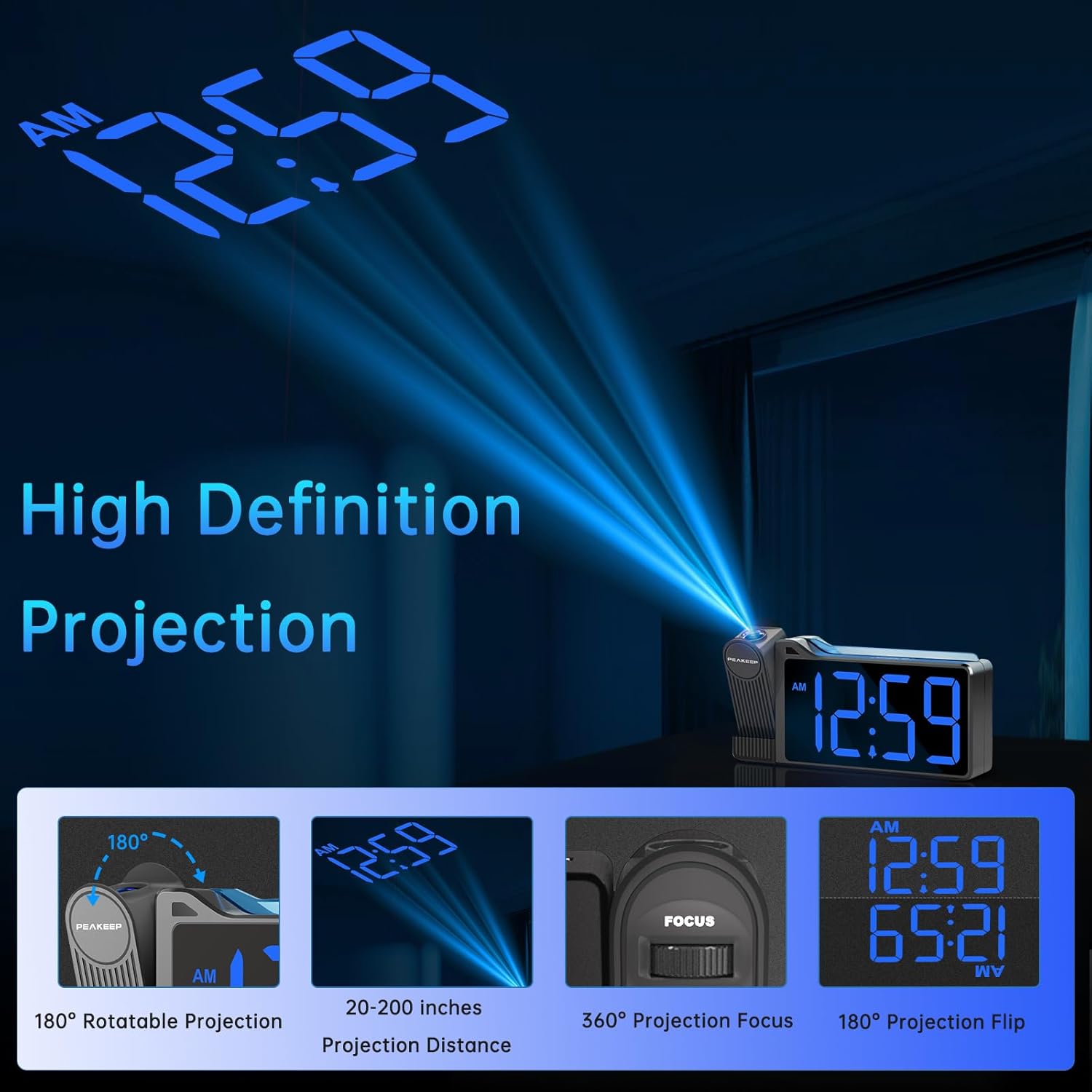
Figure 6.2: High Definition Projection capabilities.
- 180° Rotatable Projection: The projector arm can be rotated 180 degrees to project the time onto a ceiling or wall.
- Jarak Unjuran: The optimal projection distance ranges from 20 inches to 200 inches.
- Adjusting Projection Brightness: Tekan ke DIMMER unjuran button repeatedly to cycle through 5 brightness levels (L01 to L05) for the projected time.
- Projection ON/FLIP/OFF: Tekan ke Unjuran HIDUP/FLIP/MATI button to turn the projection on, flip its orientation (180 degrees), or turn it off.
- Pelarasan Fokus: Gunakan FOKUS wheel on the side of the projector to sharpen the clarity of the projected time.

Figure 6.3: Adjustable Projection Brightness levels.
6.5 Lampu Malam Berwarna-warni
The clock features an RGB color-changing nightlight on its top surface. Press the NIGHTLIGHT ON/OFF button to turn the nightlight on or off. When on, it will cycle through various colors, providing a soothing ambiance.

Figure 6.4: RGB Color-changing Nightlight.
6.6 Melaraskan Kecerahan Paparan
The main LED display has 6 levels of adjustable brightness (L1 to L5, plus OFF). Press the DIMMER button repeatedly to cycle through these brightness levels to suit your preference and environment.

Figure 6.5: Main display brightness levels.
6.7 Port Pengecasan USB
The clock is equipped with a USB OUT port (5V) on its back, allowing you to charge your smartphone or other USB-powered devices conveniently at your bedside. Simply connect your device's USB charging cable to this port.
7. Penyelenggaraan
- Clean the clock's surface with a soft, dry cloth. Do not use abrasive cleaners or solvents.
- Keep the projection lens clean to ensure clear time projection. Use a soft, lint-free cloth.
- If the clock will not be used for an extended period, remove the backup batteries to prevent leakage.
8. Penyelesaian masalah
| Masalah | Kemungkinan Punca | Penyelesaian |
|---|---|---|
| Clock display is off / Clock not working. | Power adapter not connected or faulty; Power outage. | Ensure the power adapter is securely plugged into the clock and a working outlet. Check power supply. |
| Time/Alarm settings are lost after power disconnection. | No backup batteries installed or batteries are dead. | Install 2 new AAA batteries in the battery compartment. |
| Masa yang diunjurkan kabur atau tidak jelas. | Focus not adjusted; Incorrect projection distance. | Laraskan FOKUS wheel on the projector. Ensure the clock is within the 20-200 inch projection range. |
| Projected time is not visible. | Projection is off or too dim. | Tekan Unjuran HIDUP/FLIP/MATI to turn on. Adjust DIMMER unjuran untuk meningkatkan kecerahan. |
| Alarm is not loud enough. | Alarm volume set too low. | Tekan ke JILID button to increase the alarm volume level (U01-U05). |
| Pengecasan USB lambat atau tidak berfungsi. | Device requires higher charging current; Cable issue. | Ensure your device is compatible with 5V USB charging. Try a different USB cable. Note: This port is for charging, not data transfer. |
9. Spesifikasi
| Ciri | Perincian |
|---|---|
| Nombor Model | MHP6050 |
| Jenis Paparan | LED digital |
| Warna Paparan | Angka Biru |
| Dimensi Produk | 6.9"W x 3.5"H |
| Berat Barang | 8.8 auns |
| Sumber Kuasa | Corded Electric (AC/DC Adapter included) |
| Sandaran Bateri | 2 x bateri AAA (tidak termasuk) |
| Putaran Unjuran | 180° |
| Kecerahan Unjuran | 5 peringkat |
| Kecerahan Paparan | 6 levels (including OFF) |
| Lampu malam | RGB Color-changing |
| Julat Kelantangan Penggera | 60-108 dB (5 levels) |
| Output USB | 5V (for charging devices) |
| bahan | plastik |
10. Waranti dan Sokongan
Peakeep products are manufactured with high-quality materials and craftsmanship. For any questions, technical support, or warranty claims, please contact Peakeep customer service through the retailer's platform or the official Peakeep webtapak. Sila simpan bukti pembelian anda untuk tujuan waranti.


