1. Pengenalan
Thank you for choosing the TREBLAB HD-360 Pro Ultra High-Tech Bluetooth Speaker. This manual provides essential information for setting up, operating, and maintaining your speaker to ensure optimal performance and longevity. The HD-360 Pro delivers immersive 360° surround sound with a 90W high-powered 5-driver system, subwoofer, and 8 bass radiators, designed for home, party, and outdoor use.
2. Apa yang ada di dalam Kotak
- TREBLAB HD-360 Pro Speaker
- Kabel Pengecas USB-C
- Kabel AUX 3.5mm
- Panduan Mula Pantas
- Kad Waranti
3. Produk Lebihview
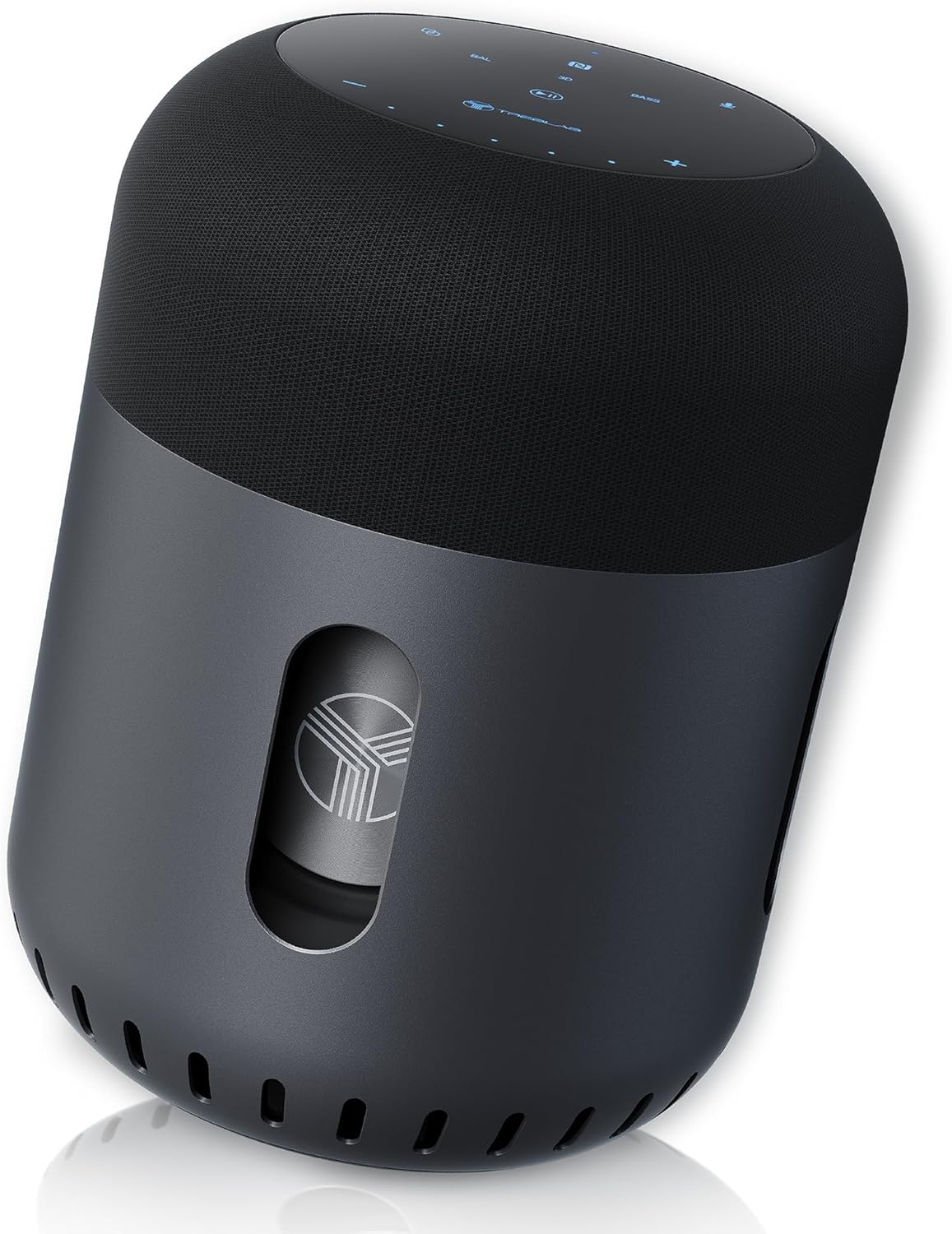
Depan view of the TREBLAB HD-360 Pro speaker, showcasinreka bentuknya yang anggun dan binaannya yang teguh.
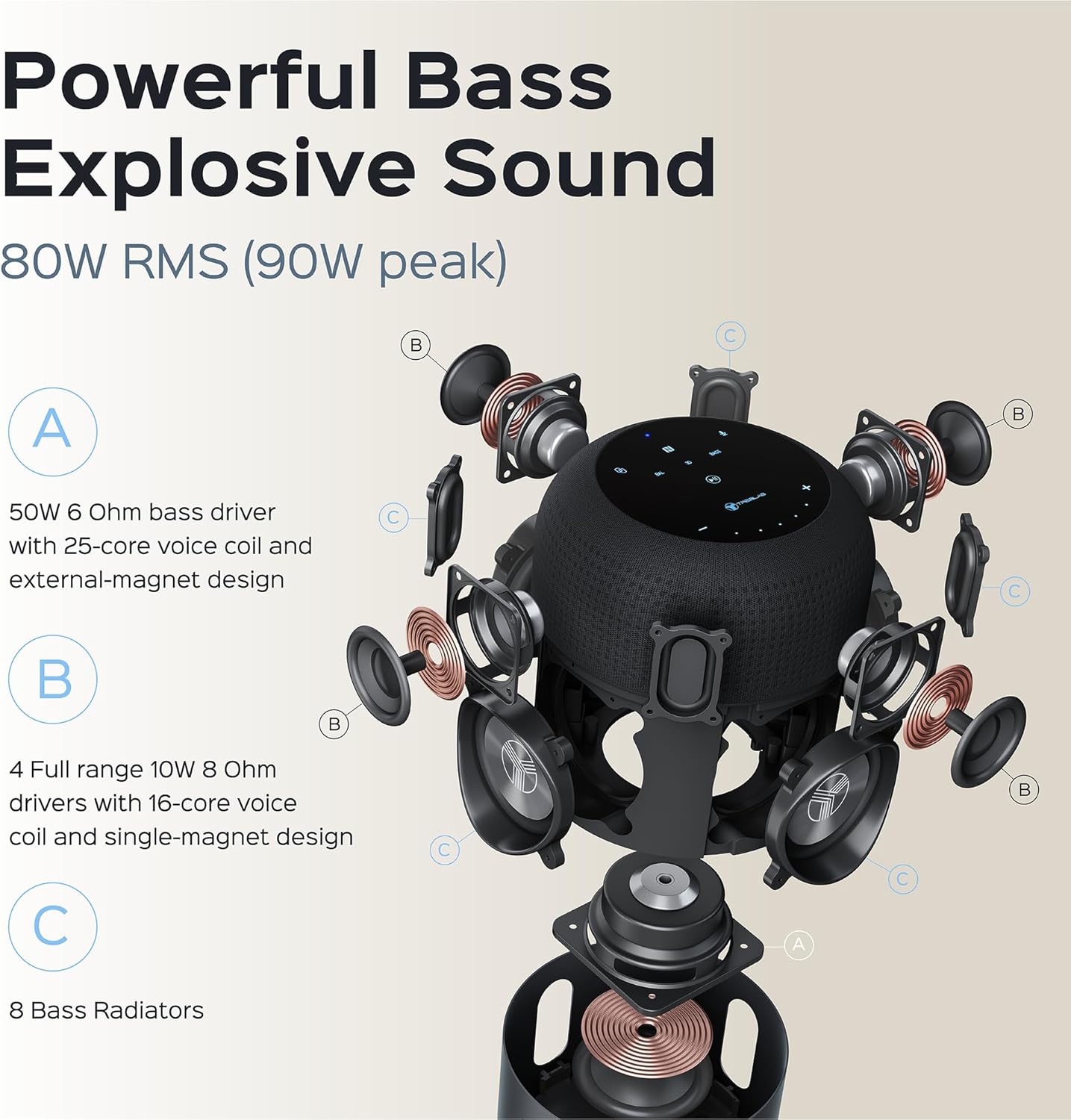
Terperinci meletup view illustrating the 5-driver system, subwoofer, and 8 bass radiators for powerful, explosive sound.
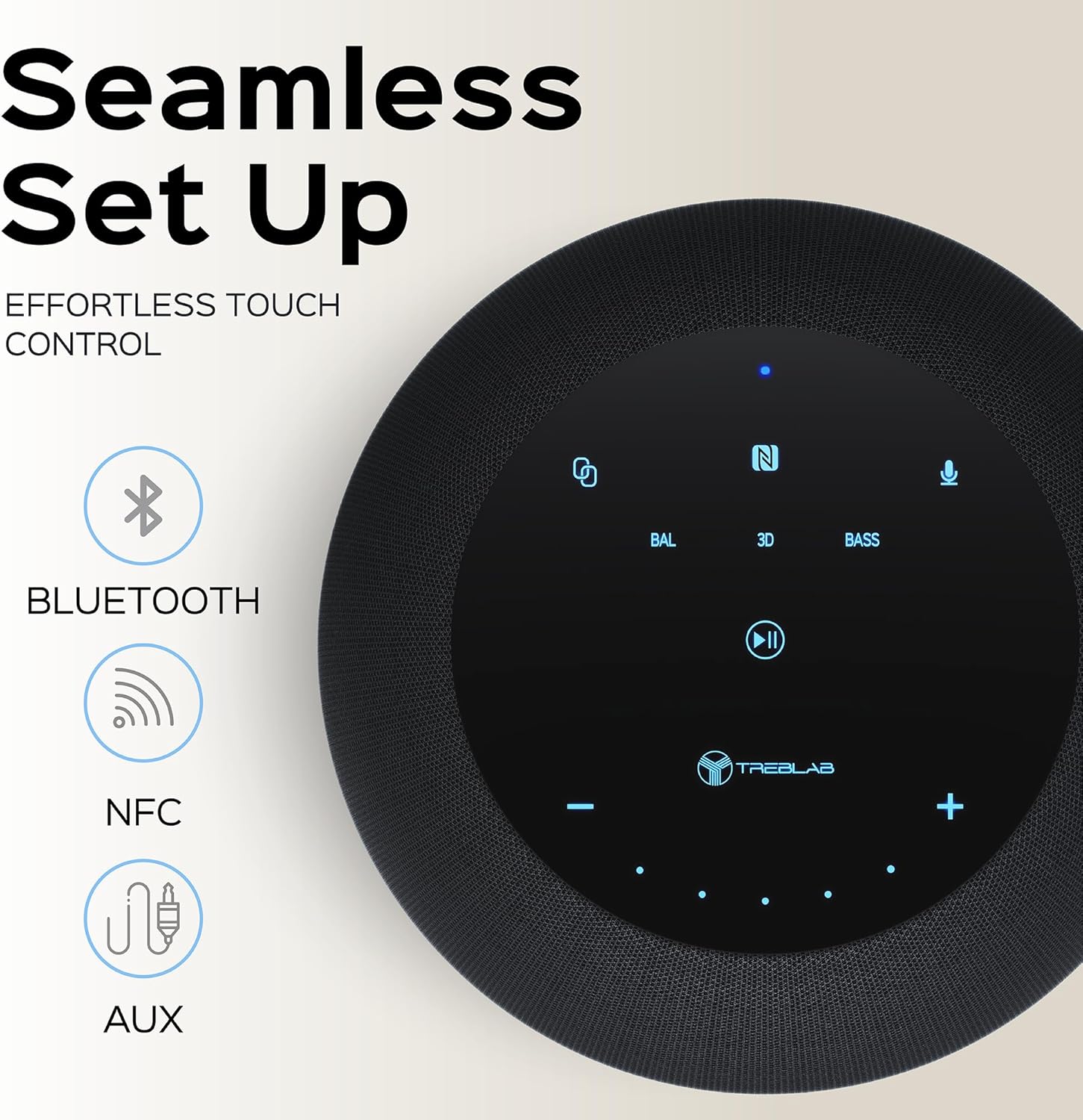
Top panel showing the intuitive touch controls for seamless operation, including Bluetooth, NFC, and AUX input options.

The speaker features an IPX4 waterproof rating, making it resistant to splashes and light rain, suitable for various environments.
4. Persediaan
4.1 Pengecasan Awal
Before first use, fully charge your TREBLAB HD-360 Pro speaker. Connect the provided USB-C charging cable to the speaker's charging port and a compatible USB power adapter (not included). The charging indicator light will show the charging status. A full charge takes approximately 2 hours.
4.2 Menghidupkan/Mematikan
To power on the speaker, press and hold the Power button on the top panel until you hear an audible prompt and the indicator lights illuminate. To power off, press and hold the Power button again until the lights turn off.
5. Arahan Operasi
5.1 Berpasangan Bluetooth
- Ensure the speaker is powered on and in pairing mode (indicated by a blinking blue light).
- Pada peranti anda (telefon pintar, tablet, komputer riba), dayakan Bluetooth.
- Cari untuk available Bluetooth devices and select "TREBLAB HD-360 Pro" from the list.
- Once connected, the indicator light will turn solid blue, and you will hear a confirmation sound.
The speaker supports Bluetooth 5.0 for fast and stable connections up to 34 feet (10 meters).
5.2 Penggandingan Stereo Tanpa Wayar Sebenar (TWS)
For an enhanced stereo experience, you can pair two TREBLAB HD-360 Pro speakers together:
- Pastikan kedua-dua pembesar suara dihidupkan dan tidak disambungkan kepada mana-mana peranti Bluetooth lain.
- On one speaker (this will be the primary speaker), press and hold the TWS button until you hear a prompt.
- The speakers will automatically search for and connect to each other. Once paired, you will hear a confirmation sound, and the indicator lights will synchronize.
- Sambungkan peranti anda kepada pembesar suara utama melalui Bluetooth seperti yang diterangkan dalam bahagian 5.1.

Illustration of two HD-360 Pro speakers connected via TWS for a doubled audio experience.
5.3 Kawalan Sentuhan
The HD-360 Pro features intuitive touch controls on its top panel:
- Kelantangan Naik/Turun: Ketik ikon '+' atau '-'.
- Main/Jeda: Tap the Play/Pause icon.
- Trek Seterusnya / Sebelumnya: Swipe left or right on the touch surface.
- Jawab/Tamatkan Panggilan: Ketik ikon Telefon.
- Aktifkan Pembantu Suara: Tap the Microphone icon.
- Mod Bunyi: Tap 'BAL' for Balanced, '3D' for 3D Surround, or 'BASS' for Bass Boost mode.
5.4 Membuat Panggilan
When connected via Bluetooth, the speaker's built-in microphone allows you to make and receive calls hands-free. Use the Phone icon on the touch panel to manage calls.
6. Mengecas
The TREBLAB HD-360 Pro is equipped with a 15600 mAh battery, providing up to 22 hours of playtime on a single charge. To charge, use the included USB-C cable. The speaker can be used while charging.

jarak dekat view of the USB-C charging port and AUX input, protected by a rubber flap.
7. Penyelenggaraan & Penjagaan
- Pembersihan: Lap pembesar suara dengan kain lembut dan kering. Jangan gunakan pembersih atau pelarut yang kasar.
- Tahan Air: The speaker has an IPX4 rating, meaning it is splash-proof. Do not submerge the speaker in water. Ensure the charging port cover is securely closed when near water.
- Storan: Simpan pembesar suara di tempat yang sejuk dan kering, jauh daripada suhu ekstrem dan cahaya matahari langsung.
8. Penyelesaian masalah
| Masalah | Kemungkinan Punca | Penyelesaian |
|---|---|---|
| Speaker tidak dihidupkan | Bateri lemah; Butang kuasa tidak dipegang cukup lama | Charge the speaker; Press and hold Power button for 3-5 seconds |
| Tidak boleh berpasangan melalui Bluetooth | Speaker not in pairing mode; Device Bluetooth off; Speaker already connected to another device | Ensure speaker is blinking blue; Turn on device Bluetooth; Disconnect from other devices |
| Tiada bunyi | Kelantangan terlalu rendah; Sumber input yang salah; Peranti tidak disambungkan | Increase volume on speaker and device; Check Bluetooth connection; Ensure AUX cable is fully inserted |
| Gandingan TWS gagal | Speakers too far apart; One speaker already paired to a device | Place speakers closer; Ensure both speakers are disconnected from other devices before TWS pairing |
9. Spesifikasi
| Ciri | Perincian |
|---|---|
| Nama Model | HD-360-Pro |
| Jenis Pembesar Suara | Subwoofer, Portable Bluetooth Speaker |
| Kuasa Keluaran | 90 Watts (Peak) / 80W RMS |
| Teknologi Ketersambungan | Bluetooth 5.0, AUX, NFC |
| Julat Tanpa Wayar | Sehingga 33 kaki (10 meter) |
| Hayat Bateri | Sehingga 22 Jam |
| Kapasiti Bateri | 15600 Miliamp jam |
| Masa Mengecas | 2 Hours (USB-C Fast Charging) |
| Tahan Air | IPX4 (kalis percikan) |
| bahan | Metal (Aluminum), ABS, Fabric |
| Dimensi (D x W x H) | 5.79"D x 7.68"W x 5.79"H |
| Berat Barang | 5.2 paun (2.36 kg) |
| Mikrofon | 4 (for calls) |
| Saluran Bunyi Sekeliling | 3.0 |
10. Maklumat Keselamatan
- Jangan dedahkan pembesar suara kepada suhu yang melampau, cahaya matahari langsung atau kelembapan yang tinggi.
- Elakkan daripada menjatuhkan atau menundukkan pembesar suara kepada impak yang kuat.
- Jauhkan daripada kanak-kanak.
- Jangan cuba membuka atau mengubah suai pembesar suara. Ini akan membatalkan jaminan dan boleh menyebabkan kerosakan.
- Gunakan hanya kabel pengecasan yang disediakan.
- Lupuskan bateri secara bertanggungjawab mengikut peraturan tempatan.
11. Waranti dan Sokongan
The TREBLAB HD-360 Pro comes with a limited warranty. Please refer to the included Warranty Card for details regarding coverage and terms. For technical support, troubleshooting assistance, or warranty claims, please visit the official TREBLAB webtapak atau hubungi perkhidmatan pelanggan mereka.
You can also find the full User Manual in PDF format di sini.
Visit the TREBLAB Store for more products and information: TREBLAB Official Store


