1. Pengenalan
Welcome to the user manual for your new BOOX Tablet Go 10.3. This ePaper E Ink tablet is designed to provide a comfortable and efficient digital experience for reading, writing, and productivity. With its 10.3-inch HD Carta 1200 glass screen and 300 PPI resolution, it offers a paper-like display that is gentle on the eyes. This manual will guide you through the setup, operation, maintenance, and troubleshooting of your device.
The BOOX Tablet Go 10.3 features a 2.4Ghz Octa-core CPU, 4GB RAM, and 64GB ROM, ensuring smooth performance for various tasks. It supports Wi-Fi and Bluetooth 5.0 connectivity, and runs on Android 12, allowing for the installation of third-party applications. Its ultra-thin design (4.6mm) and lightweight build (approx. 375g) make it highly portable for everyday use.
2. Apa yang ada di dalam Kotak
Upon unboxing your BOOX Tablet Go 10.3, please ensure all the following items are present:
- BOOX Tablet Go 10.3 Device
- BOOX Stylus

Image: The BOOX Tablet Go 10.3 with its accompanying stylus, displaying a daily schedule on its screen.
3. Panduan Persediaan
3.1 Kuasa Awal Hidup
- Press and hold the Power Button located on the side of the device until the BOOX logo appears.
- Ikut gesaan pada skrin untuk memilih bahasa dan wilayah anda.
3.2 Menyambung ke Wi-Fi
- Dari skrin utama, ketik ikon 'Tetapan'.
- Navigate to 'Network & Internet' and select 'Wi-Fi'.
- Toggle Wi-Fi to 'On' and select your preferred network from the list.
- Masukkan kata laluan Wi-Fi jika diminta dan ketik 'Sambung'.
3.3 Persediaan Gedung Google Play
Your BOOX Tablet Go 10.3 comes with the Google Play Store pre-installed, allowing you to download a wide range of applications.
- Cari dan ketik ikon 'Play Store' pada skrin utama atau laci aplikasi anda.
- Sign in with your Google account. If you don't have one, you can create one.
- Once signed in, you can browse and download apps like Kindle, Libby, OneNote, and more.
4. Arahan Operasi
4.1 Navigasi Asas
The BOOX Tablet Go 10.3 features a responsive touch screen for intuitive navigation. Swipe left or right to move between pages, tap icons to open applications, and use gestures for various functions.
4.2 Note-Taking Features
The device offers an exceptional note-taking experience with its included stylus and paper-like feel. The Notes app provides various tools to enhance your creativity and productivity.
- Stylus Interaction: The BOOX stylus provides 4,096 levels of pressure sensitivity, allowing for precise and natural writing and drawing.
- templat: Utilize numerous pre-installed templates for different purposes, such as daily schedules, meeting notes, or creative sketches. You can also import custom templates.
- Art Tools: Ignite your creativity with a variety of brushes and lines. The Smart Scribe feature helps you effortlessly create precise shapes and straight lines.
- Alat Laso: Easily select, move, and organize your notes or drawings using the Free Lasso or Smart Lasso tools.
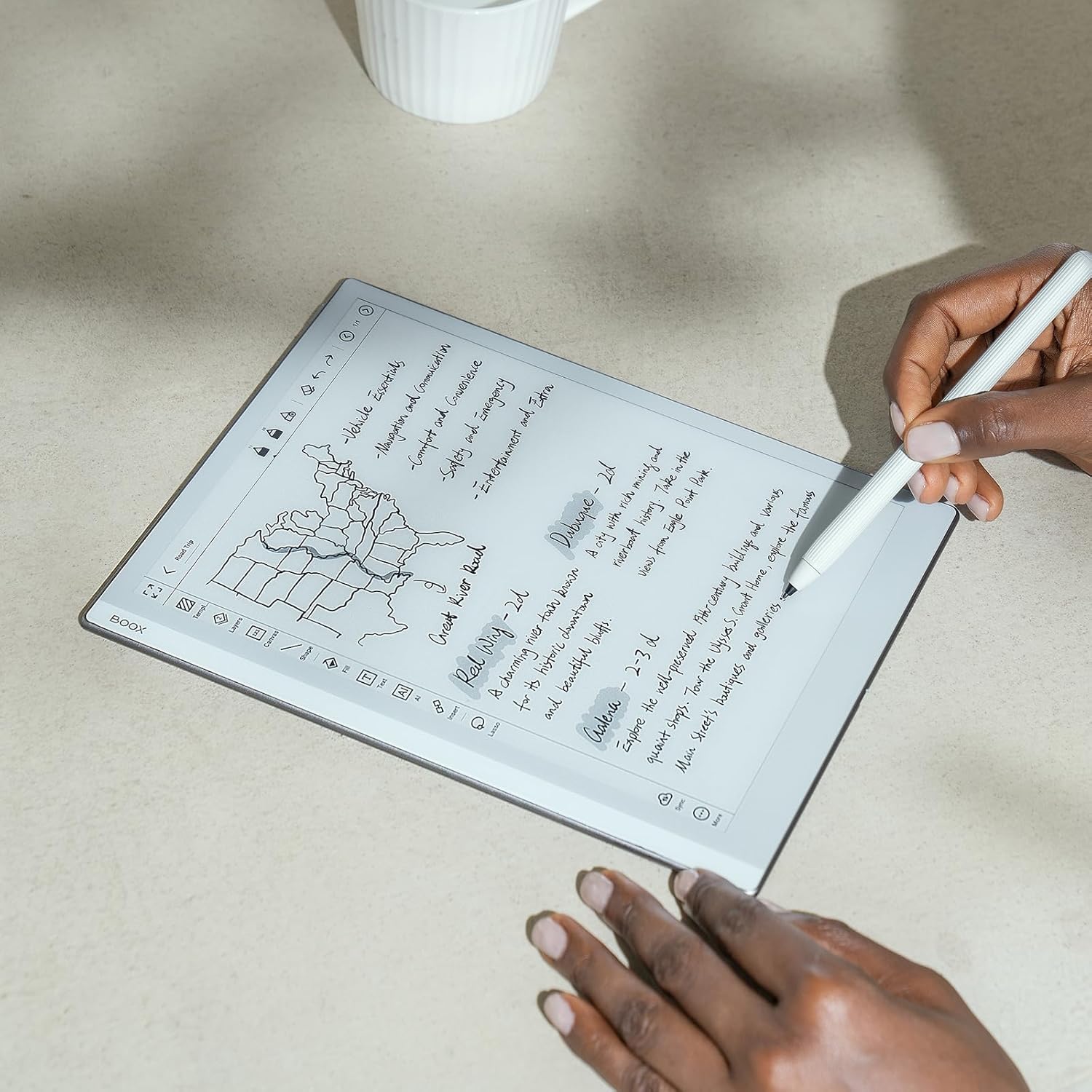
Image: A user's hands writing notes on the BOOX Tablet Go 10.3, demonstrating the natural writing experience.

Image: A user's hands drawing a detailed sketch on the BOOX Tablet Go 10.3, showcasing its artistic capabilities.
Video: Demonstrates the pen-to-paper writing feel on the BOOX Tablet Go 10.3, highlighting its responsiveness and precision.
4.3 Pengalaman Membaca
The BOOX Tablet Go 10.3 is optimized for an immersive and comfortable reading experience, especially with its E Ink display that mimics real paper.
- NeoReader: The built-in NeoReader app supports a wide range of document formats including PDF, EPUB, MOBI, and more.
- Paparan Mesra Mata: The Carta 1200 screen with 300 PPI offers crisp, clear text without the need for a front light, making it ideal for reading in natural light conditions and reducing eye strain.
- Mod Gelap: Customize your reading experience by enabling dark mode for a more flexible and concentrated view, especially in low-light environments (when external light is available).
- Auto-Putaran: The device features a G-sensor for auto-rotation, ensuring the display is always in the correct orientation regardless of how you hold it.

Image: The BOOX Tablet Go 10.3 displaying its library interface, showcasing various e-books.

Image: The BOOX Tablet Go 10.3 displaying a PDF document, demonstrating its ability to render complex layouts.
Video: Highlights the lightweight ePaper design of the BOOX Go Series, emphasizing its portability and ease of use for everyday tasks.
Video: Showcases the ultra-thin design and paper-like weight of the BOOX Go 10.3, making it comfortable to hold for extended periods.
4.4 File Pengurusan dan Perkongsian
The device allows for easy management and sharing of your content.
- Onyx Cloud: Upload your notes and documents to the free Onyx Cloud for secure backup and access across devices.
- Pilihan Perkongsian: Share your ideas and content through email or other third-party applications installed from the Google Play Store.
5. Penyelenggaraan dan Penjagaan
5.1 Membersihkan Skrin
To maintain optimal screen clarity, gently wipe the screen with a soft, lint-free cloth. For stubborn smudges, slightly dampbersihkan kain dengan air atau pembersih skrin yang direka khas untuk elektronik. Elakkan menggunakan bahan kimia yang keras atau bahan yang melelas.
5.2 Pengoptimuman Hayat Bateri
The BOOX Tablet Go 10.3 is equipped with a 3,700mAh Li-ion Polymer battery. To maximize battery life:
- Reduce screen refresh rate if not needed for dynamic content.
- Matikan Wi-Fi dan Bluetooth apabila tidak digunakan.
- Close background applications that are not actively being used.
- Elakkan suhu yang melampau, kerana ia boleh menjejaskan prestasi bateri.
6. Penyelesaian masalah
6.1 Isu dan Penyelesaian Biasa
- Peranti Tidak Dihidupkan: Ensure the device is charged. Connect it to a power source and try powering it on after a few minutes. If the issue persists, perform a hard reset by holding the power button for 10-15 seconds.
- Skrin Tidak Membalas: If the screen is unresponsive, try restarting the device. If the problem continues, ensure the screen is clean and free of debris.
- Stylus Tidak Berfungsi: Check if the stylus tip is worn out and needs replacement. Ensure there are no magnets near the screen, as they can interfere with stylus functionality.
- Apl Ranap/Pembekuan: Close and reopen the app. Clear the app's cache in 'Settings > Apps'. If the issue persists, consider reinstalling the app.
- Isu Kesambungan Wi-Fi: Restart your Wi-Fi router. Forget the network on your device and reconnect. Ensure you are within range of the Wi-Fi signal.
7. Spesifikasi Teknikal
| Ciri | Spesifikasi |
|---|---|
| Skrin | 10.3" HD Carta 1200 glass screen with flat cover-lens |
| Resolusi | 2480x1860 (300 ppi) B/W |
| Sentuh | Sentuhan stylus BOOX (4,096 tahap kepekaan tekanan) + sentuhan kapasitif |
| CPU | 2.4Ghz Octa-core |
| RAM | 4GB |
| ROM | 64GB |
| Ketersambungan | Wi-Fi (2.4GHz + 5GHz) + BT 5.0 |
| G-sensor | For Auto Rotation |
| Lampu Depan | No Front Light |
| Sistem Operasi | Android 12 |
| Format Dokumen | PDF, CAJ, DJVU, CBR, CBZ, EPUB, AZW3, MOBI, TXT, DOC, DOCX, FB2, CHM, RTF, HTML, ZIP, PRC, PPT, PPTX, EPUB3 |
| Format Imej | PNG, JPG, BMP, TIFF |
| Format Audio | WAV, MP3 |
| Butang | Butang Kuasa |
| Pelabuhan | USB-C (Menyokong OTG atau bicu audio) |
| Audio | Pembesar Suara Dwi Terbina Dalam, Mikrofon Terbina Dalam |
| Bateri | Polimer Li-ion 3,700mAh |
| Dimensi | 235*183*4.6mm (9.3" x 7.2" x 0.18") |
| Berat badan | Lebih kurang 375g (13.2oz) |
8. Waranti dan Sokongan
BOOX products are designed for durability and performance. For information regarding your product's warranty, please refer to the warranty card included in your product packaging or visit the official BOOX website. The manufacturer typically provides firmware updates and cloud storage for registered users.
For technical support, troubleshooting assistance, or any inquiries about your BOOX Tablet Go 10.3, please contact BOOX customer service through their official website or the support channels provided in your product documentation. Keep your purchase receipt handy for warranty claims.