pengenalan
This manual provides detailed instructions for the safe and efficient operation, maintenance, and troubleshooting of your LEVOIT 36" Bladeless Tower Fan and LEVOIT Core Mini-P Air Purifier. Please read this manual thoroughly before use and retain it for future reference.
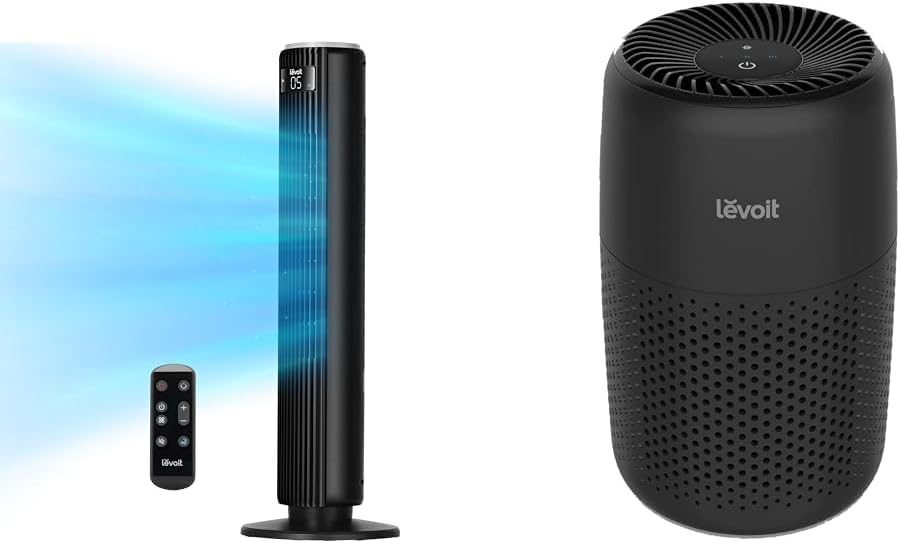
Image: The LEVOIT 36-inch Bladeless Tower Fan and the LEVOIT Core Mini-P Air Purifier shown together, highlighting their compact and modern design.
Maklumat Keselamatan Penting
Untuk mengurangkan risiko kebakaran, renjatan elektrik atau kecederaan, sila patuhi langkah berjaga-jaga keselamatan berikut:
- Sentiasa cabut plag perkakas sebelum membersihkan atau melakukan sebarang penyelenggaraan.
- Jangan kendalikan mana-mana kipas dengan kord atau palam yang rosak. Buang kipas atau kembalikan ke kemudahan servis yang dibenarkan untuk pemeriksaan dan/atau pembaikan.
- Jangan gunakan tali di bawah permaidani. Jangan tutup tali dengan permaidani lempar, pelari, atau penutup yang serupa. Susun kord jauh dari kawasan lalu lintas dan di mana ia tidak akan tersandung.
- Do not insert or allow fingers or foreign objects to enter any ventilation or exhaust opening as this may cause an electric shock or damage the appliance.
- Jangan menghalang kemasukan udara atau ekzos dengan cara apa pun.
- Gunakan perkakas ini hanya seperti yang diterangkan dalam manual ini. Sebarang penggunaan lain yang tidak disyorkan oleh pengilang boleh menyebabkan kebakaran, kejutan elektrik atau kecederaan kepada orang.
- Jangan gunakan di luar rumah.
- Perkakas ini mempunyai palam terkutub (satu bilah lebih lebar daripada yang lain). Untuk mengurangkan risiko kejutan elektrik, palam ini bertujuan untuk dimuatkan dalam alur keluar terkutub hanya satu arah. Jika palam tidak muat sepenuhnya di dalam alur keluar, undurkan palam. Jika masih tidak muat, hubungi juruelektrik bertauliah. Jangan cuba untuk mengalahkan ciri keselamatan ini.
Kandungan Pakej
- LEVOIT 36" Bladeless Tower Fan
- Alat kawalan jauh untuk Kipas Menara
- LEVOIT Core Mini-P Air Purifier
- 3-in-1 Filtration Filter (Pre-installed in Air Purifier)
- Aroma Pad (Pre-installed in Air Purifier)
- Power Adapter for Air Purifier
- Manual Pengguna
Produk Selesaiview
LEVOIT 36" Bladeless Tower Fan

Image: The LEVOIT 36-inch Bladeless Tower Fan standing upright with its remote control. Blue lines illustrate the powerful airflow emanating from the fan's vertical vent.
The tower fan features a sleek, bladeless design for safety and easy cleaning. It includes a digital display on top, indicating settings such as speed and timer. The base provides stability, and the unit comes with a remote control for convenient operation.
LEVOIT Core Mini-P Air Purifier

Imej: Dari dekat view of the LEVOIT Core Mini-P Air Purifier. It is a compact, cylindrical device with a matte black finish and perforated sides for air intake, featuring control buttons on its top surface.
The Core Mini-P Air Purifier is a compact, cylindrical device designed for small to medium-sized rooms. It features a 3-stage filtration system and a fragrance sponge for aromatherapy. Control buttons are located on the top panel.
Persediaan
Setting up the Tower Fan
- Carefully remove the tower fan from its packaging.
- Ensure the base is securely attached. If not, align the base with the fan body and twist clockwise until it locks into place.
- Letakkan kipas di atas permukaan yang kukuh dan rata.
- Palamkan kord kuasa ke soket elektrik standard.
Menyiapkan Pembersih Udara
- Keluarkan penulen udara daripada pembungkusannya.
- Turn the air purifier upside down and twist the base cover counter-clockwise to unlock and remove it.
- Remove the plastic packaging from the 3-in-1 filtration filter.
- Place the filter back into the air purifier, ensuring it is seated correctly.
- Replace the base cover and twist clockwise to lock it.
- Connect the power adapter to the air purifier and then plug it into a standard electrical outlet.
- To use the aromatherapy feature, add 2-3 drops of essential oil (not included) onto the aroma pad located at the bottom of the air purifier.
Arahan Operasi
Mengendalikan Kipas Menara
The tower fan can be operated using the control panel on top of the unit or the included remote control.
- Butang Kuasa: Tekan untuk menghidupkan atau mematikan kipas.
- Butang Mod: Cycle through 4 modes: Normal, Turbo, Sleep, and Auto.
- Mod Biasa: Aliran udara malar pada kelajuan yang dipilih.
- Mod Turbo: Maximum airflow for quick cooling.
- Mod tidur: Gradually decreases fan speed for quiet operation.
- Mod Auto: Adjusts fan speed based on ambient room temperature (detected by smart sensors).
- Pelarasan Kelajuan: Use the '+' and '-' buttons to select from 5 speed settings.
- Butang ayunan: Press to activate or deactivate 90° oscillation, allowing the fan to sweep air across a wider area.
- Butang Pemasa: Set the fan to automatically turn off after a specified period (up to 12 hours). Each press adds 1 hour.
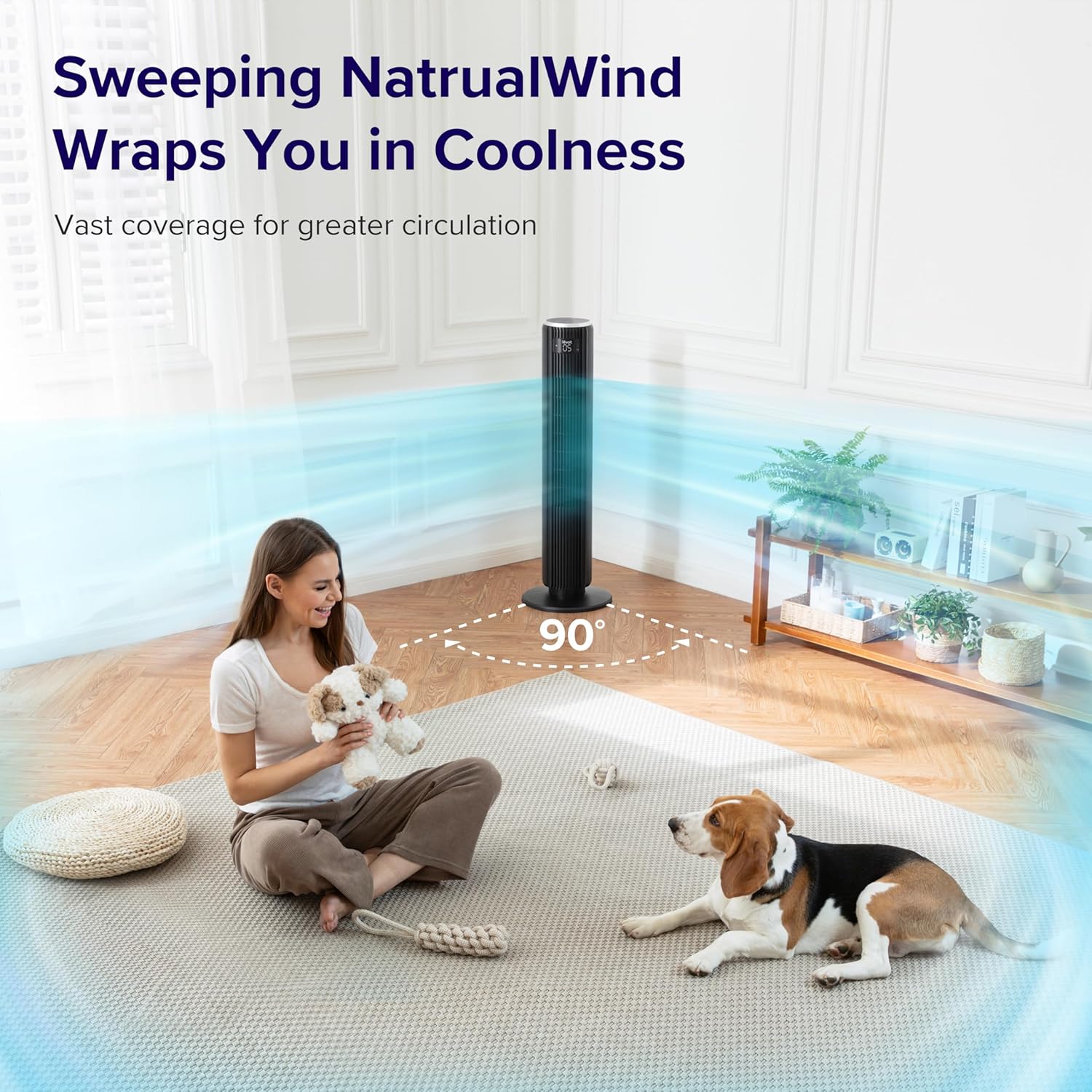
Image: The LEVOIT 36-inch Bladeless Tower Fan is shown oscillating 90 degrees, indicated by blue airflow lines covering a wide area in a living room setting. A person and a dog are comfortably within the fan's cooling range.

Image: The LEVOIT 36-inch Bladeless Tower Fan is positioned in a bedroom, emitting a gentle, natural-feeling breeze, illustrated by light blue airflow lines. A person is meditating peacefully in the background, emphasizing the fan's quiet operation and comfortable airflow.
Mengendalikan Penapis Udara
The air purifier is controlled via the touch buttons on its top panel.
- Butang Kuasa: Tekan untuk menghidupkan atau mematikan penulen udara.
- Butang Kelajuan Kipas: Cycle through 3 quiet fan speeds (Low, Medium, High).
- Aroma Feature: The aroma pad allows for the diffusion of essential oils. Add 2-3 drops of essential oil to the pad located at the bottom of the unit. The fan will then circulate the scent.

Image: The LEVOIT Core Mini-P Air Purifier is shown on a nightstand in a bedroom, with a mother and child in the background. Text overlays emphasize "Multi-Layered Protection" including Pre-Filter, Efficient Filter, and Activated Carbon Filter, illustrating its air purification capabilities.

Image: The LEVOIT Core Mini-P Air Purifier is placed on a table in a living room. A hand is shown adding essential oil drops to the aroma pad, demonstrating the "Refresh With Fragrance" feature for destressing and staying focused.
Penyelenggaraan
Membersihkan Kipas Menara
- Sentiasa cabut plag kipas sebelum membersihkan.
- Gunakan yang lembut, damp kain untuk mengelap permukaan luar kipas.
- Jangan gunakan pembersih atau pelarut yang melelas.
- For dust accumulation in the air inlet/outlet, use a vacuum cleaner with a brush attachment to gently remove dust.
Cleaning and Filter Replacement for Air Purifier
- Unplug the air purifier before cleaning or replacing the filter.
- Lap bahagian luar dengan kain lembut dan kering.
- The 3-in-1 filtration filter should be replaced every 6-8 months, or sooner depending on air quality and usage.
- Untuk menggantikan penapis:
- Turn the air purifier upside down and twist the base cover counter-clockwise to unlock.
- Keluarkan penapis lama dan buang dengan betul.
- Insert a new LEVOIT Core Mini-P replacement filter (ensure plastic packaging is removed).
- Replace the base cover and twist clockwise to lock.
- Clean the aroma pad as needed with a damp cloth and allow it to dry completely before reapplying essential oils.
Menyelesaikan masalah
| Masalah | Kemungkinan Punca | Penyelesaian |
|---|---|---|
| Fan/Purifier does not turn on. | Tidak dipasang; soket kuasa tidak berfungsi; butang kuasa tidak ditekan. | Ensure unit is securely plugged in. Test outlet with another device. Press the power button firmly. |
| Weak airflow from fan. | Fan speed too low; air inlet/outlet blocked. | Increase fan speed. Check for obstructions and clean air inlets/outlets. |
| Air purifier not effectively cleaning air. | Filter is dirty or expired; plastic packaging not removed from filter. | Replace the filter. Ensure all plastic packaging is removed from the new filter before installation. |
| Kipas bising. | Unit not on a level surface; internal obstruction. | Place the fan on a flat, stable surface. Check for any foreign objects inside the fan. |
| Alat kawalan jauh tidak berfungsi. | Batteries are dead or incorrectly inserted; remote too far from fan. | Replace batteries. Ensure correct polarity. Use remote within range and point towards the fan's receiver. |
Spesifikasi
LEVOIT 36" Bladeless Tower Fan
- model: 5ddce951-f1e5-4fc2-b790-0e25bd06f240
- Sumber Kuasa: Elektrik Bertali
- Kapasiti Aliran Udara: 1062 Kaki Kubik Seminit (CFM)
- Kelajuan Udara: Sehingga 25 kaki/s
- Pengayun: 90°
- Tahap Bunyi: Serendah 28dB
- Mod: Normal, Turbo, Sleep, Auto
- Kelajuan: 5
- Pemasa: 1-12 jam
- Kaedah Kawalan: Jauh, Panel Sentuh
- Ciri Khas: Bladeless, Temperature Sensor
LEVOIT Core Mini-P Air Purifier
- model: Core Mini-P (part of bundle)
- Penapisan: 3-in-1 (Pre-Filter, Efficient Filter, Activated Carbon Filter)
- Kawasan Liputan: Sehingga 129 kaki²
- Tahap Bunyi: 25-44dB
- Kelajuan: 3
- Ciri Khas: Fragrance Sponge for Aromatherapy, Portable
Waranti dan Sokongan
LEVOIT provides a limited warranty for this product. For detailed warranty information, including duration and coverage, please refer to the warranty card included in your product packaging or visit the official LEVOIT webtapak.
For technical support, troubleshooting assistance, or to inquire about replacement parts (such as air purifier filters), please contact LEVOIT Customer Support:
- Webtapak: www.levoit.com
- e-mel: sokongan@levoit.com
- telefon: (Refer to LEVOIT weblaman web untuk nombor telefon serantau)
Please have your model number (5ddce951-f1e5-4fc2-b790-0e25bd06f240) and purchase information ready when contacting support.


