1. Pengenalan
Thank you for choosing the VOLT PLUS TECH Dual USB-C + MicroUSB Switch Cable. This versatile cable is designed to provide efficient charging and high-speed data transfer for a wide range of devices, featuring both Micro USB and USB-C connectors. This manual provides essential information for setup, operation, maintenance, and troubleshooting to ensure optimal performance of your cable.
2. Ciri-ciri Utama
- Keserasian Universal: Equipped with both Micro USB and USB-C connectors, ensuring compatibility with a vast majority of modern devices.
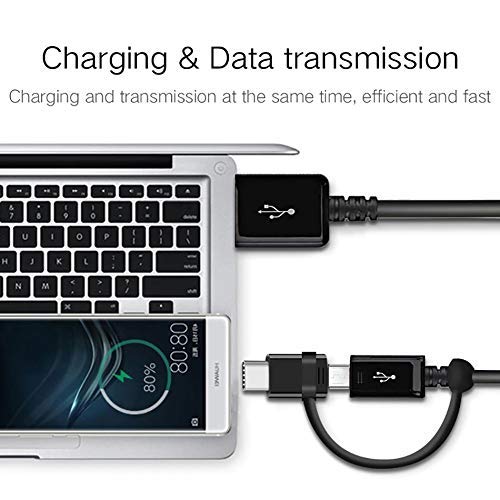
- Dwi Fungsi: Supports both power delivery for charging and high-speed data transmission simultaneously.
- Sokongan Pengecasan Pantas: Engineered to support various fast charging technologies, including Quick Charge (QC 3.0/2.0/1.0) and Power Delivery (PD) up to 25W, for compatible devices.
- Pemindahan Data Berkelajuan Tinggi: Utilizes USB 3.1 technology for rapid data synchronization between your device and computer.
- Pembinaan Tahan Lama: Built with premium materials and advanced engineering for enhanced durability and a long lifespan, designed to withstand daily use.
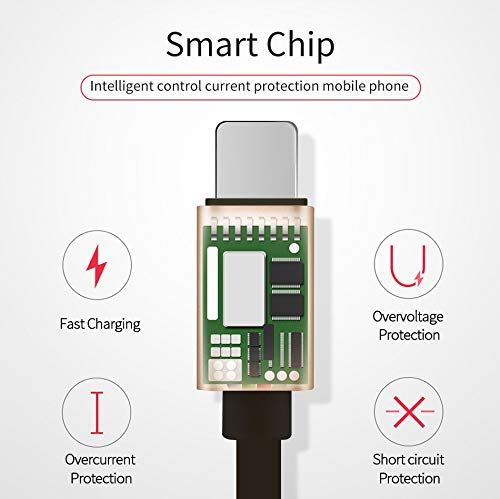
- Integrated Smart Chip: Features an intelligent circuit system for automatic device recognition and protection against overcharging, overcurrent, overvoltage, dan litar pintas.

3. Arahan Persediaan
Follow these steps to connect your VOLT PLUS TECH Dual USB-C + MicroUSB Switch Cable:
- Kenal pasti Penyambung Peranti: Determine whether your device requires a Micro USB or a USB-C connection. The cable features a switch tip design where the USB-C connector attaches over the Micro USB connector.
- Sambung ke Peranti: Gently insert the appropriate connector (Micro USB or USB-C) into your device's charging/data port. Ensure a secure fit.
- Sambungkan ke Sumber Kuasa atau Komputer: Insert the standard USB-A end of the cable into a compatible USB power adapter for charging, or into a USB port on your computer for both charging and data transfer.

4. Operating the Cable
4.1 Mengecas Peranti Anda
Once connected as described in the Setup section, your device will begin charging. The cable supports fast charging when paired with a compatible fast charger and a device that supports fast charging protocols.
4.2 Pemindahan Data
To transfer data between your device and a computer:
- Connect the USB-A end of the cable to your computer's USB port.
- Connect the appropriate Micro USB or USB-C end to your mobile device.
- Your computer should recognize the connected device. You may need to select a 'File Transfer' or 'MTP' mode on your mobile device if prompted.
- You can now access your device's storage to copy files, photos, or videos. The cable's USB 3.1 support ensures efficient transfer speeds.
5. Penjagaan dan Penyelenggaraan
To ensure the longevity and optimal performance of your cable, please observe the following guidelines:
- Storan: Store the cable in a clean, dry environment away from direct sunlight and extreme temperatures.
- Pengendalian: Elakkan membengkokkan, memusingkan atau menarik kabel secara berlebihan, terutamanya berhampiran penyambung, untuk mengelakkan kerosakan dalaman.
- Pembersihan: Jika perlu, lap kabel dan penyambung perlahan-lahan dengan kain lembut dan kering. Jangan gunakan pembersih cecair atau bahan yang melelas.
- Perlindungan: Jangan dedahkan kabel kepada air atau cecair lain.

6. Penyelesaian masalah
If you encounter issues with your cable, please refer to the following common problems and solutions:
- Peranti Tidak Mengecas:
- Pastikan kedua-dua hujung kabel dipasang dengan kukuh pada peranti dan sumber kuasa.
- Verify that the power adapter or USB port is functional by testing with another cable or device.
- Check your device's charging port for any debris or damage.
- Pengecasan perlahan:
- Confirm that your power adapter supports fast charging (e.g., QC 3.0, PD) and provides sufficient wattage.
- Ensure your device itself is compatible with fast charging technology.
- Isu Pemindahan Data:
- Make sure the cable is firmly connected to both your device and computer.
- On your mobile device, check if you have selected the correct USB connection mode (e.g., 'File Transfer' or 'MTP') when prompted.
- Try connecting the cable to a different USB port on your computer.
7. Spesifikasi
| Jenama | VOLT PLUS TECH |
| Nombor Model | VPT-2074 |
| Jenis Penyambung | USB Mikro, USB Jenis A, USB Jenis C |
| Jenis Kabel | USB Type-C / MicroUSB to USB-A |
| Peranti Serasi | Android, iOS, Mac, Vivo Xplay5 Elite, Windows devices |
| Ciri Khas | Digital IC Chip, Heavy Duty, Lightweight, Multi-Functional, Tangle Free Cord |
| Dimensi Pakej | 2 x 0.3 x 0.3 inci |
| Berat Barang | 1.4 auns |

8. Maklumat Waranti
For detailed warranty information regarding your VOLT PLUS TECH Dual USB-C + MicroUSB Switch Cable, please refer to the documentation included with your purchase or visit the official VOLT PLUS TECH webtapak. Terma dan syarat jaminan mungkin berbeza.
9. Sokongan Pelanggan
If you require further assistance or have questions not covered in this manual, please contact VOLT PLUS TECH customer support through their official website or the retailer from whom you purchased the product. Please have your model number (VPT-2074) and purchase details ready when contacting support.


