pengenalan
This manual provides comprehensive instructions for the setup, operation, and maintenance of your hohem iSteady V3 Gimbal Stabilizer. Please read this manual thoroughly before using the device to ensure proper functionality and to maximize your user experience.
The hohem iSteady V3 is a versatile 3-axis phone gimbal designed to provide stable and smooth video footage. Key features include magnetic AI tracking, a detachable remote control, a built-in extendable rod, an integrated tripod, and a magnetic fill light.
Kandungan Pakej
Sahkan bahawa semua item yang disenaraikan di bawah disertakan dalam pakej anda:
- hohem iSteady V3 Gimbal Stabilizer
- Alat Kawalan Jauh boleh tanggal
- Lampu Isi Magnetik
- Kabel Pengecas USB
- Beg Penyimpanan
- Manual Pengguna

Image: The hohem iSteady V3 Gimbal Stabilizer displayed with its complete set of accessories, including the main gimbal unit, detachable remote control, magnetic fill light, charging cable, and storage pouch.
Produk Selesaiview
Familiarize yourself with the main components of the iSteady V3 Gimbal Stabilizer:
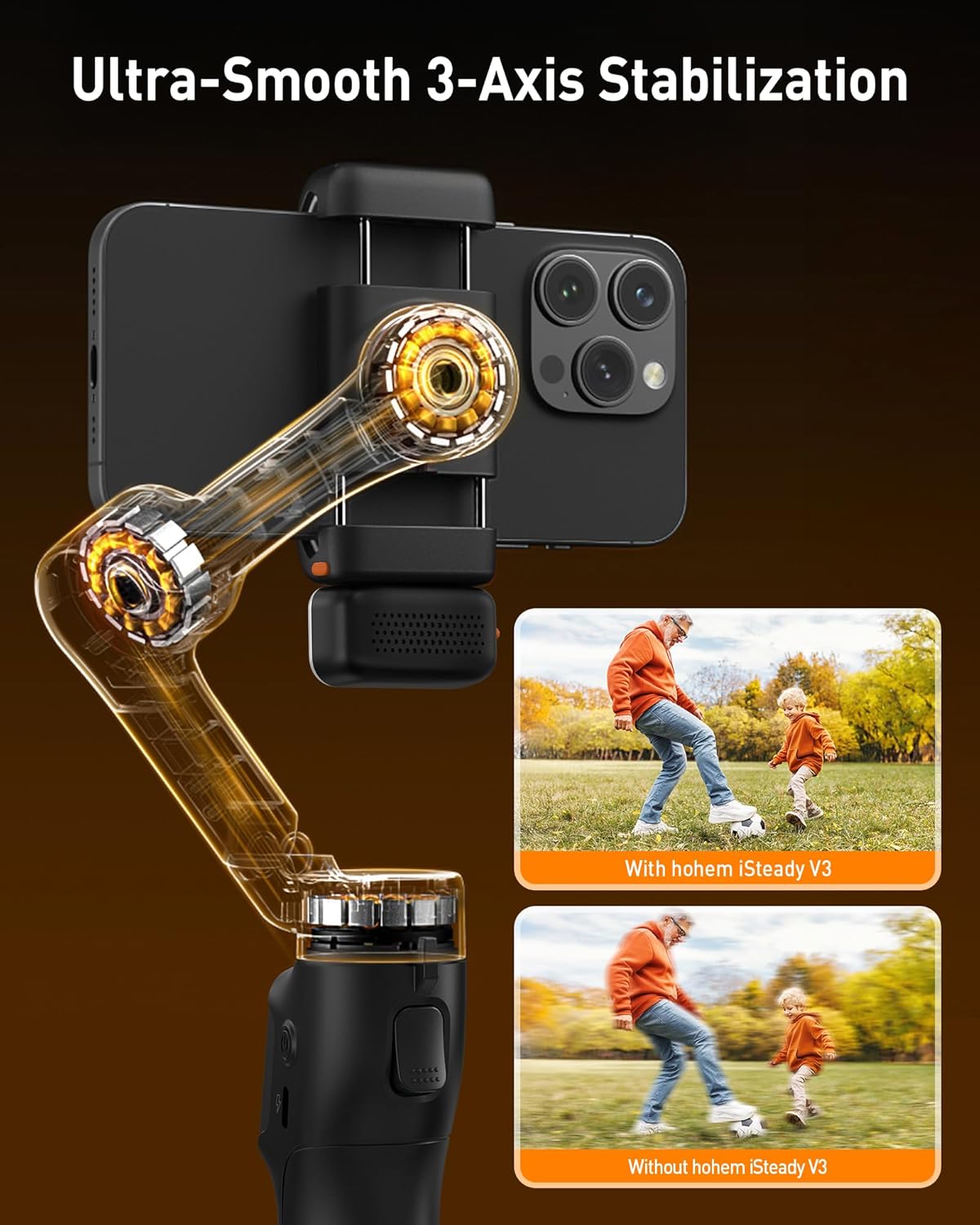
Imej: Dari dekat view of the hohem iSteady V3 Gimbal's mechanical arm, illustrating its 3-axis stabilization system. The image includes comparative examples of footage captured with and without the gimbal, highlighting the enhanced smoothness provided by the iSteady V3.
The gimbal features an advanced iSteady 8.0 anti-shake system, ensuring ultra-smooth footage even during dynamic movements. Its extended roll arm design allows for wide-angle, unobstructed shots by keeping the motor out of the frame.
Persediaan
1. Mengecas Gimbal
Connect the provided USB charging cable to the gimbal's charging port and a standard USB power adapter (not included). The indicator lights will illuminate to show the charging status. A full charge typically takes approximately 2 hours.
2. Attaching the Smartphone
Gently extend the phone clamp and carefully place your smartphone into the clamp, ensuring it is centered and securely held. The gimbal supports smartphones with a width between 2.28 and 3.86 inches.
3. Menghidupkan/Mematikan
To power on the gimbal, press and hold the power button located on the handle for approximately 3 seconds until the indicator lights activate. To power off, press and hold the power button again for 3 seconds.
4. Initial Balancing
Before powering on, ensure your smartphone is balanced. If the phone tilts significantly to one side when placed in the clamp, gently slide it horizontally within the clamp until it remains relatively level. This reduces motor strain and improves stabilization performance.
Mengendalikan Gimbal
1. Magnetic AI Tracking
The iSteady V3 features a magnetic AI tracker that enables app-free face and body tracking. To activate the AI vision sensor, perform the "OK" hand gesture in front of the camera. To deactivate, perform the "palm" hand gesture. The gimbal will automatically follow the detected subject, keeping it in frame.

Image: A smartphone mounted on the hohem iSteady V3 Gimbal, demonstrating the AI tracking feature with a green box highlighting a person's face, indicating active tracking. The image also displays text indicating "AI Face Tracking" and "AI Object Tracking".

Image: A person demonstrating various hand gestures (e.g., thumbs up) used to control the hohem iSteady V3 Gimbal. Accompanying icons illustrate the functions associated with these gestures, such as Start, Stop, Landscape/Portrait mode, Shutter Control, and Custom Composition.
2. Detachable Remote Control
The iSteady V3 includes a detachable remote control for convenient operation. It can be removed from the gimbal handle for remote shooting and magnetically reattached for charging. Use the joystick to control pan and tilt movements, and the dedicated buttons for mode switching and shutter activation.

Image: The hohem iSteady V3 Gimbal in use, showcasing its extendable rod and the detachable remote control. An inset image provides a closer look at the remote control detaching from the gimbal's handle.
3. Built-in Extendable Rod & Tripod
The gimbal features an integrated extendable rod that can extend up to 8 inches, allowing for wider shots, selfies, and unique low-angle perspectives. The built-in tripod provides stable support for stationary shots, time-lapses, or hands-free operation.

Image: The hohem iSteady V3 Gimbal with a smartphone attached, highlighting its built-in extendable rod and integrated tripod. An illustrative inset shows the internal structure of the extendable rod and the tripod legs.
4. Magnetic Fill Light
Attach the magnetic fill light to the gimbal for enhanced illumination in various lighting conditions. The fill light offers cold, warm, and natural light options. Adjust the brightness level from 4% to 100% using the side wheel on the gimbal.

Image: A user holding the hohem iSteady V3 Gimbal with the magnetic fill light activated, demonstrating its effectiveness in a low-light setting. The image also displays icons representing the cold, warm, and natural light modes.
5. Hohem Joy App (Optional)
For access to advanced features, firmware updates, and creative shooting modes, download the "Hohem Joy" app from your smartphone's app store. Connect the gimbal via Bluetooth within the app. Available modes include:
- Panorama: Capture wide-angle panoramic photographs.
- timelapse: Record time-lapse videos by condensing long periods into short clips.
- Pergerakan Perlahan: Capture high-speed actions in slow motion for dramatic effects.
- Moment Templates: Utilize pre-designed cinematic templates to easily create professional-looking videos.
Penyelenggaraan
1. Pembersihan
Regularly wipe the gimbal's surface with a soft, dry, lint-free cloth. Avoid using liquid cleaners, solvents, or abrasive materials, as these can damage the finish or internal components.
2. Penyimpanan
When not in use, store the hohem iSteady V3 in a cool, dry environment, away from direct sunlight, dust, and extreme temperatures. Utilize the provided storage pouch to protect the gimbal from scratches and impacts.

Image: The hohem iSteady V3 Gimbal in its compact, folded configuration, being placed into a side pocket of a backpack, demonstrating its portability and ease of storage.
3. Penjagaan Bateri
To maintain optimal battery health and extend its lifespan, fully charge the gimbal before long-term storage. If the gimbal is not used for an extended period, recharge it every three months to prevent deep discharge.
Menyelesaikan masalah
Gimbal Tidak Dihidupkan
Penyelesaian: Ensure the gimbal's battery is sufficiently charged. Connect the gimbal to a power source using the USB charging cable and allow it to charge for at least 30 minutes before attempting to power it on again.
Gimbal Vibrating or Unstable
Penyelesaian: Verify that the smartphone is properly balanced within the phone clamp. If the issue persists, connect to the Hohem Joy app and perform a gimbal calibration.
AI Tracking Not Working
Penyelesaian: Ensure there is adequate lighting and a clear line of sight to the subject. Confirm that the correct hand gestures ("OK" to start, "palm" to stop) are being performed clearly. If necessary, check the Hohem Joy app for any available firmware updates for the AI module.
Alat Kawalan Jauh Tidak Bertindak Balas
Penyelesaian: Check the battery level of the detachable remote control. If the remote is charged but still unresponsive, try re-pairing it with the gimbal by following the instructions in the Hohem Joy app or the quick start guide.
Spesifikasi
| Ciri | Perincian |
|---|---|
| Jenama | hohem |
| Model | iSteady V3 |
| warna | Hitam |
| Peranti Serasi | iPhone (and other smartphones) |
| Dimensi Produk (Tidak dilipat) | 5"D x 2.56"W x 12.28"H |
| Saiz Dilipat | 3.85" x 1.73" x 6.32" |
| Berat Barang | 420 Gram (0.93 lbs) |
| Muatan Maksimum | 300 Gram (0.66 lbs) |
| Hayat Bateri | Sehingga 13 jam |
| Extendable Rod Length | Sehingga 8 inci |
| Phone Clip Width Range | 2.28 - 3.86 inci |
Waranti dan Sokongan
The hohem iSteady V3 Gimbal Stabilizer comes with a standard manufacturer's warranty. For detailed warranty terms and conditions, please refer to the warranty card included in your package or visit the official hohem webtapak.
For technical assistance, product inquiries, or warranty claims, please contact hohem customer support through their official channels. It is recommended to retain your purchase receipt as proof of purchase for any warranty-related services.
Official hohem Webtapak: www.hohem.com
Seller Support (hohem Direct on Amazon): Link to Seller Profile


