pengenalan
This manual provides detailed instructions for the setup, operation, and maintenance of your ATTACK SHARK X11 Lightweight Wireless Gaming Mouse. Please read this manual thoroughly before using the product to ensure optimal performance and longevity.
Produk Selesaiview
Komponen
- ATTACK SHARK X11 Wireless Gaming Mouse
- Dok Pengecasan RGB
- Kabel USB-C
- Penerima USB 2.4G
Ciri-ciri Utama
- Sambungan Tri-Mod: Supports 2.4G wireless, Bluetooth, and USB-C wired connections.
- PAW3311 Penderia Optik: High-performance sensor with up to 22000 DPI.
- RGB Backlight Charging Dock: Convenient charging with customizable RGB lighting.
- Reka bentuk Ultralight: Weighs approximately 62g for comfortable extended use.
- HUYU Switch & TTC Encoder: Ensures precise clicks and long lifespan (20 million clicks).
- 5 Butang Boleh Aturcara: Customizable via dedicated software.
Gambarajah Produk
Refer to the diagrams below for an overview of the mouse components and features.

Image: The ATTACK SHARK X11 Wireless Gaming Mouse shown with its RGB charging dock and USB receiver. The mouse is black with a blue LED indicator. The charging dock has an RGB light strip at its base.

Imej: Meletup view of the ATTACK SHARK X11 mouse, detailing its internal components including the lightweight material case, engineering curved keys, PCB, lithium battery, TTC encoder, HUYU white spots, PAW3311 sensors, and mouse bottom case.
Persediaan
Mengecas Tetikus
Before first use, fully charge the mouse using the provided USB-C cable and RGB charging dock.
- Connect the USB-C cable to the charging dock and a power source (e.g., computer USB port, USB wall adapter).
- Place the mouse onto the charging dock, ensuring the magnetic contacts align. The RGB lighting on the dock will indicate charging status.
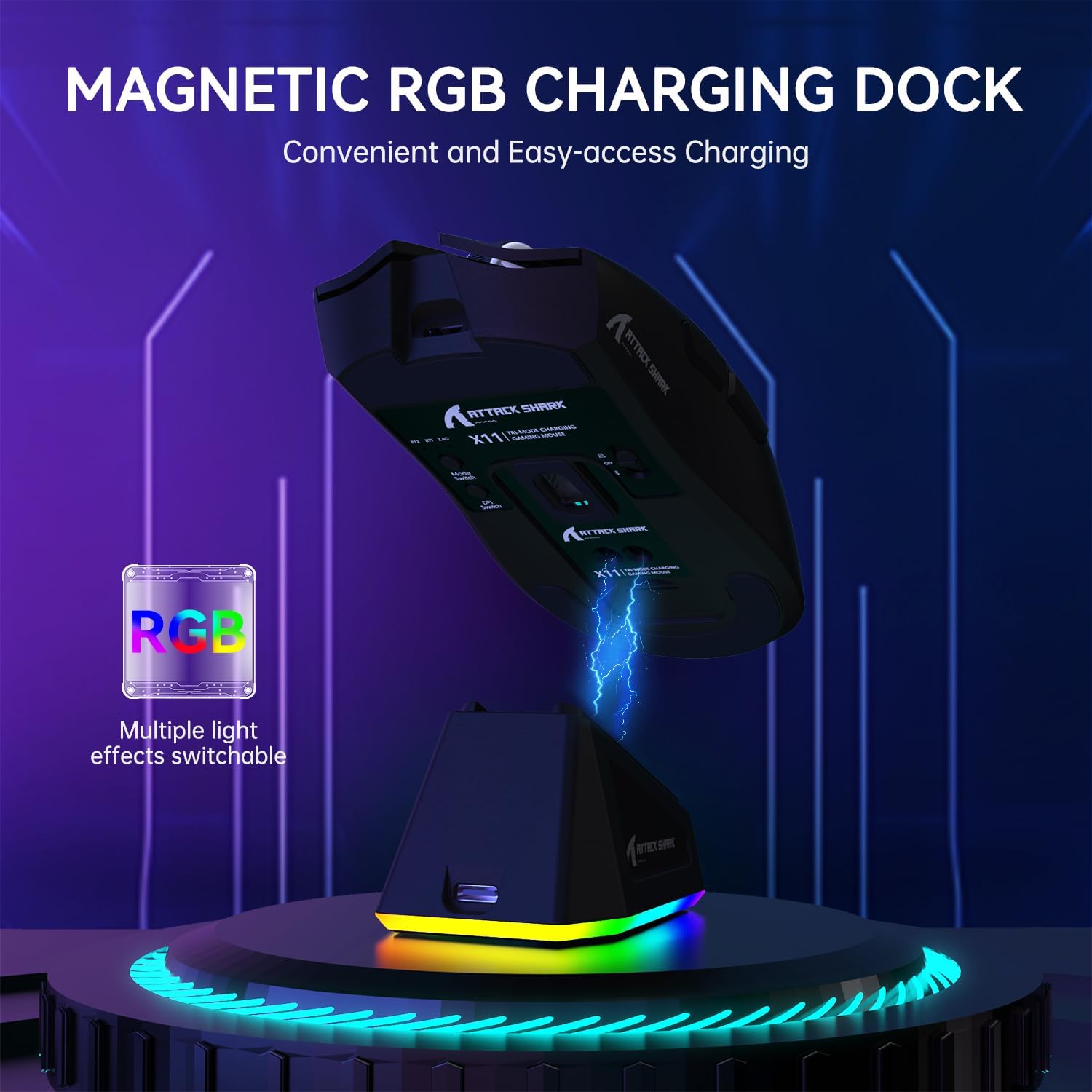
Image: The ATTACK SHARK X11 mouse magnetically attached to its RGB charging dock, illustrating the charging process.
Menyambungkan Tetikus
The ATTACK SHARK X11 offers three connection modes: 2.4G Wireless, Bluetooth, and USB-C Wired.
Sambungan Tanpa Wayar 2.4G
- Locate the 2.4G USB receiver at the bottom of the mouse.
- Palamkan penerima USB ke dalam port USB yang tersedia pada komputer anda.
- Switch the mode button on the bottom of the mouse to the 2.4G position.
- The mouse should automatically connect. If not, refer to the troubleshooting section.
Sambungan Bluetooth
- Switch the mode button on the bottom of the mouse to the Bluetooth (BT) position.
- Pada komputer atau peranti anda, dayakan Bluetooth dan cari peranti baharu.
- Select "ATTACK SHARK X11" from the list of available devices to pair.
- For multiple Bluetooth devices (BT1/BT2/BT3), short press the BT switching key on the mouse to cycle through channels. Press and hold for 3 seconds to enter pairing mode for a new device.
Sambungan Berwayar USB-C
- Connect the USB-C cable directly from the mouse to a USB port on your computer.
- The mouse will automatically switch to wired mode and function as a plug-and-play device.

Image: The ATTACK SHARK X11 mouse connected wirelessly to a laptop via its 2.4GHz USB receiver, demonstrating tri-mode connectivity options.
Arahan Operasi
Pelarasan DPI
The mouse features 6 adjustable DPI settings (800-1600-2400-3200-5000-22000). The DPI button is located on the bottom of the mouse. Each DPI setting is indicated by a different color light inside the mouse.
Butang Boleh Aturcara
The ATTACK SHARK X11 has 5 programmable buttons. To customize these buttons, DPI settings, polling rate, LOD, shortcuts, and macros, download and install the official driver software from the ATTACK SHARK webtapak.

Image: A screenshot of the ATTACK SHARK X11 mouse software interface, showing options for button settings, DPI adjustment, light settings, and polling rate, with a visual representation of the mouse and its programmable buttons.
RGB Backlight Customization
The RGB backlight on the charging dock can be customized. Refer to the driver software for detailed options or use the physical button on the dock (if available) to cycle through effects.
Penyelenggaraan
Pembersihan
Untuk membersihkan tetikus, gunakan kain lembut dan kering. Untuk kotoran degil, gunakan sedikit kainamp cloth with mild soap can be used, ensuring no liquid enters the mouse. Avoid abrasive cleaners or solvents.
Penyimpanan
Simpan tetikus di tempat yang sejuk dan kering, jauh daripada cahaya matahari langsung dan suhu yang melampau apabila tidak digunakan untuk tempoh yang lama.
Penjagaan Bateri
To prolong battery life, avoid fully discharging the mouse frequently. Charge it regularly, especially if it will be stored for a long time.
Menyelesaikan masalah
| Masalah | Kemungkinan Punca | Penyelesaian |
|---|---|---|
| Tetikus tidak bertindak balas | Low battery; Incorrect connection mode; USB receiver not plugged in; Bluetooth not paired. | Charge the mouse; Ensure correct mode (2.4G/BT/Wired) is selected; Re-plug USB receiver; Re-pair Bluetooth. |
| Lag or erratic movement | Interference; Dirty sensor; Surface issues. | Move closer to receiver/device; Clean optical sensor; Use on a clean, non-reflective mouse pad. |
| Perisian tidak mengesan tetikus | Driver not installed correctly; Compatibility issues. | Reinstall driver software; Ensure mouse is connected via wired or 2.4G mode (Bluetooth may not be supported by software); Check compatibility (Windows XP/VISTA/7/8/10/MAC). |
Spesifikasi
- model: ATTACK SHARK X11
- Mod Sambungan: Tanpa Wayar 2.4G, Bluetooth 5.2, Berwayar USB-C
- Penderia: PAW3311 Penderia Optik
- DPI: 800-1600-2400-3200-5000-22000 (Adjustable)
- Kelajuan Penjejakan: 300IPS
- Kadar Respons: 1000Hz
- Pecutan: 35G
- Suis: HUYU Switch
- Click Lifespan: 20 Juta Klik
- Butang: 5 Butang Boleh Aturcara
- Berat: Kira-kira 62g
- Keserasian: Windows XP / VISTA / 7 / 8 / 10 / MAC
- Dimensi Pakej: 7.01 x 4.53 x 2.05 inci
Waranti dan Sokongan
For warranty information and technical support, please visit the official ATTACK SHARK webtapak atau hubungi perkhidmatan pelanggan mereka. Simpan resit pembelian anda untuk tuntutan waranti.
rasmi Webtapak: Kedai ATTACK SHARK di Amazon
Sumber Tambahan
Tiada video produk rasmi daripada penjual tersedia dalam data yang diberikan.


