pengenalan
Thank you for choosing the Taiahiro RGB Backlit Wired Gaming Mouse. This manual provides detailed instructions for setting up, operating, and maintaining your new gaming mouse. Designed for precision and comfort, this mouse features adjustable DPI, vibrant RGB backlighting, and an ergonomic design to enhance your gaming experience.

Image: The Taiahiro RGB Backlit Wired Gaming Mouse, showcasing its sleek black design and illuminated elements.
Ciri-ciri Produk
- Penderia Optik Ketepatan Tinggi: Ensures accurate tracking for various gaming genres.
- 4 Tahap DPI Boleh Laras: Easily switch between 800, 1600, 2400, and 3200 DPI for customized sensitivity.
- 7-Color Breathing RGB Backlighting: Dynamic lighting effects that cycle through multiple colors.
- Reka bentuk ergonomik: Contoured shape for comfortable long-term use, reducing hand fatigue.
- Anti-Skid Scroll Wheel: Provides precise scrolling control.
- Super-Fast Game Engine: Optimized for responsive performance in demanding games.
- Butang Maju/Mundur: Convenient side buttons for navigation.

Image: Key features of the mouse highlighted, including DPI settings, RGB lighting, and navigation buttons.
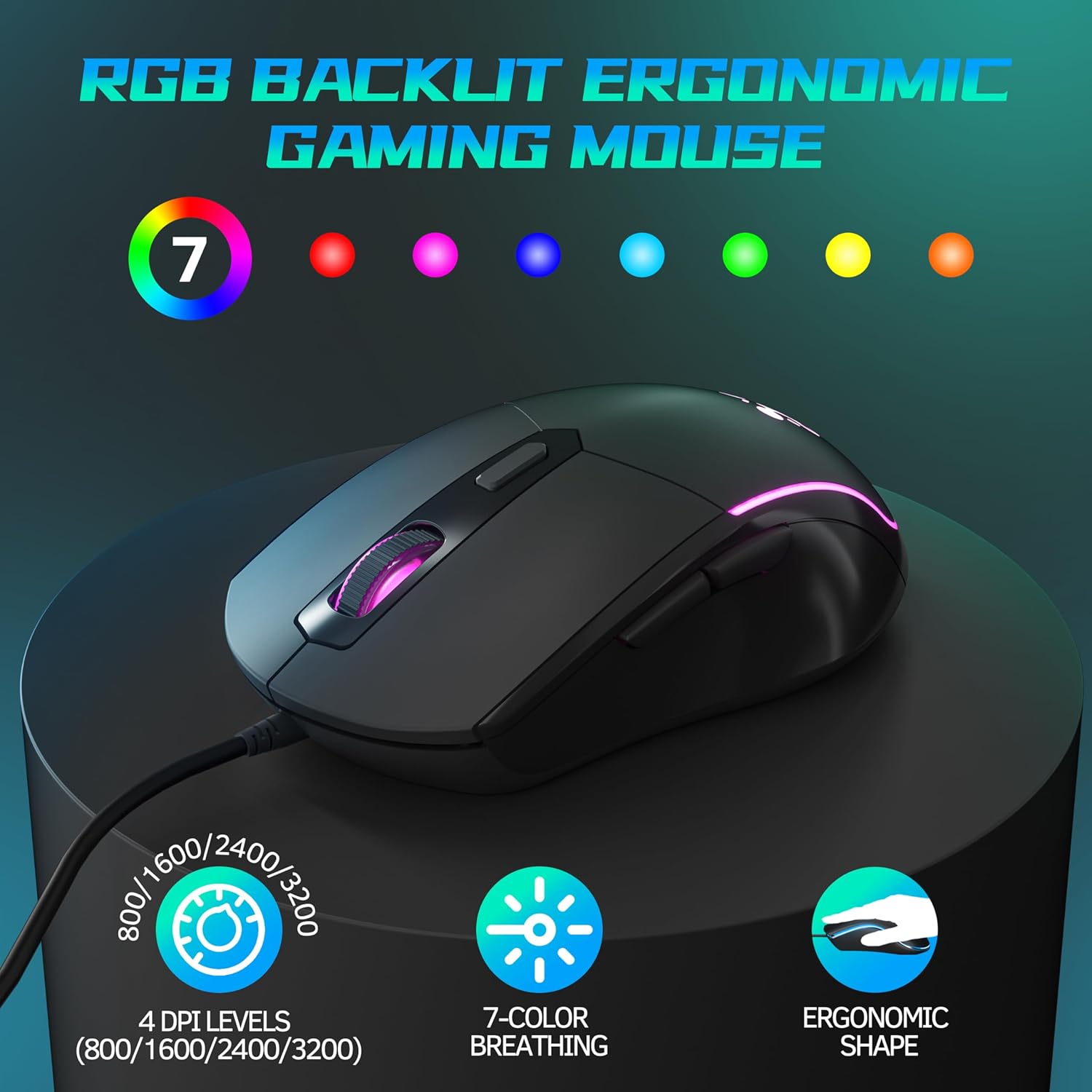
Imej: Satu lagi view emphasizing the ergonomic shape, DPI levels, and 7-color breathing light feature.
Kandungan Pakej
- 1 x Taiahiro RGB Backlit Wired Gaming Mouse
- 1 x Manual Pengguna
Persediaan
- Sambungkan Tetikus: Cari port USB yang tersedia pada komputer anda.
- Pasang dan Main: Insert the USB connector of the Taiahiro Gaming Mouse into the USB port.
- Pemasangan Pemandu: The mouse is plug-and-play and does not require additional driver installation. Your operating system will automatically detect and configure the device.
- Sedia untuk Digunakan: Once detected, the mouse will be ready for immediate use.
Arahan Operasi
The Taiahiro Gaming Mouse features standard mouse buttons along with additional programmable buttons for enhanced functionality.
- Butang Klik Kiri: Fungsi klik utama standard.
- Butang Klik Kanan: Fungsi klik sekunder standard.
- Roda Tatal: Scroll up or down. Pressing the scroll wheel acts as a middle click button.
- Butang DPI: Terletak di belakang roda skrol. Tekan untuk melihat tetapan DPI.
- Butang ke hadapan: Located on the left side of the mouse. Default function is to navigate forward in web pelayar atau file penjelajah.
- Butang ke belakang: Located on the left side of the mouse. Default function is to navigate backward in web pelayar atau file penjelajah.

Image: Illustration of the forward and backward navigation buttons located on the side of the mouse.
Pelarasan DPI
The mouse offers four adjustable DPI (Dots Per Inch) levels, allowing you to change the cursor sensitivity on the fly. This is useful for different tasks, such as precise aiming in games or fast navigation across multiple monitors.
- Tahap DPI: 800 DPI, 1600 DPI, 2400 DPI, 3200 DPI.
- Cara Melaraskan: Press the dedicated DPI button, located just behind the scroll wheel, to cycle through the available DPI settings. Each press will switch to the next DPI level.

Image: Visual representation of the DPI adjustment feature and the different sensitivity levels.
Pencahayaan RGB
The Taiahiro Gaming Mouse features dynamic 7-color breathing RGB backlighting, which automatically cycles through a spectrum of colors, adding an aesthetic appeal to your setup.
- Automatic Cycling: The lighting effect is pre-programmed to continuously cycle through 7 different colors.
- Tiada Perisian Diperlukan: The lighting effect operates automatically upon connection and does not require any software for customization.
Penyelenggaraan
Penyelenggaraan yang betul memastikan ketahanan dan prestasi optimum tetikus permainan anda.
- Pembersihan: Gunakan kain lembut dan kering untuk mengelap permukaan tetikus. Untuk kotoran degil, sedikit dampen kain dengan air atau larutan pembersih lembut. Elakkan bahan kimia yang keras atau bahan yang melelas.
- Penjagaan Sensor: Keep the optical sensor on the bottom of the mouse clean and free from dust or debris to ensure accurate tracking. Use a cotton swab or compressed air if necessary.
- Pengurusan Kabel: Elakkan selekoh tajam atau tarikan berlebihan pada kabel USB untuk mengelakkan kerosakan.
- Storan: Apabila tidak digunakan, simpan tetikus dalam persekitaran yang bersih dan kering dari suhu yang melampau.
Menyelesaikan masalah
| Masalah | Penyelesaian yang Mungkin |
|---|---|
| Tetikus tidak bertindak balas |
|
| Pergerakan kursor tidak menentu atau gelisah |
|
| RGB lighting is not working |
|
| Butang DPI tidak mengubah kepekaan |
|
Spesifikasi
| Ciri | Perincian |
|---|---|
| Jenama | Taiahiro |
| Model | B0D3DFQ1MW |
| Teknologi Ketersambungan | Berwayar USB |
| Teknologi Pengesanan Pergerakan | Optik |
| Tahap DPI | 800 / 1600 / 2400 / 3200 |
| Bilangan Butang | 1 |
| Ciri Khas | LED Lights (RGB Backlighting) |
| Berat Barang | 4.4 auns |
| Dimensi Pakej | 6.65 x 3.86 x 2.17 inci |
| Negara Asal | China |
| Tarikh Mula-mula Tersedia | 12 Julai 2024 |
Waranti dan Sokongan
For warranty information or technical support, please contact Taiahiro customer service. Details can typically be found on the product packaging or the official Taiahiro webtapak.
Untuk bantuan lanjut, anda juga boleh merujuk kepada Taiahiro Store on Amazon.


