1. Pengenalan
Thank you for choosing the SISESOL 2-Drawer Mobile File Cabinet. This manual provides detailed instructions for assembly, operation, and maintenance to ensure safe and efficient use of your new filing cabinet. Please read this manual thoroughly before assembly and use, and retain it for future reference.

Figure 1: SISESOL 2-Drawer Mobile File Kabinet
2. Maklumat Keselamatan
Always use both hands when moving the cabinet to prevent tipping. Keep fingers and other body parts away from the lock mechanism when locking or unlocking the cabinet.
- Pastikan semua bahagian ada dan tidak rosak sebelum dipasang.
- Pasang pada permukaan yang lembut dan bersih untuk mengelakkan calar.
- Jangan ketatkan skru semasa pemasangan.
- Jangan berdiri atau duduk di atas kabinet.
- Agihkan berat secara sama rata di dalam laci untuk mengekalkan kestabilan.
- Jauhkan kanak-kanak dan haiwan peliharaan semasa perhimpunan.
3. Kandungan Pakej
Sahkan bahawa semua komponen yang disenaraikan di bawah disertakan dalam pakej anda. Jika mana-mana bahagian hilang atau rosak, sila hubungi khidmat pelanggan.
- Panel Kabinet (pelbagai saiz)
- Drawer Components (front, back, sides, bottom)
- Slaid Laci
- Locking Mechanism and Keys (x2)
- Casters (2 lockable, 2 swivel, 1 anti-tilt wheel)
- Pencil Trays (removable)
- Adjustable Hanging Bars
- Assembly Hardware (screws, nuts, wrench, screwdriver)
4. Persediaan dan Pemasangan
Follow these steps carefully to assemble your SISESOL 2-Drawer Mobile File Cabinet. An installation video is also provided for visual guidance.
4.1 Panduan Video Pemasangan
Video 1: 2-Drawer Filing Cabinet Installation Guide. This video demonstrates the step-by-step assembly process for the filing cabinet.
4.2 Arahan Pemasangan Langkah demi Langkah
- Sediakan Komponen: Unpack all parts and lay them out on a protected surface. Identify each component using the provided parts list.
- Pasang Rangka Asas: Attach the base support bars to the side panels using the provided screws. Ensure they are securely fastened.
- Pasang Kastor: Screw the casters into the designated holes on the bottom of the cabinet base. Use the wrench to tighten the lockable casters.
- Lampirkan Panel Belakang: Secure the back panel to the assembled frame using screws.
- Assemble Drawer Boxes: Construct the two drawer boxes by attaching the front, back, and side panels. Ensure the bottom panel slides into place correctly.
- Pasang Slaid Laci: Attach the drawer slides to the inside of the cabinet frame and to the sides of the drawer boxes. Ensure smooth operation.
- Sisipkan Laci: Carefully slide the assembled drawers into the cabinet, aligning them with the installed slides.
- Pasang Panel Atas: Place the top panel onto the cabinet and secure it with the remaining screws.
- Kunci Ujian: Insert the key and test the locking mechanism to ensure all drawers lock simultaneously.

Figure 2: Cabinet in a home office environment.
5. Arahan Operasi
5.1 Operasi Laci
The SISESOL 2-Drawer Mobile File Cabinet features smooth-gliding drawers designed for easy access. The drawers can be fully extended to access contents at the back.
- Pembukaan: Gently pull the drawer handle to open.
- Penutup: Push the drawer firmly until it clicks into place.
- File Organisasi: The bottom drawer includes adjustable hanging bars to accommodate letter, legal, and A4 size hanging files. The top drawer features removable pencil trays for stationery.
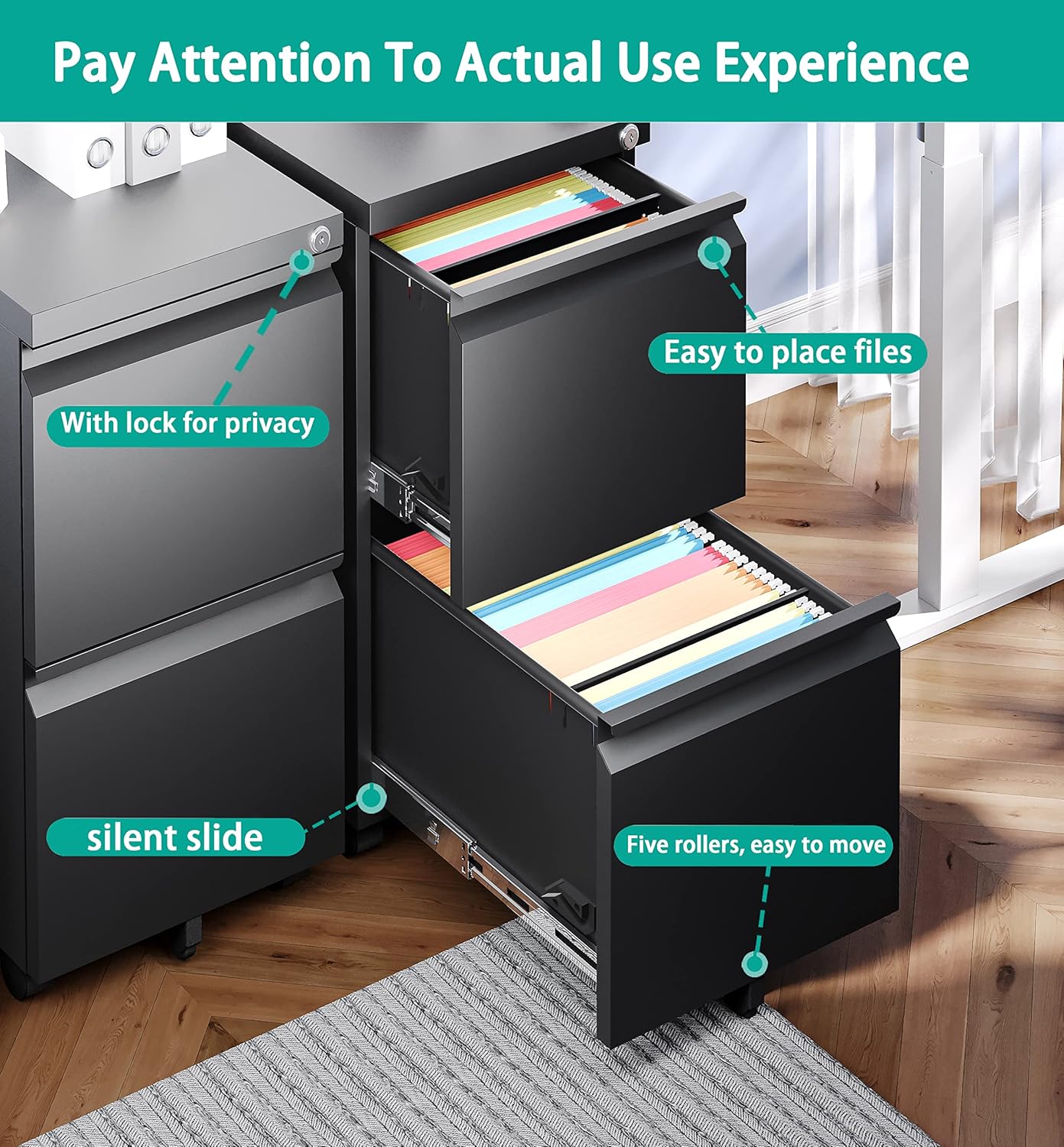
Rajah 3: Terperinci view of drawer features including lock and smooth slides.
5.2 Mekanisme Mengunci
The cabinet is equipped with a single lock that secures both drawers simultaneously, providing security for your documents.
- Untuk mengunci: Ensure both drawers are fully closed. Insert the key into the lock located on the top drawer and turn it clockwise until the drawers are secured. Remove the key.
- Untuk Membuka Kunci: Insert the key into the lock and turn it counter-clockwise. The drawers will now be able to open.
5.3 Mobiliti dan Kestabilan
The cabinet is designed with casters for easy movement and includes features for stability.
- bergerak: The cabinet has 2 lockable casters, 2 swivel casters, and 1 anti-tilt wheel. To move, ensure the lockable casters are unlocked.
- Menjamin: To prevent movement, push down the levers on the lockable casters until they click into place.
- Anti-Tilt Feature: The anti-tilt wheel located under the bottom drawer prevents the cabinet from tipping over when a single drawer is fully extended.
Video 2: 2-Drawer File Cabinet with Lock. This video demonstrates the locking mechanism, drawer functionality, and anti-tilt feature.
6. Penyelenggaraan
Regular maintenance will prolong the life and appearance of your filing cabinet.
- Pembersihan: Lap permukaan dengan lembut, damp kain. Elakkan pembersih yang melelas atau bahan kimia yang keras.
- Slaid Laci: Periksa slaid laci secara berkala untuk operasi lancar. Jika ia menjadi kaku, sedikit pelincir silikon boleh digunakan.
- Perkakasan: Periksa semua skru dan pengikat sekali-sekala untuk memastikan ia ketat. Ketatkan semula jika perlu.
- Kastor: Pastikan roda bebas daripada serpihan (rambut, habuk) untuk memastikan penggelekkan yang lancar.
7. Penyelesaian masalah
Jika anda menghadapi sebarang masalah dengan kabinet fail anda, rujuk masalah dan penyelesaian biasa berikut:
- Laci kaku atau tidak meluncur dengan lancar:
a. Check if the drawer slides are properly aligned and free of obstructions.
b. Ensure the cabinet is on a level surface.
c. Apply a silicone-based lubricant to the drawer slides. - Lock is not engaging:
a. Ensure both drawers are fully closed and pushed in completely.
b. Check if the key is fully inserted and turned correctly. - Cabinet is unstable or wobbles:
a. Verify that all assembly screws are securely tightened.
b. Ensure the cabinet is placed on a flat, level surface.
c. Check if the lockable casters are engaged when the cabinet is stationary.
If problems persist, please contact SISESOL customer support.
8. Spesifikasi
| Ciri | Perincian |
|---|---|
| Jenama | SISESOL |
| Model | Mudah Alih 2-Laci File Kabinet |
| Dimensi Produk | 14.5"D x 17.3"W x 26.2"H |
| bahan | Alloy Steel (Frame), Metal (Top) |
| Jenis Selesai | Bersalut Serbuk |
| Had berat | 330 paun |
| Bilangan Laci | 2 |
| Jenis Kunci | Key (locks both drawers) |
| mobiliti | Casters (2 lockable, 2 swivel, 1 anti-tilt) |
| Perhimpunan Diperlukan | ya |

Rajah 4: Dimensi produk.
9. Waranti dan Sokongan
SISESOL is committed to providing high-quality products. For any questions, concerns, or assistance with your product, please contact SISESOL customer support through your purchase platform or the official SISESOL website. Please have your purchase details and model information ready when contacting support.


