1. Pengenalan
This manual provides detailed instructions for the setup, operation, maintenance, and troubleshooting of your Koiiko Wireless Gaming Controller Z01. This versatile controller is designed for compatibility across multiple platforms, including iOS, Android, PC, Nintendo Switch, PlayStation 3, and PlayStation 4, offering an enhanced gaming experience with its advanced features.

Imej 1.1: Depan view of the Koiiko Wireless Gaming Controller Z01, showcasing its design and illuminated elements.
2. Controller Components
Familiarize yourself with the various buttons and features of your Koiiko Z01 controller:
- Left/Right Analog Sticks (Hall Effect): For precise 3D movement and input, featuring Hall Effect sensors to prevent drift.
- D-Pad: Pad arah untuk input digital.
- Butang Tindakan (A, B, X, Y): Standard gaming input buttons, with interchangeable key values.
- Shoulder Buttons (LB, RB) & Triggers (Hall Effect Linear): For additional actions and responsive input, featuring Hall Effect linear triggers.
- Butang rumah: For system menu access and power control.
- Select/Share Button: For various in-game or system functions.
- Start/Options Button: For various in-game or system functions.
- Butang M1/M2: Programmable back buttons for custom actions.
- Butang Turbo: Activates continuous input for other buttons.
- Butang Pelarasan Cahaya: Controls the 7-color RGB breathing light modes.
- Port USB-C: For charging the controller.

Imej 2.1: Diperincikan di atasview of the Koiiko Wireless Gaming Controller Z01, highlighting its main features.
3. Ciri-ciri Utama
- Keserasian Luas: Supports iOS (iPhone, iPad), Android (phones, tablets), PC, Nintendo Switch/Switch OLED/Switch Lite, PlayStation 3, and PlayStation 4. Compatible with Steam, Xbox Game Pass, Nvidia GeForce Now, Amazon Luna, Google Stadia, and other cloud gaming services.
- Hall Effect Technology: Equipped with Hall Effect joysticks and linear triggers for enhanced precision, durability, and prevention of stick drift.
- Pencahayaan RGB yang boleh disesuaikan: Features a 7-color RGB breathing light with 5 distinct lighting modes on the joysticks, adjustable via a dedicated button.
- Butang Boleh Aturcara: Includes two programmable back buttons (M1, M2) and highly customizable LB, RB buttons, supporting up to 30 action keys.
- Six-Axis Gyro: Built-in 6-axis gyroscope for motion control, supported on PC, PS3, PS4, and Switch.
- Fungsi Turbo: Allows for continuous input with a single press, enhancing gameplay for rapid actions.
- Bateri tahan lama: Integrated 600mAh lithium battery provides approximately 10-15 hours of continuous use on a single charge.
- Reka Bentuk Mudah Alih: Small and lightweight, making it easy to carry and store.
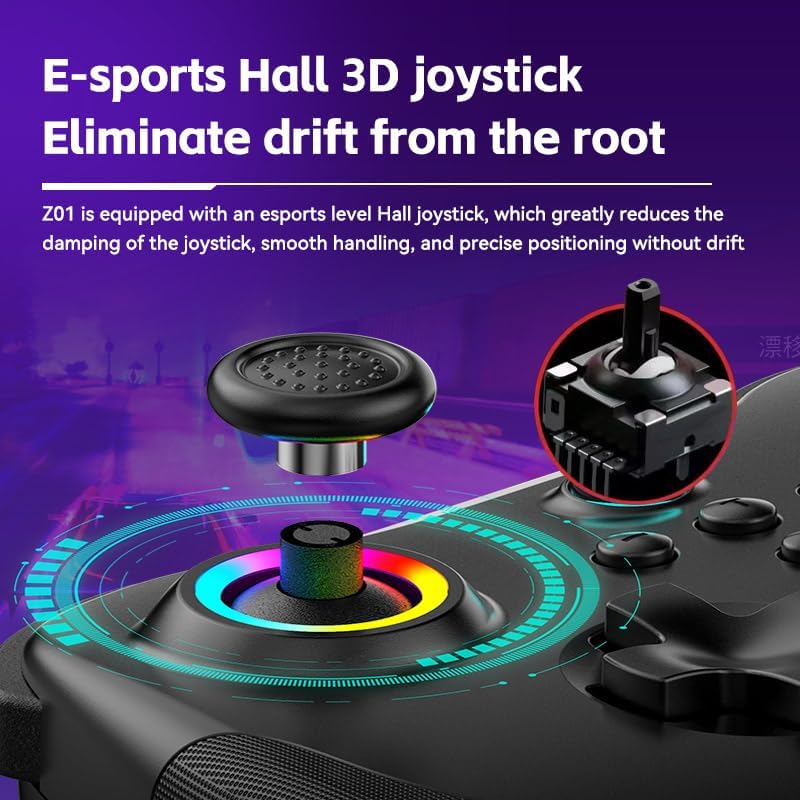
Image 3.1: Illustration of the Hall Effect 3D joystick, highlighting its drift-prevention design.
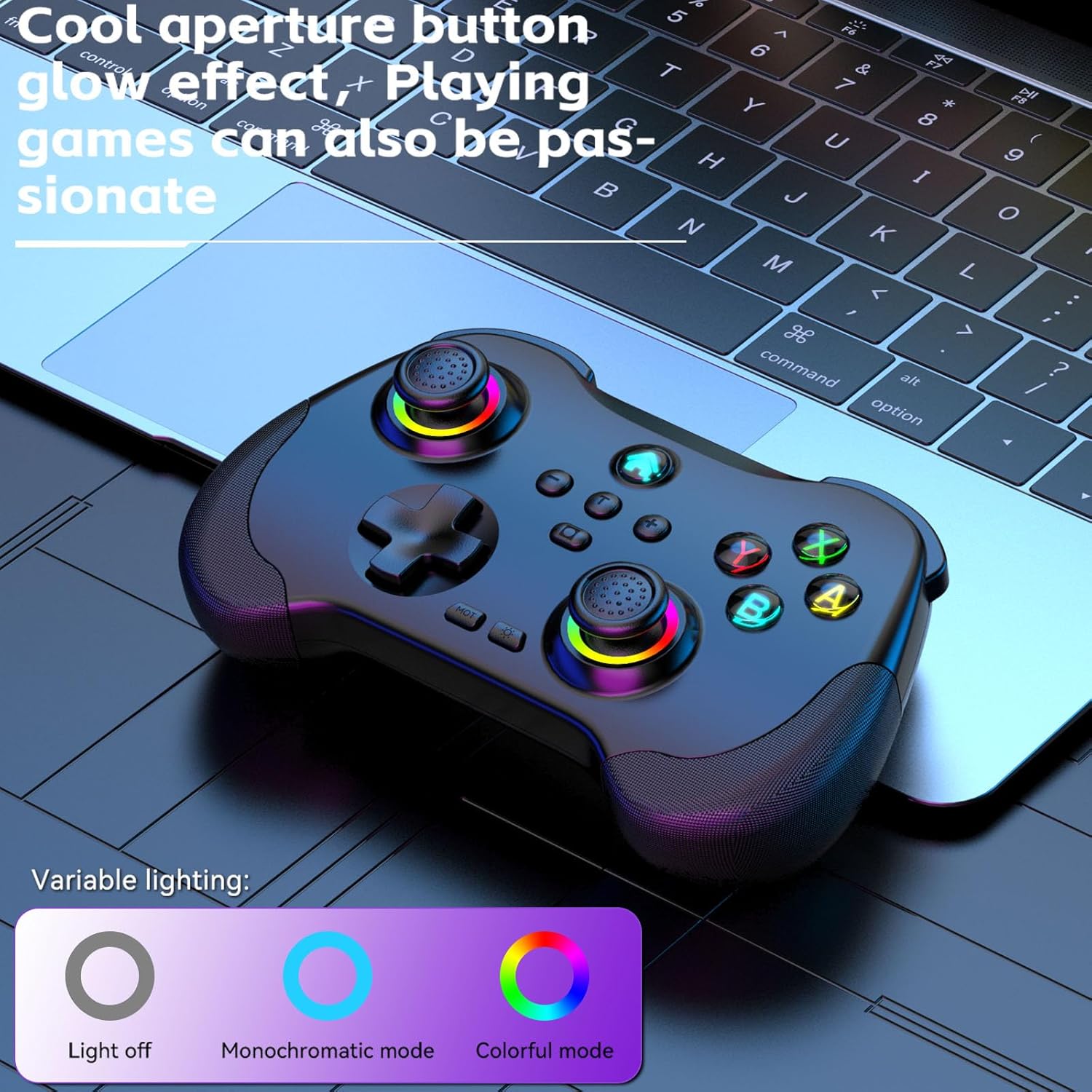
Image 3.2: The controller displaying its customizable RGB lighting on joysticks and buttons.
4. Persediaan dan Pengecasan
4.1. Mengecas Pengawal
Before first use, fully charge the controller. Connect the included USB-C cable to the controller's charging port and the other end to a USB power source (e.g., computer, wall adapter). The LED indicators will show charging status and turn off or change color when fully charged.
- Kapasiti Bateri: 600mAh
- Masa Pengecasan: Lebih kurang 2 jam
- Ketahanan: Lebih kurang 10-15 jam
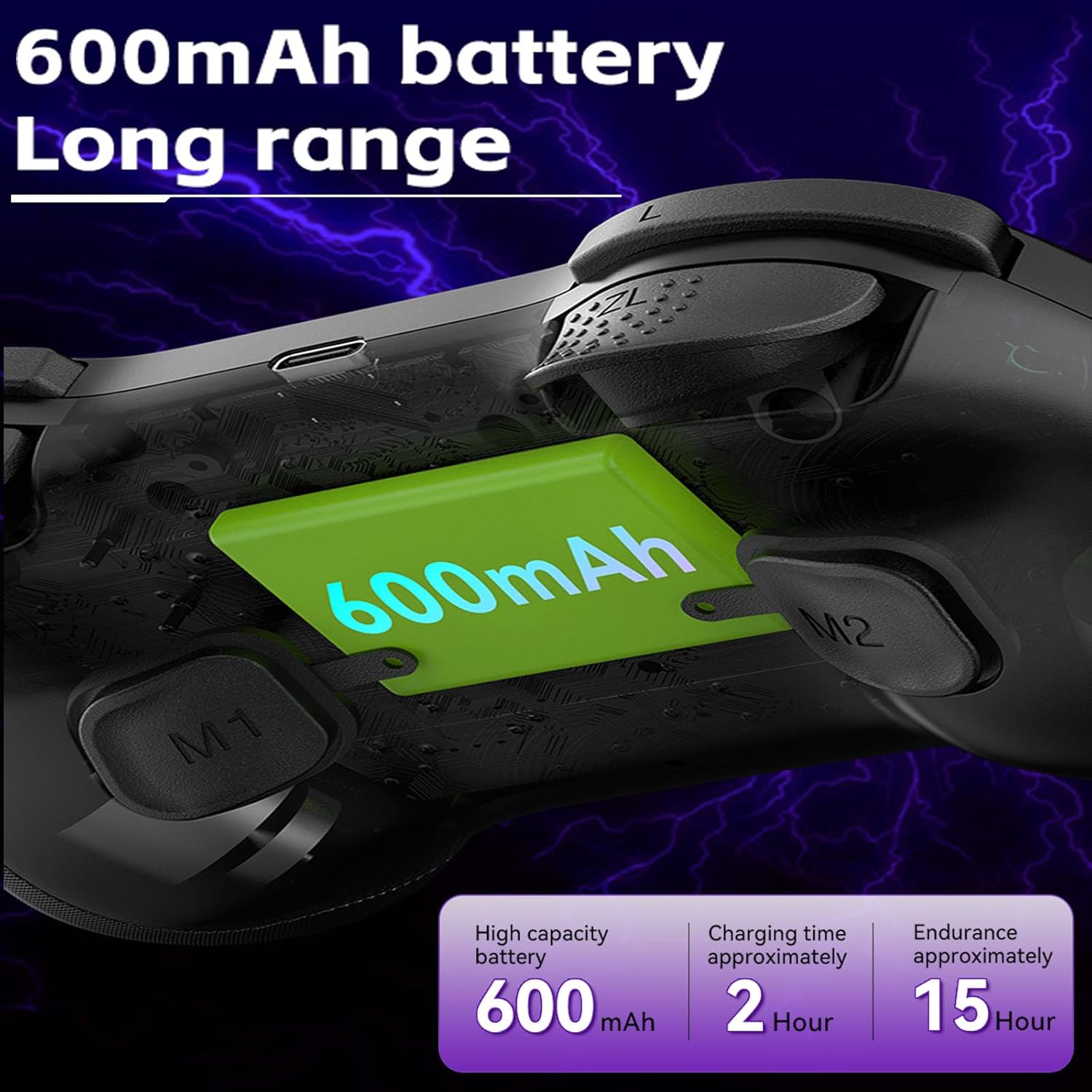
Image 4.1: Diagram illustrating the 600mAh battery capacity and charging specifications.
4.2. Menghidupkan/Mematikan
- Untuk Menghidupkan: Press and hold the Home button for 1-2 seconds.
- Untuk Mematikan: Press and hold the Home button for 3-5 seconds until the indicator lights turn off.
5. Arahan Operasi
5.1. Menyambung ke Peranti
The Koiiko Z01 controller supports various connection modes. The specific button combination to enter pairing mode may vary by platform. Please refer to the included physical user manual for exact button combinations for each mode. Below are general guidelines:
- General Bluetooth Pairing: Typically involves holding a combination of buttons (e.g., Home + X, Home + A, Home + B) until the indicator lights flash rapidly, indicating pairing mode. Then, search for "Koiiko Z01" or similar on your device's Bluetooth settings and connect.
- Nintendo Switch: Navigate to the 'Controllers' menu on your Switch, then 'Change Grip/Order'. Hold the specific pairing button combination on the controller until it connects.
- PC (Windows): Ensure your PC has Bluetooth enabled. Hold the specific pairing button combination, then go to 'Bluetooth & other devices' in Windows settings and add a new Bluetooth device. The controller will typically connect as an X-Input device.
- iOS/Android: Enable Bluetooth on your mobile device. Hold the specific pairing button combination, then select the controller from the list of available Bluetooth devices.
- PlayStation 3/4: Connect the controller via USB cable first to register it, then it may be used wirelessly. Specific pairing methods may vary; consult your console's instructions.

Image 5.1: Connection guideline for PC.

Image 5.2: Connection guideline for Nintendo Switch.
5.2. ABXY Key Value Interchange
The controller allows you to switch the ABXY button layout between Nintendo Switch and Xbox settings without physically removing the buttons.
- To Interchange: Tekan dan tahan butang X + B + HOME keys simultaneously. The controller will switch its ABXY key value. Repeat the combination to revert to the previous setting.

Image 5.3: ABXY key value interchange function.
5.3. Pelarasan Pencahayaan RGB
The controller features customizable RGB lighting around the joysticks and on the buttons.
- Untuk Menukar Mod: Press the dedicated Light Adjustment button (refer to the controller diagram in your physical manual for location) to cycle through the 5 available RGB light modes, including a mode to turn the lights off.
5.4. Butang Belakang Boleh Diprogram (M1/M2)
The M1 and M2 buttons on the back of the controller can be programmed to perform specific actions or sequences.
- Langkah Pengaturcaraan: Refer to your physical user manual for detailed instructions on how to program the M1 and M2 buttons, as the process typically involves entering a programming mode and then inputting the desired button sequence.
5.5. Fungsi Turbo
The Turbo function allows a button to register continuous presses when held down.
- Untuk Mengaktifkan: Tekan ke TURBO button simultaneously with the desired action button (e.g., TURBO + A).
- Untuk Nyahaktifkan: Repeat the activation step (TURBO + A) for the same button.

Imej 5.4: Selesaiview of advanced functions including macro programming and Turbo mode.
6. Penyelenggaraan
Proper care will extend the life of your controller.
- Pembersihan: Gunakan kain lembut dan kering untuk mengelap pengawal. Untuk kotoran degil, sedikit dampen kain dengan air. Elakkan bahan kimia yang keras atau pembersih yang kasar.
- Storan: Simpan pengawal di tempat yang sejuk dan kering jauh dari cahaya matahari langsung dan suhu yang melampau.
- Penjagaan Bateri: To maintain battery health, avoid fully discharging the controller frequently. If storing for an extended period, charge it to about 50% every few months.
- Elakkan Kesan Fizikal: Jangan jatuhkan atau tundukkan pengawal kepada hentaman kuat, kerana ini boleh merosakkan komponen dalaman.
7. Penyelesaian masalah
If you encounter issues with your Koiiko Z01 controller, try the following solutions:
| Masalah | Penyelesaian yang Mungkin |
|---|---|
| Pengawal tidak dihidupkan. | Pastikan pengawal dicas. Sambungkannya ke sumber kuasa menggunakan kabel USB-C. |
| Tidak dapat menyambung melalui Bluetooth. |
|
| Buttons or joysticks are unresponsive or drifting. |
|
| Lampu RGB tidak berfungsi. | Press the Light Adjustment button to cycle through modes or turn them on. Ensure the controller is powered on. |
| Pengawal kerap terputus sambungan. |
|
8. Spesifikasi
| Ciri | Perincian |
|---|---|
| Model | Z01 |
| Dimensi Produk | 2.44 x 6.85 x 4.84 inci (6.2 x 17.4 x 12.3 cm) |
| Berat Barang | 12.6 auns (357.2 gram) |
| Bateri | 1 AA battery required (included) - Note: Product features mention 600mAh Lithium, please refer to product packaging for exact battery type. |
| Kapasiti Bateri | 600mAh (Lithium, built-in) |
| Masa Mengecas | Lebih kurang 2 jam |
| Tempoh Penggunaan | Lebih kurang 10-15 jam |
| Jarak Penghantaran Bluetooth | ≤ 8 meter |
| Bekerja Voltage | DC3.7V |
| Bekerja Semasa | < 35mA |
| Pengeluar | ShenZhen ShanWan Technology Co., Ltd. |
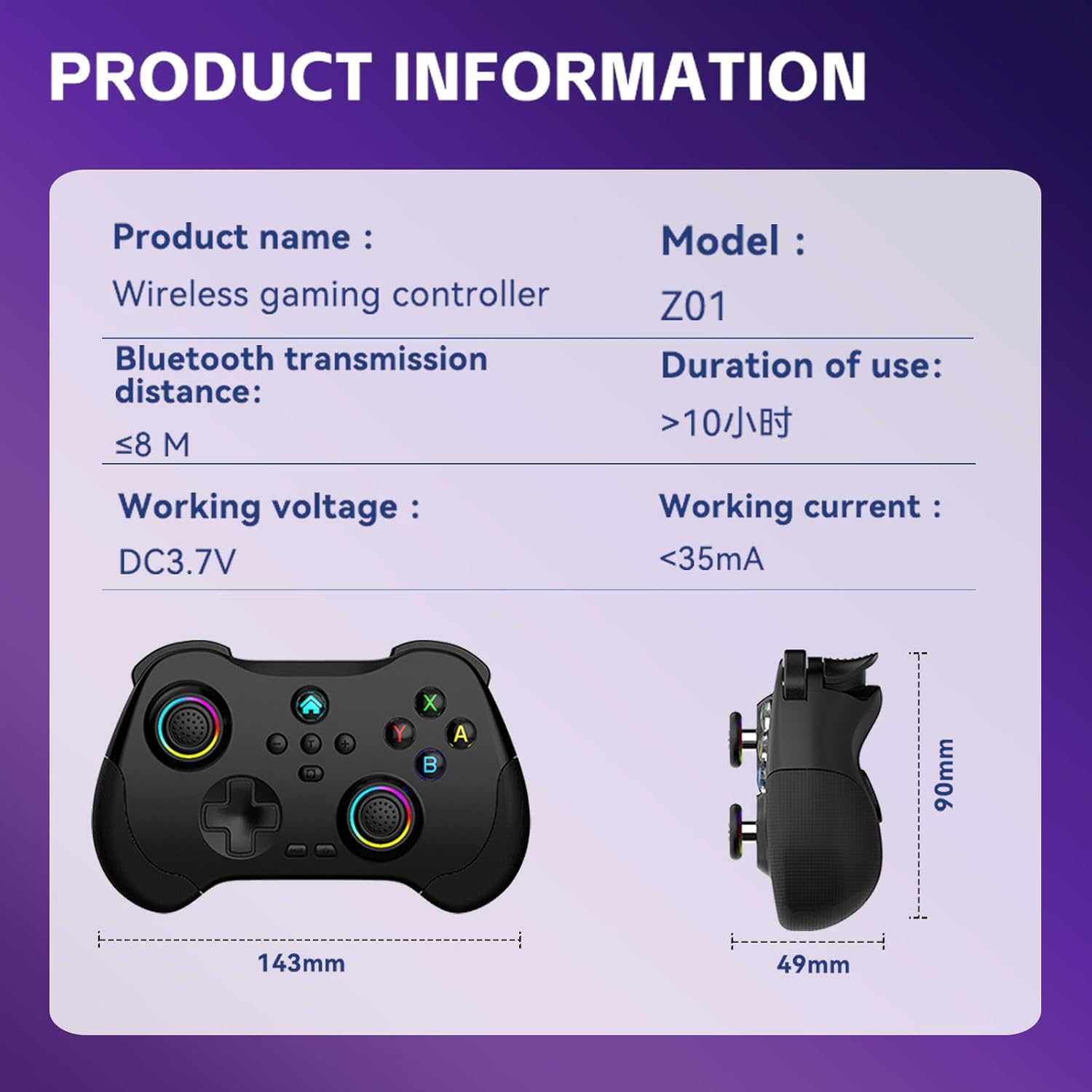
Image 8.1: Product information table with key specifications.
9. Waranti dan Sokongan
Koiiko provides technical support for its products. If you have any questions, encounter issues, or require assistance with your Koiiko Wireless Gaming Controller Z01, please contact our customer support team.
- Maklumat Hubungan: Please refer to the contact details provided on your product packaging or the official Koiiko webtapak untuk saluran sokongan yang paling terkini.
- Waranti: Information regarding product warranty periods and terms can be found on the official Koiiko webtapak atau di dalam pembungkusan produk anda.


