pengenalan
This user manual provides detailed instructions for the operation, installation, and maintenance of your Acekool Portable Air Conditioner. Please read this manual thoroughly before using the appliance and retain it for future reference.
Produk Selesaiview

Figure 1: Acekool Portable Air Conditioner and its remote control.
The Acekool Portable Air Conditioner is a versatile 3-in-1 unit designed to cool, dehumidify, and circulate air as a fan. It features an 8000 BTU ASHRAE cooling capacity, suitable for rooms up to 350 sq.ft. Key features include an LED control panel, remote control, sleep mode, and a 24-hour timer.
Apa yang ada dalam Kotak

Rajah 2: Semua komponen termasuk dalam pakej produk.
- 1 x Unit Penghawa Dingin Mudah Alih
- 1 x Window Kit
- 1 x Hose Connector
- 1 x Window Kit Adapter
- 1 x Hos Ekzos
- 1 x Paip Longkang
- 1 x Alat Kawalan Jauh
- 1 x Membetulkan skru
- 1 x Manual Pengguna
Persediaan dan Pemasangan
Follow these steps for proper setup and installation to ensure optimal performance of your portable air conditioner.

Figure 3: Visual guide for exhaust hose and window kit installation.
- Sambungkan penyambung hos ke satu hujung hos ekzos.
- Sambungkan penyesuai kit tingkap ke hujung hos ekzos yang satu lagi.
- Attach the hose connector to the exhaust air outlet of the air conditioner unit.
- Extend the adjustable window kits to fit your window in place and tighten the nuts.
- Install the window partitions to fit the window (suitable for horizontal or vertical slide windows).
- Insert the exhaust hose adapter into the window kit, then install the ventilation tube to the window partitions.
Video 1: Official product video demonstrating the features and setup of the 8000 BTU Air Conditioner.
Arahan Operasi
Panel Kawalan dan Alat Kawalan Jauh

Figure 4: LED Touch Panel with Remote Control functionality.
The unit can be operated using the LED touch control panel on top of the unit or the included wireless remote control. The control panel provides easy access to all functions.
Mod Pengendalian

Figure 5: Three-in-one modes: Cool, Dry, and Fan.
- Mod Sejuk: Provides powerful cooling for rooms up to 350 sq.ft., with adjustable temperature settings from 61°F to 88°F.
- Mod Kering (Penyahlembap): Removes up to 45 pints of moisture per day, helping to reduce humidity in the room. Features self-evaporation technology.
- Mod Kipas: Circulates air with two adjustable wind speeds (Low/High) without cooling.
Ciri-ciri Tambahan
- Mod tidur: Activates energy-saving operation with an ultra-low noise level of 50 dB for undisturbed sleep. Activated by pressing Increase and Speed simultaneously.
- Pemasa 24 Jam: Allows you to customize the cooling duration to suit your schedule.
- Ayunan Udara Automatik: Features automatic horizontal swing wind and manual vertical wind for widespread oscillation, cooling every corner of your room.
- mudah alih: Equipped with 4 rotatable wheels for easy movement and storage.

Figure 6: Airflow direction control with automatic horizontal swing and manual vertical adjustment.
Penyelenggaraan
Membersihkan Penapis Udara
Regular cleaning of the air filter is essential for maintaining the efficiency and longevity of your air conditioner.

Figure 7: Detachable and washable air filter location.
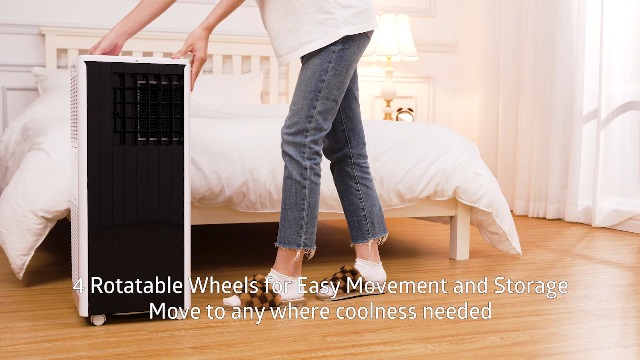
Figure 8: Cleaning the filter screen directly under water.
- Locate the air filter on the side of the unit.
- Gently pull out the filter screen.
- Wash the filter screen directly under running water.
- Benarkan penuras kering sepenuhnya sebelum memasukkannya semula ke dalam unit.
- Reinsert the dry filter screen back into its slot.
Mengeringkan Unit
The unit features self-evaporation technology, which atomizes condensed water. However, in high humidity environments, manual draining may be required. Use the provided drain pipe for this purpose.

Figure 9: Drainage hole for excess water removal.
Menyelesaikan masalah
If you encounter any issues with your Acekool Portable Air Conditioner, please refer to the following common troubleshooting steps. For problems not listed here, contact customer support.
| Masalah | Kemungkinan Punca | Penyelesaian |
|---|---|---|
| Unit tidak dihidupkan | Tiada bekalan kuasa; Kord kuasa tidak dipasang; Pemutus litar tersandung. | Ensure unit is plugged into a working outlet; Check circuit breaker; Press the power button. |
| Unit tidak menyejukkan dengan berkesan | Air filter is dirty; Exhaust hose not properly installed; Room size too large; Doors/windows open. | Clean the air filter; Ensure exhaust hose is securely connected and vented outside; Close all doors and windows; Verify room size is within specifications. |
| Unit bising | Unit not on a flat surface; Obstruction in fan/air intake. | Letakkan unit pada permukaan yang rata dan stabil; Semak dan keluarkan sebarang halangan. |
| Kebocoran air | Drain plug not secured; Water tank full (in high humidity). | Ensure drain plug is tightly closed; Drain the water tank if full. |
Spesifikasi
| Ciri | Perincian |
|---|---|
| Jenama | Acekool |
| Model | Portable Air Conditioner (0XHWSTFL001) |
| Kuasa Penyejukan | 8000 BTU (ASHRAE) / 5000 BTU (DOE) |
| Kawasan Liputan | Sehingga 350 kaki persegi. |
| Fungsi | Cool, Dehumidify, Fan |
| Kapasiti Dehumidifikasi | 45 Pint/Hari |
| Tahap Kebisingan | 45 dB (50 dB dalam Mod Tidur) |
| Voltage | 115 Volt |
| Wattage | 699 watt |
| Bahan penyejuk | R32 |
| Dimensi (D x W x H) | 11.3" x 11.7" x 27.4" |
| Berat Barang | 47.5 paun |
Waranti dan Sokongan
Your Acekool Portable Air Conditioner comes with a standard manufacturer's warranty. For detailed warranty information, product support, or service inquiries, please refer to the warranty card included in your package or visit the official Acekool website. You can also contact customer support through the retailer where you purchased the product.
Untuk maklumat dan sokongan tambahan, lawati laman web Acekool Store on Amazon.