pengenalan
This manual provides essential information for the safe and efficient operation of your Eliminator Lighting Bubbletron EXL Bubble Machine. Please read these instructions thoroughly before initial use to ensure proper setup, operation, and maintenance.
Maklumat Keselamatan
Always observe the following safety precautions to reduce the risk of electrical shock, fire, or personal injury:
- Pastikan unit diletakkan pada permukaan yang stabil dan rata.
- Jangan kendalikan unit ini jika kord kuasa rosak.
- Jauhkan unit daripada air atau cecair lain.
- Jangan menyekat bukaan pengudaraan.
- Use only approved bubble fluid.
- Cabut plag unit sebelum membersihkan atau menservis.
- This device is for indoor use or covered outdoor use in dry conditions only.
- Jauhkan daripada kanak-kanak.
Kandungan Pakej
- Eliminator Bubbletron EXL Bubble Machine
- 9-foot/3M Wired Remote Control (Model: LC-3)
- Kord Kuasa
- Manual Pengguna (dokumen ini)
Persediaan
- Membongkar: Carefully remove the bubble machine from its packaging. Inspect for any damage during transit.
- penempatan: Place the unit on a flat, stable surface. Ensure adequate ventilation around the machine.
- Tangki Bendalir: Locate the EZ-Access front fluid tank. Open the tank cover.
- Fill with Fluid: Pour appropriate bubble fluid into the tank. Do not overfill; observe the MAX fill line.
- Sambungan Kuasa: Connect the power cord to the unit's power input and then to a suitable electrical outlet (120V or 230V, depending on model).
- Sambungan Kawalan Jauh: Plug the wired remote control (LC-3) into the designated remote control input on the rear of the unit.

Penerangan Imej: An annotated diagram showing the top and rear views of the Eliminator Bubbletron EXL. Key components are labeled, including the Carrying Handle, EZ-Access Front Fluid Tank, Manual Bubble Switch, Input for Remote Control, Fuse, Power Cord, and Large Dual Fans.
Arahan Operasi
- Hidupkan kuasa: Flip the ON/OFF switch located on the rear of the unit to the "ON" position.
- Aktifkan Buih:
- Wired Remote Control (LC-3): Use the switch on the LC-3 remote control to turn the bubble production ON or OFF.
- Suis Manual: If not using the remote, the manual bubble switch on the rear of the unit can be used to activate bubble production.
- Bubble Production: The internal bubble wands will begin to rotate, and the dual high-velocity fans will disperse bubbles into the air.
- Matikan: When finished, turn the bubble production OFF using the remote or manual switch, then flip the main ON/OFF switch on the rear of the unit to the "OFF" position. Unplug the power cord from the electrical outlet.
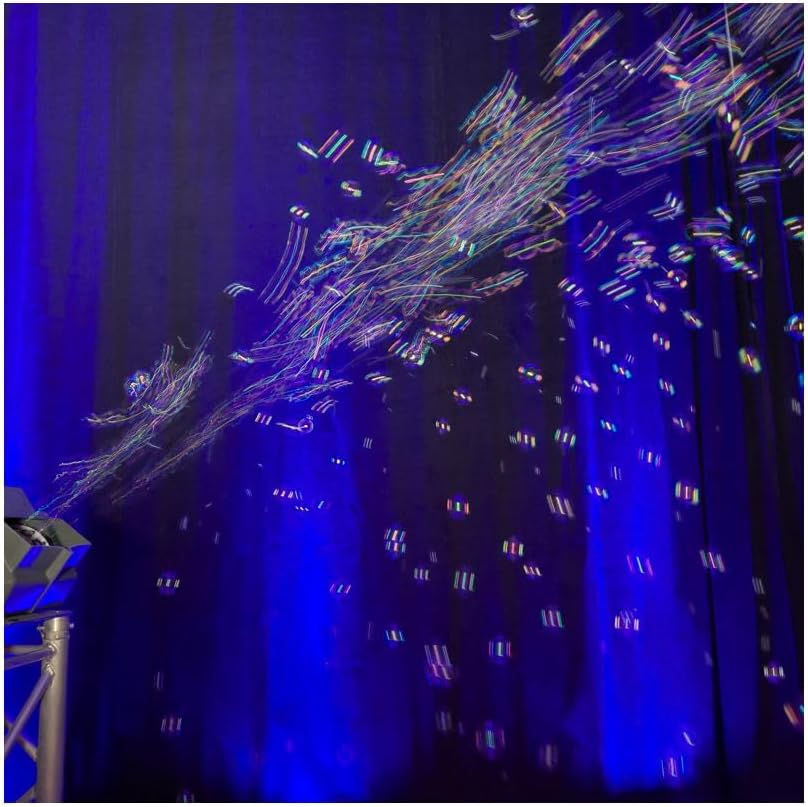
Penerangan Imej: The Eliminator Bubbletron EXL bubble machine in operation, emitting a large quantity of bubbles against a dark background with blue lighting, demonstrating its output capacity.
Penyelenggaraan
Regular maintenance ensures optimal performance and extends the lifespan of your bubble machine.
- Fluid Tank Cleaning: After each use, empty any remaining bubble fluid from the tank. Rinse the tank with distilled water to prevent residue buildup.
- Pembersihan Luaran: Lap bahagian luar unit dengan kain lembut dan kering. Jangan gunakan pembersih atau pelarut yang melelas.
- Lubang Kipas: Periodically check the fan vents for dust or debris. Use a soft brush or compressed air to clean them.
- Storan: Store the unit in a cool, dry place when not in use. Ensure the fluid tank is empty and clean before storage.
Menyelesaikan masalah
| Masalah | Kemungkinan Punca | Penyelesaian |
|---|---|---|
| Tiada buih dihasilkan |
|
|
| Keluaran gelembung rendah |
|
|
| Unit tidak dihidupkan |
|
|
Spesifikasi
| model: | BUBBLETRON-EXL |
| Jenama: | Pencahayaan Eliminator |
| Dimensi (LxWxH): | 14.25" x 10.5" x 11" (359 x 266 x 278 mm) |
| Berat: | 9 paun (3.7 kg) |
| Sumber Kuasa: | Elektrik Bertali |
| Penggunaan Kuasa: | 37W @ 120V / 14W @ 230V |
| Kadar Penggunaan Cecair: | 40ml per minute |
| Bahan: | plastik |
| warna: | Black (Unit appears grey in images) |
| Disertakan Alat Jauh: | 9-foot/3M Wired Remote Control (Model: LC-3) |
Waranti dan Sokongan
For warranty information and technical support, please contact Eliminator Lighting directly. Keep your purchase receipt as proof of purchase for any warranty claims.
Maklumat Hubungan: Please refer to the official Eliminator Lighting website or product packaging for the most current contact details for customer support.


