1. Pengenalan
Terima kasih kerana membeliasing the WANBO X2 Max Projector. This manual provides essential information for setting up, operating, and maintaining your projector. Please read it thoroughly before use to ensure optimal performance and safety. The WANBO X2 Max is a versatile projector offering Full HD 1080p resolution, 450 ANSI lumens brightness, and an integrated Android 9.0 operating system for a seamless entertainment experience.
2. Maklumat Keselamatan
- Jangan lihat terus ke dalam kanta projektor apabila lamp sedang aktif.
- Pastikan pengudaraan yang betul di sekeliling projektor untuk mengelakkan terlalu panas.
- Jauhkan projektor daripada air, kelembapan dan bahan mudah terbakar.
- Gunakan hanya penyesuai kuasa yang dibekalkan dengan projektor.
- Jangan cuba membuka atau membaiki projektor sendiri. Hubungi kakitangan servis yang berkelayakan untuk mendapatkan bantuan.
- Keep the projector out of reach of children.
3. Kandungan Pakej
Sila pastikan semua item ada dalam pakej anda:
- WANBO X2 Max Projector
- Alat Kawalan Jauh
- Kabel Kuasa
- Manual Pengguna (dokumen ini)
4. Produk Lebihview
Familiarize yourself with the components and ports of your WANBO X2 Max Projector.

Rajah 4.1: Atas-bawah view of the WANBO X2 Max Projector, showcasing reka bentuk putihnya yang anggun.

Rajah 4.2: Depan view of the projector, highlighting the main lens and the 'wanbo' branding.

Rajah 4.3: Belakang view of the projector, displaying the various input/output ports including USB, HDMI, AV, Audio, and the power input.
Komponen Utama:
- Kanta Tayangan: Memancarkan imej ke skrin.
- Input Kuasa: Menyambung ke kabel kuasa.
- Port USB: Untuk menyambungkan peranti storan USB.
- Port HDMI: Untuk menyambungkan peranti luaran seperti komputer riba, konsol permainan atau pemain Blu-ray.
- Pelabuhan AV: Untuk menyambungkan peranti analog lama.
- Output Audio: Untuk menyambungkan pembesar suara luaran atau fon kepala.
- Penerima IR: Untuk menerima isyarat daripada alat kawalan jauh.
5. Persediaan
5.1 Penempatan
Choose a flat, stable surface for the projector. Ensure there is enough space for proper ventilation. The projection distance will determine the screen size. For optimal viewing, position the projector directly in front of your projection surface.
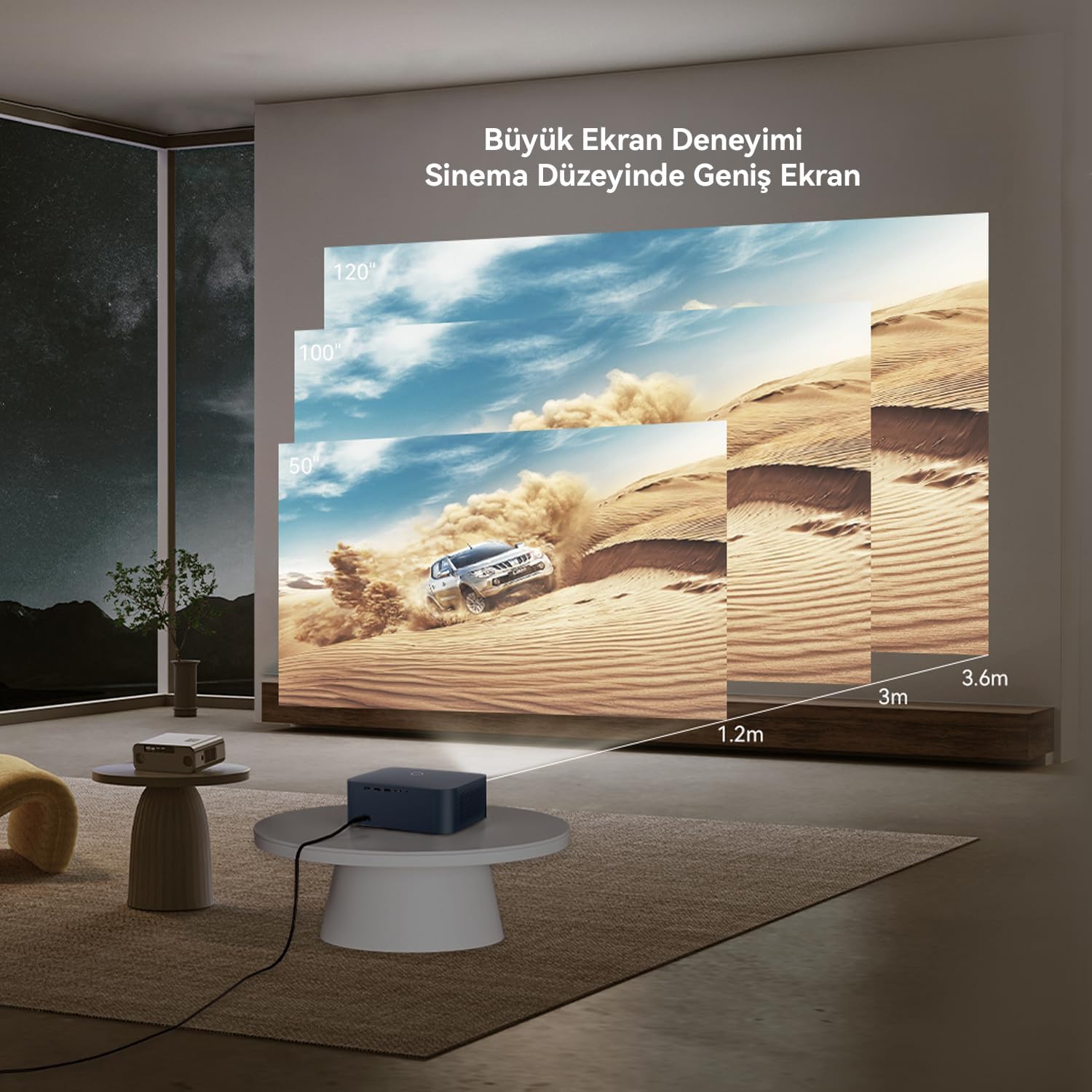
Figure 5.1: Guide for projection distances and corresponding screen sizes. For example, a 1.2m distance yields approximately a 50-inch screen, while 3.6m can achieve a 120-inch screen. The projector supports up to a 300-inch maximum image size.
5.2 Sambungan Kuasa
- Sambungkan kabel kuasa ke port input kuasa projektor.
- Palamkan hujung kabel kuasa yang lain ke dalam salur keluar kuasa.
- Tekan butang kuasa pada projektor atau alat kawalan jauh untuk menghidupkannya.
5.3 Pelarasan Fokus dan Keystone
The WANBO X2 Max features automatic focus and keystone correction. When the projector is powered on or moved, its AI vision algorithm system will automatically adjust the image to ensure clarity and a rectangular shape.

Figure 5.2: The projector's automatic focus system ensures a clear image upon startup or movement, utilizing Wanbo's proprietary AI vision algorithm.
6. Beroperasi
6.1 Menyambung Peranti
The projector supports multiple connectivity options:

Gambar 6.1: Lebihview of multi-device connection capabilities, including tablets, smartphones, PCs, laptops, DVD players, TV boxes, gaming consoles (Xbox/PS5), and cameras. The projector offers Audio, HDMI, AV, and USB ports.
- HDMI: Connect laptops, gaming consoles, Blu-ray players, or TV sticks using an HDMI cable. Select the corresponding HDMI input from the projector's source menu.
- USB: Masukkan pemacu kilat USB atau pemacu keras luaran ke dalam port USB untuk memainkan media files secara langsung.
- DARI: Use an AV cable to connect older devices like DVD players or VCRs.
- Keluar Audio: Sambungkan pembesar suara atau fon kepala luaran melalui bicu audio 3.5mm untuk bunyi yang dipertingkatkan.
6.2 Menggunakan Alat Kawalan Jauh
The included remote control allows you to navigate the projector's interface, adjust settings, and control media playback. Ensure the remote has batteries installed and is pointed towards the projector's IR receiver.
6.3 Navigating Android 9.0 Interface
The projector runs on Android 9.0, providing access to various apps and streaming services. Use the remote control to navigate the home screen, open applications, and adjust system settings.

Figure 6.2: The Android 9.0 interface offers a wide range of content, including films, TV series, shows, animations, and documentaries. Popular streaming service logos like Netflix, YouTube, Prime Video, and Disney+ are shown, indicating potential access to content.
6.4 Sambungan WiFi
To access online content and features, connect the projector to a Wi-Fi network:
- Go to the 'Settings' menu on the Android home screen.
- Pilih 'Rangkaian & Internet'.
- Hidupkan Wi-Fi dan pilih rangkaian yang anda inginkan daripada senarai.
- Masukkan kata laluan Wi-Fi jika digesa.
The projector supports Dual-band WiFi 6, which significantly reduces latency for smoother streaming and online experiences.

Figure 6.3: Demonstration of the projector's WiFi 6 capabilities, illustrating reduced delay for a smooth and fast movie streaming experience.
6.5 Pencerminan Skrin
You can mirror content from your smartphone or tablet to the projector. Refer to the specific screen mirroring app or feature on your device and the projector's Android interface for instructions.
Nota Penting: Due to copyright protection, certain streaming services like Netflix, Amazon Prime Video, and Disney+ may not allow direct screen mirroring of their content. For these services, it is recommended to use a dedicated TV stick (e.g., Amazon Fire TV Stick, Google Chromecast) connected to the projector's HDMI port.
7. Penyelenggaraan
7.1 Membersihkan Lensa
Gunakan kain lembut dan bebas lin yang direka khusus untuk kanta optik untuk mengelap kanta projektor dengan perlahan. Jangan gunakan pembersih yang melelas atau daya yang berlebihan, kerana ini boleh mencalarkan kanta.
7.2 Penjagaan Am
- Simpan projektor di persekitaran yang bersih dan kering.
- Avoid exposing the projector to extreme temperatures or direct sunlight.
- Regularly clean the projector's exterior with a soft, dry cloth.
- Pastikan bukaan pengudaraan tidak disekat.
7.3 Lamp kehidupan
The projector's light source has an estimated lifespan of up to 50,000 hours, providing long-term usage without frequent lamp penggantian.
8. Penyelesaian masalah
Jika anda menghadapi masalah dengan projektor anda, rujuk kepada masalah dan penyelesaian biasa berikut:
| Masalah | Kemungkinan Punca | Penyelesaian |
|---|---|---|
| Tiada kuasa | Power cable not connected; Power outlet faulty; Projector off | Check power cable connection; Try a different outlet; Press power button on projector/remote |
| Tiada imej | Input source not selected; Device not connected; Lens cap on | Select correct input source (HDMI, USB, AV); Ensure device is connected and powered on; Remove lens cap |
| Imej kabur | Focus issue; Projector moved | Allow automatic focus to adjust; If manual adjustment is needed (rare), check settings. |
| Image distorted (trapezoid) | Keystone issue; Projector not perpendicular to screen | Allow automatic keystone correction to adjust. |
| Tiada bunyi | Kelantangan terlalu rendah; Dibisukan; Peranti audio luaran tidak disambungkan/dipilih | Increase volume; Unmute; Check external audio connections and settings |
| Alat kawalan jauh tidak berfungsi | Batteries low/dead; Obstruction; Out of range | Replace batteries; Remove obstructions; Ensure remote is pointed at IR receiver within range |
9. Spesifikasi
Detailed technical specifications for the WANBO X2 Max Projector:

Figure 9.1: Infographic summarizing key features including 1080P FHD, 4K Support, 450 ANSI lumens, Android 9.0, Automatic Focus, Automatic Keystone Correction, 2000:1 Contrast, Dual Band 6G WiFi, 10W Hi-Fi Speaker, Tripod and Ceiling Mount Compatibility, 50,000 hour Lamp Life, Lightweight and Portable design.
| Ciri | Spesifikasi |
|---|---|
| Jenama | Wanbo |
| Nombor Model | WPA23 |
| Resolusi Asli | 1920 x 1080 (HD Penuh) |
| Kecerahan | 450 ANSI Lumen |
| Nisbah Kontras | 2000:1 |
| Sistem Operasi | Android 9.0 |
| Teknologi Ketersambungan | HDMI, USB, AV, Dual-band WiFi 6 |
| Saiz Imej Maks | 300 inci |
| Lamp kehidupan | Sehingga 50,000 jam |
| Output Audio | 10W Hi-Fi Speaker, 3.5mm Audio Jack |
| Ciri Khas | Automatic Focus, Automatic Keystone Correction, Portable, Tripod and Ceiling Mount Compatible |
| Dimensi (L x W x H) | 28 x 27 x 16 sentimeter |
| Berat badan | 1.4 Kilogram |
10. Waranti dan Sokongan
10.1 Waranti Pengilang
The WANBO X2 Max Projector comes with a 2-year manufacturer's warranty. This warranty covers defects in materials and workmanship under normal use. Please retain your proof of purchase for warranty claims.
10.2 Sokongan Pelanggan
For technical assistance, troubleshooting, or warranty inquiries, please contact Wanbo customer support. Refer to the official Wanbo weblaman web atau dokumentasi pembelian anda untuk maklumat hubungan terkini.
Anda juga boleh melawat Wanbo Store on Amazon untuk mendapatkan lebih banyak maklumat produk dan sumber sokongan.