1. Pengenalan
The Triplett TVR1G is a versatile LAN Network Tester designed to evaluate LAN devices and cabling according to the 10, 100, and 1000 Base-T standards. This comprehensive tool assists in identifying faulty hubs, PCs, or cable connections that may impede network performance. It can also be used inline to determine the negotiated speed and duplex of a link. The TVR1G is an essential tool for both LAN installers and repair personnel, facilitating the documentation, installation, and repair of LANs, as well as the integration of new equipment into existing networks.
Ciri-ciri utama termasuk:
- Tests LAN devices and cabling up to the 1000 (1GB) Base-T standard.
- Cable test port checks continuity, opens, shorts, and splits.
- Audibly traces cable locations of all 4 pairs to ensure network compatibility.
- Functions as a Hub/Switch/PC verifier, indicating equipment device type and verifying if PC/hub/switch is ON.
- LAN speedometer verifies link speed and duplex (10, 100, 1000, 10000 MB/s, full or half duplex).
- Inline network activity monitor indicates the negotiated speed and duplex between two LAN devices.
- Straight thru/crossover cable simulator indicates the type of patch cable required and verifies wiring.
- Detects PoE (Power over Ethernet) and indicates whether it is endspan or midspan.
2. Apa yang ada di dalam Kotak
Selepas membuka bungkusan, sila sahkan bahawa semua komponen ada dan tidak rosak:
- TVR1G Main Unit
- Probe Jauh
- 9V Batteries (2)
- RJ45 Cables (2)
- RJ45 to Coax Adapter
- Membawa Sarung

3. Persediaan
3.1 Pemasangan Bateri
The Triplett TVR1G requires two 9V batteries for operation. These are included with the unit.
- Locate the battery compartments on the rear of both the Main Unit and the Remote Probe.
- Buka penutup bateri.
- Insert one 9V battery into each compartment, ensuring correct polarity (+/-).
- Tutup penutup bateri dengan ketat.
3.2 Menghidupkan/Mematikan
To power on the Main Unit, slide the HIDUP/MATI switch located on the front panel to the ON position. To power off, slide the switch to the DIMATIKAN position. The Remote Probe does not have a separate power switch; it is activated when connected to the Main Unit or when its trace button is pressed.

4. Arahan Operasi
4.1 LAN Device and Cabling Testing (10/100/1000 Base-T)
The TVR1G can test various aspects of your LAN infrastructure.
4.1.1 Hub/Switch/PC Verification
Connect the main unit to a LAN port. The tester will identify the connected device type (Hub, Switch, or PC) and indicate if it is active. This helps in quickly diagnosing network connectivity issues at the device level.
4.1.2 LAN Speed and Duplex Verification
The unit displays the negotiated speed (10, 100, 1000, or 10000 MB/s) and duplex mode (Half or Full) of the connected link. This is crucial for ensuring optimal network performance.
4.1.3 Inline Network Activity Monitoring
To monitor the negotiated speed and duplex between two LAN devices, connect the TVR1G inline between them. This provides real-time insight into the link's operational parameters.
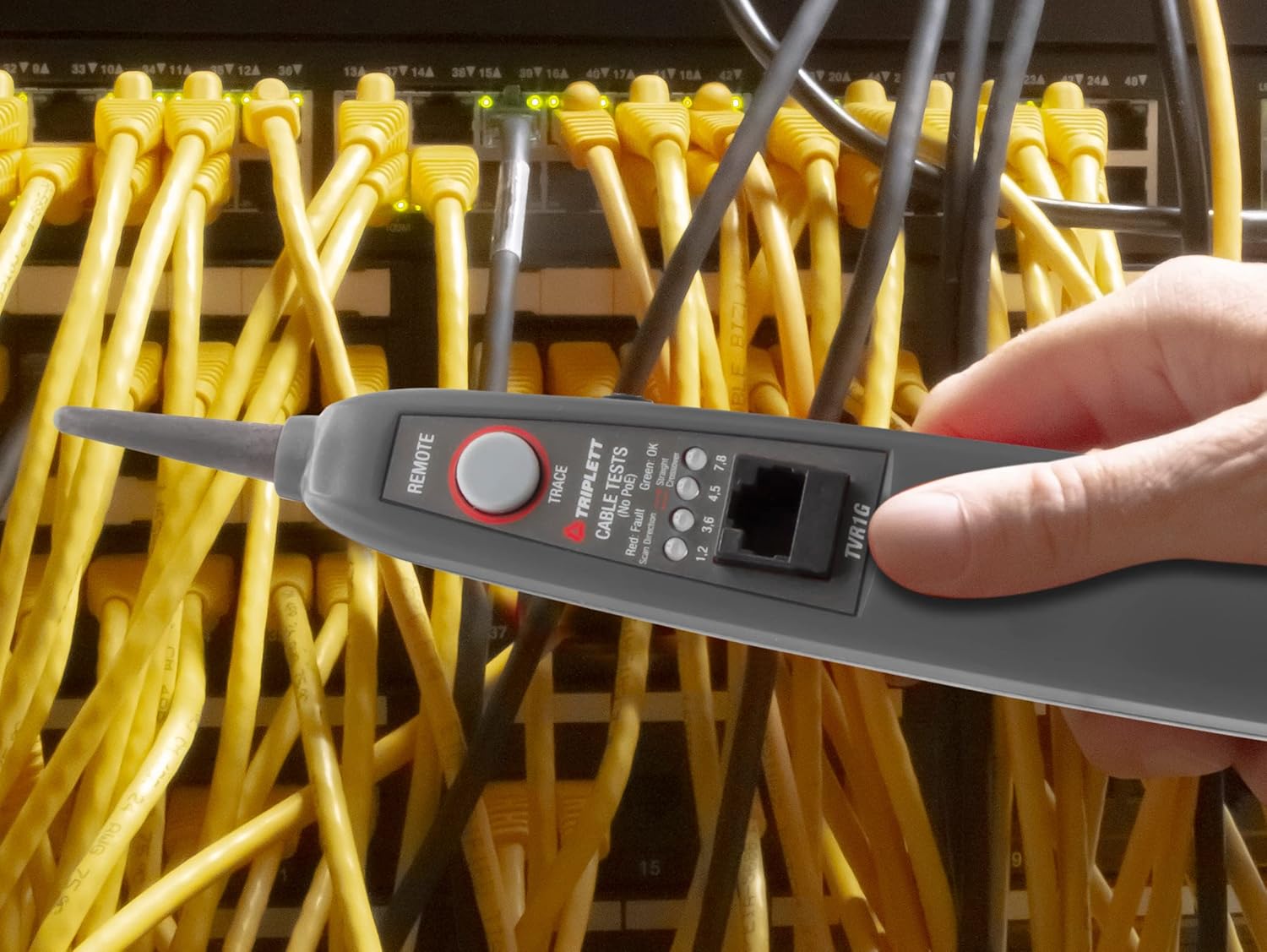
4.2 Pengujian Kabel
The TVR1G's cable test port allows for comprehensive analysis of network cables.
4.2.1 Continuity, Opens, Shorts, and Splits Test
Connect one end of the RJ45 cable to the Main Unit's cable test port and the other end to the Remote Probe. The unit will display the wiring status, identifying any opens, shorts, or split pairs, which are common causes of network issues.
4.2.2 Straight Thru/Crossover Cable Simulation
The tester can simulate both straight-through and crossover cable configurations, indicating the type of patch cable required for a specific connection and verifying if the cable is wired correctly.
4.2.3 Pengesanan Kabel
To trace cable locations, connect the Remote Probe to the cable to be traced. Press the TRACE button on the Remote Probe. The Main Unit will emit an audible tone, allowing you to follow the cable path. This feature is particularly useful for identifying specific cables in a bundle or within walls.

4.3 Power over Ethernet (PoE) Detection
The TVR1G can detect the presence of Power over Ethernet (PoE) and indicate whether it is endspan (Power Sourcing Equipment, e.g., switch) or midspan (PoE injector). This helps in verifying PoE availability and troubleshooting power delivery issues to network devices.
5. Penyelenggaraan
To ensure the longevity and accurate performance of your Triplett TVR1G, follow these maintenance guidelines:
- Pembersihan: Lap unit dengan kain lembut dan kering. Jangan gunakan pembersih atau pelarut yang melelas.
- Storan: Store the tester and its accessories in the provided carrying case when not in use to protect it from dust, moisture, and physical damage.
- Penggantian Bateri: Replace batteries promptly when the low battery indicator appears or if the unit's performance degrades. Always use fresh 9V alkaline batteries. Remove batteries if the unit will not be used for an extended period to prevent leakage.
- Elakkan Keadaan Melampau: Do not expose the unit to extreme temperatures, high humidity, or direct sunlight for prolonged periods.
6. Penyelesaian masalah
If you encounter issues with your Triplett TVR1G, refer to the following common troubleshooting steps:
| Masalah | Kemungkinan Punca | Penyelesaian |
|---|---|---|
| Unit tidak dihidupkan. | Bateri mati atau tidak dipasang dengan betul. | Check battery polarity. Replace with fresh 9V batteries. |
| Inaccurate cable test results. | Poor connection, damaged cable, or faulty port. | Ensure RJ45 connectors are fully seated. Try a known good cable. Inspect ports for damage. |
| No tone during cable tracing. | Remote Probe not connected or trace button not pressed. | Ensure Remote Probe is connected to the cable and its trace button is pressed. Check Remote Probe battery. |
| Incorrect speed/duplex detection. | Issue with the connected network device or cable. | Verify the network device settings. Test with a different, known good cable. |
7. Spesifikasi
| Ciri | Perincian |
|---|---|
| Nombor Model | TVR1G |
| Dimensi Produk | 11.5 x 12 x 3 inci |
| Berat Barang | 2.1 paun |
| Sumber Kuasa | Battery Powered (2 x 9V batteries, included) |
| Pengeluar | Triplett Test Equipment and Tools |
| Negara Asal | China |
| LAN Standards Supported | 10/100/1000 Pangkalan-T |
| Cable Test Functions | Continuity, Opens, Shorts, Splits, Straight Thru/Crossover Simulation |
| Pengesanan PoE | Yes (Endspan/Midspan) |
8. Waranti dan Sokongan
Triplett products are designed for durability and reliability. For specific warranty information regarding your TVR1G LAN Network Tester, please refer to the warranty card included with your product or visit the official Triplett website. For technical support, troubleshooting assistance beyond this manual, or service inquiries, please contact Triplett customer service through their official channels.
Official Triplett Webtapak: www.triplett.com