1. Pengenalan
Welcome to the VTech 2-in-1 Map & Go Scooter user manual. This versatile ride-on toy is designed to grow with your child, transforming from a stable trike into an exciting scooter. It features interactive elements that encourage imaginative play and introduce basic concepts like counting and road safety.
Please read this manual thoroughly before assembly and use to ensure safe and optimal operation of the product. Keep this manual for future reference.
2. Maklumat Keselamatan Penting
WARNING: Adult assembly required. Adult supervision is required at all times when the product is in use.
- This product is intended for children aged 12-36 months, with a maximum weight limit of 42 pounds (19 kg).
- Do not use this product on public roads, near motor vehicles, or on steep inclines. Use only on flat, level surfaces free of obstacles.
- Ensure all parts are securely fastened before each use. Regularly check for loose or damaged components.
- Jauhkan bahagian kecil dan bahan pembungkus daripada kanak-kanak untuk mengelakkan bahaya tercekik.
- Keselamatan Bateri:
- Requires 2 AA batteries. New alkaline batteries are recommended for regular use.
- Jangan campurkan bateri lama dan baru. Jangan campurkan bateri beralkali, standard (karbon-zink), atau boleh dicas semula (nikel-kadmium).
- Remove exhausted batteries promptly. Remove batteries if the unit will not be used for an extended period.
- Bateri yang tidak boleh dicas semula tidak boleh dicas semula. Bateri boleh dicas semula hanya perlu dicas di bawah pengawasan orang dewasa.
- Jangan pintaskan terminal bekalan.
3. Kandungan Pakej
Sila pastikan semua komponen ada sebelum memulakan pemasangan:
- Main Scooter Body
- Perhimpunan Hendal
- Roda Depan
- Rear Wheels (2 for trike mode, 1 for scooter mode)
- tempat duduk
- Manual Arahan (dokumen ini)
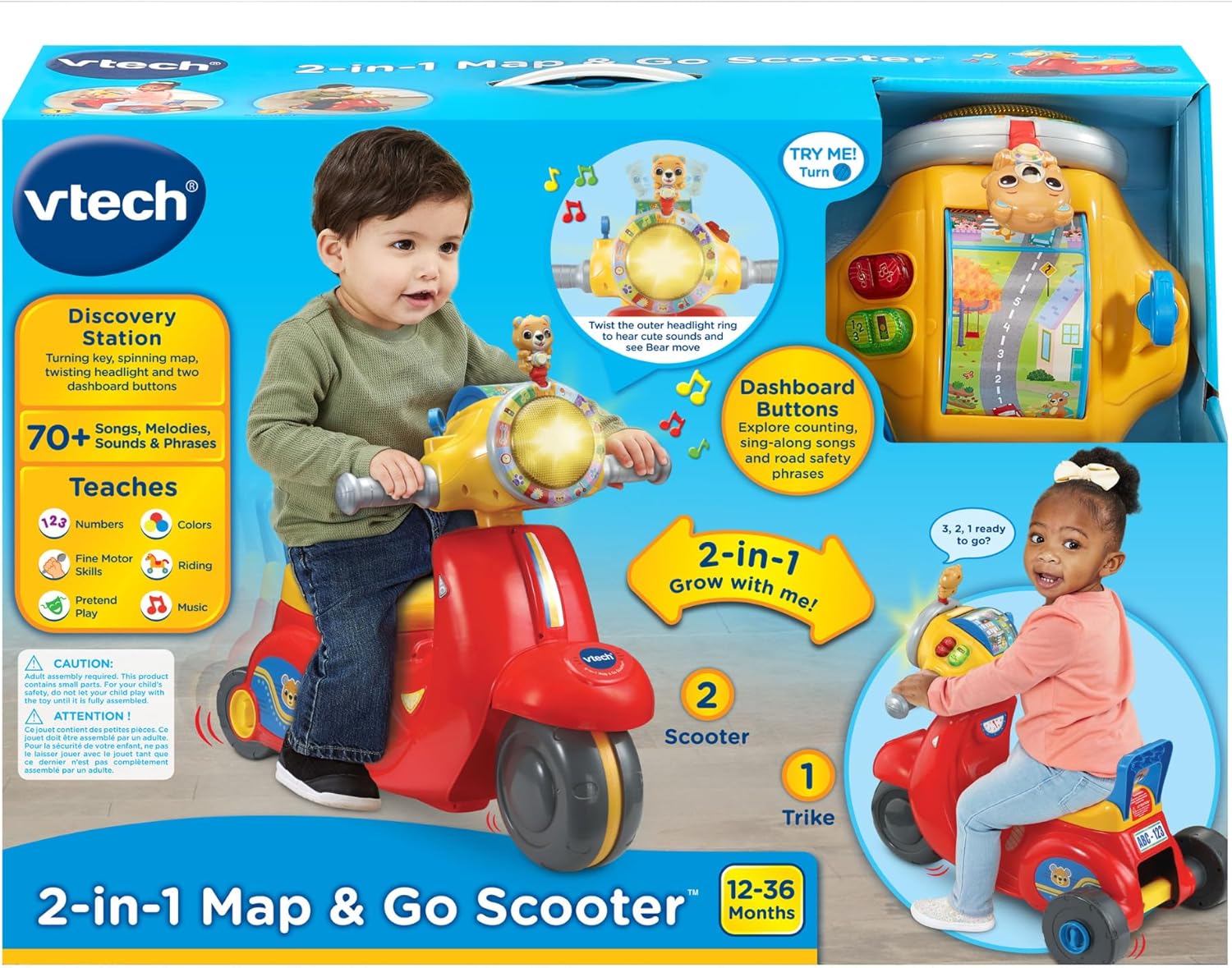
Image: Product packaging illustrating the 2-in-1 transformation and key features.
4. Pemasangan dan Persediaan
4.1. Pemasangan Bateri
- Locate the battery compartment, typically on the underside or within the main body of the scooter.
- Menggunakan pemutar skru (tidak disertakan), buka penutup petak bateri.
- Masukkan 2 bateri AA baharu, pastikan kekutuban (+/-) yang betul seperti yang ditunjukkan di dalam petak.
- Pasang semula penutup dan ketatkan skru.
4.2. Assembling the Trike Mode
The scooter is initially assembled in trike mode for enhanced stability for younger children.
- Attach the handlebar assembly to the main scooter body, ensuring it clicks securely into place.
- Insert the front wheel into its designated slot.
- Attach the two rear wheels to the back axle, ensuring they are firmly secured.
- Secure the seat onto the main body.
- Verify all connections are tight and secure before allowing a child to use the product.

Image: The VTech 2-in-1 Map & Go Scooter configured in its stable trike mode.
4.3. Transforming to Scooter Mode
As your child grows and gains confidence in balance and coordination, the trike can be easily transformed into a two-wheeled scooter.
- Locate the transformation mechanism, typically a latch or button, near the rear wheels.
- Follow the instructions on the product itself or refer to the included quick-start guide for specific steps to convert the rear wheel assembly from two wheels to a single wheel.
- Ensure the transformation is complete and all parts are securely locked in the scooter configuration before use.
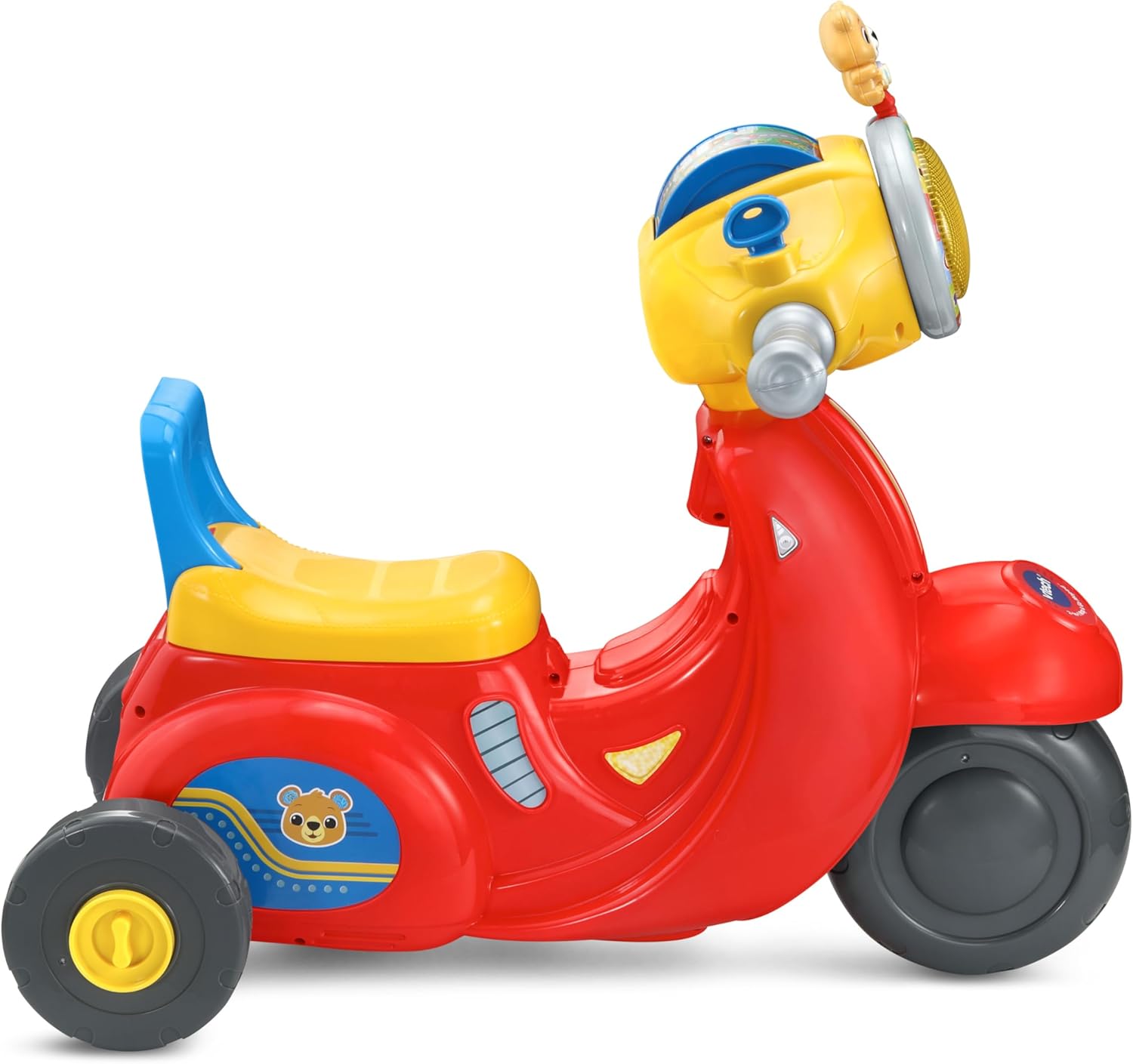
Image: The VTech 2-in-1 Map & Go Scooter configured in its two-wheeled scooter mode.
5. Arahan Operasi
5.1. Operasi Asas
- Hidupkan/Mati Kuasa: Locate the power switch, usually on the dashboard or underside of the unit. Turn it to the 'On' position to activate the toy.
- Menunggang: In trike mode, children can sit on the seat and push with their feet. In scooter mode, children stand on the footrest and propel themselves. Always ensure a safe, clear area for riding.

Image: A child enjoying the VTech 2-in-1 Map & Go Scooter in its stable trike configuration.

Image: A child riding the VTech 2-in-1 Map & Go Scooter in its two-wheeled scooter configuration.
5.2. Ciri Interaktif
- Pencucuhan Kekunci: Turn the key to activate engine sounds and phrases, simulating starting a real vehicle.
- Roller Map: Explore different locations by turning the roller map. This feature encourages imaginative journeys.
- Headlight Ring: Twist the outer headlight ring to activate lights, sounds, and melodies, enhancing sensory play.
- Butang Papan Pemuka: Press the various buttons on the dashboard to hear counting, traffic-related phrases, road safety messages, and engaging songs.
- Bunyi Diaktifkan Pergerakan: The scooter features motion sensors that trigger motor sounds as the child rolls, adding to the realistic play experience.
6. Penyelenggaraan
- Pembersihan: Wipe the surface of the scooter with a slightly damp cloth. Do not immerse the product in water. Avoid using harsh chemicals or abrasive cleaners.
- Penggantian Bateri: Refer to Section 4.1 for instructions on replacing batteries when sounds or lights become faint or stop working.
- Storan: Store the scooter in a cool, dry place away from direct sunlight and moisture when not in use.
- Pemeriksaan biasa: Periodically inspect all parts for wear and tear, loose screws, or damage. Discontinue use if any damage is found.
7. Penyelesaian masalah
| Masalah | Kemungkinan Punca | Penyelesaian |
|---|---|---|
| Product does not turn on or sounds/lights are faint. | Batteries are low, dead, or incorrectly installed. | Gantikan dengan bateri AA baharu, pastikan kekutuban yang betul. |
| Sounds are distorted or intermittent. | Kuasa bateri rendah. | Gantikan bateri. |
| Roda tidak berputar dengan bebas. | Obstruction (e.g., hair, debris) or loose assembly. | Check wheels for obstructions and remove. Ensure all assembly points are secure. |
| Product not transforming correctly. | Mechanism not fully disengaged/engaged. | Refer to Section 4.3 and ensure the transformation latch/button is fully operated. |
8. Spesifikasi
| Ciri | Perincian |
|---|---|
| Jenama | VTech |
| Model | 2-in-1 Map & Go Scooter |
| bahan | plastik |
| Berat Barang | 6.26 paun (2.84 kg) |
| Dimensi Produk (L x W x H) | 59.1L x 36.8W x 53.5H Sentimeter |
| Tema | kenderaan |
| Perhimpunan Diperlukan | ya |
| Had berat | 42 paun (19 kg) |
| Umur Disyorkan | 12-36 Bulan |
| Bateri Diperlukan | 2 x AA (not included for regular use) |
9. Waranti dan Sokongan
VTech products are designed to provide years of educational and entertaining play. For detailed warranty information, please refer to the warranty card included with your purchase or visit the official VTech webtapak.
If you encounter any issues or have questions regarding your VTech 2-in-1 Map & Go Scooter, please contact VTech Customer Support:
- Webtapak: www.vtechkids.ca (for Canadian customers) or your regional VTech webtapak.
- Maklumat Hubungan: Refer to the VTech website for current contact numbers and support hours.
Please have your product model name and purchase date available when contacting support.


