1. Pengenalan
Welcome to the SUUNY X1 Pro Max Smartwatch user manual. This document provides comprehensive instructions to help you set up, operate, and maintain your new smartwatch. The X1 Pro Max is designed to enhance your daily life with features such as Bluetooth calling, health monitoring (heart rate, blood pressure, blood oxygen), sports tracking, and smart notifications. Please read this manual carefully before using the device to ensure optimal performance and longevity.
2. Kandungan Pakej
Selepas membuka pakej, sila sahkan bahawa semua item berikut disertakan:
- SUUNY X1 Pro Max Smartwatch
- Kabel Pengecas Tanpa Wayar
- Manual Pengguna
- Silicone Strap (Black or Grey, depending on model)
- Steel Bamboo Strap (Black or Silver, depending on model)
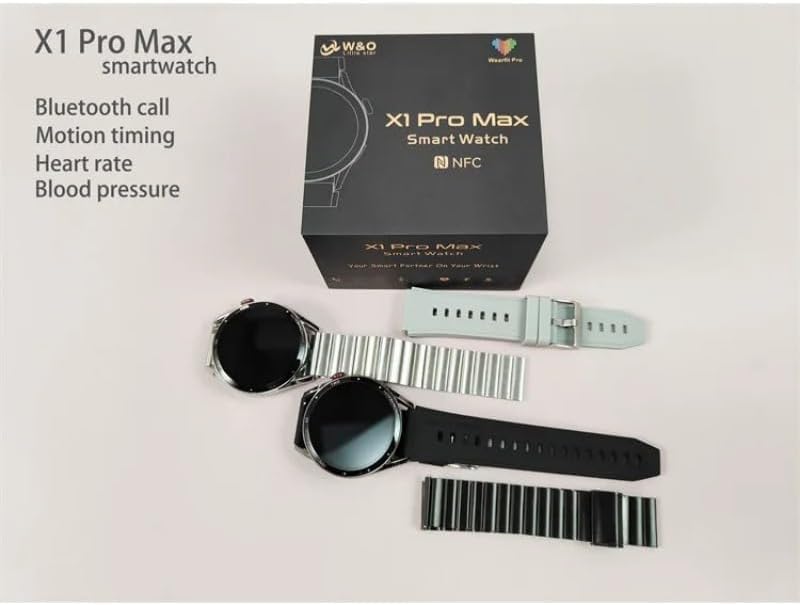
Image: The SUUNY X1 Pro Max Smartwatch packaging, showing two watches (one black, one silver) along with various silicone and steel straps, and the user manual.
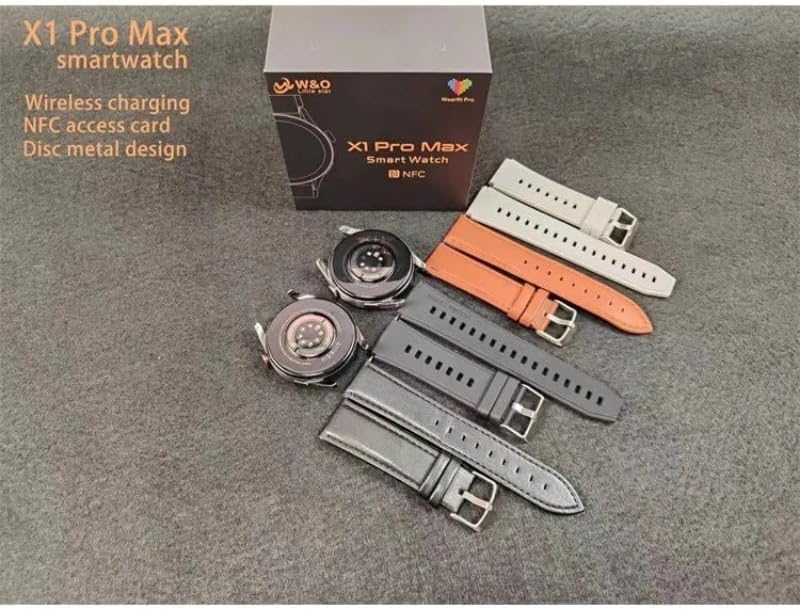
Image: A SUUNY X1 Pro Max Smartwatch box with the watch body and several interchangeable straps in different colors (grey, orange, black, silver).
3. Produk Lebihview
The SUUNY X1 Pro Max features a round 1.45-inch AMOLED display with a resolution of 412x412 pixels. It is equipped with a main chip 551 and Bluetooth version 5.2 for stable connectivity.
Komponen Utama:
- paparan: 1.45-inch Round AMOLED Touchscreen
- Butang Sisi/Mahkota: For navigation and function control.
- Penderia: Heart rate, blood pressure, blood oxygen sensors on the rear.
- Mengecas Kenalan: On the rear for wireless charging.
- Pembesar Suara/Mikrofon: For Bluetooth calls.

Imej: Dari dekat view of the SUUNY X1 Pro Max Smartwatch in silver with a grey silicone strap, displaying a watch face with time, date, weather, steps, and heart rate.
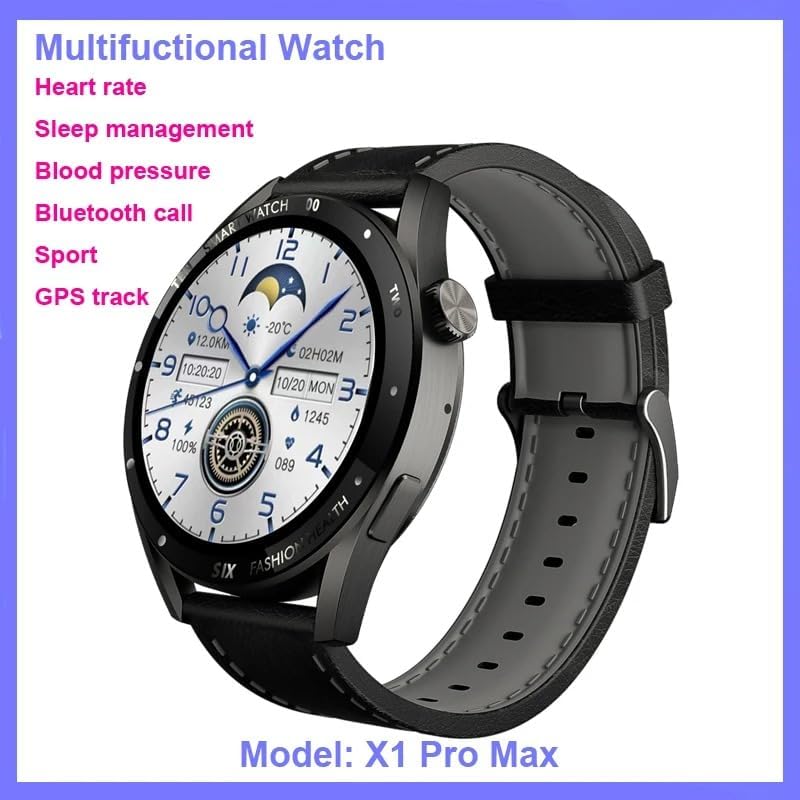
Image: The SUUNY X1 Pro Max Smartwatch in black with a black silicone strap, shown at an angle, highlighting its design and the 'Multifunctional Watch' capabilities.

Imej: Terperinci views of the SUUNY X1 Pro Max Smartwatch, showing the alloy watch case, the sweat-proof breathable silicone strap with its buckle, and the stainless steel rear cover with brand logo.
4. Persediaan
4.1 Mengecas Jam Pintar
Before initial use, fully charge your smartwatch. The X1 Pro Max supports wireless charging.
- Connect the wireless charging cable to a USB power adapter (not included) and plug it into a power source.
- Place the back of the smartwatch onto the charging pad of the wireless charger. Ensure the charging contacts align.
- Paparan jam tangan akan menunjukkan status pengecasan. Cas penuh biasanya mengambil masa kira-kira 2 jam.
4.2 Menghidupkan/Mematikan
- Hidupkan kuasa: Press and hold the side button until the SUUNY logo appears.
- Matikan: Tekan dan tahan butang sisi, kemudian pilih "Matikan Kuasa" pada skrin.
4.3 Pemasangan Apl dan Berpasangan Bluetooth
To unlock the full potential of your smartwatch, download and install the "WearFit Pro" application on your smartphone. The app is compatible with Android 5.0+ and iOS 10.0+ devices.
- Scan the QR code provided in the manual or on the watch screen, or search for "WearFit Pro" in your smartphone's app store.
- Install and open the "WearFit Pro" app.
- Dayakan Bluetooth pada telefon pintar anda.
- In the "WearFit Pro" app, navigate to the device section and select "Add Device".
- The app will search for available devices. Select "X1 Pro Max" from the list to pair.
- Sahkan permintaan berpasangan pada telefon pintar anda dan jam tangan pintar.
4.4 NFC Access Control Setup
The X1 Pro Max supports NFC access control unlocking.
- Open the "WearFit Pro" app and navigate to the NFC settings.
- Follow the in-app instructions to add and configure your NFC access card information.
- Once set up, you can use your smartwatch to unlock compatible NFC access points.
5. Arahan Operasi
5.1 Navigasi Asas
- Leret ke Bawah: Access quick settings (e.g., brightness, DND mode).
- Leret ke atas: View pemberitahuan.
- Leret Kiri/Kanan: Scroll through widgets and main functions (e.g., activity, heart rate, weather).
- Tekan Butang Sisi: Return to the watch face or access the app menu.
- Double-click Screen: Wake up the function (if enabled).
- Rotate Crown: Scroll through menus or adjust settings.
5.2 Panggilan Bluetooth
Once paired via Bluetooth, you can make and receive calls directly from your smartwatch.
- Membuat Panggilan: Access the dialer or contacts list on the watch to initiate a call.
- Menerima Panggilan: Apabila panggilan masuk, anda boleh menjawab atau menolaknya terus dari skrin jam tangan.
5.3 Pemberitahuan
Enable app notifications in the "WearFit Pro" app to receive alerts for messages, calls, and other applications directly on your watch.
5.4 Mod Sukan
The smartwatch supports various sports modes to track your workouts.
- Navigate to the "Sports" or "Workout" section on your watch.
- Pilih aktiviti yang anda inginkan (cth., berlari, berjalan, berbasikal).
- Start the activity. The watch will record data such as duration, distance, calories burned, and heart rate.
- End the activity to save the data, which will sync with the "WearFit Pro" app.
6. Ciri-ciri Pemantauan Kesihatan
The SUUNY X1 Pro Max provides various health monitoring functions. For accurate readings, ensure the watch is worn snugly on your wrist.
6.1 Pemantauan Kadar Jantung
The watch can continuously monitor your heart rate or take on-demand measurements.
- Navigate to the "Heart Rate" function on the watch.
- The watch will begin measuring your heart rate.
- View your heart rate data and trends in the "WearFit Pro" app.
6.2 Blood Pressure Monitoring
The watch can estimate your blood pressure.
- Navigate to the "Blood Pressure" function on the watch.
- Kekal diam semasa pengukuran.
- Results will be displayed on the watch and synced to the app.
6.3 Pemantauan Oksigen Darah
Measure your blood oxygen saturation (SpO2) levels.
- Navigate to the "Blood Oxygen" function.
- Keep your arm still and flat during the measurement.
6.4 Pemantauan Tidur
Wear the watch to bed, and it will automatically track your sleep patterns, including deep sleep, light sleep, and wake times. View detailed analysis in the "WearFit Pro" app.
Nota: The health monitoring features are for reference only and should not be used for medical diagnosis or treatment. Consult a medical professional for health-related concerns.
7. Ciri Pintar
- Weather Reminders: Dapatkan kemas kini cuaca masa nyata pada jam tangan anda.
- Peringatan Sedentari: The watch will remind you to move after periods of inactivity.
- Jam loceng: Tetapkan penggera melalui aplikasi atau terus pada jam tangan.
- Jam randik: Use the built-in stopwatch for timing activities.
- Cari Jam Tangan: Use the "WearFit Pro" app to locate your watch if it's within Bluetooth range.
- Kawalan Kamera Jauh: Shake the watch to take photos on your paired smartphone.
- Short Video Remote Control: Control short video playback on your smartphone.
- Business Card Function: Store and display digital business cards.
8. Penyelenggaraan
8.1 Pembersihan
Regularly clean your smartwatch and strap to prevent skin irritation and maintain device functionality.
- Lap skrin jam tangan dan badan dengan kain lembut dan tidak berbulu.
- Untuk kotoran degil, sedikit dampen kain dengan air. Elakkan menggunakan bahan kimia yang keras atau bahan yang melelas.
- Bersihkan kenalan pengecas secara berkala untuk memastikan pengecasan yang cekap.
8.2 Rintangan Air (IP67)
The SUUNY X1 Pro Max is rated IP67, meaning it is protected from dust and can withstand immersion in water up to 1 meter for 30 minutes.
- It is suitable for daily use, such as hand washing or light rain.
- Avoid wearing the watch during swimming, showering with hot water, or diving, as steam and high water pressure can compromise the seal.
- Jika jam tangan basah, keringkan dengan teliti sebelum dicas.
8.3 Penjagaan Bateri
- Elakkan menyahcas sepenuhnya bateri dengan kerap.
- Jangan dedahkan jam tangan kepada suhu yang melampau.
- If storing the watch for an extended period, charge it to about 50% and power it off.
9. Penyelesaian masalah
9.1 Jam Tangan Tidak Menyala
- Pastikan jam tangan dicas sepenuhnya. Sambungkannya ke pengecas tanpa wayar selama sekurang-kurangnya 30 minit.
- Try pressing and holding the side button for 10-15 seconds to force a restart.
9.2 Tidak Dapat Dipasangkan dengan Telefon Pintar
- Pastikan Bluetooth didayakan pada telefon pintar anda.
- Ensure the "WearFit Pro" app is installed and running.
- Mulakan semula telefon pintar dan jam tangan pintar anda.
- Forget the device in your smartphone's Bluetooth settings and try pairing again through the "WearFit Pro" app.
- Pastikan jam tangan belum dipasangkan dengan peranti lain.
9.3 Bacaan Kesihatan yang Tidak Tepat
- Pastikan jam tangan dipakai dengan kemas di pergelangan tangan anda, tidak terlalu ketat atau terlalu longgar.
- Keep your arm still during measurements.
- Bersihkan penderia di belakang jam tangan.
- Note that these readings are for general wellness and fitness purposes and are not medical-grade.
9.4 Pemberitahuan Tidak Muncul
- Check if notifications are enabled in the "WearFit Pro" app.
- Ensure your smartphone's notification settings allow the "WearFit Pro" app to send notifications.
- Verify that the watch is connected to your smartphone via Bluetooth.
10. Spesifikasi
| Ciri | Spesifikasi |
|---|---|
| Nombor Model | X1 Pro Max |
| Saiz Paparan | 1.45 inci (Bulat) |
| Resolusi Paparan | 412 x 412 piksel |
| Jenis Paparan | AMOLED |
| Chip Utama | 551 |
| Ingatan | 128 MB |
| Versi Bluetooth | 5.2 (AB5376A3) |
| Kapasiti Bateri | 260 mAh (Litium-ion) |
| Kaedah Pengecasan | Pengecasan Tanpa Wayar |
| Tahan Air | IP67 |
| Keserasian | Android 5.0+ / iOS 10.0+ |
| Apl Pendamping | WearFit Pro |
| GPS | Tiada GPS |
11. Waranti dan Sokongan
For warranty information and customer support, please refer to the documentation provided with your purchase or contact the retailer where you purchased the SUUNY X1 Pro Max Smartwatch. Specific warranty terms may vary by region and seller.
For technical assistance or further inquiries, please reach out to the SUUNY customer service channels as indicated on their official webtapak atau pembungkusan produk.


