Arahan Keselamatan Penting
Please read all instructions carefully before operating the dehumidifier and retain this manual for future reference. Failure to follow these instructions may result in electric shock, fire, or serious injury.
- Sentiasa sambungkan penyahlembap ke soket kuasa yang dibumikan.
- Jangan kendalikan unit jika kord kuasa atau palam rosak.
- Ensure the dehumidifier is placed on a level, stable surface to prevent water spillage.
- Maintain a minimum clearance of 8 inches (20 cm) around the unit for proper airflow.
- Jangan masukkan jari atau benda asing ke dalam saluran masuk atau keluar udara.
- Cabut plag unit sebelum membersihkan atau melakukan sebarang penyelenggaraan.
- Do not use the dehumidifier in areas where flammable gases or liquids are present.
- Perkakas ini tidak dimaksudkan untuk digunakan oleh orang (termasuk kanak-kanak) yang kurang keupayaan fizikal, deria atau mental, atau kurang pengalaman dan pengetahuan, melainkan mereka telah diberi pengawasan atau arahan mengenai penggunaan perkakas oleh orang yang bertanggungjawab untuk keselamatan mereka.
Produk Selesaiview
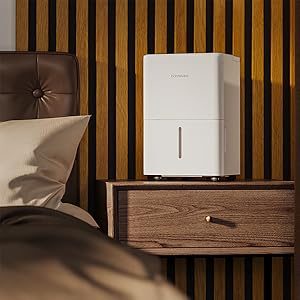
The hOmeLabs 1,000 Sq. Ft Portable Dehumidifier is designed to efficiently remove excess moisture from your indoor environment, improving air quality and comfort. It is ideal for small spaces such as bedrooms, bathrooms, offices, and closets, covering up to 1,000 square feet.

Image: The hOmeLabs 1,000 Sq. Ft Portable Dehumidifier, a compact white unit, shown next to its blue product packaging. The unit features a top handle and a visible water level indicator on the front.
This compact unit is capable of removing up to 8 pints of moisture per day (at 89.6°F, 80% RH) and operates at an ultra-quiet 33dB, making it suitable for noise-sensitive environments. It offers both manual bucket drainage and continuous drainage options for convenience.

Image: A diagram illustrating the dimensions of the hOmeLabs 8 Pint Dehumidifier. The unit measures 15.2 inches in height, 11.0 inches in width, and 7.7 inches in depth. The handle adds an additional 2.5 inches to the height.
Persediaan
1. Membongkar dan Meletakkan
- Keluarkan dehumidifier dengan berhati-hati daripada pembungkusnya.
- Place the unit upright on a firm, level surface in the area where dehumidification is desired.
- Ensure there is at least 8 inches (20 cm) of space around all sides of the unit for proper air circulation. Do not block the air inlet or outlet.
- Avoid placing the unit near heat sources, direct sunlight, or in areas exposed to freezing temperatures.
2. Sambungan Kuasa
- Palamkan kord kuasa ke soket elektrik 120V/60Hz yang dibumikan.
- Jangan gunakan kord sambungan atau jalur kuasa.
3. Pilihan Saliran
Your dehumidifier offers two drainage methods: manual bucket drainage or continuous drainage using the included hose.

Image: A split image demonstrating the two drainage options. On the left, a person is shown removing the built-in water tank for manual emptying. On the right, the dehumidifier is connected to a gravity drain hose, illustrating continuous drainage into a floor drain.
Manual Drainage (Built-in Tank)
- The dehumidifier will collect water in its internal water tank.
- When the tank is full, the unit will automatically shut off and an indicator light will illuminate.
- Carefully remove the water tank from the front of the unit.
- Kosongkan air yang terkumpul ke dalam singki atau longkang.
- Replace the empty water tank firmly back into the unit until it clicks into place. The unit will resume operation.
Imej: Dari dekat view of the hOmeLabs dehumidifier's water collection tank being pulled out from the bottom front of the unit for emptying.
Continuous Drainage (Drain Hose)
- For continuous operation without needing to empty the tank, attach the included 3.3 ft drain hose.
- Locate the drain outlet on the back or side of the dehumidifier (refer to diagram in manual if available).
- Connect one end of the drain hose to the drain outlet. Ensure a secure connection to prevent leaks.
- Direct the other end of the hose to a suitable drain, such as a floor drain, large sink, or bucket. Ensure the hose is sloped downwards to allow gravity drainage.
- Do not allow the end of the hose to be submerged in water, as this can cause backflow.
Arahan Operasi
Panel Kawalan

Imej: Dari dekat view of the hOmeLabs dehumidifier's top control panel. It features a digital display showing "35", and buttons for "TIMER", "MODE", power, and humidity adjustment (+/-). Indicator lights for "Comfort", "Continuous Drain", "Turbo", "Auto Defrost", and "Tank Full" are also visible.
- Butang kuasa (⏻): Turns the dehumidifier ON or OFF.
- Butang Mod: Cycles through different operating modes:
- Mod Keselesaan: Automatically sets the humidity level for optimal comfort.
- Mod Turbo: Operates at maximum fan speed for faster moisture removal.
- Continuous Drain Mode: Runs continuously, ideal when using the drain hose.
- Butang Pelarasan Kelembapan (+/-): Used to set your desired humidity level (typically between 35% and 80% Relative Humidity).
- Butang Pemasa: Sets a timer for the unit to turn ON or OFF (1-24 hours).
- Petunjuk Penuh Tangki: Illuminates when the water tank is full and needs to be emptied.
- Auto Defrost Indicator: Illuminates when the unit is performing an auto-defrost cycle.
Menetapkan Tahap Kelembapan Yang Diingini
- Turn on the dehumidifier using the Power button.
- Press the Humidity Adjustment buttons (+/-) to select your desired humidity level. The display will show the set humidity.
- Unit ini akan beroperasi sehingga kelembapan ambien mencapai tahap yang ditetapkan, kemudian ia akan hidup dan mati secara kitaran untuk mengekalkannya.
Menggunakan Fungsi Pemasa
- To set a timer for the unit to turn OFF: While the unit is ON, press the Timer button. Use the +/- buttons to select the desired number of hours (1-24) after which the unit will turn off.
- To set a timer for the unit to turn ON: While the unit is OFF, press the Timer button. Use the +/- buttons to select the desired number of hours (1-24) after which the unit will turn on.
Penyelenggaraan
Penyelenggaraan tetap memastikan prestasi optimum dan jangka hayat dehumidifier anda.
Membersihkan Penapis Udara
Penapis udara hendaklah dibersihkan setiap dua minggu atau lebih kerap bergantung pada penggunaan dan kualiti udara.
- Cabut plag penyahlembap daripada salur keluar kuasa.
- Locate the air filter, typically on the back or side of the unit. Gently pull it out.
- Rinse the filter under running tap water (not hot water) or use a vacuum cleaner to remove dust and debris.
- Allow the filter to air dry completely before reinserting it into the unit. Do not expose it to direct sunlight or heat.
- Setelah kering, masukkan semula penapis ke dalam slotnya.

Image: A white air filter from the dehumidifier is shown being cleaned under running water in a kitchen sink, demonstrating the washable nature of the filter.
Membersihkan Tangki Air
Bersihkan tangki air dengan kerap untuk mengelakkan pertumbuhan acuan dan cendawan.
- Keluarkan tangki air dari unit.
- Basuh tangki dengan detergen ringan dan air suam.
- Bilas dengan teliti dan keringkan sepenuhnya sebelum memasukkannya semula ke dalam penyahlembap.
External Cleaning and Storage
- Lap bahagian luar unit dengan lembut, damp kain. Jangan gunakan bahan kimia yang keras atau pembersih yang kasar.
- For long-term storage, ensure the unit is completely dry, including the water tank and internal components. Store in a cool, dry place, covered to protect from dust.
Menyelesaikan masalah
Sebelum menghubungi sokongan pelanggan, sila rujuk jadual berikut untuk isu biasa dan penyelesaiannya.
| Masalah | Kemungkinan Punca | Penyelesaian |
|---|---|---|
| Dehumidifier tidak dihidupkan. | No power; Water tank full or not properly seated; Temperature too low. | Check power connection; Empty and re-seat water tank; Ensure room temperature is above 41°F (5°C). |
| Tiada air yang dikutip. | Tahap kelembapan terlalu rendah; Penapis udara tersumbat; Suhu bilik terlalu rendah; Unit dalam mod kipas sahaja. | Adjust desired humidity lower; Clean air filter; Ensure room temperature is suitable; Select dehumidifying mode. |
| Unit bising. | Unit tidak berada di permukaan yang rata; Penapis udara tersumbat; Halangan pada kipas. | Letakkan di atas permukaan yang rata; Bersihkan penapis udara; Periksa dan tanggalkan sebarang halangan. |
| Beku pada gegelung. | Suhu bilik rendah. | This is normal; the unit has an auto-defrost function. If persistent, increase room temperature. |
| Error Codes (e.g., E1, E2). | Sensor malfunction or other internal issue. | Cabut palam unit selama 10 minit, kemudian pasang semula. Jika ralat berterusan, hubungi sokongan pelanggan. |
Spesifikasi
| Ciri | Perincian |
|---|---|
| Jenama | hOmeLabs |
| Nama Model | HME010081N (Product Model: HME0081) |
| Kapasiti Dehumidifikasi | 8 Pints per Day (at 89.6°F, 80% RH) |
| Kawasan Liputan | Sehingga 1000 Kaki Persegi |
| Kapasiti Tangki Air | 0.8 Gallons (approx. 6.4 pints) |
| Dimensi Produk (DxWxH) | 7.7"D x 11"W x 15.2"H |
| Berat Barang | 24 paun |
| Mod Operasi | Sleep (also Comfort, Turbo, Continuous) |
| warna | putih |
| UPC | 810049721725 |
Waranti dan Sokongan
For warranty information and customer support, please refer to the warranty card included with your product packaging or visit the official hOmeLabs website. You may also contact hOmeLabs customer service directly for assistance with product inquiries, troubleshooting, or parts replacement.
Please have your model number (HME0081) and purchase date available when contacting support.


