pengenalan
This manual provides instructions for the safe and efficient use of your BUFF Handheld Cordless Vacuum Cleaner, Model BF01. Please read this manual thoroughly before operating the device and retain it for future reference.
Maklumat Keselamatan
Patuhi langkah berjaga-jaga keselamatan berikut untuk mengelakkan kecederaan atau kerosakan pada peranti:
- Jangan rendam pembersih vakum ke dalam air atau cecair lain.
- Jauhkan rambut, pakaian longgar, jari dan semua bahagian badan daripada bukaan dan bahagian yang bergerak.
- Jangan ambil bahan mudah terbakar atau mudah terbakar, abu panas atau objek tajam.
- Pastikan vakum dicas sepenuhnya sebelum penggunaan pertama.
- Gunakan hanya kabel pengecasan yang disediakan.
- Do not operate the vacuum without the dust bin and filter properly installed.
- Perkakas ini tidak dimaksudkan untuk digunakan oleh orang yang kurang keupayaan fizikal, deria atau mental melainkan diawasi.
Kandungan Pakej
Sahkan bahawa semua item terdapat dalam pakej:
- BUFF Handheld Cordless Vacuum Cleaner (BF01)
- Alat Celah
- Lekapan Berus
- Flex-Tube Hose
- Berus Pembersih Penapis
- Penapis Ganti
- Kabel Pengecas USB-C
- Beg Simpanan
- Manual Pengguna (dokumen ini)

Rajah 1: BUFF Handheld Cordless Vacuum Cleaner and its accessories, including the crevice tool, brush, flex-tube hose, filters, and charging cable.
Produk Selesaiview
Biasakan diri anda dengan komponen pembersih vakum anda.
- Butang Kuasa
- Butang Lampu Suluh LED
- Dust Bin Release Latch
- Tong Debu
- Pemasangan Penapis
- Port Pengecasan (USB-C)
- Lampu Penunjuk Aras Bateri
Persediaan
1. Mengecas Vakum
- Connect the USB-C charging cable to the charging port on the vacuum cleaner.
- Palamkan hujung kabel USB-C yang satu lagi ke dalam penyesuai kuasa USB yang serasi (tidak disertakan).
- The battery level indicator lights will illuminate to show charging status. A full charge takes approximately 3.5 hours.
- Putuskan sambungan pengecas setelah dicas sepenuhnya.

Rajah 2: Connecting the USB-C charging cable to the vacuum cleaner. The battery indicator lights show charging progress.
2. Memasang Aksesori
The vacuum comes with various attachments for different cleaning tasks.
- Alat Celah: Ideal for narrow gaps and hard-to-reach areas. Insert the crevice tool firmly into the vacuum's nozzle.
- Lampiran Berus: Suitable for upholstery, carpets, and delicate surfaces. Attach the brush tool to the crevice tool or directly to the vacuum nozzle.
- Flex-Tube Hose: Provides extended reach and flexibility. Connect one end to the vacuum nozzle and the desired attachment to the other end.

Rajah 3: The included flex-tube hose, brush tool, and crevice tool for versatile cleaning.
Mengendalikan Vakum
1. Menghidupkan/Mematikan
- Press the Power Button once to turn the vacuum cleaner on.
- Press the Power Button again to turn the vacuum cleaner off.

Rajah 4: The vacuum cleaner effectively removing dirt from a surface.
2. Menggunakan Lampiran
- Select the appropriate attachment for your cleaning task.
- Attach it firmly to the vacuum nozzle or flex-tube hose.
- Untuk example, use the crevice tool for tight spaces in a car interior.

Rajah 5: The crevice tool is effective for cleaning debris from narrow spaces, such as between sofa cushions.

Rajah 6: The compact design allows for easy cleaning of vehicle interiors.
3. Menggunakan Lampu Suluh LED
- Press the LED Flashlight Button to turn the light on.
- Use the flashlight to illuminate dark areas, such as under furniture or in car footwells, to ensure thorough cleaning.
- Press the LED Flashlight Button again to turn the light off.

Rajah 7: The integrated LED flashlight helps to identify and clean debris in dimly lit environments.
Penyelenggaraan
1. Mengosongkan Tong Debu
- Pastikan vakum dimatikan.
- Press the Dust Bin Release Latch to detach the dust bin from the main unit.
- Carefully empty the contents of the dust bin into a waste receptacle.
- Reattach the dust bin until it clicks securely into place.
2. Membersihkan Penapis
Regular filter cleaning maintains optimal suction performance.
- After emptying the dust bin, remove the filter assembly.
- Use the provided filter cleaning brush to gently remove dust and debris from the filter.
- For a more thorough clean, the filter can be rinsed under running water. Ensure the filter is completely dry before reinserting it into the vacuum.
- Replace the filter assembly and reattach the dust bin.
3. Cleaning Attachments and Main Unit
- Wipe the exterior of the vacuum cleaner and attachments with a soft, damp kain.
- Jangan gunakan pembersih atau pelarut yang melelas.
- Ensure all parts are dry before storage or next use.
4. Penyimpanan
Store the vacuum cleaner and its accessories in the provided storage bag in a cool, dry place, away from direct sunlight and extreme temperatures.
Menyelesaikan masalah
| Masalah | Kemungkinan Punca | Penyelesaian |
|---|---|---|
| Vakum tidak dihidupkan. | Bateri habis. | Caskan pembersih vakum sepenuhnya. |
| Kuasa sedutan rendah. | Dust bin is full or filter is clogged. | Empty the dust bin and clean the filter. Ensure the filter is dry before reinserting. |
| Lampiran tidak muat dengan selamat. | Incorrect attachment or not fully inserted. | Ensure the correct attachment is used and pushed firmly onto the nozzle or hose. |
| Lampu suluh LED tidak berfungsi. | Flashlight button not pressed or battery low. | Press the flashlight button. If still not working, charge the vacuum. |
Spesifikasi
| Nama Model | BF01 |
| Jenama | BUFF |
| Sumber Kuasa | Dikuasakan Bateri (Tanpa Kord) |
| Bateri Voltage | 11.1V |
| Tenaga Bateri | 22.2Wj |
| Masa Mengecas | Lebih kurang 3.5 jam |
| Masa Larian | Sehingga 20 minit |
| Kapasiti Tong Debu | 350 ml |
| Jenis Penapis | Kecekapan Tinggi |
| Tahap Kebisingan | 75 dB |
| Dimensi Produk | 13.58"L x 3.81"W x 4.25"H |
| Berat Barang | 1.57 paun |
| Pensijilan | diluluskan oleh cETL |
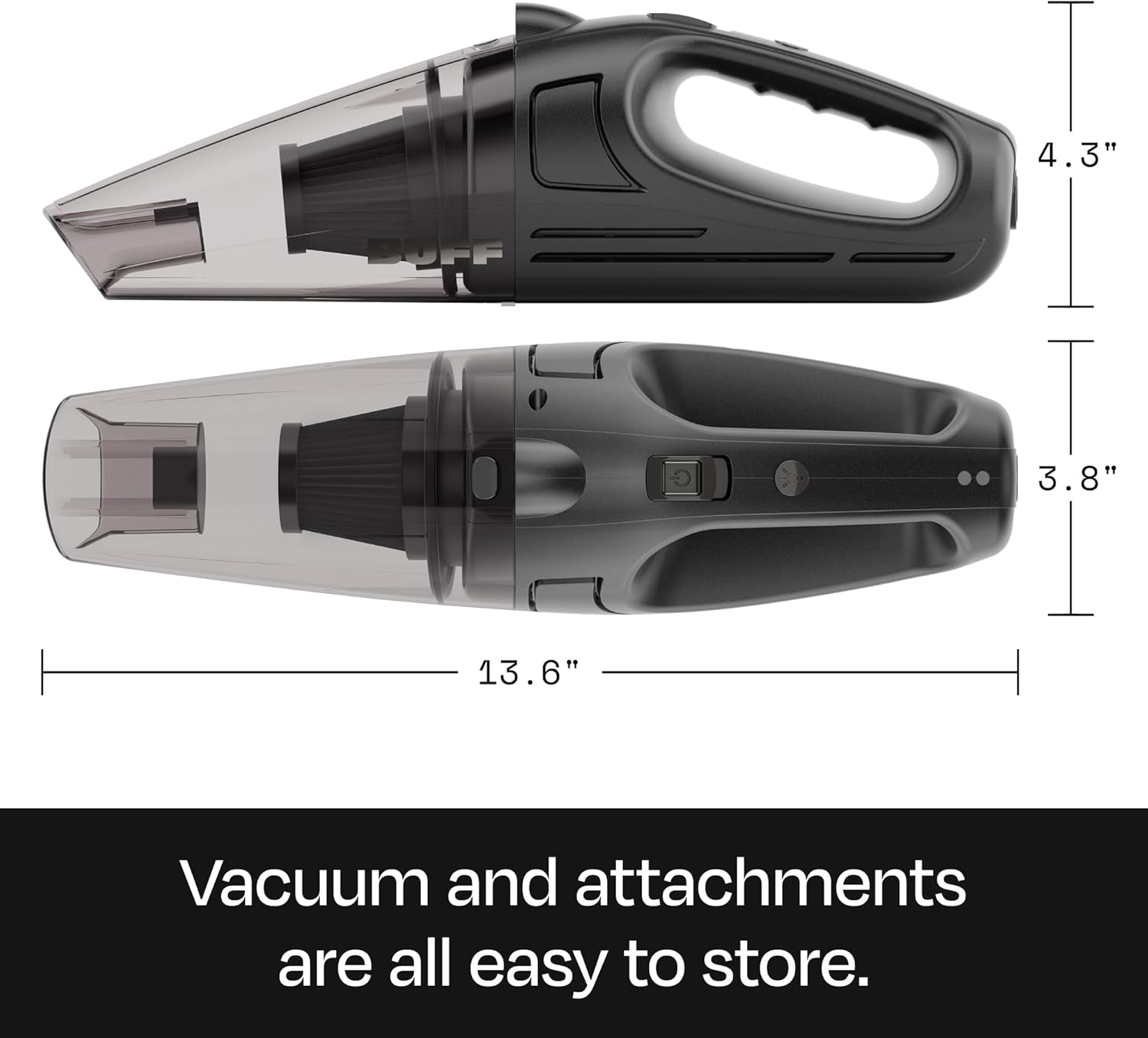
Rajah 8: Physical dimensions of the BUFF BF01 Handheld Cordless Vacuum Cleaner.
Waranti dan Sokongan
The BUFF Handheld Cordless Vacuum Cleaner BF01 comes with a 1-year assurance provided by BUFF.
For warranty claims, technical support, or any inquiries regarding your product, please contact BUFF customer service through the retailer's platform or the official BUFF webtapak.
Please have your model number (BF01) and proof of purchase ready when contacting support.


