BRAZE-6 Portable Bluetooth Speaker User Manual
Model: BRAZE-6-BK | Brand: TOPTECH
1. Pengenalan
The TOPTECH BRAZE-6 is a portable wireless Bluetooth speaker system designed to deliver powerful sound with an integrated LED light show. Featuring dual 3-inch woofers, this rechargeable speaker is suitable for various indoor and outdoor settings, including parties, gatherings, and personal listening.
It supports multiple audio input sources, including Bluetooth, USB, TF card, FM radio, and AUX, and offers True Wireless Stereo (TWS) functionality for enhanced audio experience. The built-in rechargeable battery provides extended standby time, ensuring your music accompanies you for longer durations.

Imej 1.1: Depan view of the BRAZE-6 Portable Bluetooth Speaker, showcasing its dual woofers and multi-color LED lighting.
2. Kandungan Pakej
Sila sahkan bahawa semua item yang disenaraikan di bawah disertakan dalam pakej anda:
- BRAZE-6 Portable Bluetooth Speaker
- Alat Kawalan Jauh
- Mikrofon Berwayar
- Penyesuai Kuasa
- Manual Pengguna (dokumen ini)
- Kad Waranti
3. Produk Lebihview
Familiarize yourself with the main components and controls of your BRAZE-6 speaker.

Imej 3.1: Sisi view of the BRAZE-6 speaker, highlighting the top-mounted control buttons.
Panel Kawalan (Atas)
- Butang Kuasa: Turns the speaker On/Off.
- Butang Mod: Bertukar antara mod Bluetooth, Radio FM, AUX, USB dan kad TF.
- Butang Main/Jeda: Memainkan atau menjeda main balik audio.
- Butang Trek Sebelumnya/Seterusnya: Navigates through tracks or FM radio stations.
- Kawalan Kelantangan: Melaraskan kelantangan induk.
- Butang Lampu LED: Activates or changes the LED light patterns.
Input Ports (Rear/Side)
- Port USB: Untuk pemacu kilat USB.
- Slot Kad TF: For TF (MicroSD) cards.
- Input AUX: Untuk menyambungkan peranti audio luaran melalui kabel audio 3.5mm.
- Input Mikrofon: Untuk menyambungkan mikrofon berwayar.
- Input DC 5V: Untuk mengecas pembesar suara.
4. Bermula
4.1 Mengecas Speaker
Before first use, fully charge the speaker for optimal battery life.
- Connect the provided power adapter to the DC 5V input port on the speaker.
- Pasangkan penyesuai ke soket dinding standard.
- The charging indicator light will illuminate (color may vary) to show charging is in progress.
- Once fully charged, the indicator light will change or turn off. Disconnect the adapter.
Note: The speaker can be used while charging, but it is recommended to fully charge it before initial use.
4.2 Menghidupkan/Mematikan
- Untuk menghidupkan, tekan dan tahan Butang Kuasa until the speaker activates and you hear an audible prompt.
- Untuk mematikan, tekan dan tahan Butang Kuasa again until the speaker shuts down.
5. Arahan Operasi
5.1 Kesambungan Bluetooth
Pair your BRAZE-6 speaker with a Bluetooth-enabled device (e.g., smartphone, tablet, computer).
- Pastikan pembesar suara dihidupkan dan dalam mod Bluetooth. Jika tidak, tekan butang Butang Mod until you hear the "Bluetooth mode" prompt. The LED lights may flash to indicate pairing mode.
- Pada peranti anda, dayakan Bluetooth dan cari peranti yang tersedia.
- Select "BRAZE-6" from the list of found devices.
- Once paired, you will hear a confirmation sound, and the LED lights may change their pattern.
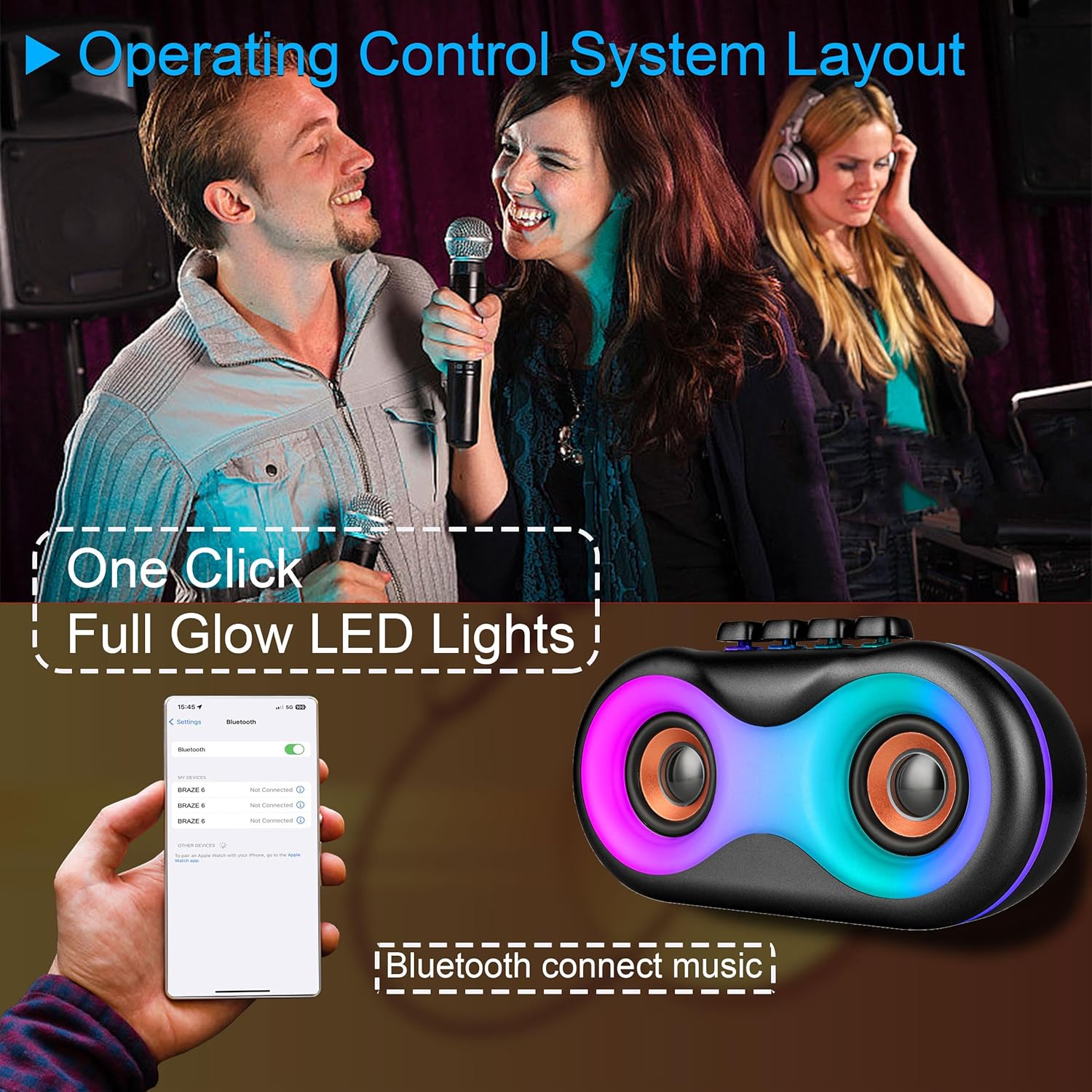
Image 5.1: Illustration of Bluetooth pairing process with a smartphone, showing the speaker's LED lights active.
Note: The speaker supports BLE agreements for stable wireless audio streaming up to 10 meters (33 feet).
5.2 Playing Audio from Various Sources
The BRAZE-6 speaker supports multiple input methods:

Image 5.2: Visual representation of supported input types: USB, Bluetooth, FM Radio, TWS, AUX, and TF Card.
- Kad USB/TF: Insert a USB flash drive or TF card into the respective port. The speaker will automatically switch to the correct mode and begin playing audio files.
- Input AUX: Connect an external audio device (e.g., MP3 player, laptop) to the AUX port using a 3.5mm audio cable. Press the Butang Mod untuk memilih mod AUX.
- Radio FM: Tekan ke Butang Mod to switch to FM Radio mode. Use the Previous/Next Track buttons to scan for stations.
5.3 Pertunjukan Lampu LED
The BRAZE-6 features dynamic multi-color LED lights that enhance your listening experience.
- Tekan ke Butang Lampu LED on the control panel to activate the light show.
- Press the button again to cycle through different light patterns or turn the lights off.

Image 5.3: The BRAZE-6 speaker with its powerful stereo sound output and integrated lighting effects.
5.4 Wired Microphone Usage
Connect the included wired microphone for karaoke or public address functions.
- Plug the microphone cable into the dedicated Microphone Input port on the speaker.
- Adjust the microphone volume using the speaker's controls or the microphone's built-in controls if available.
5.5 Fungsi Stereo Wayarles Sejati (TWS).
The TWS function allows you to pair two BRAZE-6 speakers together for a true stereo sound experience.
- Ensure both BRAZE-6 speakers are powered on and in Bluetooth pairing mode (not connected to any device).
- Pada salah satu pembesar suara (ini akan menjadi pembesar suara utama), tekan dan tahan Butang TWS (if available, or a combination of buttons as per specific model instructions, typically the Play/Pause button).
- The speakers will attempt to connect to each other. Once connected, you will hear a confirmation sound.
- Now, connect your Bluetooth device to the primary speaker. Audio will play through both speakers in stereo.
6. Penjagaan dan Penyelenggaraan
6.1 Pembersihan
- Lap bahagian luar pembesar suara dengan kain lembut, kering atau sedikit keringamp kain.
- Do not use abrasive cleaners, alcohol, benzene, or other volatile solvents, as they may damage the surface.
- Ensure no liquid enters the speaker's ports or openings.
6.2 Penyimpanan
- Simpan pembesar suara di tempat yang sejuk dan kering jauh dari cahaya matahari langsung dan suhu yang melampau.
- Elakkan menyimpan di persekitaran yang berdebu atau lembap.
6.3 Penjagaan Bateri
- Untuk memanjangkan hayat bateri, elakkan daripada menyahcas sepenuhnya bateri dengan kerap.
- If the speaker will not be used for an extended period, charge it to approximately 50% every 3-6 months.
- Jangan dedahkan bateri kepada haba yang berlebihan, seperti cahaya matahari langsung atau api.
7. Penyelesaian masalah
If you encounter issues with your BRAZE-6 speaker, refer to the following common problems and solutions:
| Masalah | Kemungkinan Punca | Penyelesaian |
|---|---|---|
| Speaker tidak dihidupkan. | Bateri lemah; Butang kuasa tidak ditekan dengan betul. | Charge the speaker; Press and hold the Power button for a few seconds. |
| Tiada bunyi. | Volume too low; Incorrect mode selected; Device not connected properly. | Increase volume; Press Mode button to select correct input; Reconnect device. |
| Gandingan Bluetooth gagal. | Pembesar suara tidak dalam mod berpasangan; Bluetooth peranti dimatikan; Terlalu jauh dari pembesar suara. | Ensure speaker is in Bluetooth mode; Turn on device Bluetooth; Move device closer (within 10m). |
| Lampu LED tidak berfungsi. | LED light feature turned off. | Press the LED Light Button to activate. |
| Penerimaan radio FM yang lemah. | Isyarat lemah; Gangguan. | Adjust speaker position; Extend antenna if available. |
8. Spesifikasi Teknikal
Detailed specifications for the BRAZE-6 Portable Bluetooth Speaker:

Image 8.1: Product dimensions of the BRAZE-6 speaker.
| Ciri | Spesifikasi |
|---|---|
| Nama Model | BRAZE-6-BK |
| Jenama | TOPTECH |
| Jenis Pembesar Suara | Woofer (Dual 3-inch) |
| Teknologi Ketersambungan | Bluetooth, Auxiliary, USB, Wireless |
| Protokol Ketersambungan | Bluetooth |
| Ciri Khas | Lampu LED |
| Sumber Kuasa | Dikuasakan Bateri |
| Dimensi Produk (D x W x H) | 18.9" x 13.2" x 22.83" |
| warna | Hitam |
| Jenis Pengawal | Butang |
| Penggunaan yang Disyorkan | Untuk Telefon Pintar atau Tablet |
| Peranti Serasi | Telefon pintar |
| Adakah Kalis Air | BENAR |
| Bilangan Item | 1 |
| UPC | 755824425996 |
| Pengeluar | Top Tech Audio |
9. Waranti dan Sokongan
Your BRAZE-6 Portable Bluetooth Speaker comes with a warranty. Please refer to the included warranty card for specific terms and conditions, including coverage period and claim procedures.
For technical support, troubleshooting assistance beyond this manual, or warranty inquiries, please contact TOPTECH customer service through the following channels:
- Sokongan dalam talian: Visit the official TOPTECH weblaman web atau halaman kedai Amazon untuk maklumat hubungan.
- Sokongan E-mel: Rujuk kad jaminan atau pembungkusan produk anda untuk alamat e-mel khidmat pelanggan.
For more information about TOPTECH products, you can visit the TOPTECH Store on Amazon.


