1. Arahan Keselamatan
Please read and understand all safety instructions before operating the OUPES Exodus 600 Plus portable power station. Failure to follow these instructions may result in electric shock, fire, or serious injury.
- Jangan membongkar, memperbaiki atau mengubah unit.
- Do not expose the unit to fire, direct sunlight, or high temperatures.
- Jangan gunakan atau simpan unit di dalam bilik mandi atau di kawasan yang terdedah kepada air atau lembapan.
- Jauhkan unit daripada kanak-kanak dan haiwan peliharaan.
- Pastikan pengudaraan yang betul semasa penggunaan dan pengecasan untuk mengelakkan terlalu panas.
- Gunakan hanya kabel dan aksesori pengecasan asli atau yang diperakui.
- Elakkan daripada menjatuhkan atau menyebabkan unit terkena hentakan yang kuat.
- In case of abnormal operation, smoke, or unusual odors, immediately discontinue use and contact customer support.
2. Produk Lebihview
The OUPES Exodus 600 Plus is a portable power station designed to provide reliable power for various applications, including outdoor camping, home backup, and emergency situations. It features a 512Wh LiFePO4 battery and delivers up to 600W of AC output.
2.1 Ciri-ciri Utama
- kapasiti: Bateri LiFePO512 4Wh
- Output: 600W AC (1200W Peak)
- Berat: Kira-kira 12.35 paun (5.6 kg)
- Pelabuhan: 2x AC outlets, 1x USB-C (PD), 2x USB-A, 1x 12V DC port
- Sistem Pengurusan Bateri (BMS): Built-in for multi-protection against short-circuit, over-current, over-voltage, vol-rendahtage, over-load, and over-heating.
- Emergency Power Supply (EPS) Function: Rapid response to power outages.
2.2 Product Components and Ports
Familiarize yourself with the various ports and components of your OUPES Exodus 600 Plus.

Imej: Depan view of the OUPES Exodus 600 Plus, highlighting the 2 AC outlets, 2 USB-A ports, 1 USB-C port, and 1 DC 12V port, capable of powering up to 6 devices simultaneously.

Image: Detailed diagram showing the location of the Car Charger Output Port, 600W AC Output Ports, LCD Screen, 18W Max USB-A Output Ports, 18W Max USB-C Output, Overload Protection, AC Charge Input, and PV Input (DC 7909 Input) on the OUPES Exodus 600 Plus.

Image: The OUPES Exodus 600 Plus, a compact powerhouse with 512Wh capacity and 600W output, shown powering a laptop, drone batteries, and a small TV, demonstrating its versatility for various devices.
3. Persediaan
3.1 Pengecasan Awal
Before first use, fully charge your OUPES Exodus 600 Plus. This ensures optimal battery performance and calibration.
- Connect the provided AC charging cable to the AC Charge Input port on the power station.
- Palamkan hujung kabel pengecas AC yang satu lagi ke soket dinding standard.
- The LCD screen will indicate charging status. Charge until the battery indicator shows 100%.
3.2 Connecting the Solar Panel (Optional)
The OUPES Exodus 600 Plus can be charged using the included 100W solar panel.
- Buka lipatan panel solar 100W dan letakkannya di bawah cahaya matahari langsung.
- Connect the solar charging cable (7909 & MC4) to the solar panel's output.
- Connect the other end of the solar charging cable to the PV Input (DC 7909 Input) port on the power station.
- The LCD screen will display the solar charging input wattage.

Image: Illustration of the OUPES Exodus 600 Plus charging via AC (300W) in 2 hours to 80%, via PV (240W) in 2 hours to 80%, and combined AC+PV (540W) in 59 minutes to 80%, demonstrating fast charging capabilities.
4. Arahan Operasi
4.1 Menghidupkan/Mematikan
- To power on the unit, press and hold the 'POWER' button for 3 seconds. The LCD screen will illuminate.
- To power off the unit, press and hold the 'POWER' button for 3 seconds again.
4.2 Menggunakan Soket AC
- Pastikan stesen janakuasa dihidupkan.
- Press the 'AC' button to activate the AC outlets. The AC indicator on the LCD screen will light up.
- Pasangkan peranti berkuasa AC anda ke soket AC.
- To turn off AC output, press the 'AC' button again.
4.3 Using DC and USB Ports
- Pastikan stesen janakuasa dihidupkan.
- The DC and USB ports are typically active when the unit is on. Refer to the manual for specific model behavior.
- Plug your USB or 12V DC devices into the respective ports.
4.4 Fungsi Bekalan Kuasa Kecemasan (EPS)
The OUPES Exodus 600 Plus features an EPS function, allowing it to switch to battery power within 20 milliseconds during a power outage, providing uninterrupted power to connected devices.
Video: An official OUPES video demonstrating the features and portability of the Exodus 600 power station, including its various ports, charging capabilities, and use in outdoor settings. It highlights the unit's compact size and ability to power multiple devices.
5. Penyelenggaraan
Proper maintenance ensures the longevity and optimal performance of your OUPES Exodus 600 Plus.
- Pengecasan Biasa: If the power station is not in use, recharge it every 3 months to maintain battery health.
- Keadaan penyimpanan: Store the unit in a dry, well-ventilated area with a temperature range of 14°F to 113°F (-10°C to 45°C). Avoid extreme temperatures.
- Pembersihan: Gunakan kain kering dan lembut untuk membersihkan bahagian luar unit. Jangan gunakan bahan kimia yang keras atau bahan yang melelas.
- Kesihatan Bateri: The LiFePO4 battery is designed for 3500+ cycles to 80% capacity.
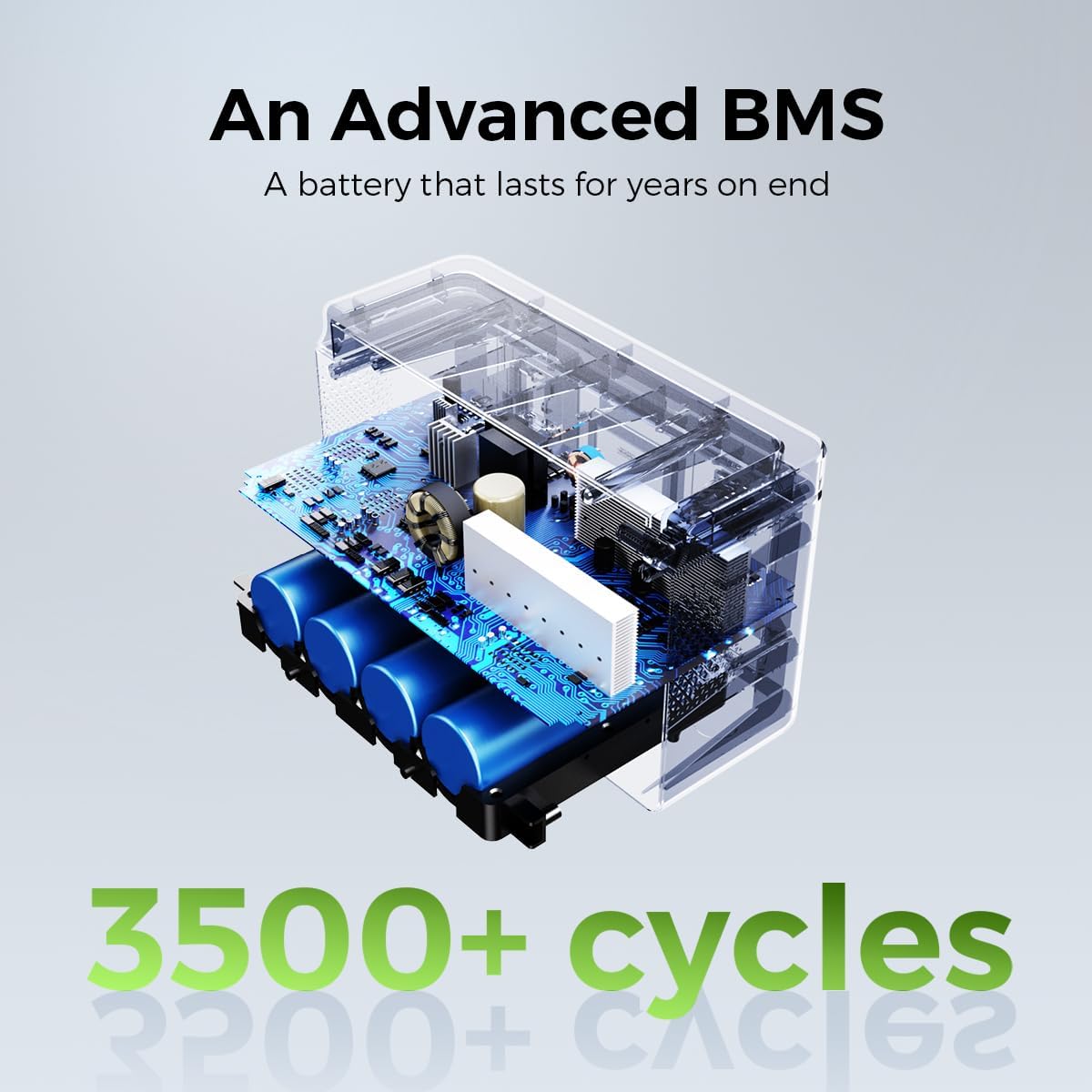
Imej: Satu dalaman view illustrating the advanced Battery Management System (BMS) and LiFePO4 battery cells of the OUPES Exodus 600 Plus, emphasizing its durability with 3500+ cycles.
6. Penyelesaian masalah
This section addresses common issues you might encounter with your OUPES Exodus 600 Plus.
| Masalah | Kemungkinan Punca | Penyelesaian |
|---|---|---|
| Unit tidak dihidupkan. | Bateri habis. | Charge the unit using the AC adapter or solar panel. |
| Output AC tidak berfungsi. | AC output not activated or overloaded. | Press the 'AC' button to activate. Reduce the load if overloaded. Check device wattage. |
| Unit goes into sleep mode / shuts off with low power devices. | Automatic power-saving feature for low power draw. | This model may have an automatic shutdown feature for very low power devices to conserve energy. For continuous power to low-draw devices, ensure the total output exceeds the minimum threshold to keep the unit active. Consider using devices with higher power consumption or contact OUPES support for specific thresholds. |
| Pengecasan lambat atau tidak berfungsi. | Incorrect charger, poor solar panel placement, or high temperature. | Ensure you are using the correct charger. For solar charging, ensure the panel is in direct sunlight and free from obstructions. Move the unit to a cooler environment if overheating. |
| LCD screen shows an error code. | Internal fault or protection activated. | Note the error code and refer to the full user manual or contact OUPES customer service for assistance. |
7. Spesifikasi
Detailed technical specifications for the OUPES Exodus 600 Plus portable power station.
| Ciri | Spesifikasi |
|---|---|
| Jenama | LUAR BIASA |
| Nama Model | Exodus 600 Plus |
| Jenis Bateri | LiFePO4 |
| Wattage (Kapasiti) | 512 Watt-jam |
| Output Wattage (AC) | 600 Watts (1200W Peak) |
| Voltage (AC) | 110 Volt |
| Berat Barang | 12.35 paun (5.6 kg) |
| Dimensi Produk | 9.45"L x 7.28"W x 7.7"H |
| Jumlah Outlet Kuasa | 6 (2x AC, 1x USB-C, 2x USB-A, 1x 12V DC) |
| Ciri Khas | Easy to Install, Electric Brake, LiFePO4 Rechargeable Battery, MPPT, BMS System, EPS Rapid Response |
| Komponen yang Disertakan | Exodus 600w Plus power station, 100W Solar Panel & 7909 & MC4 Charging Cable, AC Charger, 3 Fuse 10A, Warranty Card & User Manual |
| Kitaran Kehidupan | 3500+ kitaran kepada kapasiti 80%. |
8. Waranti & Sokongan
OUPES provides comprehensive support for your Exodus 600 Plus portable power station.
8.1 Maklumat Waranti
The OUPES Exodus 600 Plus comes with a Waranti 36 bulan dari tarikh pembelian. Waranti ini melindungi kecacatan pada bahan dan mutu kerja di bawah penggunaan biasa. Sila simpan bukti pembelian anda untuk tuntutan waranti.
8.2 Sokongan Pelanggan
For any questions, technical assistance, or warranty claims, please contact OUPES customer service. Our friendly customer service team is available to help you.
- Refer to the contact information provided in your warranty card or on the official OUPES webtapak.
- When contacting support, please have your product model (Exodus 600 Plus) and purchase date available.


