1. Pengenalan
Terima kasih kerana membeliasing the TOPTECH STAR-115 Portable Bluetooth Speaker. This powerful speaker is designed to deliver blazing sound with a vibrant flame light show, perfect for home use, outdoor gatherings, and parties. Please read this manual carefully before operating the device to ensure proper use and to maximize its performance and lifespan.
2. Maklumat Keselamatan
- Do not expose the speaker to water or excessive moisture. This product is not waterproof.
- Elakkan meletakkan pembesar suara berhampiran sumber haba seperti radiator, daftar haba, dapur atau peralatan lain (termasuk amppenghidup) yang menghasilkan haba.
- Gunakan hanya lampiran/aksesori yang ditentukan oleh pengilang.
- Cabut palam pembesar suara semasa ribut petir atau apabila tidak digunakan untuk tempoh yang lama.
- Jangan sekat sebarang bukaan pengudaraan. Pasang mengikut arahan pengilang.
- Lindungi kord kuasa daripada berjalan atau tersepit, terutamanya pada palam, bekas kemudahan dan tempat keluar dari radas.
- Rujuk semua servis kepada kakitangan perkhidmatan yang berkelayakan. Servis diperlukan apabila radas telah rosak dalam apa jua cara, seperti kord bekalan kuasa atau palam rosak, cecair telah tertumpah atau objek jatuh ke dalam radas, radas telah terdedah kepada hujan atau lembapan, tidak beroperasi seperti biasa. , atau telah digugurkan.
3. Kandungan Pakej
Sila tandai kotak untuk item berikut:
- STAR-115 Portable Bluetooth Speaker
- Alat Kawalan Jauh
- Mikrofon Berwayar
- Penyesuai Kuasa
- Manual Pengguna (dokumen ini)
- Kad Waranti
4. Produk Lebihview
Familiarize yourself with the various parts of your STAR-115 speaker.

Depan view of the STAR-115 speaker, showcasing its 15-inch woofer and vibrant multi-color flame light display.
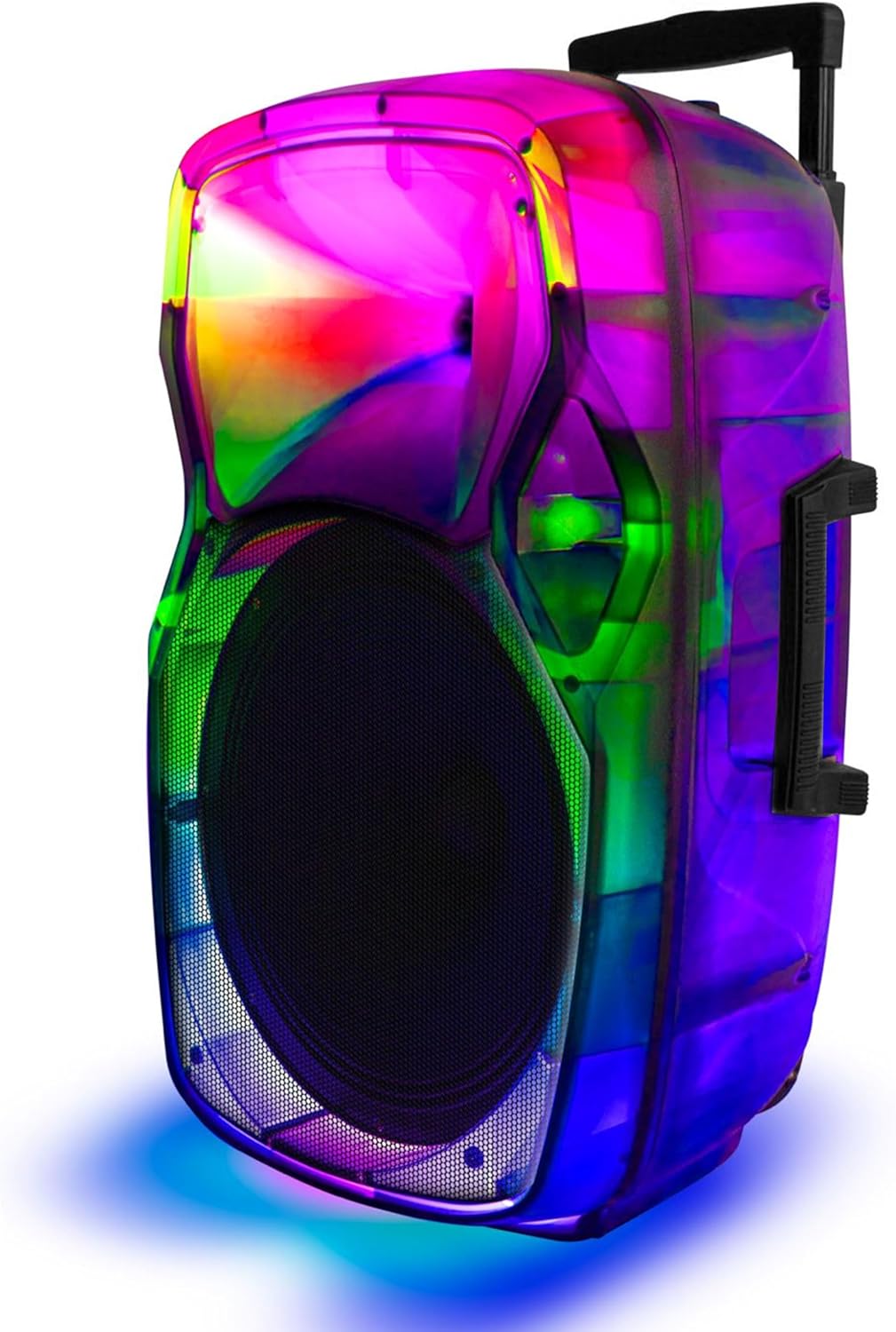
sebelah view of the STAR-115 speaker, highlighting its integrated handle and wheels for easy portability.
Control Panel (Top/Rear)
- Butang Kuasa: Menghidupkan/mematikan pembesar suara.
- Butang Mod: Switches between Bluetooth, FM Radio, AUX, USB, and TF Card modes.
- Kawalan Kelantangan: Melaraskan kelantangan induk.
- Input Mikrofon: Untuk menyambungkan mikrofon berwayar.
- Port USB: Untuk pemacu kilat USB.
- Slot Kad TF: For TF (MicroSD) cards.
- Input AUX: Untuk menyambungkan peranti audio luaran melalui kabel 3.5mm.
- Butang Mod Cahaya: Controls the flame light effects.
- Butang Trek Sebelumnya/Seterusnya: Navigates through tracks in media playback modes.
- Butang Main/Jeda: Mengawal main balik.
5. Persediaan
5.1 Mengecas Speaker
Before first use, fully charge the speaker. Connect the provided power adapter to the speaker's charging port and plug it into a standard wall outlet. The charging indicator light will show the charging status (e.g., red for charging, off or green for fully charged).

The speaker features a reliable battery for extended playback. Ensure it is fully charged before use.
A full charge provides approximately 6 hours of battery life, depending on usage and volume levels.
5.2 Menghidupkan/Mematikan
Tekan dan tahan butang Butang Kuasa on the control panel to turn the speaker on or off.
6. Arahan Operasi
6.1 Sambungan Bluetooth
The STAR-115 speaker is compatible with Bluetooth-enabled devices for wireless audio streaming.
- Hidupkan pembesar suara. Ia akan memasuki mod gandingan Bluetooth secara automatik, ditunjukkan oleh lampu LED yang berkelip.
- Pada peranti mudah alih anda (telefon pintar, tablet, dll.), dayakan Bluetooth dan cari peranti yang tersedia.
- Select "STAR-115" from the list of devices.
- Once connected, the speaker will emit a confirmation sound, and the LED light will stop flashing.

Quick and easy connection via Bluetooth, USB, TF card, AUX, or FM Radio.
6.2 Main Semula Kad USB/TF
Insert a USB flash drive or TF (MicroSD) card into the respective port. The speaker will automatically switch to USB/TF mode and begin playing audio files (MP3, WAV, dsb.) daripada peranti storan.
- Use the Previous/Next Track buttons to navigate.
- Tekan butang Main/Jeda untuk mengawal main balik.
6.3 Input AUX
Connect an external audio device (e.g., MP3 player, laptop) to the speaker's AUX input using a 3.5mm audio cable. The speaker will automatically switch to AUX mode. Control playback from your connected device.
6.4 Radio FM
Tekan ke Butang Mod to switch to FM Radio mode. The speaker will automatically scan and save available radio stations. Use the Previous/Next Track buttons to switch between saved stations.
6.5 Penggunaan Mikrofon
Connect the wired microphone to the Microphone Input port. Adjust the microphone volume using the dedicated knob on the control panel (if available) or the master volume.
6.6 Flame Light Operation
The STAR-115 features a multi-color flame light show. Press the Butang Mod Cahaya to activate or change the lighting effects. Press again to cycle through different patterns or turn off the lights.

One click activation of multi-color disco lights adds extra excitement to your gathering.
6.7 Penggandingan Stereo Tanpa Wayar Sebenar (TWS)
For an unparalleled stereo sound experience, you can pair two STAR-115 speakers together.
- Pastikan kedua-dua pembesar suara dihidupkan dan tidak disambungkan ke mana-mana peranti Bluetooth.
- On one speaker (this will be the primary speaker), press and hold the TWS button (refer to control panel diagram if available, or try the Mode button for 3 seconds if no dedicated TWS button).
- Pembesar suara utama akan mencari pembesar suara sekunder. Setelah disambungkan, kedua-dua pembesar suara akan mengeluarkan bunyi pengesahan.
- Sekarang, sambungkan peranti mudah alih anda ke pembesar suara utama melalui Bluetooth seperti yang diterangkan dalam bahagian 6.1. Audio akan dimainkan melalui kedua-dua pembesar suara dalam stereo.

Pair two speakers to get true wireless stereo sound, creating a harmonious and immersive sound environment.
6.8 Penggunaan Alat Kawalan Jauh
The included remote control allows for convenient operation from a distance. Functions include power on/off, mode selection, volume control, track navigation, play/pause, and light control.
7. Penyelenggaraan
7.1 Pembersihan
Lap bahagian luar pembesar suara dengan kain lembut dan kering. Jangan gunakan pembersih, lilin atau pelarut yang kasar kerana ia boleh merosakkan kemasannya. Elakkan menyembur cecair terus ke atas pembesar suara.
7.2 Penyimpanan
When not in use for extended periods, store the speaker in a cool, dry place away from direct sunlight and extreme temperatures. It is recommended to charge the battery periodically (e.g., every 3 months) to maintain its health.
8. Penyelesaian masalah
| Masalah | Kemungkinan Punca | Penyelesaian |
|---|---|---|
| Speaker tidak dihidupkan. | Bateri habis. | Sambungkan pembesar suara kepada penyesuai kuasa dan casnya. |
| Tiada bunyi. | Kelantangan terlalu rendah atau diredamkan. | Increase the volume on the speaker and your connected device. |
| Sambungan Bluetooth gagal. | Pembesar suara tidak berada dalam mod berpasangan; peranti terlalu jauh; gangguan. | Ensure speaker is in pairing mode. Move device closer. Disconnect other Bluetooth devices. Try restarting both speaker and device. |
| Kad USB/TF tidak dimainkan. | tak betul file format; kad/pemacu tidak dimasukkan dengan betul; rosak files. | pastikan files are in supported format (MP3, WAV). Reinsert the card/drive. Try a different card/drive. |
| Mikrofon tidak berfungsi. | Microphone not connected properly; microphone volume too low. | Ensure microphone is fully plugged in. Adjust microphone volume. |
| Gandingan TWS gagal. | Pembesar suara sudah disambungkan ke peranti lain; terlalu jauh terpisah. | Ensure both speakers are disconnected from other Bluetooth devices. Place them close together during pairing. |
9. Spesifikasi
| Ciri | Perincian |
|---|---|
| Nama Model | BINTANG-115 |
| Jenis Pembesar Suara | Woofer |
| Diameter Woofer | 15 Inci |
| Teknologi Ketersambungan | Bluetooth |
| Teknologi Komunikasi Tanpa Wayar | Bluetooth |
| Julat Bluetooth | 33 Kaki (10 Meter) |
| Sumber Kuasa | Dikuasakan Bateri |
| Hayat Bateri | 6 Jam |
| Kuasa Output Maksimum Pembesar Suara | 150 Watt |
| Mod Keluaran Audio | Stereo |
| Komponen yang Disertakan | Remote control, wired microphone, adapter, user manual, warranty card |
| Dimensi Produk | 1"D x 1"W x 1"H (Note: This appears to be a placeholder, actual dimensions may vary) |
| warna | Hitam |
| Adakah Kalis Air | PALSU |
| Pengeluar | Top Tech Audio |
| UPC | 755824425859 |
10. Waranti dan Sokongan
10.1 Maklumat Waranti
This product comes with a Limited Warranty. Please refer to the included Warranty Card for detailed terms and conditions, including coverage period and what is covered. Keep your purchase receipt as proof of purchase for warranty claims.
10.2 Sokongan Pelanggan
If you encounter any issues not covered in this manual or require further assistance, please contact TOPTECH customer support. Contact information can typically be found on the product packaging, warranty card, or the official TOPTECH webtapak.
Untuk maklumat lanjut, anda boleh melawati TOPTECH Store on Amazon.


