1. Pengenalan
This manual provides detailed instructions for the installation, setup, operation, and maintenance of your Schneider Electric X Series 15A 125V Wi-Fi Energy Monitoring Socket Outlet. This device integrates smart home functionality, allowing for remote control, energy monitoring, and compatibility with various smart home ecosystems via Matter certification.
2. Maklumat Keselamatan Penting
Please read and understand all instructions before installing or using this product. Failure to follow these instructions may result in electric shock, fire, or serious injury.
- Matikan Kuasa: Always disconnect power at the circuit breaker or fuse box before installing or servicing the outlet.
- Juruelektrik Berkelayakan: Sekiranya anda tidak pasti mengenai mana-mana bahagian arahan ini, berjumpa dengan juruelektrik yang berkelayakan.
- Wayar Neutral Diperlukan: This device requires a neutral wire for proper operation. Verify that your electrical box has a neutral wire (typically white) before installation.
- Penggunaan Dalaman Sahaja: Produk ini direka bentuk untuk kegunaan dalaman di lokasi kering sahaja.
- Voltage dan Amppemadaman: Pastikan litar voltage dan amperage are compatible with the outlet's ratings (125V, 15A).
- TampTahan er: This outlet features tampbekas tahan er untuk keselamatan yang dipertingkatkan.
3. Kandungan Pakej
Sahkan bahawa semua komponen hadir sebelum memulakan pemasangan:
- Schneider Electric X Series 15A 125V Wi-Fi Energy Monitoring Socket Outlet
- Screwless Wall Plate (included with some models, or sold separately)
- Skru Pemasangan
4. Produk Lebihview
Familiarize yourself with the components of your smart outlet.
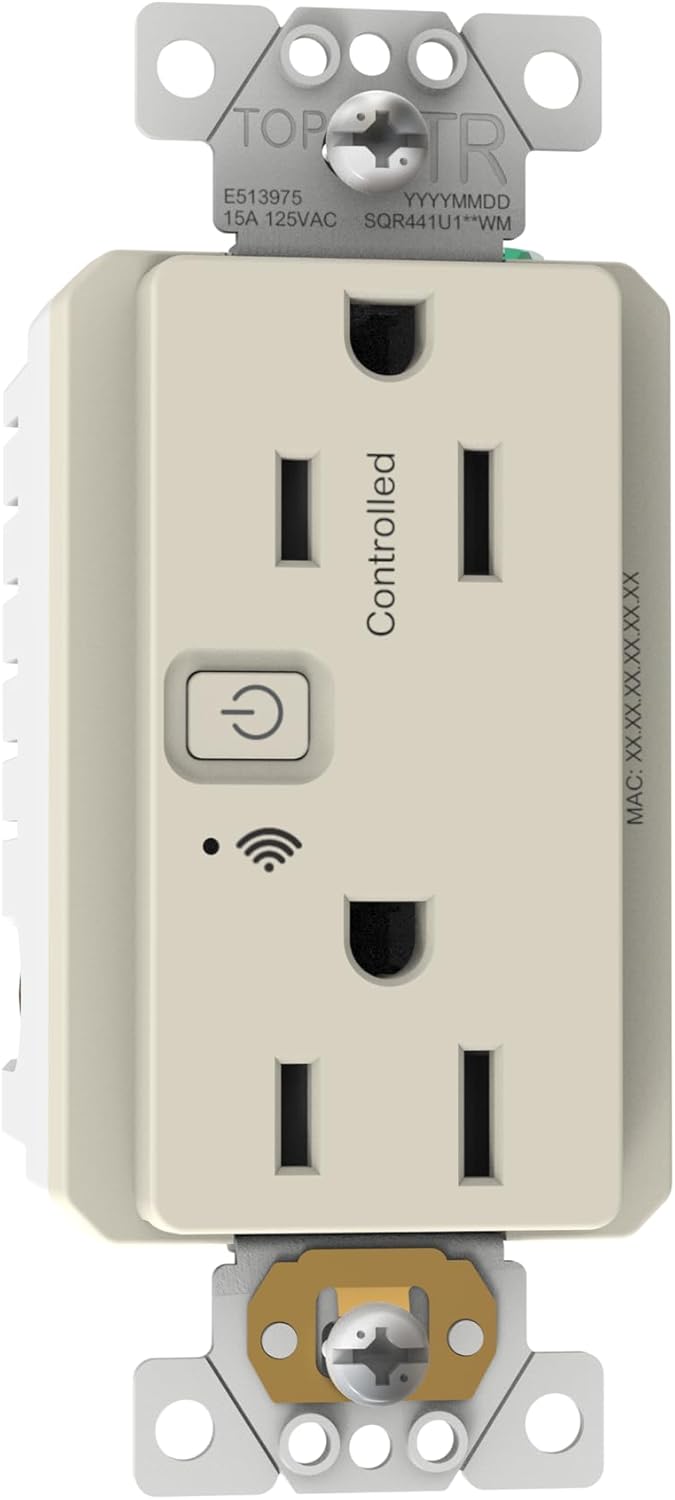
Imej 4.1: Depan view of the Schneider Electric X Series Wi-Fi Energy Monitoring Socket Outlet. It shows the two receptacles, a power button with an indicator light, and a Wi-Fi signal icon. The top receptacle is labeled 'Controlled'.

Imej 4.2: sebelah view of the outlet, displaying the Wi-Fi logo, a QR code for pairing, and terminal screws for wiring connections.
- Top Receptacle: This outlet is controlled by the smart features (app, voice, schedule).
- Bottom Receptacle: This outlet is always on and not controlled by smart features.
- Butang/Penunjuk Kuasa: Press to manually turn the controlled outlet on/off. The indicator light shows the status (e.g., solid for on, blinking for pairing mode).
- Penunjuk Wi-Fi: Menunjukkan status sambungan Wi-Fi.
- Terminal Pendawaian: Screw terminals on the sides for connecting Hot, Neutral, and Ground wires.
5. Arahan Pemasangan
Follow these steps carefully to install your smart outlet.
- Matikan Kuasa: At the circuit breaker or fuse box, turn off the power to the outlet you are replacing. Verify power is off using a voltage penguji.
- Keluarkan Outlet Lama: Unscrew and carefully pull the existing outlet from the wall box. Disconnect the wires, noting which wire was connected to which terminal (Hot, Neutral, Ground).
- Sediakan Wayar: If necessary, strip approximately 1/2 inch of insulation from the ends of the electrical wires in the wall box. Ensure wires are straight and free of nicks.
- Sambung wayar:
- Sambungkan Panas (Hitam) wire from the wall box to the brass screw terminal on the smart outlet.
- Sambungkan Neutral (Putih) wire from the wall box to the silver screw terminal on the smart outlet.
- Sambungkan Ground (Bare Copper or Green) wire from the wall box to the green screw terminal on the smart outlet.
- Pemasangan Outlet: Carefully push the wired outlet back into the wall box. Secure it with the provided mounting screws.
- Pasang Plat Dinding: Snap the screwless wall plate onto the outlet for a clean finish.
- Pulihkan Kuasa: Turn the power back on at the circuit breaker. The outlet's indicator light should illuminate.
6. Wi-Fi and Smart Home Setup
Your X Series outlet is Matter certified, allowing for seamless integration with various smart home platforms.
- Download the Schneider Home App: Cari untuk "Schneider Home" in your device's app store (iOS or Android) and download the application.
- Buat Akaun: Buka aplikasi dan ikuti arahan untuk membuat akaun pengguna baharu atau log masuk jika anda sudah mempunyainya.
- Tambah Peranti: In the Schneider Home app, select the option to add a new device. The app will guide you through the pairing process.
- Penyandingan Perkara: The outlet supports Matter. You can typically initiate pairing by scanning the QR code located on the side of the device (refer to Image 4.2) or by entering a numerical code provided with the product. Ensure your smart home hub (e.g., Apple HomePod, Google Nest Hub, Amazon Echo) is within range and in pairing mode.
- Sambungan Wi-Fi: The app will prompt you to connect the outlet to your 2.4GHz Wi-Fi network. Ensure your phone is connected to the same 2.4GHz network during setup.
- Sepadukan dengan Pembantu Suara: Once paired with the Schneider Home app or your Matter-compatible smart home system, you can link it to voice assistants like Amazon Alexa, Google Assistant, or Apple Home for voice control. Follow the instructions within your preferred smart home app to enable this integration.

Imej 6.1: The Schneider Electric X Series outlet shown alongside a smartphone displaying the Schneider Home app interface, which lists various smart plugs and their energy usage.
7. Operating the Smart Outlet
You can control your smart outlet in several ways:
- Kawalan manual: Press the power button on the front of the outlet to manually turn the controlled receptacle on or off.
- Kawalan Apl: Use the Schneider Home app or your integrated smart home app (e.g., Apple Home, Google Home, Alexa app) to remotely turn the controlled receptacle on/off, set schedules, or create automation routines.
- Kawalan Suara: Once integrated with a voice assistant, use commands such as "Alexa, turn on the kitchen outlet" or "Hey Google, turn off the lamp."
- Pemantauan Tenaga: The Schneider Home app provides real-time energy consumption data for the controlled receptacle. This allows you to monitor power usage and identify opportunities for energy savings.
8. Penyelenggaraan
The Schneider Electric X Series outlet requires minimal maintenance.
- Pembersihan: To clean the outlet, wipe it with a soft, damp kain. Jangan gunakan pembersih atau pelarut yang melelas. Pastikan kuasa dimatikan sebelum membersihkan.
- Kemas kini Firmware: Periodically check the Schneider Home app for available firmware updates to ensure optimal performance and security.
9. Penyelesaian masalah
If you encounter issues with your smart outlet, refer to the following common solutions:
- Outlet Tidak Menjawab:
- Periksa sama ada pemutus litar tersekat.
- Ensure the outlet is receiving power.
- Verify the power button indicator light is on.
- Cannot Connect to Wi-Fi / Pairing Issues:
- Ensure your Wi-Fi network is 2.4GHz. This device may not connect to 5GHz networks.
- Move the outlet closer to your Wi-Fi router during the initial setup.
- Temporarily disable any mesh Wi-Fi satellites or 5GHz bands on your router during pairing, if possible.
- Mulakan semula penghala Wi-Fi anda dan cuba proses penggandingan sekali lagi.
- Perform a factory reset on the outlet (refer to the Schneider Home app or manufacturer's weblaman web untuk arahan khusus).
- Ensure your smart home hub (for Matter pairing) is updated and functioning correctly.
- Energy Monitoring Not Working:
- Verify the outlet is properly connected to Wi-Fi and the Schneider Home app.
- Ensure the device plugged into the controlled outlet is drawing power.
- Check for app updates or firmware updates for the outlet.
- Kawalan Suara Tidak Berfungsi:
- Confirm the outlet is successfully linked within your voice assistant's app (Alexa, Google Home, Apple Home).
- Ensure your voice commands are clear and match the device name configured in your smart home app.
10. Spesifikasi Teknikal

Imej 10.1: Product label detailing electrical specifications, including voltage, amperage, wattage, dan pensijilan.
| Ciri | Nilai |
|---|---|
| Nombor Model | SQR441U1LAWM |
| Voltage | 125 Voltan AC |
| Amppemadam | 15 Amps |
| Wattage | 600 Watts (LED: 5A, Incandescent: 1000W, Standard ballast: 1200VA, Motor: 1/2 HP) |
| Ketersambungan | Wi-Fi, Matter Certified |
| bahan | plastik |
| Dimensi (Pakej) | 4.92 x 3.15 x 2.17 inci |
| Berat Barang | 5.7 auns |
| Pensijilan | REACH, RoHS, cUL Listed (E513975) |
| Persekitaran Operasi | Penggunaan Dalaman Sahaja |
11. Waranti dan Sokongan
Schneider Electric products are designed for reliability and performance. This product is covered by a manufacturer's warranty. For specific warranty terms, technical support, or service inquiries, please refer to the official Schneider Electric webtapak atau hubungi sokongan pelanggan mereka secara langsung. Simpan bukti pembelian anda untuk tuntutan waranti.
Sumber Dalam Talian: Lawati Schneider Electric webtapak for additional product information, FAQs, and support documentation.