1. Pengenalan
Welcome to the ACwO DwOTS Fire user manual. These innovative earbuds offer a unique dual-style design, providing both in-ear and half-in-ear options within a single charging case. Designed for versatility and high-quality audio, the DwOTS Fire earbuds feature advanced connectivity, extended battery life, and intuitive controls to enhance your listening experience.

Image: ACwO DwOTS Fire earbuds showcasing both half-in-ear and in-ear styles from a single case.
2. Apa yang ada di dalam Kotak
Sila sahkan bahawa semua item terdapat dalam pakej anda:
- 2 x Set of Wireless Earbuds (one in-ear, one half-in-ear)
- 1 x Kabel Pengecas Cepat Jenis-C
- 4 x Extra Earmuffs (for in-ear style)
- 1 x Kad Waranti
- 1 x Kad Imbas Saya

Image: The ACwO DwOTS Fire earbuds and charging case.
3. Persediaan dan Berpasangan
3.1 Gandingan Awal
- Pastikan fon telinga dicas.
- Buka bekas pengecas. Fon telinga akan memasuki mod berpasangan secara automatik.
- Pada peranti anda (telefon pintar, tablet, dll.), dayakan Bluetooth.
- Cari untuk available devices and select "ACwO Fire" or "ACwO DwOTS Fire" to connect.
- Once connected, you will hear an audio prompt, and the indicator light on the earbuds will change.
3.2 Kesambungan Dwi
The ACwO DwOTS Fire earbuds offer unique dual connectivity options:
- Connect Each Pair to Two Different Devices: Ideal for sharing your listening experience.
- Connect Both Pairs to a Single Device: Perfect for watching movies or listening to music together with a loved one. This feature is available only for devices with dual audio connectivity (e.g., certain Android devices).

Image: Illustration of the dual connectivity feature, showing two pairs of earbuds.
Steps for Dual Sharing (Connecting Both Pairs to a Single Device):
- Connect both 'ACwO DwOTS Fire' and 'ACwO Fire +' with your device's Bluetooth.
- Once both pairs are connected, scroll down your device's notification panel and click on 'Media Output'.
- One pair will already be selected. Select the other pair to enable dual audio.
- You can now listen on both pairs of your earbuds simultaneously.

Image: Visual guide for setting up dual sharing on a compatible device.
4. Arahan Operasi
4.1 Kawalan Sentuh Intuitif
The earbuds feature intuitive touch controls for easy management of music, calls, and voice assistants. Refer to the included 'Scan Me Card' for a detailed diagram of touch functions.
- Main/Jeda: Ketik sekali pada salah satu fon telinga.
- Lagu Seterusnya: Ketik dua kali pada fon telinga kanan.
- Trek Sebelumnya: Ketik dua kali pada fon telinga kiri.
- Jawab/Tamatkan Panggilan: Ketik sekali pada salah satu fon telinga.
- Tolak Panggilan: Tekan lama pada kedua-dua fon telinga.
- Aktifkan Pembantu Suara: Ketik tiga kali pada salah satu fon telinga.
4.2 Mod EQ
Customize your audio experience with 3 preset EQ modes, offering a total of 3+3 EQ options across the two earbud styles. Switch between modes to suit your preference for deep bass, balanced sound, or enhanced treble.
- Mod Permainan: Optimized for immersive gaming audio with low latency.
- Mod Teater: Enhanced soundstage for movies and videos.
- Mod Seimbang: Provides a neutral and clear audio profile untuk pendengaran umum.

Image: ACwO DwOTS Fire earbuds with a visual representation of available EQ modes.
4.3 Pembantu Suara
Easily access your device's voice assistant by triple-tapping either earbud. Compatible with "Ok Google" and "Hey Siri" for hands-free control.
5. Mengecas
5.1 Earbuds and Case Charging
The ACwO DwOTS Fire earbuds provide up to 52 hours of music playtime with the charging case. The case supports both wired and wireless charging.
- Pengecasan Berwayar: Connect the provided Type-C fast charging cable to the charging port on the case and a power source.
- Pengecasan Tanpa Wayar: Place the charging case on a compatible wireless charging pad (wireless charger not included). The indicator light on the case will show charging status.

Image: ACwO DwOTS Fire charging case highlighting 52 hours of playtime.

Image: 'One On, One Charging' feature for extended use.
6. Penyelenggaraan
6.1 Rintangan Air dan Peluh
The earbuds are IPX5 water and sweat resistant, making them suitable for workouts and outdoor activities. This rating protects against low-pressure water jets from any direction. Do not submerge the earbuds in water.

Image: ACwO DwOTS Fire earbuds demonstrating IPX5 water and sweat resistance.
6.2 Pembersihan
Regularly clean your earbuds and charging case with a soft, dry, lint-free cloth. Avoid using abrasive materials or harsh chemicals. For the in-ear style, gently remove and clean the earmuffs with water and mild soap, ensuring they are completely dry before reattaching.
7. Spesifikasi
| Ciri | Perincian |
|---|---|
| Nama Model | Api DwOTS |
| Teknologi Ketersambungan | Wayarles (Bluetooth V5.3) |
| Jenis Pemacu Audio | 13mm Real Drivers |
| Kawalan Bunyi | AI-ENC with Quad Mics, Passive Noise Cancellation |
| Masa bermain | Sehingga 52 Jam (dengan kes pengecasan) |
| Latensi | Up to 45ms (Ultra-low) |
| Tahap Ketahanan Air | IPX5 (Water Repellent) |
| Mengecas | Type-C Fast Charging, Wireless Charging Capability |
| Kaedah Kawalan | Touch Controls, Voice Assistant (Ok Google, Hey Siri) |
| Bentuk alat dengar | In-Ear, Half-in-Ear |
| Berat Barang | 43 g |
| Dimensi Produk | 5.6 x 5.6 x 1.8 cm |
| bahan | plastik |
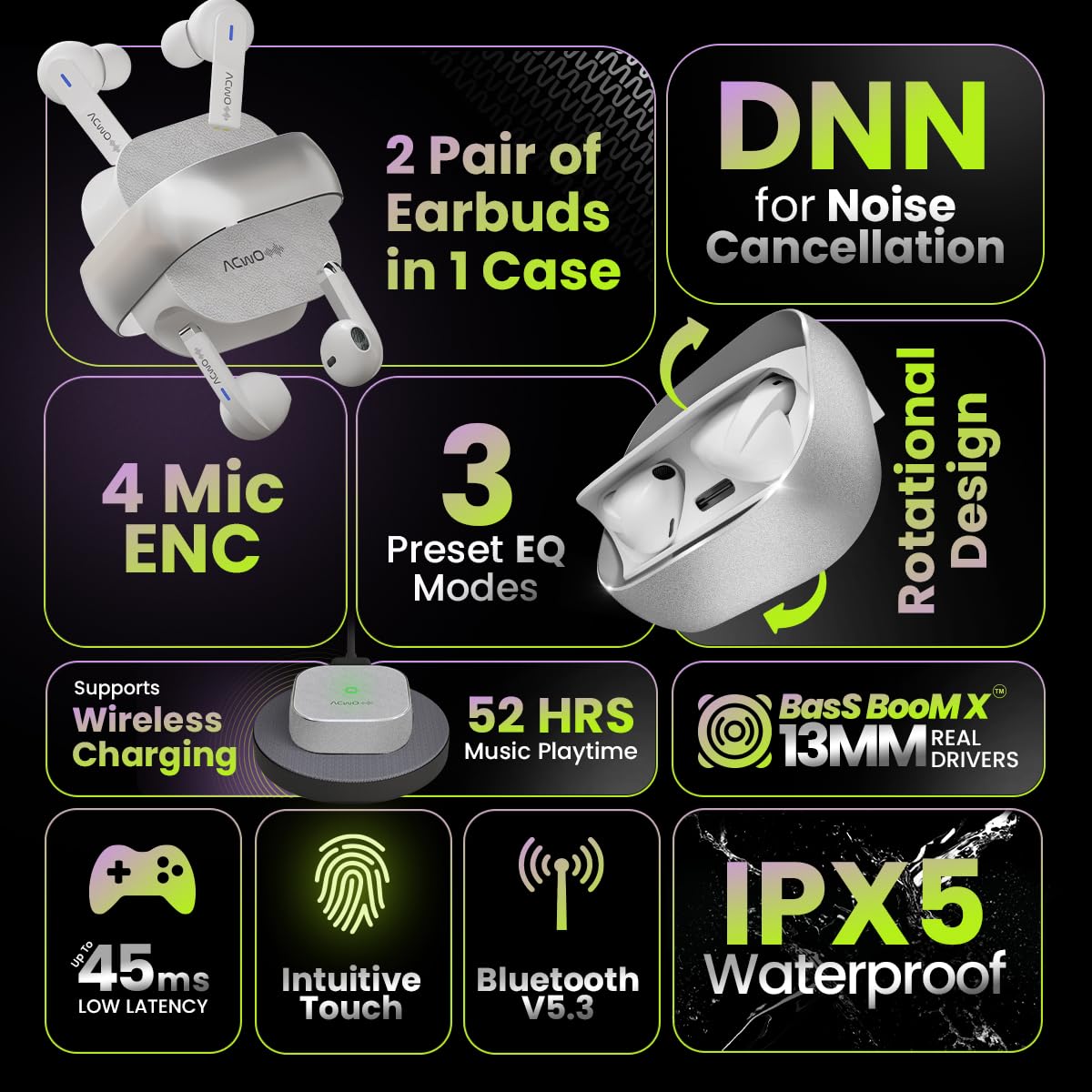
Image: Summary of ACwO DwOTS Fire key features.
8. Penyelesaian masalah
8.1 Fon Telinga Tidak Berpasangan
- Pastikan fon telinga dicas dan penutup bekas dibuka.
- Matikan dan hidupkan Bluetooth peranti anda.
- Lupakan peranti daripada senarai Bluetooth anda dan cuba pasangkan semula.
- Reset the earbuds (refer to the 'Scan Me Card' for specific reset instructions).
8.2 Tiada Bunyi atau Kelantangan Rendah
- Semak tahap kelantangan pada kedua-dua peranti anda dan fon telinga.
- Pastikan fon telinga diletakkan dengan betul di telinga anda.
- Bersihkan sebarang serpihan daripada pembesar suara fon telinga dan kanta lekap pengecas.
- Sambung semula fon telinga ke peranti anda.
8.3 Isu Pengecasan
- Pastikan kabel pengecasan disambungkan dengan selamat pada kedua-dua bekas dan sumber kuasa.
- If using wireless charging, ensure the case is correctly placed on a compatible wireless charging pad.
- Check for any obstructions on the charging contacts of the earbuds and inside the case.
- Cuba kabel pengecasan atau penyesuai kuasa yang berbeza.
9. Waranti dan Sokongan
The ACwO DwOTS Fire earbuds come with a standard brand warranty. Please refer to the included Warranty Card for specific terms and conditions.
Sokongan Pelanggan:
Untuk sebarang pertanyaan, bantuan teknikal atau tuntutan jaminan, sila hubungi khidmat pelanggan ACwO:
- e-mel: help@acwo.com
- telefon: +91 9320420001
- Pengeluar: ACWO LIFESTYLE PRIVATE LIMITED, Borivali, Mumbai, Maharashtra - 400092, India


