1. Pengenalan
This manual provides detailed instructions for the safe installation, operation, and maintenance of your Mount-It! MI-384 Fireplace Mantel TV Wall Mount. This spring-assisted pull-down mount is designed to position your television above a fireplace mantel, allowing it to be lowered to a comfortable viewing height when in use. Please read this manual thoroughly before installation and retain it for future reference.

Imej 1.1: The Mount-It! MI-384 allows you to lower your TV from above the fireplace for optimal viewing.
2. Safety Information and Pre-Installation Checklist
WARNING: Failure to read and follow all instructions may result in personal injury or property damage. If you have any questions, please contact Mount-It! customer support.
- This wall mount requires installation into solid concrete or wood studs. Ia adalah not suitable for stone or marble surfaces unless proper anchoring methods for these materials are used. Consult a professional if unsure.
- Ensure the maximum allowable mantel depth is 16 inci (40.6 cm).
- When fully raised, the mount arm may extend up to 37 inci (94 cm) over the top of the mantel. Verify adequate vertical distance is available between the mantel and the ceiling, especially for larger televisions.
- For smaller TVs or TVs with lower VESA mounting holes, a portion of the wall mount might be visible under the TV when it is in the raised position.
- This is not a low-profile TV mount. Due to its height adjustment and extension capabilities, the TV mount sits a minimum of 5.7 inci (14.5 cm) jauh dari dinding.
- Gas spring tension adjustment is crucial for proper operation and may be required for both heavier and lighter televisions to ensure smooth movement.
- Jangan melebihi kapasiti berat maksimum bagi 55 paun (25 kg).
- Ensure your TV's VESA pattern is compatible with the mount (see Specifications section).

Imej 2.1: Illustration of the mount's distance from the wall in both raised and lowered positions.

Imej 2.2: Guide for calculating necessary vertical clearance above your mantel.

Imej 2.3: Minimum TV size requirement to conceal the mount when in the raised position.
3. Kandungan Pakej
Please verify that all components are present and undamaged before beginning installation. If any parts are missing or damaged, do not attempt to install and contact Mount-It! customer support immediately.
The Mount-It! MI-384 includes all necessary hardware for installation. While specific component lists may vary, typical contents include:
- Pemasangan Plat Dinding
- TV Bracket Arms
- Mounting Hardware (screws, anchors, washers for wall and TV attachment)
- Pemegang Berkusyen
- Manual Arahan
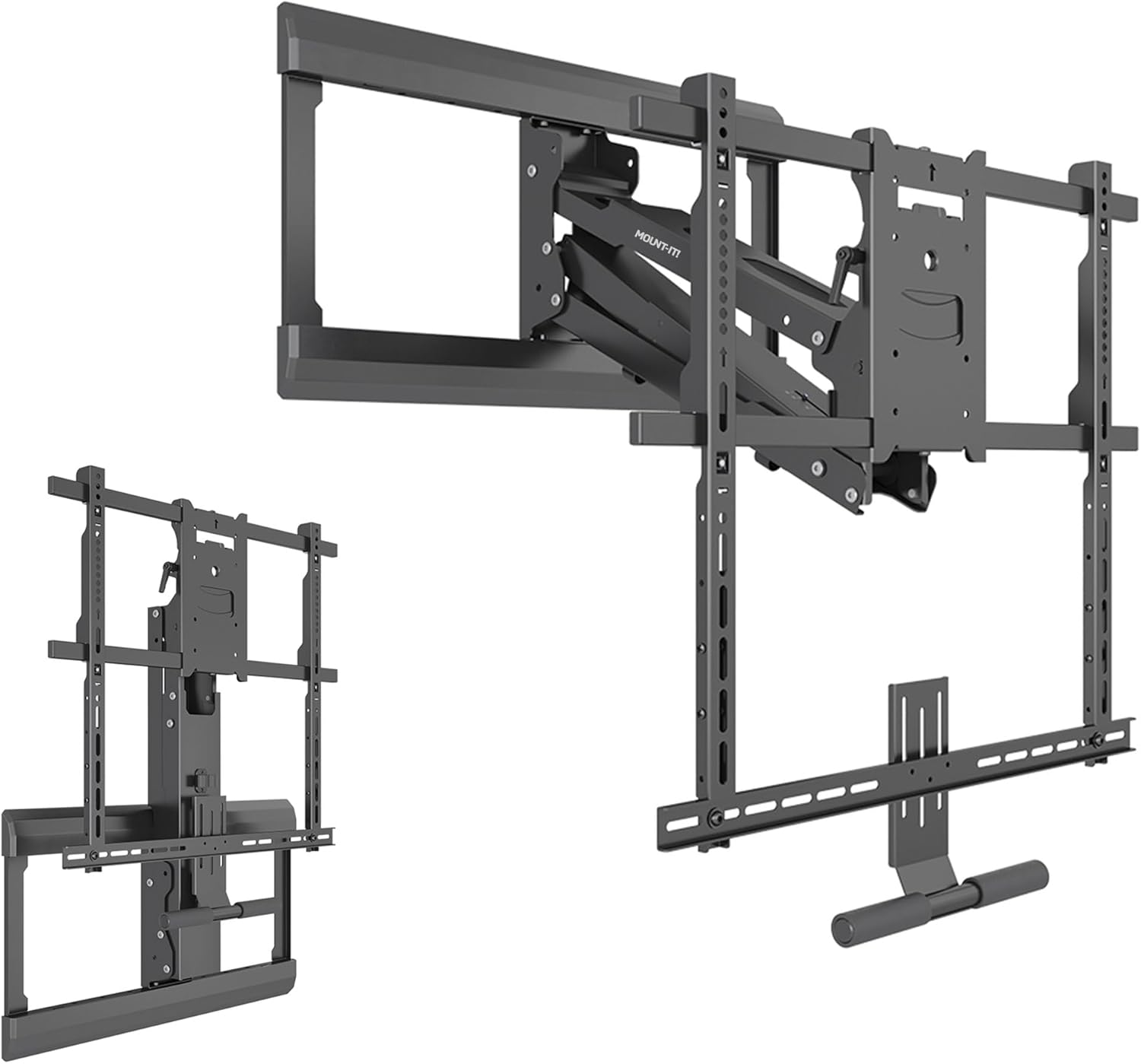
Imej 3.1: Berakhirview of Mount-It! MI-384 components.
4. Spesifikasi
| Ciri | Spesifikasi |
|---|---|
| Jenama | Pasang! |
| Nombor Model | MI-384 |
| Keserasian Saiz TV | 42 - 65 inci |
| Kapasiti Berat Maksimum | 55 paun (25 kg) |
| Keserasian VESA | 100x100, 200x200, 300x200, 300x300, 400x200, 400x300, 400x400, 600x500 |
| Jenis Pemasangan | Over Fireplace Mantel, Wall Mounted |
| Jenis Pergerakan | Articulating, Tilt, Swivel, Height Adjustment |
| Julat Pelarasan Tinggi | Up to 29 inches (73.7 cm) total |
| Julat Kecondongan | +10 hingga -5 darjah |
| Julat Putar | +/- 30 darjah |
| Pelarasan Meratakan | +/- 5 degrees (post-installation) |
| Jarak Minimum dari Dinding | 5.7 inci (14.5 cm) |
| bahan | Keluli Aloi |
| warna | Hitam |
| Dimensi Produk | 31.75 x 15 x 6.5 inci (80.6 x 38.1 x 16.5 cm) |
| Berat Barang | 34.9 paun (15.8 kg) |
| UPC | 810041739643 |
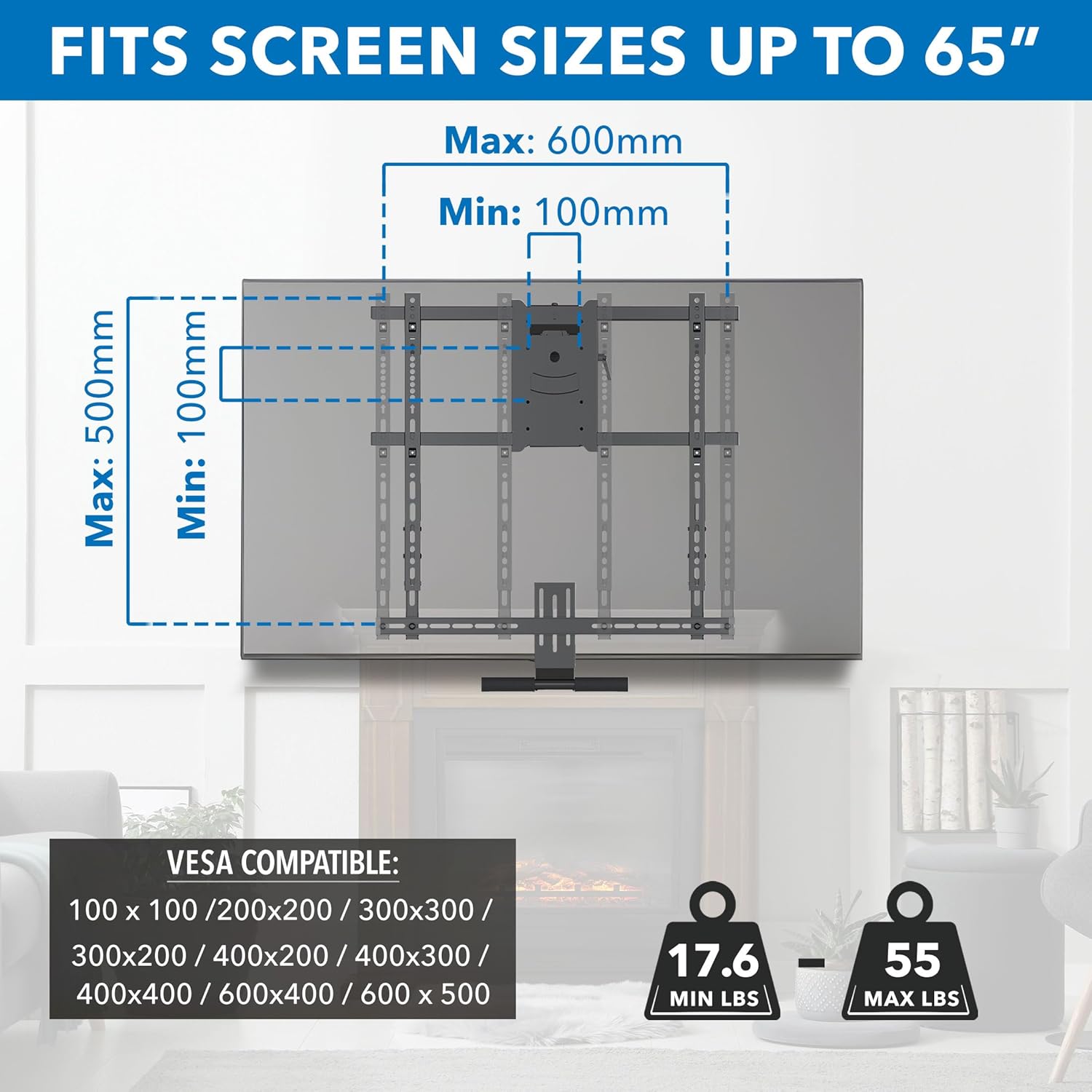
Imej 4.1: VESA and TV size compatibility details.
5. Persediaan dan Pemasangan
Before starting, ensure you have read the Safety Information section and confirmed your wall type and TV compatibility. Professional installation is recommended if you are not confident with the process.
5.1 Alat Diperlukan (Tidak Termasuk)
- latih tubi
- Pencari Belajar
- Tahap
- Pita Pengukur
- Socket Wrench / Spanner
- Pemutar Skru Kepala Phillips
- Pensel
5.2 Langkah Pemasangan
- Sediakan Dinding: Locate wood studs or a solid concrete wall where you intend to mount the TV. Mark the desired height for the top of the wall plate, ensuring it allows for the TV to be raised above the mantel and lowered to a comfortable viewing position. Refer to Image 2.2 for vertical clearance calculations.
- Pasang Plat Dinding: Secure the wall plate assembly to the wall using the provided hardware. Ensure it is level before tightening all fasteners. The mount features an adjustable wall plate for centering the TV above the fireplace, even if studs are off-center.
- Lampirkan Kurungan TV: Secure the TV bracket arms to the back of your television using the appropriate VESA screws and spacers from the hardware kit. Ensure the brackets are centered and securely fastened to your TV's VESA mounting holes.
- Gantungkan TV: Carefully lift the television with the attached brackets and hook it onto the wall plate assembly. Ensure the TV is securely seated on the mount.
- Lekatkan TV: Fasten any safety screws or locking mechanisms to prevent the TV from accidentally disengaging from the mount.
- Adjust Spring Tension: The gas spring mechanism requires tension adjustment to match your TV's weight. Use the provided tool to adjust the spring tension until the TV can be smoothly lowered and raised with minimal effort and stays in position when released. Refer to the operating instructions for more details.

Imej 5.1: Adjustable wall plate for TV centering.
6. Arahan Operasi
The Mount-It! MI-384 offers dynamic height adjustment, tilt, and swivel capabilities for an optimal viewpengalaman dalam.
6.1 Lowering and Raising the TV
To lower the TV, grasp the cushioned handle located at the bottom of the TV bracket. Gently pull the TV downwards. The spring-assisted mechanism will provide a counterbalance, allowing for smooth, controlled movement. To raise the TV, push it upwards until it locks into its raised position. Ensure the spring tension is correctly adjusted for your TV's weight (see Setup section).

Imej 6.1: Lowering the TV using the cushioned handle.
6.2 Adjusting Tilt and Swivel
Once the TV is in your desired viewing position, you can adjust its angle:
- Condong: The mount allows for a tilt range of +10 degrees (upwards) to -5 degrees (downwards). Gently push or pull the top or bottom of the TV to achieve the desired tilt angle and reduce glare.
- Pusing: The mount can swivel up to +/- 30 degrees left or right. Carefully rotate the TV horizontally to adjust the viewsudut untuk kedudukan tempat duduk yang berbeza.
- meratakan: After installation, a micro-adjustment of +/- 5 degrees is available to ensure the TV is perfectly level.

Imej 6.2: Full motion capabilities: Swivel, Level, and Tilt.
7. Penyelenggaraan
Penyelenggaraan berkala memastikan ketahanan dan operasi yang selamat pada dudukan TV anda.
- Pembersihan: Lap pelekap dengan kain lembut dan kering. Elakkan pembersih atau pelarut yang kasar yang boleh merosakkan kemasan.
- Semak Sambungan: Periodically check all screws and fasteners to ensure they are tight and secure. Loose connections can lead to instability.
- Periksa Bahagian Bergerak: Occasionally inspect the articulating arms and spring mechanism for any signs of wear or damage. Ensure smooth movement.
- Re-adjust Tension: If you notice the TV becoming difficult to move, or if it doesn't stay in its desired position, re-adjust the gas spring tension according to your TV's weight.
8. Penyelesaian masalah
| Masalah | Kemungkinan Punca | Penyelesaian |
|---|---|---|
| TV is difficult to pull down or push up. | Gas spring tension is not correctly adjusted for TV weight. | Adjust the gas spring tension. Increase tension for heavier TVs, decrease for lighter TVs. |
| TV does not stay in the desired position (sags or floats). | Gas spring tension is not correctly adjusted. | Re-adjust the gas spring tension until the TV holds its position. |
| Wall plate is visible when TV is in the raised position. | TV is too small or VESA mounting holes are too low on the TV. | This is an inherent characteristic for smaller TVs or those with lower VESA patterns. Ensure your TV meets the minimum height requirement (Image 2.3). |
| Gunung berasa tidak stabil atau goyah. | Loose fasteners or incorrect installation. | Check all wall and TV fasteners and tighten them securely. Ensure installation followed instructions for wall type. |
| Mount is too far from the wall. | This is a feature of the mount's design. | The mount sits a minimum of 5.7 inches from the wall due to its articulating and height adjustment capabilities. This is not a low-profile melekap. |
9. Waranti dan Sokongan Pelanggan
The Mount-It! MI-384 Pull Down TV Mount over Fireplace comes with a LIFETIME warranty, mencerminkan komitmen kami terhadap kualiti dan ketahanan.
If you encounter any issues, have questions during installation, or require assistance, please do not hesitate to contact our knowledgeable and responsive US-based customer support team. They are available to answer any questions you may have during standard business hours.
For support, please visit the official Mount-It! webtapak atau rujuk maklumat hubungan yang diberikan bersama pembungkusan produk anda.


