pengenalan
This manual provides comprehensive instructions for the installation, operation, and maintenance of the Aruba AP-503 Dual Band IEEE 802.11ax Wireless Access Point. The AP-503 is designed to deliver high-performance, cost-effective connectivity for environments with increasing device density, cloud adoption, and IoT integration.
Ciri-ciri Utama
- Kesambungan Berkelajuan Tinggi: Provides a maximum real-world aggregate data rate of 1.49 Gbps (HE80/HE20) for reliable and fast wireless performance.
- Optimized User Experience: Features like Orthogonal Frequency-Division Multiple Access (OFDMA) and cellular optimization reduce airtime contention and improve efficiency.
- Aruba Air Slice™: Ensures application assurance by optimizing radio resources for specific traffic types, providing SLA-grade performance.
- Wi-Fi 6 Aware Client Optimization: Utilizes Aruba's AI-powered ClientMatch technology to steer Wi-Fi 6 capable devices to the best available access point.
- Automated RF Optimization: AirMatch uses machine learning to adapt the network to changing RF conditions, including noise, radar, and density.
- Advanced Cellular Coexistence (ACC): Minimizes interference from cellular networks and other external sources.
- Port Ethernet Gigabit: For ultra-fast wired network speeds.
- Bekalan Kuasa terbina dalam: Ensures accurate voltage supply to all components.
- Boleh Dipasang Siling: Designed for convenient and discreet installation.
Produk Selesaiview

Rajah 1: Atas view of the Aruba AP-503, highlighting its sleek, circular design and the Aruba branding.
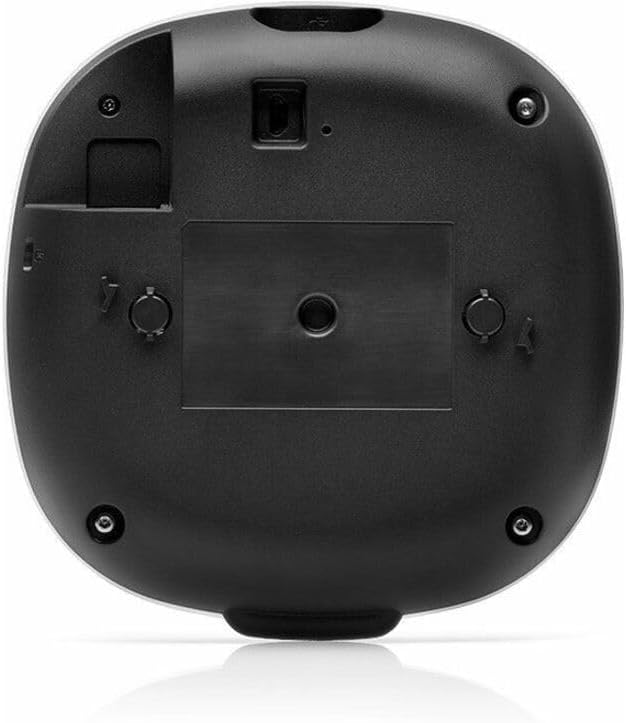
Rajah 2: Bawah view of the Aruba AP-503, illustrating the mounting mechanism and port locations for connectivity.
Persediaan dan Pemasangan
The Aruba AP-503 is designed for easy deployment, typically ceiling-mounted. Ensure you have the necessary mounting hardware and network cables before beginning installation.
- Tinjauan Tapak: Conduct a site survey to determine optimal placement for wireless coverage and minimize interference.
- Pemasangan: Securely attach the access point to the ceiling or wall using the appropriate mounting bracket (sold separately or included depending on kit). Refer to the mounting guide for detailed instructions.
- Sambungan Kuasa: Connect the access point to a power source. The AP-503 supports Power over Ethernet (PoE) or an optional external power adapter.
- Sambungan Rangkaian: Connect the Gigabit Ethernet port of the AP-503 to your network switch or router.
- Konfigurasi Awal: Access the access point's management interface via a web browser or dedicated Aruba management software to perform initial setup, including network settings, SSID configuration, and security protocols.
Arahan Operasi
Once installed and configured, the Aruba AP-503 operates automatically to provide wireless connectivity. Users can connect to the configured Wi-Fi networks using their devices.
- Menyambung Peranti: Cari untuk the configured Wi-Fi network (SSID) on your wireless devices (laptops, smartphones, tablets) and enter the password if required.
- Prestasi Pemantauan: Use the Aruba management interface (e.g., Aruba Central or Instant GUI) to monitor network performance, connected clients, and troubleshoot any issues.
- Kemas kini Firmware: Regularly check for and apply firmware updates to ensure optimal performance, security, and access to new features.
Penyelenggaraan
Regular maintenance ensures the longevity and optimal performance of your Aruba AP-503.
- Pembersihan: Lap bahagian luar titik akses dengan kain lembut dan kering. Jangan gunakan pembersih cecair atau aerosol.
- Pengurusan Perisian Tegar: Keep the device firmware updated to the latest stable version. This often includes security patches and performance enhancements.
- Keadaan Persekitaran: Ensure the access point is operating within its specified temperature and humidity ranges to prevent overheating or damage.
- Pemantauan Rangkaian: Semula secara berkalaview network logs and performance metrics through the management interface to identify and address potential issues proactively.
Menyelesaikan masalah
| Masalah | Kemungkinan Punca | Penyelesaian |
|---|---|---|
| Tiada Kuasa/LED Dimatikan | Power cable disconnected; PoE not active; faulty power adapter. | Check power connections. Ensure PoE switch port is active or use a functional power adapter. |
| Tidak Dapat Menyambung ke Wi-Fi | Incorrect Wi-Fi password; out of range; SSID hidden; AP not broadcasting. | Verify password. Move closer to AP. Check AP configuration for SSID broadcast. Restart AP. |
| Kelajuan Wi-Fi Perlahan | Network congestion; interference; outdated firmware; poor AP placement. | Reduce number of connected devices. Check for interference sources. Update firmware. Re-evaluate AP placement. |
| Access Point Not Visible on Network | Network cable issue; IP address conflict; management interface misconfiguration. | Check Ethernet cable connection. Verify IP address settings. Ensure management interface is accessible. |
Spesifikasi
| Atribut | Perincian |
|---|---|
| Jenama | Aruba |
| Nombor Model | AP-503 |
| Standard Tanpa Wayar | IEEE 802.11ax (Wi-Fi 6) |
| Kelas Band Kekerapan | Dwi-Jalur (2.4 GHz, 5 GHz) |
| Kadar Data Maks | 1.49 Gbit/s (aggregate) |
| Teknologi Ketersambungan | Wi-Fi, Ethernet |
| Pelabuhan Ethernet | Gigabit Ethernet |
| Antenna Form Factor | Dalaman |
| Jenis Pemasangan | Boleh Dipasang Siling |
| Dimensi Produk | 5.7 x 5.7 x 1.4 inci |
| Berat Barang | 9 auns |
| Pengeluar | HPE - ARUBA NON-INSTANT |
Waranti dan Sokongan
For detailed warranty information and technical support, please refer to the official Aruba website or contact Aruba customer service. Keep your purchase receipt for warranty claims.
Official Aruba Webtapak: www.aubanetworks.com


